












A content calendar for social media is much more than just a schedule of your upcoming posts. Think of it as your strategic command center—the tool that transforms social media from a relentless daily chore into a powerful, predictable growth engine. It’s where you organize content, lock in a consistent posting schedule, and get your entire team on the same page.
Why a Content Calendar Is Your Secret Weapon
Let’s be real: the pressure to come up with something clever to post every single day is exhausting. Without a plan, you're constantly scrambling for ideas. This reactive scramble often leads to inconsistent, low-impact content that just doesn't connect with your audience. It's not just stressful; it's bad for business.
A content calendar is your roadmap out of that chaos. It helps you shift from random acts of posting to a proactive, results-driven strategy. By giving you a bird's-eye view of your entire social presence, it ensures every post has a purpose and ties back to your bigger marketing goals. You stop just filling a feed and start building a cohesive brand story.
If you're looking for a deeper dive into the fundamentals, we break it all down in our guide on what is a content calendar.
From Chaos to Consistency
Consistency is the name of the game on social media. The algorithms reward it, and your audience craves it. When you post regularly, platforms give you a visibility boost. A calendar is what makes this happen, helping you maintain a steady drumbeat that keeps your brand top-of-mind.
This kind of planning is also a massive time-saver. Forget the daily panic of "what do I post today?" Instead, you can batch your content creation—setting aside dedicated blocks of time to write all your copy, design graphics, and schedule everything in one go. This frees up so much mental energy to focus on what really matters, like strategy and engaging with your community.
A well-managed calendar isn't just about scheduling; it’s about creating a predictable, high-quality experience for your audience. When they know they can count on you for valuable content, they're more likely to engage, trust, and ultimately convert.
The Tangible Business Impact
The benefits here aren't just a feeling; they show up in the numbers. We've seen that organizations with a planned posting schedule report up to a 30–60% higher engagement rate. They also see 20–45% higher follower growth compared to brands that just post whenever they feel like it.
To get the most out of your calendar, it has to be paired with smart expert social media marketing strategies. A calendar enforces the necessary cadence, which for most businesses means posting 3–5 times per week on platforms like Instagram and LinkedIn. For a platform like TikTok, you might need to post daily just to keep up with the algorithm.
Laying the Groundwork with Goals and Content Pillars
Before you even think about dropping a post into your calendar, you need a blueprint. A content calendar for social media without a solid strategy behind it is just a list of random posts. You might feel busy, but you won't be making any real progress.
This is the foundational work that separates the social media accounts that look active from the ones that actually drive business results.
So, where do we start? First, you need to define what "winning" actually looks like for your brand. Forget vague goals like "getting more engagement." We need to get specific and tie our social media efforts to tangible business outcomes. A well-defined strategic content plan is the engine that makes this happen.
Think about goals you can actually track. For example:
- Increase website referral traffic from Instagram by 15% in the next quarter.
- Grow our LinkedIn follower base by 10% over the next six months.
- Generate 50 qualified leads from our Facebook campaigns this month.
Goals like these give every post a purpose. They’re your North Star, ensuring every piece of content you schedule is intentionally pushing you toward a meaningful result.
From Goals to Content Pillars
Once you know why you're posting, it's time to figure out what you'll be talking about. This is where content pillars come in.
Think of these as the 3-5 core themes or topics that your brand will own. They’re the backbone of your entire content strategy, making sure your feed stays focused, relevant, and consistently valuable to your audience.
Basically, if your brand had a magazine, these would be the main sections. Every single post—whether it’s a quick X (Twitter) update, a detailed LinkedIn article, or a fun Instagram Reel—should fit neatly under one of these pillars. This approach stops you from posting on a whim and helps you build a strong, cohesive brand story over time.
A well-defined set of content pillars is the bridge between your high-level business goals and the individual posts in your calendar. They ensure that every piece of content has a strategic purpose, reinforcing who you are and what you offer.
Building Pillars for Different Businesses
Content pillars aren't a one-size-fits-all solution. They have to be custom-built for your industry and your audience. The magic happens at the intersection of what your brand is an expert in and what your audience is genuinely curious about.
Let's break this down with a couple of real-world scenarios.
Scenario 1: A B2B SaaS Company
Their primary goal is to generate leads and position themselves as industry experts. Their pillars might look something like this:
- Industry Insights: Sharing data-backed reports, analyzing emerging trends, and offering expert takes on the future of their sector.
- Product Education: Creating practical tutorials, in-depth case studies, and feature spotlights that show exactly how their software solves real-world problems.
- Customer Success Stories: Showcasing how real clients achieve amazing results with their product. This is all about building trust and social proof.
- Company Culture: Giving a peek behind the curtain to show off their team, values, and what makes them a great place to work. It humanizes the brand and attracts talent.
Scenario 2: A Local Coffee Shop
This café wants to drive foot traffic and become a beloved community hub. Their pillars would be completely different:
- Community Stories: Featuring loyal customers, promoting local events, and collaborating with other neighborhood businesses.
- Behind-the-Scenes: Showing the art of the perfect pour, introducing the baristas by name, and telling the story behind their coffee beans.
- Product Spotlight: Using drool-worthy photos and videos to highlight seasonal drinks, fresh pastries, and special offers.
- Educational Content: Sharing home-brewing tips, explaining the difference between a flat white and a latte, or even hosting a virtual coffee tasting.
To help you brainstorm, here’s a simple matrix that shows how a single pillar can be spun into different post ideas across various platforms.
Sample Content Pillar and Post Idea Matrix
This table provides a practical framework showing how to translate broad content pillars into specific, actionable post ideas for different social media platforms.
| Content Pillar | Post Idea for Instagram (Visual) | Post Idea for LinkedIn (Professional) | Post Idea for X/Twitter (Timely) |
|---|---|---|---|
| Industry Insights | Infographic carousel summarizing a new industry report. | Article sharing 5 key takeaways from a recent conference. | Thread of live reactions to breaking industry news. |
| Product Education | Short Reel demonstrating a time-saving product feature. | Case study detailing how a client increased ROI by 40%. | Quick poll asking users which feature they use most. |
| Company Culture | "Day in the Life" Instagram Story takeover by an employee. | Post celebrating a team member's work anniversary and contributions. | Photo of the team at a volunteer event or company outing. |
| Customer Success | User-generated content post featuring a customer's photo. | Video testimonial from a happy, high-profile client. | Quote graphic from a positive customer review. |
As you can see, the pillar provides the strategic "what," while the platform dictates the creative "how."
By setting these foundational goals and pillars first, your content calendar for social media transforms from a simple scheduling tool into a powerful engine for intentional brand building. Every post becomes a deliberate step toward hitting your biggest business goals.
Mapping Your Content with Key Dates and Themes
Okay, you’ve defined your goals and set up your content pillars. Now for the fun part: actually filling your content calendar for social media with killer ideas. This is where we shift from high-level strategy to the day-to-day planning that finally puts an end to the "what on earth should I post today?" scramble.
The trick is to think like a magazine editor. You're not just posting randomly; you're mapping out content around key dates, strategic timelines, and engaging themes. This layered approach is what makes a social feed feel cohesive and professional, not chaotic.
Start with the Big Picture: Your Tentpole Events
Before you get bogged down in what to post next Tuesday, zoom way out. Look at the entire year and pinpoint the major "tentpole" events that are absolute musts for your brand. These are the big moments you can, and should, plan for months in advance.
Think about events that fall into these buckets:
- Major Holidays and Seasonal Moments: This is the obvious stuff—Black Friday, Christmas, Valentine's Day, Back-to-School season.
- Industry-Specific Dates: What about key trade shows, annual conferences, or important awareness months in your niche? For a fintech brand, something like Financial Literacy Month is a golden opportunity.
- Internal Company Milestones: Don't forget your own big news! Product launches, company anniversaries, and major brand announcements all deserve a spot.
Getting these big rocks on your calendar first gives your whole year a solid foundation. It lets you plan integrated campaigns, line up your resources, and get content production started early, which means no last-minute panic. This is what separates the pros from the amateurs.
Anchoring your calendar to seasonality and key dates is a proven driver of campaign performance. There's a reason major brands often allocate 40–60% of their annual social budget around the top 6–10 shopping and cultural events of the year.
This strategic focus really pays off. For many e-commerce brands, the Black Friday/Cyber Monday window alone can generate 25–50% of their annual social-driven sales. That's a massive return from just a tiny slice of the calendar. To see more data on building a high-impact schedule, discover more insights about killer social media content calendars on adicator.com.
Zooming in on Monthly and Weekly Themes
Once your tentpoles are locked in, it's time to zoom in and layer on monthly and weekly themes. This is an incredibly powerful way to keep your content focused and prevent your feed from feeling all over the place. A theme basically acts as a creative container, making brainstorming a whole lot easier.
And a "theme" doesn't have to be some grand, complicated concept. It can be a simple idea that ties your posts together for a little while.
For example, a wellness brand could map out its January content like this:
- Monthly Theme for January: New Beginnings
- Week 1 Theme: Goal Setting & Journaling
- Week 2 Theme: Mindful Mornings
- Week 3 Theme: Digital Detox Challenge
- Week 4 Theme: Healthy Meal Prep
See how that works? Suddenly, your content feels like a cohesive series instead of just a collection of random posts. It gives your audience a reason to follow along, turning passive scrollers into an engaged community. This is a core part of building a strong social presence, and we've got a great resource to help you get organized. Check out our guide on using a social media calendar template to map out these ideas.
By layering these big-picture events with more focused weekly themes, your calendar transforms into a truly strategic tool. You'll have a clear plan guiding your daily work, but you'll still have the flexibility to jump on spontaneous, trend-driven content. It's the perfect balance of preparation and agility.
Choosing Your Tools and Building a Practical Workflow
A brilliant strategy is only as good as the tools and processes you use to bring it to life. Once you’ve mapped out your content themes and tentpole events, it's time to get into the nuts and bolts of how you'll actually manage your content calendar for social media. This is where you build the engine that turns raw ideas into polished, published posts.
The right toolset is the foundation. Let's be honest, the market is flooded with options, each promising to be the one-stop solution for different team sizes and budgets. It’s easy to get overwhelmed, but the choice usually boils down to your scale and how complex your needs really are.
Selecting the Right Content Calendar Tool
For solo creators or small teams just getting their feet wet, a simple spreadsheet in Google Sheets or a Notion template can be surprisingly powerful. They cost next to nothing and are endlessly customizable, letting you build a system that fits your initial workflow perfectly. You can easily track dates, copy, assets, and approval status without the learning curve of a big platform.
But as your team or content volume grows, that trusty spreadsheet can start to feel like a bottleneck. This is where dedicated social media management platforms really start to shine. Tools like Sprout Social, Agorapulse, or our own PostSyncer are built specifically for this. They don’t just offer a calendar; they integrate it with scheduling, team approvals, and deep analytics all in one place.
Your tool shouldn't create more work—it should eliminate friction. The best choice is the one that makes your process smoother, whether that's a basic spreadsheet or a full-featured platform. If your current system feels clunky, it’s probably time to upgrade.
When you're weighing your options, ask yourself these questions:
- Who needs access? How many people need to create, edit, or approve content?
- What's the budget? Are you looking for a free solution, or can you invest in a monthly subscription?
- What features are non-negotiable? Do you absolutely need direct scheduling, an approval workflow, or detailed analytics?
- How many accounts are you juggling? Are you managing one brand or ten?
If you're stuck trying to compare the options, our in-depth guide to the best social media scheduling tools breaks it all down to help you find the perfect fit.
The right tool gives you a bird's-eye view, helping you spot opportunities and gaps instantly.
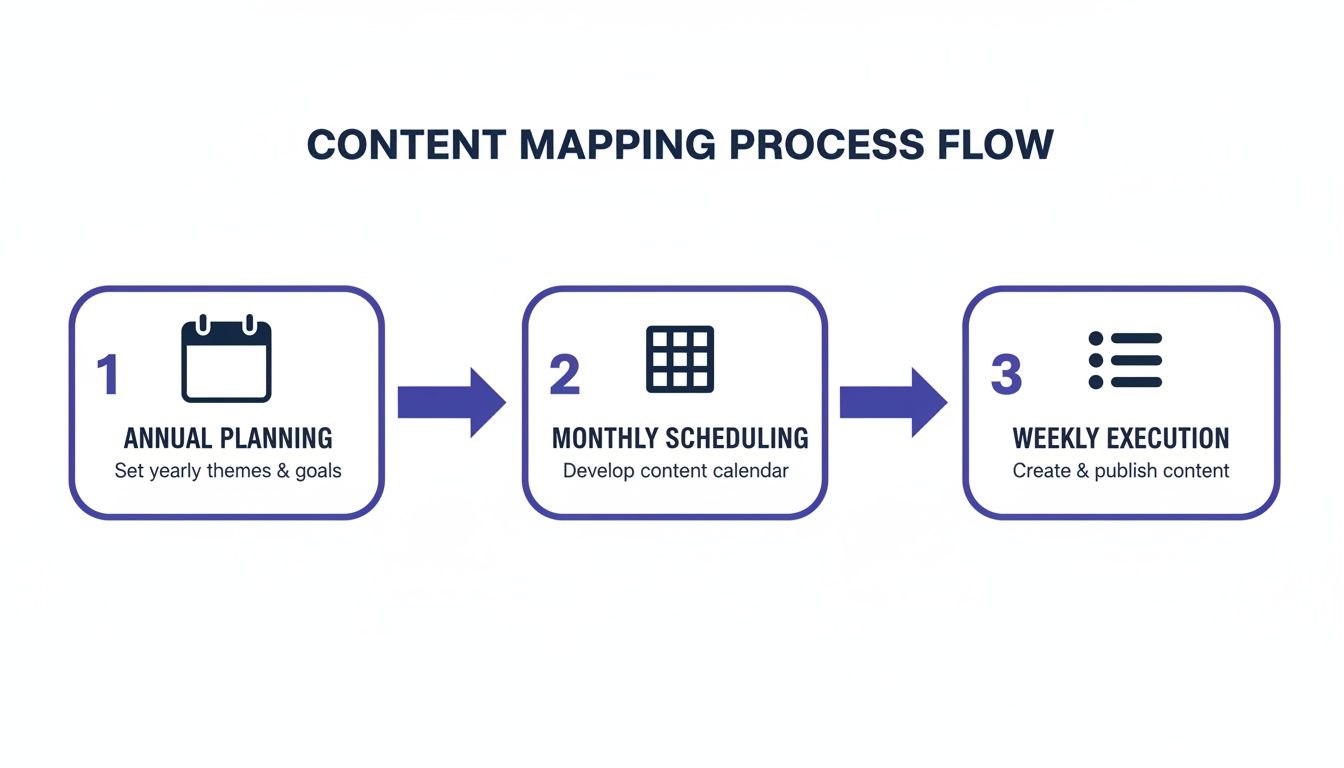
This visual approach is a game-changer for understanding your content cadence at a glance.
To help you get a clearer picture of what's out there, here’s a quick comparison of the different types of tools available.
Comparison of Content Calendar Tools
Choosing the right tool depends heavily on your team's size, budget, and specific needs. A freelance social media manager has very different requirements from a large in-house marketing department. This table breaks down the common options to help you find your match.
| Tool Type | Best For | Key Features | Typical Cost |
|---|---|---|---|
| Spreadsheets (Google Sheets) | Solopreneurs, freelancers, and small teams on a tight budget. | High customization, cost-effective, easy to share and collaborate. | Free |
| Project Mgmt (Notion, Trello) | Small teams needing more than a spreadsheet but not a full SMM suite. | Kanban boards, databases, status tracking, content repositories. | Free to ~$10/user/month |
| All-in-One SMM Platforms | Growing businesses and marketing agencies managing multiple clients. | Scheduling, approval workflows, analytics, social listening, asset libraries. | $50 to $500+/month |
| Niche/Specialized Tools | Brands focused on a specific platform (e.g., Pinterest, Instagram). | Platform-specific features like visual planning, link-in-bio tools. | Varies, often ~$15-40/month |
Ultimately, the goal is to find a tool that fits so seamlessly into your workflow that you barely notice it's there.
Designing a Bulletproof Content Workflow
A tool is just one piece of the puzzle. You also need a repeatable process that takes a piece of content from a spark of an idea to a published post. Without a clear workflow, you’re inviting chaos—bottlenecks, missed deadlines, and inconsistent quality are almost guaranteed.
Let’s walk through a real-world scenario to see how a solid workflow operates.
Scenario: A Three-Person Marketing Team's Workflow
Imagine a nimble team: a Social Media Manager, a Content Writer, and a Graphic Designer. They need a system that keeps everyone in sync without bogging them down in endless meetings or Slack threads.
Here’s how they could structure their process using a shared calendar tool:
The Brief (Social Media Manager): The Social Media Manager owns the calendar. At the start of each month, they populate it with content briefs for every planned post. Each brief outlines the content pillar, key message, target audience, and call-to-action. The status is set to 'Briefed'.
Copywriting (Content Writer): The writer gets a notification for new briefs. They jump in and write the post copy directly in the calendar tool, adding any necessary hashtags and links. Once finished, they update the status to 'Copy Ready for Review'.
Visuals (Graphic Designer): At the same time, the designer sees the briefs and starts creating the images or videos. They upload the final assets to a shared drive or the tool's media library and link them to the correct post, changing the status to 'Visuals Ready'.
Final Review (Social Media Manager): The Social Media Manager sees that both copy and visuals are done. They do a final check on the complete post—is it on-brand, error-free, and aligned with the campaign goals? If something needs tweaking, they leave a comment for the writer or designer.
Green Light (Approval & Scheduling): Once everything looks perfect, the manager marks the post as 'Approved'. The last step is scheduling it to go live at the optimal time, which changes the final status to 'Scheduled'.
This simple, status-driven process keeps things moving. Everyone knows exactly what they’re responsible for and where each post is in the pipeline. This is the practical engine that powers a successful, stress-free social media strategy.
Optimizing Your Schedule for Maximum Impact
Look, creating brilliant content is a huge win, but that's only half the battle. If you publish your masterpiece when your audience is offline, you've essentially shouted into an empty room. This is where the science of scheduling comes in, turning your content calendar for social media from a simple planner into a strategic weapon.
Timing isn't just a minor detail; it’s a critical factor that can make or break your post's performance. Those first few hours after a post goes live are absolutely crucial. Strong early engagement tells the algorithm that your content is valuable, which can kickstart a significant boost in organic reach.
Platform-Specific Posting Times
Let me be clear: there is no single "best time to post" that works everywhere. Each network has its own unique rhythm and user behavior patterns. Following generic advice is a waste of time—you need to align your schedule with how people actually use each app.
For instance, LinkedIn is a professional network, so it's buzzing during the workday. I've seen engagement peak on weekday mornings as people grab their coffee and catch up on industry news. On the flip side, a platform like TikTok comes alive in the evenings and on weekends, when people are kicking back and looking for a distraction.
As a starting point, here’s a general guide based on what I’ve seen work:
- LinkedIn: Your best bet is weekday mornings (8–10 AM) and around lunchtime. It’s a ghost town after 5 PM and on weekends.
- Instagram & Facebook: These platforms see pretty consistent traffic all day, but I find the sweet spots are mid-morning (9–11 AM) and during that post-work wind-down (5–7 PM).
- X (Twitter): This one's a different beast. It's fast-paced and news-driven, so you get multiple peaks. Early mornings, lunch breaks, and evenings are all solid contenders.
- TikTok: Activity absolutely skyrockets in the late afternoon and evening, usually from 4 PM to 10 PM, as the younger crowd gets out of school and work.
Treat these as starting points, not rigid rules. Timing studies back this up. For example, some of the most comprehensive 2024–2025 analyses show that LinkedIn engagement can plummet by 30–50% outside of core business hours. Meanwhile, entertainment-first platforms like TikTok see their highest engagement between 6 PM and 10 PM. If you want to dive deeper, you can learn more about these platform-specific timing findings to really fine-tune your schedule.
Building Your Performance Feedback Loop
Okay, this is where the magic happens. You have to stop guessing and start using your own data to make scheduling decisions. This is what I call a performance feedback loop. It's a simple—but incredibly powerful—process of publishing, analyzing, and optimizing that turns every single post into a learning opportunity.
Instead of just posting and forgetting, you need to systematically review your analytics. Most social platforms and scheduling tools like PostSyncer give you detailed insights that show you exactly when your followers are most active and which posts are getting the most love.
Don't treat your content calendar as a static document. It should be a living, breathing plan that evolves based on real performance data. Your audience is giving you the answers—you just have to listen.
This feedback loop is what separates the good social media managers from the great ones. It ensures your strategy is constantly improving, guided by what your specific audience responds to, not by some generic industry benchmark.
How to Analyze and Optimize Your Calendar
To close that loop, block out some time each month to review your performance. During this review, you're hunting for patterns in your top-performing content.
Get in the habit of asking yourself these questions:
- What days and times brought in the most engagement? Look for clear windows where your posts consistently took off.
- Which content pillars or themes really hit the mark? Did your behind-the-scenes posts blow your product spotlights out of the water?
- What formats drove the best results? Did Reels get more saves than static images? Did carousels earn more comments?
- Which CTAs actually got people to click? Did asking a question work better than the old "click the link in bio"?
Use the answers to inform next month’s calendar. If you see that Wednesday morning posts are always a hit, double down on that time slot. If a particular content theme fell flat, either figure out a new angle or swap it for something that works better.
This continuous cycle of testing and refining is the key to sustained growth. By optimizing your schedule and content based on hard data, you ensure every ounce of your effort delivers the maximum possible impact. This is how you turn a content calendar into a true engine for success.
Common Questions About Social Media Calendars
Even with the best template in hand, putting a social media calendar into practice can raise a few questions. I've been there. Let's walk through some of the most common sticking points I see and get you the clear, practical answers you need.
How Far Out Should I Actually Plan My Content?
For most brands, the sweet spot is planning your core, evergreen content one month in advance. This gives your team plenty of time for creation, reviews, and scheduling without feeling like you're on a constant content treadmill. It's the perfect rhythm for maintaining quality and consistency.
But for the big stuff, you need a longer runway.
- Major Campaigns: Think product launches or big holiday promotions. You'll want to start planning these 2-3 months ahead. This is crucial for making sure all your marketing channels—from email to social ads—are telling the same story.
- Tentpole Events: For things like annual industry conferences or seasonal pushes, I've seen teams start sketching out high-level concepts as far as 6 months in advance.
The goal isn't to be rigid; it's to be prepared. A good plan always has a little wiggle room for those brilliant, last-minute ideas.
What Absolutely Has to Be in My Calendar?
A simple calendar is fine, but a great calendar is your team's command center. To stop the endless "where's that graphic?" or "is this copy approved?" Slack messages, make sure every single post in your calendar includes these non-negotiables:
- Publication Date & Time: The exact moment it’s scheduled to publish.
- Social Platform: Which network is this for? (e.g., Instagram, LinkedIn).
- Post Copy: The final, fully approved text. No more guesswork.
- Visual Asset: A direct link to the final image, video, or graphic file in your shared drive.
- Relevant Links & Hashtags: The destination URL and any campaign-specific or evergreen hashtags.
- Status: This is a lifesaver. A simple dropdown (like Draft, In Review, Approved, Scheduled) makes your workflow visible to everyone at a glance.
Pro tip: I always recommend adding columns for the content pillar and campaign name. It’s a tiny addition that pays off big time when you're analyzing performance later, helping you see what themes are resonating and ensuring your content mix stays balanced.
This level of detail is what transforms your calendar from a basic schedule into an indispensable strategic tool.
My Calendar Is Planned, But How Do I Handle Spontaneous Content?
This is a huge one. Your calendar should be a framework, not a straitjacket. The magic of social media happens when you blend well-planned, brand-building content with of-the-moment, reactive posts. The secret is to plan for spontaneity.
Don't book your calendar solid. I always advise teams to leave one or two "flex spots" open each week. These are your designated slots for jumping on a trending meme, sharing breaking industry news, or joining a viral conversation.
This hybrid approach gives you the reliability of a planned calendar while still letting you capture the lightning-in-a-bottle engagement that comes from being part of the real-time conversation. It shows your audience you're not just a brand broadcasting on a schedule—you're a living, breathing part of the community.
Is My Content Calendar Actually Working? How Can I Tell?
A full calendar doesn't automatically mean a successful strategy. The only way to know if your calendar is working is to measure it against the goals you set from day one. It's time to look past vanity metrics like simple likes and focus on what’s actually moving the needle for your business.
Your measurement strategy should be a direct reflection of your objectives.
- If your goal is website traffic: Your North Star metric is click-through rate (CTR). You should also be living in Google Analytics, tracking social media referral traffic to see which platforms and posts send the most valuable visitors.
- If your goal is brand awareness: Keep a close eye on reach, impressions, and follower growth rate. Is your content getting in front of more new eyeballs this month than last month?
- If your goal is lead generation: The proof is in the pudding. Track conversions from social-specific landing pages or the number of DMs and form fills that mention seeing your content.
Make it a non-negotiable team ritual to review these core metrics every single month. This is where you'll find the gold—the insights that tell you what's working, what's not, and how to make next month's calendar even more effective.
Ready to build a smarter, more efficient social media workflow? PostSyncer provides the tools you need to plan, schedule, and analyze your content all in one place. Start your free 7-day trial today and see how easy it is to manage your social media presence with PostSyncer.



