











Look, if you've ever Googled "best time to post on Instagram," you've probably seen the same answers everywhere. The general consensus points to weekdays between 3 p.m. and 6 p.m. These are the magic hours when people are winding down at work or commuting home, phone in hand.
And sure, that's a decent starting point.
Why Generic Posting Times Are Only the Beginning
But here’s the thing: relying solely on those industry benchmarks is like using a map of New York to find your way around Los Angeles. The basic idea is sound, but you're missing all the specific details that actually matter.
Your audience isn't a generic monolith. They have their own habits, schedules, and time zones. A truly effective Instagram strategy gets personal. It digs into your data to find out when your followers are most likely to stop their scroll and engage with what you have to say.
To really nail this, you need to answer a few key questions:
- Your Audience's Activity: When are your followers actually online and tapping through stories?
- Their Dominant Timezones: Are you trying to reach people in London or Los Angeles? Or both?
- Content Performance: Do your Reels pop off in the evening, while your carousels get more love in the morning?
This is the journey we’re on—moving from broad advice to sharp, actionable insights that are unique to your account.
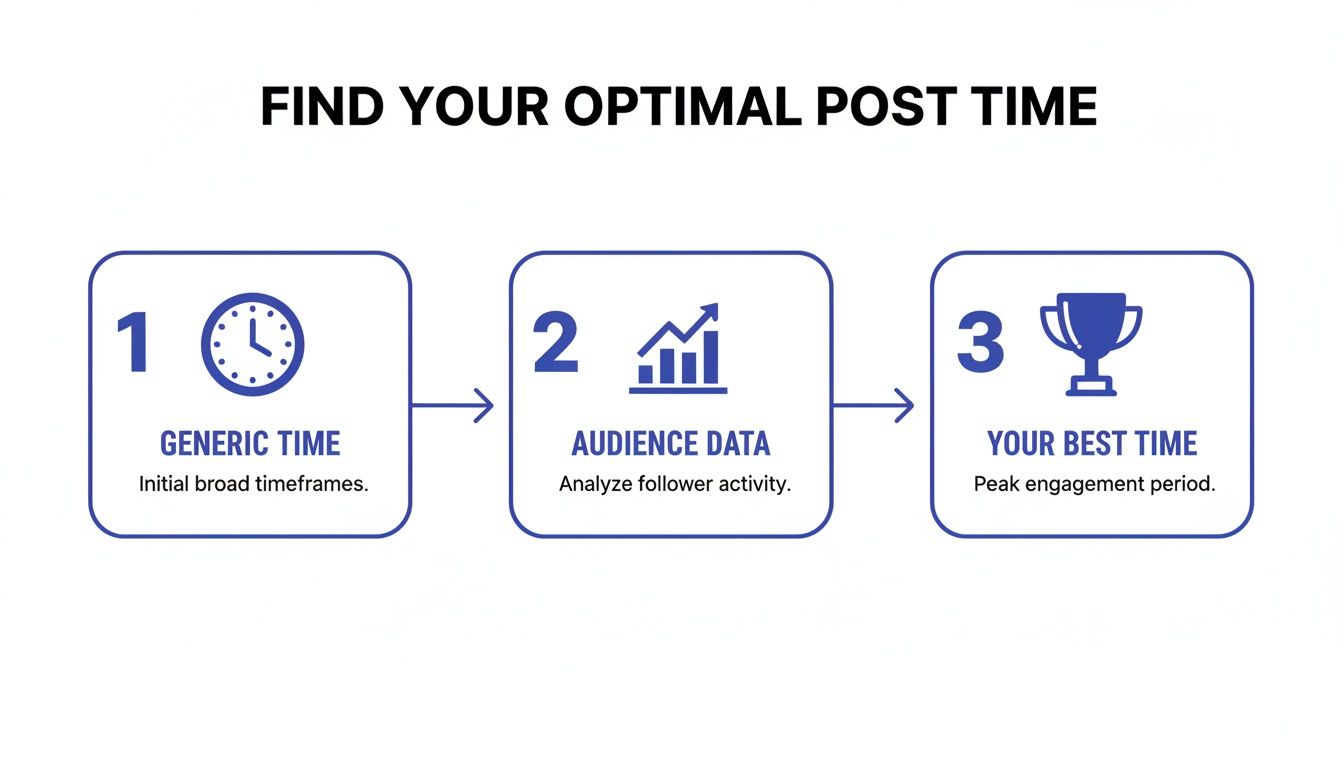
The real win comes from analyzing your own performance data. That’s how you find the posting windows that nobody else can tell you about.
The Problem with a One-Size-Fits-All Approach
Let’s play this out. Say you run a US-based coffee brand targeting young professionals. A generic guide tells you to post at 9 AM EST to catch the morning rush. Makes sense, right?
But what if your own Instagram Analytics show a huge chunk of your most engaged followers are remote workers on the West Coast, who don't really get active until 11 AM PST (which is 2 PM EST)? If you stick to that generic advice, you're consistently missing one of your most valuable audience segments.
The goal isn't just to post when someone is online; it's to post when your ideal follower is most receptive to your message. This distinction is the foundation for turning your Instagram from a guessing game into a predictable growth engine.
So, instead of just handing you a time and calling it a day, this guide is a framework. It's designed to help you discover exactly when your audience is ready and waiting to engage.
Sure, industry benchmarks are a decent place to start, but the real secret to finding your perfect Instagram posting time is already in your pocket. Your account's own analytics tool, Instagram Insights, is a goldmine of data custom-built for your specific followers. Think of it as a personalized roadmap to their daily scrolling habits.
To start digging, you’ll need a Business or Creator account. If you don't have one, it's a quick switch in your settings and well worth it for the analytics alone. Once you're set up, just head to your profile, tap the 'Professional Dashboard' right under your bio, and find the account insights section.
This is where you'll uncover the patterns that generic advice completely misses.
Finding Your Audience Activity Chart
Once you're inside Insights, make your way to the 'Total Followers' tab. Scroll down a bit, and you’ll see the 'Most Active Times' chart. This is your command center for understanding when your community is actually online.
The chart gives you a crystal-clear visual of when your followers were active over the last seven days. You can slice this data in two helpful ways:
- Hours: This view gives you a bar chart for any given day, with the peaks showing the hours when the highest number of your followers are using the app.
- Days: Flip over to this view, and you’ll see which days of the week consistently have the most people online.
This isn’t just random data; it's a direct look into the digital lives of the people who follow you.
Turning Raw Data Into a Smart Hypothesis
Alright, let's figure out what this chart is telling you. Don't just give it a quick glance—look for the peaks that show up again and again. A random one-off spike is just noise, but a recurring peak? That’s a powerful clue.
For example, you might see that activity always seems to ramp up on Mondays between 11 AM and 1 PM. This pattern strongly suggests your audience is scrolling during their late-morning break or as they settle into the work week. Imagine kicking off your week with a post that gets immediate traction. That mid-morning window could be your golden ticket.
Industry studies actually back this up, showing how mid-day and early evening posts line up with natural breaks in the day. In fact, 65% of professionals check social media during their lunch break.
Key Takeaway: Your goal here is to pinpoint 2-3 high-activity windows that show up consistently. These are your 'golden hours' and the foundation for your first round of A/B testing.
Double-Checking with Your Best Content
Knowing when your audience is online is only half the puzzle. The next move is to connect that data with how your content actually performs. Are your best posts—the ones with the most likes, comments, and saves—already hitting those peak activity times?
Head over to your content insights and filter for your top-performing posts from the last month or so. Jot down the day and time each one was published. If your most viral Reel went live at 6 PM on a Wednesday and your 'Most Active Times' chart shows a big spike right then, you’ve found a powerful correlation.
This cross-referencing process is what turns a good guess into a data-backed strategy. Understanding these connections is a fundamental part of mastering social media analytics for business. By combining audience activity with content performance, you stop just posting and start posting with a purpose.
Managing a Global Audience and Multiple Timezones
As your Instagram account starts to take off, you’ll probably notice something exciting: followers popping up from all over the world. While this is a fantastic sign of growth, it throws a wrench into the whole "best time to post" equation.
Suddenly, a post scheduled for 2 PM in New York is hitting your Los Angeles audience at 11 AM and your followers in London at 7 PM. Who do you prioritize? This is where you have to graduate from simply looking at peak hours to thinking like a global strategist. The first step is to stop guessing and start digging into your own data.
Pinpointing Your Top Follower Locations
Before you can build any kind of multi-timezone strategy, you need a map. Luckily, Instagram gives you one. Just head into your Instagram Insights, go to the "Total Followers" section, and scroll down to the demographic data. You'll find a breakdown of your "Top Locations" by both cities and countries.
Pay close attention to the percentages here. If 70% of your audience is in the United States but split between the East and West Coasts, your game plan will look totally different than if you have 40% in the US, 30% in the UK, and 20% in Australia.
This location data is the absolute foundation of your global posting strategy. It tells you exactly which timezones you need to solve for, allowing you to ditch the one-size-fits-all schedule.
A common mistake I see is people catering only to their single largest city or country. The real magic often happens when you find a strategic time that serves your top two or three locations reasonably well, rather than just one location perfectly.
Crafting a Multi-Timezone Posting Strategy
Once you know where your audience lives, you can pick a strategy that works for your brand and—let's be real—your resources. There’s no single right answer here; it all depends on how your followers are distributed across the globe.
Here are a couple of my favorite approaches:
The Overlap Method: This is all about finding a "sweet spot" that catches multiple key timezones during reasonable hours. Let's say you have big followings in New York (EST) and London (GMT). Posting at 2 PM EST is a smart move. You'll catch the late afternoon slump in New York while hitting the early evening scrollers in London at 7 PM GMT. It’s a compromise, but it’s an effective one.
The Staggered Content Method: If your audience is too spread out for a single overlap time (think California, Germany, and Japan), a staggered approach is your best bet. This means you'll post multiple times a day to specifically target each region's peak hours. You might post at 8 AM PST for your US audience and then again at 8 PM CET for your European followers.
Real-World Scenario: A Fitness Coach
Let's put this into practice. Imagine you're a fitness coach, and your analytics show your top three audience locations are Los Angeles (PST), Toronto (EST), and Sydney (AEST). An overlap is pretty much impossible.
- Strategy: Go with the staggered method.
- Morning Motivation Post (7 AM PST): This hits the West Coast as they wake up and also catches the Toronto crowd during their mid-morning break (10 AM EST).
- Evening Wind-Down Post (4 PM PST): This post is perfectly timed for the Australian audience's morning workout the next day (9 AM AEST).
Sure, this approach requires more content, but it makes each major segment of your audience feel like you're posting just for them.
Automating Your Global Schedule
Trying to manage all of this manually is a surefire way to burn out. This is exactly why social media scheduling tools like PostSyncer are so essential for growing accounts. Instead of doing timezone math in your head or waking up at 3 AM, you can plan and schedule your content weeks in advance.
These platforms let you set specific times for every post, making the staggered method effortless. Some of the more advanced tools even have AI features that analyze your global audience data and recommend the best posting times for each segment, completely taking the guesswork out of it. It’s all about making sure your content consistently lands in front of the right people at the right time, no matter where on Earth they are.
So, your Instagram Insights have thrown you a few bones. You’ve got some solid clues about when your audience is online, and you've probably formed a few hypotheses—Monday mornings seem hot, maybe Thursday evenings too. But right now, these are just educated guesses.
To really nail down the absolute best time to post for your account, you have to move past assumption and into action.

This is where the magic of A/B testing (or split testing) comes in. It’s simply a structured way to pit two or more variables against each other to see which one comes out on top. In our case, that variable is the time you hit "Publish." By running a clean, controlled experiment, you'll get hard data that shows exactly when your posts get the most love.
No more crossing your fingers for engagement. It's time to know when to expect it.
Designing a Clean A/B Test for Posting Times
To get results you can actually trust, you need to design your experiment carefully. The whole point is to make sure the only thing you're changing is the posting time. Think about it: if you test a killer Reel at 9 AM and a so-so static image post at 5 PM, you won't know if the difference in engagement was because of the time or the content.
Consistency is your best friend here.
First, pull two or three promising time slots straight from your Instagram Insights. These are your test groups. For instance, let's say your data suggests these contenders:
- Test Time A: Monday at 11 AM
- Test Time B: Wednesday at 6 PM
- Control Time: Your usual, go-to posting time (let's say Friday at 2 PM)
Next, create content for each slot that is as similar as possible. I'm not saying it has to be identical, but it should be comparable. Maybe you plan a series of three carousel posts, all with a similar visual style, topic, and call to action. This way, you can be confident you're truly measuring the impact of timing.
Pro Tip: I always recommend running these tests for at least two weeks, if not four. A single week can be a fluke—maybe there was a holiday, a big news event, or just a weird vibe online. A longer testing period smooths out those anomalies and gives you a much clearer picture of your audience's real habits.
Tracking the Metrics That Actually Matter
Once your test is live, it’s time to be meticulous. Don’t just glance at the like count and call it a day. The real gold is in the metrics that show how the Instagram algorithm treated your post in those first critical hours.
Here are the key numbers to watch for each post in your test:
- Reach (First 1-3 Hours): This one is huge. How many unique accounts saw your post right after it went live? A big initial reach is a strong signal you've hit a peak activity window.
- Engagement Rate: This is your gut check. Add up the likes, comments, shares, and saves, then divide by your follower count. It levels the playing field and shows you what percentage of your audience actually cared enough to interact.
- Comments and Saves: These are high-value interactions. If a post gets a ton of saves at a specific time, it tells you people aren't just scrolling—they're finding your content genuinely useful and want to come back to it.
To keep everything straight, pop your results into a simple spreadsheet. It doesn't need to be fancy. Just a few columns will do the job.
Here’s a quick example of what that could look like as you validate your best times.
A/B Testing Schedule Example
| Week | Test Time 1 (e.g., Mon 11 AM) | Test Time 2 (e.g., Wed 6 PM) | Control Time (Your Current Time) | Metric to Track |
|---|---|---|---|---|
| Week 1 | Post A Reach: 1,200 | Post B Reach: 1,850 | Post C Reach: 950 | Reach (First 3 Hours) |
| Week 2 | Post D Engagement: 4.5% | Post E Engagement: 6.2% | Post F Engagement: 3.8% | Engagement Rate |
After a couple of weeks, you’ll see the patterns start to jump out at you. You might discover that your Wednesday 6 PM slot consistently pulls in 30% higher reach in the first hour and gets twice the saves.
That’s no longer a guess. It's a data-backed insight you can confidently build your entire content calendar around. You've just turned your posting strategy from an art into a science.
Using AI for Smarter and More Efficient Scheduling
Let's be real. Manually digging through analytics, juggling timezone charts, and logging A/B test results is a massive time-drain. It’s a fast track to burnout, especially if you're trying to scale your brand or manage more than one account. This is exactly where AI-powered tools come in and completely change the game, turning that tedious manual process into a smart, automated system.
Modern scheduling platforms now use artificial intelligence to optimize your posting schedule in ways that are just about impossible to replicate by hand. Think of these systems as a dedicated data scientist for your account, working around the clock to find your perfect posting rhythm.
How AI Uncovers Hidden Engagement Patterns
An AI scheduler doesn't just glance at your data; it dives deep. It sifts through your account’s entire history, analyzing thousands of data points in a matter of seconds. This goes way beyond the simple "Most Active Times" chart you see in Instagram Insights to pinpoint subtle—but powerful—patterns in how your audience behaves.
Here’s a practical example. The basic chart might show your followers are most active around 6 PM. But an AI could discover that your most valuable segment—the people who actually comment, save, and click your links—are consistently online and ready to engage on Thursdays between 8:00 AM and 9:30 AM. That's a golden opportunity you would almost certainly miss on your own.
These tools then recommend high-impact posting slots that actually adapt in real-time as your audience's habits shift, keeping you ahead of the curve. You can learn more about integrating these powerful systems in our complete guide to using AI for social media marketing.
By analyzing deeper metrics like shares, saves, and profile clicks, AI can distinguish between passive scrolling and active, high-intent engagement. It helps you target the moments when your followers are not just online, but ready to take action.
This means the tool isn’t just finding the best time to post on Instagram; it’s finding the best time for your specific goals.
Automating for Consistency and Growth
Honestly, the biggest win here is the sheer efficiency. Instead of blocking out hours each week to pore over spreadsheets and manually set post times, you can automate the whole process with total confidence.
An intelligent scheduler like PostSyncer brings a few key advantages to the table:
- Time Savings: It gives you back hours every single week. Time you can now spend on creating amazing content instead of crunching numbers.
- Peak Performance: It ensures every single post goes out at its moment of maximum potential, consistently driving up your engagement and reach.
- Adaptability: The system automatically adjusts its recommendations based on seasonal trends, algorithm updates, or shifts in follower behavior. No manual tweaks needed.
Imagine you're running a small e-commerce brand. An AI tool might figure out that your product carousels get the most sales when posted on Tuesday afternoons, while your fun, user-generated content pops off on Saturday mornings. The tool can then automatically slot your content into these optimal windows for you.
To take it a step further, you can pair smart scheduling with automated content creation. Using AI Reel Generator tools can ensure you always have a steady stream of engaging video content ready to go. This one-two punch is an incredible engine for sustainable growth.
Ultimately, bringing AI into your scheduling workflow is about shifting from reactive analysis to proactive optimization. It ensures every piece of content you create has the best possible shot at success, delivering far better results with a fraction of the manual effort.
How to Keep Your Posting Strategy Effective Over Time
Figuring out your ideal posting times is a great start, but it’s definitely not a one-and-done job. The digital world moves fast. Instagram's algorithm is always evolving, new features pop up constantly, and your audience's daily routines will absolutely change.
What worked like a charm six months ago might just be delivering so-so results today.
This is why the most successful accounts I've seen treat their posting strategy like a living document, not a set of concrete rules. Building a system that actually grows your account means committing to ongoing fine-tuning. It’s all about staying agile and making sure your content keeps landing with maximum impact for the long haul.
A proactive approach is what keeps your strategy from going stale. By regularly checking in on your performance, you can adapt to shifts before they tank your reach, ensuring you maintain that hard-earned growth.
Conducting Periodic Performance Reviews
Pop a recurring reminder in your calendar—either monthly or quarterly—to run a quick performance audit. Don't worry, this isn't about getting lost in spreadsheets for hours. It's a focused check-in to make sure your strategy is still firing on all cylinders.
During this review, you're really just trying to answer a few key questions:
- Are my go-to "best times" still bringing in top-tier reach and engagement? Look at your recent posts in those prime slots and see how they stack up against your historical averages.
- Have any new, unexpected time slots started to shine? Keep an eye out for those outlier posts that got great engagement at a time you wouldn't normally post.
- Is engagement starting to dip in a once-strong time slot? A gradual decline is often the first red flag that your audience's habits are shifting.
Keeping this process organized is key. A solid plan helps you track your content, schedule posts, and jot down performance notes all in one spot. You can check out our guide on creating a powerful social media calendar template to build a system that works for you.
Don't wait for your engagement to fall off a cliff before you re-evaluate. A quarterly review helps you spot subtle dips and make small tweaks, which is way better than needing a massive strategy overhaul later. Think of it as proactive maintenance for your Instagram growth engine.
Adapting to New Trends and Insights
If your review uncovers a performance dip, it’s time to adapt. Maybe you notice that your 6 PM weekday slot, which used to be a guaranteed winner, is now seeing a drop in reach. That’s your signal to run a fresh round of A/B tests with some new hypotheses based on your latest data.
And remember, timing is just one piece of the puzzle. To truly keep your Instagram strategy effective, you also need to make sure your content quality is top-notch. This covers everything from the initial idea to the final visual. A great starting point is learning about optimizing your image export settings for Instagram to ensure your posts always look sharp and professional.
Ultimately, staying ahead on Instagram comes down to continuous learning and refinement. When you combine a solid data foundation with regular check-ins, you transform your posting schedule from a static plan into a dynamic strategy that grows right alongside your audience.
Common Questions About Instagram Posting Times
Even after you've crunched the numbers and built a data-driven schedule, a few questions always seem to surface. I get these all the time, so let's clear up some of the most common ones.
Does the Post Format Change the Best Time to Post?
Yes, it absolutely does. Think about user behavior—it changes depending on what they're looking for.
People tend to scroll through Reels for a dose of entertainment when they're winding down, like in the evenings or on weekends. On the other hand, feed posts and carousels are perfect for those midday breaks when users are catching up on things. Stories? Those are checked all day long for quick, bite-sized updates.
While your main posting times should come from your overall audience data, you can definitely add a layer of strategy here:
- Reels: Test these out during the evening chill-out window, say between 6 PM and 9 PM. This is prime time for passive entertainment.
- Stories: These are your all-day MVPs. Pop them up throughout the day—especially during morning commutes and lunch breaks—to stay top-of-mind.
- Feed Posts: Stick to your proven peak engagement windows for these. They're the core of your content strategy, so you want maximum eyes on them.
How Often Should I Check and Update My Posting Schedule?
Your audience’s habits aren’t set in stone, so your schedule shouldn’t be either. A quarterly review is a fantastic rhythm to get into. Every three months or so, jump back into your Instagram Insights and see if things have shifted.
You're not looking for massive, overnight changes. It's usually more subtle. Maybe a time slot that used to be a guaranteed win is now just… average. That's your cue. It’s a clear sign that it's time to run a few new A/B tests and pinpoint a new sweet spot.
Your posting schedule isn't a rulebook; it's a dynamic strategy. Regular check-ins mean you're always adapting to how your audience behaves now, not just clinging to what worked last year.
Does Posting More Often Affect My Best Times?
Frequency and timing are definitely connected. If you’re only posting once a day, you have one shot to make it count. You'll want to aim for that single, undisputed best time slot to get the most bang for your buck.
But what if you're posting multiple times a day, maybe to reach different audience segments or time zones? In that case, you’ll be targeting your top two or three peak windows.
The real key here is consistency without sacrificing quality. Let me be clear: posting a great piece of content at your second-best time is always, always better than rushing out a mediocre post just to hit that number one slot.
Ready to stop guessing and start scheduling with total confidence? The AI-powered platform at PostSyncer digs into your unique audience data to pinpoint your optimal posting times, making sure every post gets the visibility it deserves. Start your free trial and automate your growth.



