












An AI content generator for social media is basically a tool that takes your ideas and turns them into ready-to-go posts, captions, or even video scripts. For marketers, this means shifting from long hours of manual grinding to a much faster, more strategic way of working. It frees you up to actually talk to your community and think about the big picture.
This isn’t just about working faster; it's about working smarter.
The New Reality of Social Media Content Creation

Remember spending an entire afternoon just trying to brainstorm a week's worth of captions? Those days are quickly becoming a thing of the past. The whole process has moved from a content production line to a more intelligent, AI-assisted operation. I've seen top agencies and creators get back countless hours by handing off the repetitive stuff to AI.
And this isn't some fringe trend anymore. Recent data shows that a whopping 89.7% of marketers are using AI tools either daily or multiple times a week. Digging deeper, nearly 60% of them are using AI specifically for content ideas and spotting trends, which tells you how valuable it is right from the start of the creative process.
From Manual Effort to Strategic Advantage
Let's be clear: bringing an AI content generator into your social media workflow is more than a small adjustment. It’s a complete overhaul. Think about it—what used to take a handful of different tools for brainstorming, writing, and design can now happen in one place. This gives teams a serious edge, letting them jump on trends faster and churn out more quality content without hitting burnout.
Here’s where it gets really practical:
- Content Ideation: Stuck for ideas? AI can look at what’s going viral and spit out fresh angles or hooks that actually fit your brand. No more staring at a blank screen.
- Drafting and Copywriting: You can generate five different versions of a caption in seconds. This is perfect for A/B testing different tones or calls-to-action to see what your audience really responds to.
- Content Repurposing: We all know how important it is to get the most out of our big content pieces. Tools that can, for example, create YouTube Shorts from existing video are becoming absolute must-haves for boosting output and reach.
Before we go further, it's worth seeing just how different the old and new ways of working are.
A Look at Traditional vs AI-Powered Social Workflows
This table really puts the time savings into perspective. What used to take hours or even days can now be condensed significantly, shifting the focus from production to performance.
| Task | Traditional Manual Workflow | AI-Powered Workflow |
|---|---|---|
| Content Ideation | Lengthy brainstorming sessions, manual trend research across multiple platforms. | AI analyzes trends and generates dozens of relevant ideas in minutes. |
| Copywriting | Manually writing and rewriting each post, caption, and script. | AI drafts multiple copy variations instantly for A/B testing and variety. |
| Asset Creation | Coordinating with designers or using separate tools for visuals and videos. | AI generates images, suggests visuals, or even creates short video clips. |
| Repurposing Content | Manually editing blog posts into threads or cutting long videos into shorts. | AI automatically summarizes and reformats content for different platforms. |
| Approval Process | Back-and-forth emails and document comments, often causing delays. | Centralized review of AI-assisted drafts within a shared platform. |
By automating the heavy lifting, teams are free to concentrate on what really matters: strategy, community interaction, and creative direction.
The most effective AI workflows don't replace human marketers. They make them better. With 78.4% of professionals doing moderate to heavy editing on AI-generated content, the winning formula is clearly a human-AI partnership.
This hybrid approach is becoming the new standard. AI does the initial grunt work, and a human expert comes in to add the final polish, nuance, and brand voice. It ensures every post is not only created efficiently but also connects authentically. Honestly, getting a handle on this tech is no longer optional for any marketing team that wants to stay competitive.
Choosing Your Toolkit and Training Your AI
Before you write a single AI-generated post, you need to get your foundation right. The market is flooded with options, from standalone AI writing apps to social media management platforms with AI baked right in. The choice you make here will shape your entire workflow.
Standalone apps can be great for one-off tasks like copywriting or image creation. The problem is, you end up bouncing between different tools, which fragments your process and quickly becomes an organizational nightmare.
An integrated platform, on the other hand, puts everything you need in one place. When your AI content generator for social media lives inside your scheduling calendar, approval queue, and analytics dashboard, your whole operation just flows better. For agencies juggling multiple clients or teams that need to collaborate, this isn't a luxury—it's a necessity.
Evaluating Must-Have Platform Features
It's easy to get distracted by a long list of shiny features when you're comparing tools. My advice? Focus on what will actually make your team more productive and your content better. A good starting point is exploring the top AI content generation tools to get a sense of the landscape.
From my experience, these are the non-negotiables:
- Collaborative Calendars: Can everyone on the team see, edit, and comment on scheduled content from a single dashboard? This is crucial for keeping campaigns on track.
- Multi-Brand Support: If you're an agency, you absolutely need the ability to set up separate workspaces for each client, complete with their own unique brand voice, assets, and schedule.
- Integrated Approval Workflows: A built-in system where you can tag a manager or client to review a post without leaving the platform is a massive time-saver.
- Direct Publishing and Scheduling: The tool has to let you generate content and schedule it to go live on all your social channels. No exporting and re-uploading.
The best tools feel less like a simple writing assistant and more like a central command center for your whole social strategy. For more ideas, check out this breakdown of other social media content creation tools that can work alongside your AI.
Crafting Your Brand Constitution
This is the single most important step in making AI work for you, and it’s where I see most people go wrong. An AI without clear direction will churn out generic, soulless content that just screams "a robot wrote this." To avoid that fate, you need to build a detailed 'brand constitution.'
Think of it as a master prompt—a set of guidelines you feed the AI to teach it how to sound like you. It provides the context for every single piece of content it generates.
The goal isn't just to tell the AI what to write, but how to write it. A well-defined brand constitution is the difference between content that feels authentic and content that falls flat.
Your brand constitution should be a clear instruction manual. It's also a living document you can tweak and refine as your brand evolves or as you learn which prompts get the best results from your AI.
Defining Your AI's Voice and Rules
So, what actually goes into this constitution? You have to get specific. Vague instructions like "be friendly" just won't cut it.
Here’s a practical checklist to get you started:
- Tone of Voice: Don't just say "professional." Describe it. Are you "authoritative yet approachable," "witty and slightly irreverent," or "inspirational and empathetic"? Give it 3-5 adjectives.
- Vocabulary and Jargon: List words you love to use and, just as important, words you never use. Include any industry-specific terms your audience expects to see.
- Formatting Rules: Get granular. Do you use emojis? Which ones? How do you use hashtags—at the end of the post or sprinkled throughout the copy? Do you prefer short, punchy sentences?
- Forbidden Topics: Clearly outline any subjects, competitor names, or sensitive issues the AI should steer clear of. This is all about protecting your brand's integrity.
When you invest time in this initial setup, you ensure every piece of content the AI generates is already 80-90% of the way there. This saves you a ton of editing time down the road and keeps your brand voice consistent across every channel.
Engineering Prompts That Deliver Great Content
Once you've picked your AI content generator for social media and set up your brand constitution, you get to the fun part: prompt engineering. This is where you go from giving the AI simple commands to having a real conversation to get the exact content you're picturing. Think of yourself less like a manager and more like a director guiding your AI actor toward a killer performance.
A great prompt isn't just a request—it's a detailed creative brief. The more context you give it upfront, the less you'll have to edit on the back end. I've found that a simple framework can make a world of difference, turning generic AI drafts into posts that are nearly ready to publish.
A Framework for Battle-Tested Prompts
Instead of just telling the AI what to write about, you need to guide its entire thought process. Every single prompt I build, no matter the tool, includes four key ingredients that shape the final output.
This approach gives the AI a clear roadmap, which drastically cuts down on the chances of it spitting out something off-brand or just plain weird.
As you can see, a prompt is the direct input that creates the output. Vague instructions lead to vague results. But a detailed, structured prompt gives the AI the specific guardrails it needs to do its best work.
This framework is how you provide that structure, every single time.
- Context: What's the source material? This is where you drop in the raw info, whether it's a link to a blog post, a customer review, or just a few key talking points for a product launch.
- Platform: Where is this going to live? Be specific: Instagram, LinkedIn, TikTok, or Facebook. This little detail tells the AI everything it needs to know about formatting, tone, character limits, and even whether to use hashtags or emojis.
- Audience & Tone: Who are you talking to, and what should you sound like? Pull this directly from your brand constitution. Are you addressing C-suite executives with a formal tone, or are you talking to creative freelancers with a witty, casual voice?
- Action: What do you want the reader to do next? Every post needs a purpose. Clearly state the call-to-action (CTA), whether it's "Click the link in bio," "Share your thoughts below," or "Save this post for later."
When you build your prompts around these four pillars, you're creating a repeatable system that gets you consistent, high-quality content. To get more of a handle on the fundamentals, our guide on copywriting for social media is a great place to start.
From Vague Requests to Specific Directives
Let's look at a couple of real-world examples to see how this actually works. Understanding the theory is one thing, but seeing a weak prompt and a powerful prompt side-by-side really makes it click.
Let's say you want to make an educational Instagram carousel about time management for entrepreneurs.
Before (A Weak Prompt): "Write an Instagram post about time management for entrepreneurs."
This is way too broad. The AI has no idea about the format, the tone, or the goal. You’ll probably get back a generic, forgettable paragraph that won't get any traction.
Now, let's inject our framework into it.
After (A Powerful Prompt): "Act as a social media expert creating an educational Instagram carousel for busy entrepreneurs. Context: The topic is the 'Eisenhower Matrix' for time management, breaking tasks into Urgent/Important quadrants. Platform: Instagram carousel with 5 slides. Audience & Tone: Speak to overwhelmed small business owners using an encouraging, actionable, and slightly witty tone. Use emojis to add visual appeal. Action: End with a clear call-to-action: 'Which quadrant are you stuck in? Let me know in the comments!'"
The content you get from these two prompts will be night and day. The second one specifies the exact topic, the format (a 5-slide carousel), the audience, the tone, and the engagement hook. This level of detail turns your AI from a simple writer into a strategic partner.
Prompting for Different Platforms
The best part about a solid ai content generator for social media is its adaptability. You can take the same core idea and just tweak the prompt for different channels to get the most mileage out of it.
Imagine you're repurposing a successful client case study. Here’s how you could prompt the AI for two completely different platforms:
- For a LinkedIn Article: "Generate a 300-word LinkedIn article based on this case study [link]. The target audience is marketing directors at SaaS companies. Use a professional, data-driven tone, and focus on the ROI and key metrics we achieved. Finish with a question to spark a professional discussion."
- For a TikTok Video Script: "Create a 15-second TikTok video script from this case study [link]. The script needs three quick scenes: Scene 1 shows the 'problem' (the client's pain point). Scene 2 shows the 'solution' (our service in action). Scene 3 shows the 'result' (a big, exciting number). Write it in a fast-paced, energetic style and include suggestions for on-screen text."
When you engineer your prompts with this kind of precision, you unlock what your AI tools are truly capable of. You'll stop getting basic drafts and start getting strategic, platform-aware content that's practically ready to go live.
Building Your AI-Assisted Approval Workflow
Generating great social media content with AI is just one piece of the puzzle. If those brilliant drafts get stuck in a chaotic mess of emails and spreadsheets, you lose all the efficiency you just gained. This is where a solid, AI-assisted approval workflow becomes absolutely critical.
The key is to treat your AI content generator as a brilliant, incredibly fast junior copywriter. It’s full of ideas and can produce drafts at lightning speed, but it always needs a senior team member to provide oversight, add nuance, and give the final sign-off. This human-in-the-loop approach ensures quality while still massively accelerating your output.
Setting Up a Collaborative Workspace
Your first move should be to get everything out of scattered email threads and into a centralized, collaborative workspace. It’s the only way to keep your team, stakeholders, and clients on the same page without losing your mind. A shared content calendar becomes your single source of truth.
When a draft is generated by the AI, it shouldn't just sit in a document. It needs to be placed directly into a calendar view where everyone can see it in context with other upcoming posts. This visual approach helps spot content gaps or overlaps in the schedule instantly.
This flowchart gives you a simplified look at how to structure your prompts for the best AI output.
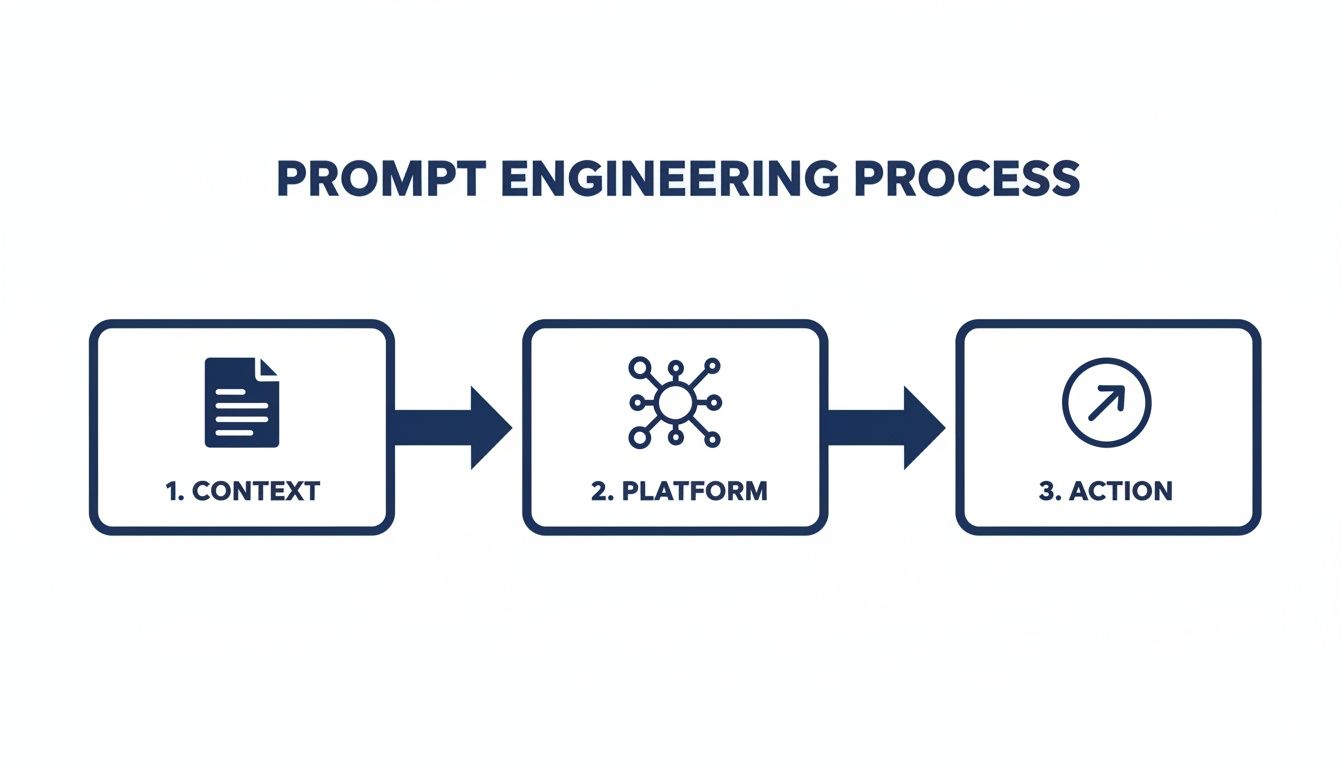
As you can see, providing context and specifying the platform are foundational steps before defining the final action. This ensures the AI has all the necessary information upfront.
From Draft to Approved Content
With a shared workspace, the approval process becomes clean and simple. Instead of emailing attachments back and forth, you create a clear, repeatable system for review.
Here’s how a practical workflow might look in the real world:
- AI Draft Generation: The social media manager uses the AI to generate a batch of initial post drafts for an upcoming campaign.
- Internal Review: The manager performs a quick edit, checking for brand voice alignment, factual accuracy, and adding any necessary human touch.
- Status Update: The post's status is changed from 'Draft' to 'Pending Approval' directly within the platform. This automatically notifies the client or internal stakeholder.
- Stakeholder Feedback: The approver logs in, views the post exactly as it will appear, and can either click 'Approve' or leave specific, contextual comments for revisions.
This system creates a clear audit trail and eliminates the classic "which version are we looking at?" problem. Our own guide on creating a streamlined content approval process offers more detailed strategies you can implement.
Organizing Campaigns and Optimizing Schedules
As you scale up your AI content production, organization is everything. Using campaign tags or labels within your content calendar is a simple but powerful way to keep everything tidy. You can tag posts by theme (e.g., #ProductLaunch, #Q3Promo) or by client, making it easy to filter your view and track specific initiatives.
The real win with an integrated AI workflow isn't just speed—it's radical efficiency. Real-world testing shows that teams can shrink their weekly content production time from 20 hours down to just 3 hours, an 85% improvement that covers everything from planning to final edits.
This massive time savings frees your team to focus on higher-value tasks. One of those tasks is optimizing when you post. Modern social media management platforms often include AI-powered scheduling, which analyzes your audience's activity patterns to suggest the best times to publish for maximum reach and engagement.
This feature closes the loop on your AI-assisted workflow. You're not just creating content more efficiently; you're also distributing it more intelligently. By combining an AI content generator with an automated approval system and smart scheduling, you build an end-to-end process that is fast, organized, and data-driven.
How to Measure and Refine Your AI Strategy

Hitting "generate" on an AI content generator for social media is just the starting line. The real magic, the kind that actually grows your accounts, happens when you stop guessing what works and start letting the data guide you.
A winning strategy isn't about just churning out posts. It's about learning from every single thing you publish to make the next piece of content even better. This means shifting your focus from vanity metrics (like that ever-seductive follower count) to the numbers that really show a healthy, engaged community. Your analytics dashboard is about to become your new best friend.
Tracking the KPIs That Truly Matter
When you're digging into the performance of your AI-generated content, you've got to look beyond the surface. Sure, likes are nice, but they don't tell you much about whether your content truly connected or inspired action.
Instead, let's zero in on the metrics that signal genuine interest. These are the numbers that will tell you exactly how to tweak your prompts and sharpen your creative direction.
Here are the core KPIs I always have my eye on:
- Engagement Rate per Follower: This is way more insightful than raw engagement numbers. It tells you what percentage of your actual audience is interacting, giving you a much clearer picture of what resonates.
- Click-Through Rate (CTR): Are people doing what you want them to do? A strong CTR is proof that your AI-generated copy and calls-to-action are compelling enough to get someone to click that link.
- Shares and Saves: These are pure gold. A share means someone found your content so valuable they put their own reputation behind it. A save means they see it as a resource worth coming back to. Both are powerful signals of quality.
- Conversions: This is the bottom line, plain and simple. How many people who clicked your link actually signed up, downloaded, or bought something? This is how you directly tie your social media work to real business results.
Running Practical A/B Tests
Once you know what to track, you can start experimenting. A/B testing is the most direct way to figure out what your audience loves, and it's incredibly easy to do with an AI generator. The concept is simple: you pit two versions of a post against each other and see which one comes out on top.
The goal of A/B testing isn't just to find a single winning post. It's to uncover patterns and principles you can use to make all your future content more effective.
The key is to start with small, isolated changes so your data is clean. For example, you could generate two different captions for the exact same image, changing only the headline or the call-to-action.
Here are a few A/B tests you can run this week:
- Headline vs. Headline: Ask your AI for two different hooks for the same core idea. Maybe one is a question and the other is a bold, controversial statement. See which one actually stops the scroll.
- Image vs. Image: Keep the copy identical but test two different AI-generated visuals. Does a clean graphic with text outperform a candid lifestyle photo? Your audience will tell you.
- CTA vs. CTA: Try a direct call-to-action ("Shop Now") against a softer, more benefit-driven one ("Discover the new collection"). The results might surprise you and reveal a lot about your audience's buying habits.
Running these simple tests gives you hard evidence about what works. That kind of insight is invaluable for refining your future prompts.
Creating a Monthly Review Framework
Data is useless if you don't do anything with it. To make all this tracking worthwhile, you need a simple monthly review process for your team. This creates a powerful feedback loop where performance data directly fuels your next content plan.
At the end of each month, pull up your analytics and look at your best and worst-performing posts.
- Spot the Winners: What topics, formats, or tones got the most shares and saves? Those are clear signals to double down on what’s working.
- Analyze the Duds: Why did some posts completely fall flat? Was the hook weak? Was the visual bland? Every "failure" is a learning opportunity in disguise.
- Update Your Prompts: Take what you've learned and build it directly into your AI prompts. If you found that posts ending with a question get 2x more comments, you can add a new rule to your prompt template: "Always end the caption with an engaging, open-ended question."
This cycle of creating, measuring, and refining is what turns your social media strategy from a simple content machine into a smart, self-improving engine that gets better over time.
Common Questions About AI for Social Media
Diving into AI for social media always brings up a ton of questions. It's totally normal. You start wondering if a machine can really capture your brand's unique vibe, or if using it will just make all your content sound like it came from a robot.
Let's cut through the noise and tackle the real-world questions that pop up the second teams start playing with an AI content generator for social media. Getting these sorted out now will save you a world of headaches later on.
Can an AI Really Match My Brand's Unique Voice?
Yes, but it's not going to read your mind. The magic isn't in the AI itself, but in how you guide it. You can't just toss a generic prompt at it and expect perfection.
The best way to get it right is to create a detailed brand style guide that you feed the AI with every single prompt. This isn't just about tone—it should cover everything from your go-to vocabulary and emoji usage to the topics you would never, ever touch.
Think of the AI as your new super-efficient junior copywriter. It'll handle the first 80% of the work, getting the core ideas down. Your job is to come in for that final 20%—adding that human spark, tweaking a phrase here and there, and making sure it feels genuinely you. That's the combo that delivers speed without sacrificing authenticity.
Will Using AI Content Hurt My Engagement?
This is the big one, right? The fear is that AI content will fall flat. But honestly, I've seen the opposite happen. When you use it smartly, AI can be a massive engagement booster.
The low-engagement stuff everyone's worried about? That comes from lazy, one-line prompts. A well-guided AI, on the other hand, can be your secret weapon. It can help you brainstorm hooks, find interesting angles, and analyze what’s already working in your niche.
Don't just ask it to "write a post." Ask it to brainstorm five different questions based on a top-performing article or come up with three controversial takes on a trending topic. When you pair creative, AI-assisted ideas with a solid, data-backed publishing schedule, you end up with more relevant content hitting your audience at the right time. Better engagement usually follows.
The problem is never the AI; it’s the strategy behind it. Generic prompts get you generic content. Sharp, specific prompts get you content that starts real conversations.
How Do I Manage Approvals with Clients When Using AI?
Trying to manage this over email or Slack is a complete nightmare. It’s messy, things get lost, and you lose all the speed you gained from using AI in the first place. This is where having an all-in-one platform is non-negotiable.
Your workflow should be clean, clear, and dead simple for your clients. Here’s how it should look:
- Draft in the Platform: The AI generates the initial post right inside your social media tool.
- Quick Internal Edit: Your social media manager gives it a once-over, polishing the copy and checking for brand voice.
- Send for Review: With one click, the post is sent for approval, and the client gets an automatic notification.
- Client Feedback: The client logs into a shared calendar, sees the post exactly as it will appear live, and can either hit "approve" or leave specific comments right on the draft.
This kind of structured process cuts out all the confusing back-and-forth and keeps everyone on the same page.
What Is the Best Way to Get Started with an AI Content Generator?
Don't try to boil the ocean. The quickest win, and the best place to start, is content repurposing. It’s low-risk and gives you an immediate return on your time while you’re still learning how to write good prompts.
Grab a meaty piece of content you already have—a blog post, a case study, maybe a webinar recording. Then, use the AI to slice and dice it for social media.
For example, try a prompt like this: "Based on this article [link], generate 5 engaging poll questions for Facebook, 3 professional posts for LinkedIn summarizing the key takeaways, and 10 short, punchy tweets highlighting the statistics."
This is the perfect training ground. You learn how to guide the AI effectively and you walk away with a calendar full of content. It’s a win-win.
Ready to build a smarter, faster social media workflow? PostSyncer provides an all-in-one platform with a powerful AI Content Studio, collaborative calendars, and streamlined approval processes designed for busy teams and agencies. Start your 7-day free trial today and see how easy it is to generate high-quality content that gets results.