











You've got a valid integration, the credentials are working, and the wrong workspace still gets the wrong post. That's the kind of failure that makes teams think they have an authentication problem when the actual issue is authorization. API access control is the layer that decides who a caller is, what they can do, and which exact resource they're allowed to touch, every time a request comes in.
A useful mental model is a hotel. The front desk checks your identity, the room key decides what floor you can reach, and the room number decides which door opens. If someone hands you a real key, that still doesn't mean you can enter every room, and that's the distinction many API teams miss.
What API Access Control Means
A valid integration can still cause the wrong outcome. In a social publishing tool, a scheduler might read one client's draft or publish it in another client's workspace because its token was accepted without an object-level check. The login worked. The permission decision failed.
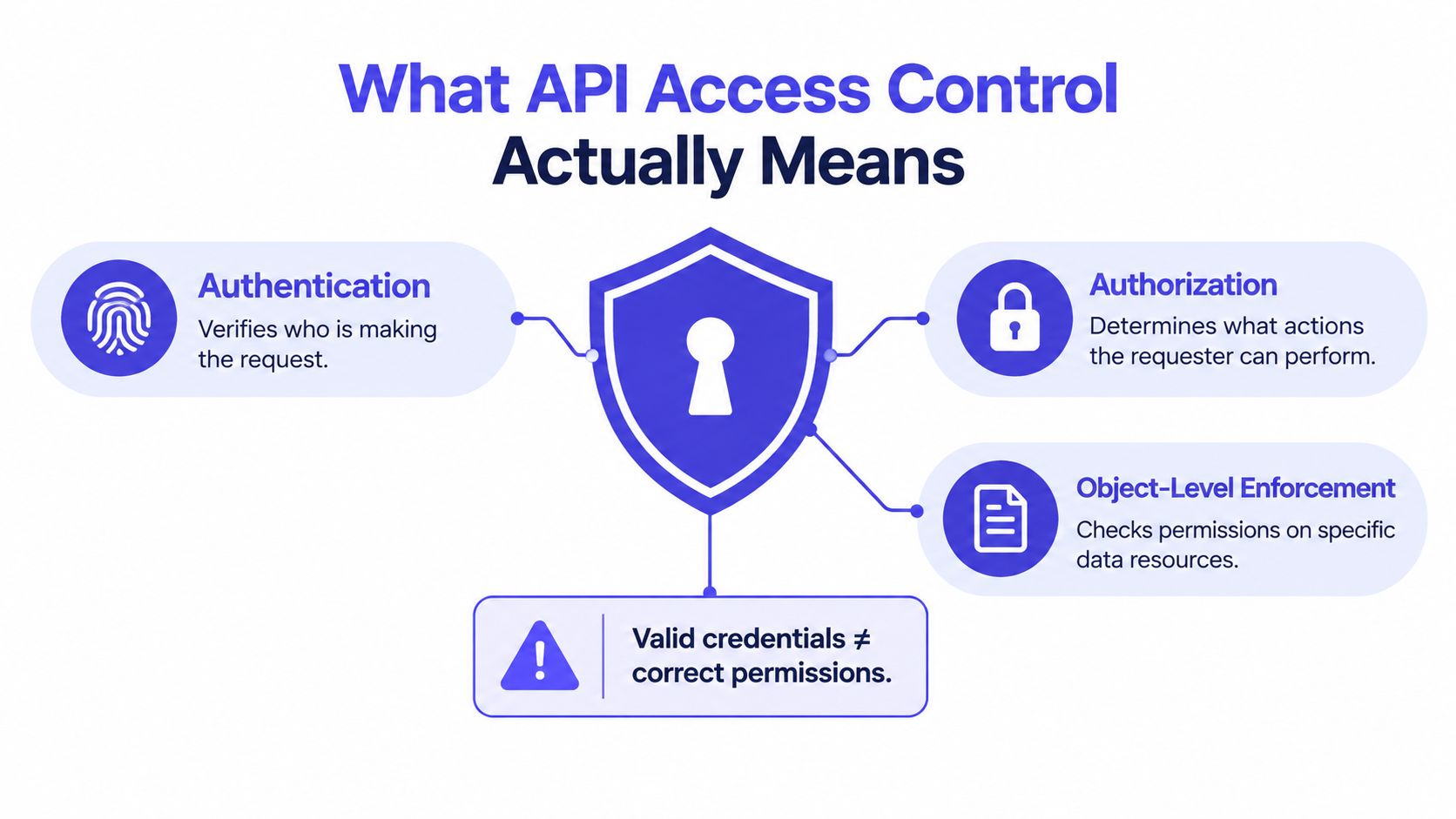
API access control is the set of decisions that prevents that mistake. It confirms the caller, determines which actions the caller may perform, and verifies that those actions apply to the specific object in the request. Treating security as one “secure or not” switch hides the failure points between those decisions.
Authentication is only the first gate
Authentication answers who are you? An API key, bearer token, certificate, or other credential can prove that a caller may communicate with the system. OAuth's history shows how delegated access developed from avoiding password sharing into a framework for apps, APIs, and devices. OAuth 2.0 was published as RFC 6749 in 2012, alongside RFC 6750 for bearer tokens. OAuth's history and RFC 6749 milestone
That credential identifies a caller. It does not decide whether the caller may edit a draft, export a report, or publish for a particular workspace. A valid session gets the caller through the front door, not into every room.
A useful production test is to trace one request from token validation to the database query. If the token is checked but the workspace, brand, or record is not, authentication has succeeded while access control remains incomplete.
Authorization decides what that caller may do
Authorization answers what can this caller do? Access-control failures are a central concern in the OWASP API Security Top 10, including Broken Object Level Authorization and Broken Function Level Authorization. An attacker may not need to forge a login. A legitimate session with excessive reach can be enough.
For PostSyncer-like workflows, permissions should distinguish actions such as reading drafts, editing content, publishing posts, exporting reports, and managing workspaces. They should also bind each action to the correct tenant, brand, and object. A token issued for one workspace must not become a general-purpose key for every customer.
Practical rule: whenever a request changes state, check more than token validity. Confirm that this caller may perform this action on this specific record.
That check belongs at the endpoint and at the data-access boundary, so a missed route condition does not expose another workspace's content. Authentication opens communication. Authorization limits the work that communication can perform.
The Building Blocks of API Access Control
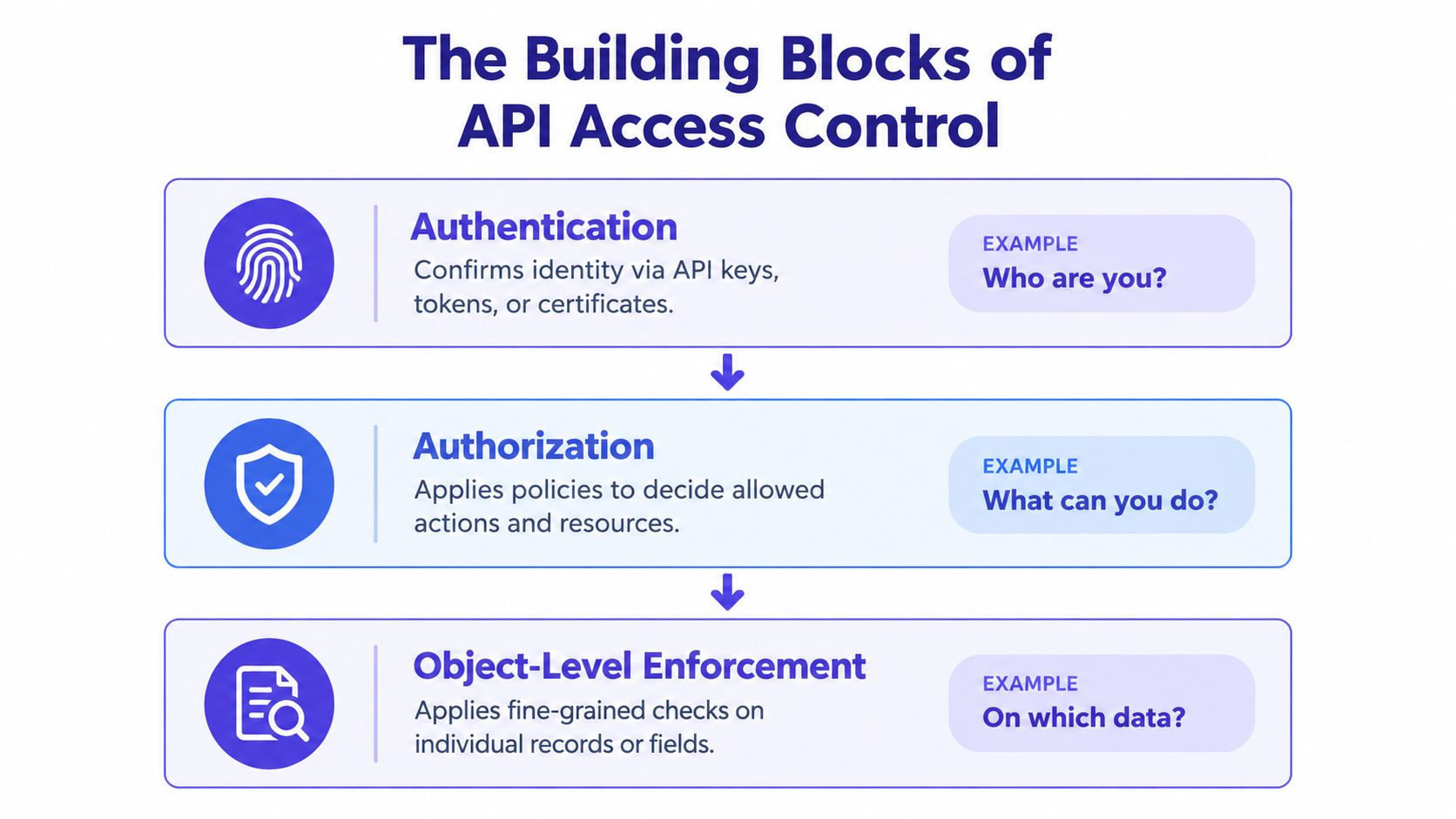
A PostSyncer-style integration may arrive with a valid credential and still request the wrong workspace or record. A safer model treats api access control as three connected decisions: who is calling, what that caller may do, and which object the request may touch. A failure in any one of them can expose data.
Authentication says who the caller is
Authentication works like the hotel desk checking a key. It confirms that the caller holds a recognized credential, such as a user session, API key, OAuth token, service account credential, or agent identity. It does not decide which rooms that key opens.
A principal is the actor making the request. It may be a user, application, service account, or automated agent. A tenant is the boundary around one customer, brand, or workspace. Keeping those identities separate matters because a credential issued to one principal or tenant must not become a general key for another tenant's data.
A recognized credential is only the first gate. For accounts holding tenant data, teams should also block intruders with MFA, so a stolen password or key does not provide the only line of defense.
Authorization says what the caller may do
Authorization evaluates the authenticated principal's requested action. It may permit reading analytics while denying publishing, allow draft editing while denying member management, or restrict connection administration to selected roles. A legitimate login can still have excessive reach, which is why many API incidents occur after the caller has already passed authentication.
A scope is a named slice of permission, such as read, write, publish, or administration. An access token carries the permissions and context presented to the API. A refresh token can obtain new access tokens under defined rules. Authorization endpoints help obtain consent or credentials, while resource endpoints perform the protected operation.
A broad token creates a broad blast radius. Keep permissions tied to the action and tenant they serve rather than treating successful login as permission to perform every operation.
Object-level enforcement says which record is safe to touch
The API must check the specific object after it checks the endpoint and token. A request may be allowed to read posts, yet still be forbidden from reading another workspace's post. This check should bind the object to the principal, tenant, and requested action, including identifiers supplied in the URL or request body.
Authentication asks who. Authorization asks what. Object-level enforcement asks which record.
For a content workflow, that means checking the workspace, brand, draft, post, or analytics record before returning or changing it. If those decisions are kept separate, a valid session cannot turn into access to every customer's data.
Comparing API Keys, OAuth, Scopes, and Rate Limits
A lot of teams lump these together because they all show up in the same settings screen. They don't do the same job. If you treat them as interchangeable, you'll end up with a secure-looking system that still leaks access in the wrong places.
| Mechanism | What it identifies | What it protects against | Common misuse | Best used for |
|---|---|---|---|---|
| API key | A calling app or integration | Unwanted anonymous use, some basic abuse | Granting one key broad account-wide power | Simple caller identification |
| OAuth | A delegated client acting for a user or service | Password sharing and overexposure of credentials | Using one broad token for every action | Delegated access across apps and APIs |
| Scopes | The specific permissions inside a delegated token | Excessive permissions inside the token | Defining scopes that are too broad or vague | Narrowing read, write, publish, or admin actions |
| Rate limits | Request volume over time | Availability abuse, spikes, and brute-force pressure | Treating rate limits as if they were permission control | Protecting uptime and throttling abuse |
API keys are easy to understand, but they're blunt. They identify the caller, yet they don't automatically express fine-grained user intent. OAuth is better when one service needs to connect to another without collecting a password, and scopes make that delegation smaller and safer. Rate limits help keep the service usable, but they don't tell you whether a request is allowed in the first place.
That's why a small product team usually wants all four in combination, not one instead of the others. A key or client credential proves the caller is known. OAuth lets a user or service delegate access. Scopes keep that delegation tight. Rate limits reduce abuse without pretending to solve authorization.
For a deeper look at how teams think about access boundaries in public versus private interfaces, the comparison in comparing public and private APIs is a helpful companion read. The design question is the same one you face in production, how much should this caller be able to do, and on what surface?
PostSyncer's own API documentation also helps illustrate the difference between a broad integration and a tightly scoped one, especially when you compare scheduled publishing with analytics access in its social media scheduling API.
API keys identify the caller. OAuth delegates the access. Scopes narrow the delegation. Rate limits keep the lights on.
How OAuth Works for Real World Integrations
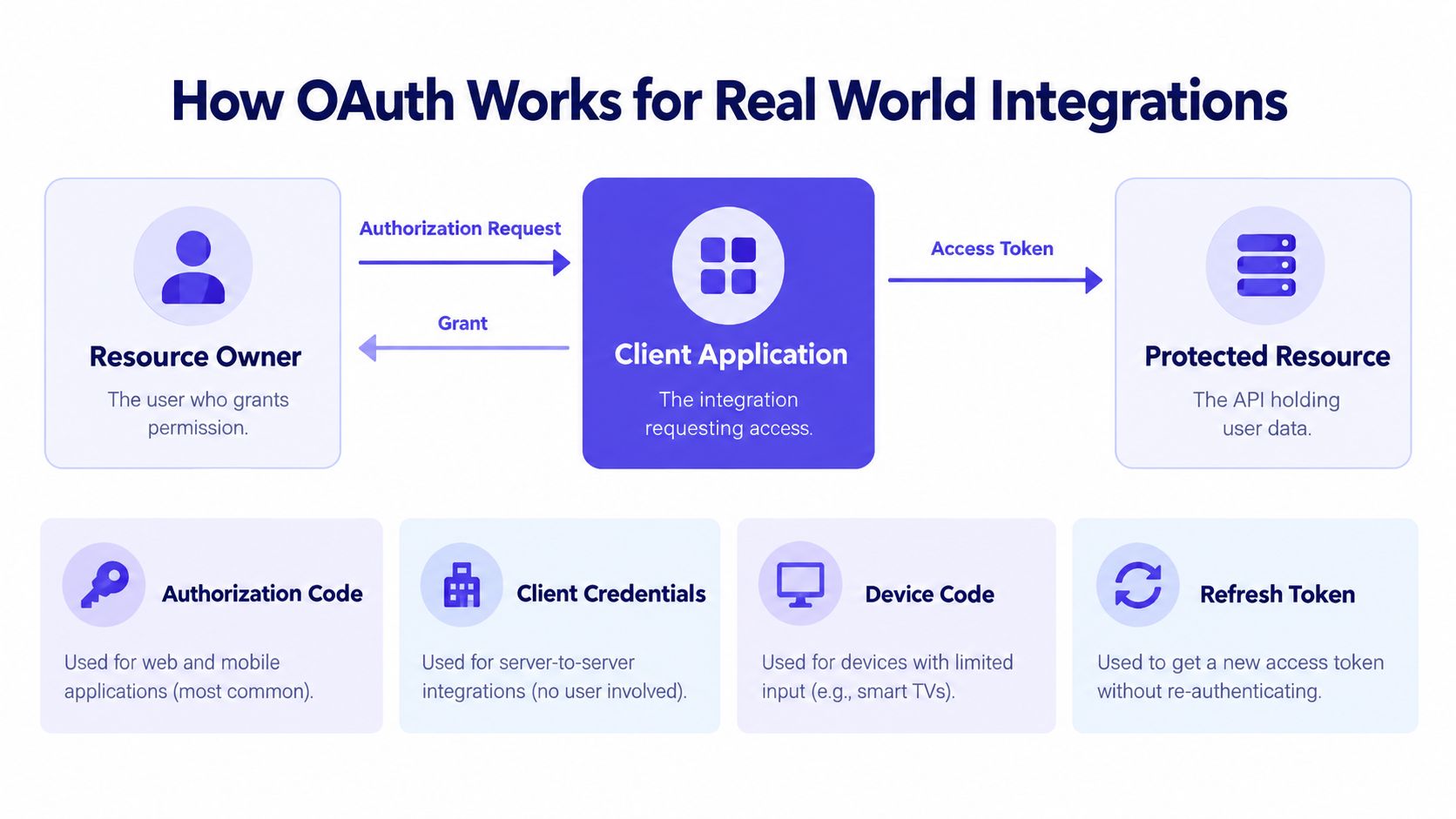
A publishing app can show a successful sign-in and still give the wrong workspace access. OAuth helps prevent that failure by separating the person who owns the data, the application requesting access, and the API protecting the data. The user grants access, the client receives a token, and the protected resource decides whether that token permits the requested operation. OAuth 2.0's parties and grant model
The three parties and the four grant types
The resource owner is the user who controls the data. The client application is the integration asking to use it. The protected resource is the API or service holding that data. RFC 6749 defines four major grant types: Authorization Code, Implicit, Resource Owner Password Credentials, and Client Credentials. Later security guidance introduced PKCE and moved implementation practice away from unsafe flows such as Implicit and Password Credentials. The RFC 7636 PKCE specification explains how the code-verifier exchange protects authorization requests.
For a scheduler or publishing app, the flow is concrete. The user signs in with the provider, approves the requested access, and the provider returns a token limited to the granted scope. The token represents delegated permission, not the user's password, and its authority should match what the user approved. OAuth delegation examples for connected applications
Why the token matters more than the login
Authentication answers, “Who is calling?” Authorization answers, “What may that caller do here?” A secure login addresses the first question, but it does not automatically answer the second. Broken authentication can expose sessions, while object-level and function-level authorization failures can still let an authenticated caller reach another user's data or perform an operation they were never meant to perform.
A social scheduler illustrates the risk. Its connection to a social provider may authenticate correctly, yet the API can still publish into the wrong workspace or use a read-only token for publishing. Each request therefore needs the right scope, token lifetime, destination, and object-level decision.
Practical rule: if an integration needs to publish content, do not let it reuse the same token path used for reading analytics.
OAuth avoids password sharing, but it does not design the permission model for you. Your API still has to define the client's allowed actions, access duration, and permitted resources.
Designing Scopes and Object Level Checks
Scopes work best when they match the actions people recognize in the product. In a publishing or scheduling app, users do not think in terms of one giant permission bucket. They think in terms of reading analytics, creating drafts, publishing posts, managing team members, and connecting accounts. Your access model should follow that shape. Broad tokens are easy to issue, but they turn every mistake into a larger incident.
Build scopes around real actions
A good scope set is intentionally plain. Read analytics should stand on its own. Publish content should be separate. Create drafts should not include administer OAuth connections, and manage team members should stay apart from content actions because it affects a different part of the system, with different risk and a different audit trail.
A useful analogy is a hotel keycard. The card may open your room, but not the supply closet, the office safe, or every floor in the building. API scopes should behave the same way. They answer one question well, which action is this token allowed to perform, and they avoid answering ten unrelated ones by accident.
Token handling matters too. An access token is not just proof that someone logged in earlier. It is a live credential. Treat it like a secret, keep it out of URI query parameters, keep its lifetime short, and design for rotation or reuse detection when you can. For higher risk integrations, bind tokens more tightly to the client and require stronger client authentication so a leaked token is less useful.
Check the object every time
Authentication gets a caller through the front door. Many production breaches happen after that point, when the caller is already authenticated and the API fails to ask, “Are you allowed to act on this specific record?”
That question has to run on every endpoint that accepts an identifier, whether the identifier points to a post, workspace, comment, media asset, or analytics record. The decision needs to combine principal, workspace, object, operation, and membership or ownership policy before the server reads or writes anything.
Middleware helps, but it is not enough by itself. A middleware layer can confirm that a token is valid and that it carries a scope. The handler still has to verify that the requested object belongs to the caller's workspace, and that the caller may perform this exact operation on this exact object right now. If you load by ID first and ask permission second, you are already on the risky path.
A short review checklist keeps teams honest:
- Scope check: Does the token allow the action the endpoint is about to perform?
- Ownership check: Does this record belong to the workspace or tenant on the token?
- Operation check: Is the caller reading, editing, deleting, or publishing?
- Policy check: Does the current membership or approval state allow this action right now?
A PostSyncer-style example
A marketer uses one workspace to prepare drafts for Brand A and another to review analytics for Client B. The session is valid. The token may even be valid. The bug appears when the API trusts that login alone.
If the server only checks that the caller is signed in, a request for a draft from workspace A can still succeed while the interface is sitting in workspace B. If the server checks the object ID but never confirms the workspace boundary, the same leak can happen through another route. The safe pattern is one authorization decision that evaluates the caller, the workspace, the target object, and the requested action together. A dropdown in the client is a convenience. It is never proof of entitlement.
Handling Non Human Identities and AI Agents
A lot of authorization advice stops at human users. Production systems don't. They also run scheduled jobs, service accounts, connectors, and AI agents that act on somebody's behalf, often with broader reach than the human intended. That's where the old “one user, one role, one token” model starts to fall apart.
The better mental model is least privilege for actions and context, not just identities. A drafting agent should be able to assemble copy, but not publish it. A reporting job should read analytics, but only for the workspace it was assigned to. A connector should be able to sync one brand's account, not every account it can discover.
Limit the job, not just the login
If a background task only needs to generate a draft, give it a token or service credential that can't publish. If it only needs one workspace, bind it to that workspace and expire it quickly. If it should run only after approval, make approval state part of the authorization decision instead of assuming the task itself is trustworthy.
That approach lines up with what modern API-security guidance is emphasizing for AI agents and workload identities, which are moving faster than conventional RBAC patterns. It also matches the warning from current threat reporting that most reported API attacks in a 2025 industry report came from authenticated sessions, which means the weak point is often the permission model after login, not the login itself. Authenticated-session API attack trend and posture gap
Treat act-on-behalf carefully
When one system acts for another, the safest model is to issue a separate scoped token for the downstream target instead of forwarding a broad original credential unchanged. That keeps each hop narrow, makes revocation clearer, and reduces the chance of a confused deputy problem. The same logic matters for AI-generated content, multi-step approvals, and cross-brand automation.
For teams using PostSyncer-like workflows, this shows up in creator approvals, agency access, analytics visibility, and social account connections. A service account that can enqueue a post doesn't need to own the whole posting workflow. It needs just enough permission to complete its assigned step and nothing more.
Putting It All Together as a Security Baseline
If you only have one afternoon, start with the decisions that reduce the most risk fastest. Tighten scopes, then add object-level checks, then review token lifetime and revocation, then make sure tenant boundaries are enforced server-side on every request. If you can't answer who can read, who can publish, and who can move data between workspaces, you don't have a finished access-control model yet.
For a social analytics tool, that means checking that the token used to read dashboards can't suddenly export or publish, and that the current workspace is validated on the server before any record is returned. The analytics layer can't be the place where permission is assumed. It has to be the place where permission is proven. PostSyncer's analytics API context
A practical baseline looks like this:
- Narrow scopes first: Separate read, create, publish, team management, and OAuth administration.
- Check objects on every request: Verify the principal, tenant, object, and operation together.
- Harden tokens: Keep them short-lived, treat them as secrets, and support rotation or revocation.
- Log authorization decisions: Record allow and deny outcomes so you can audit later.
- Protect tenant isolation: Never let client-side state decide workspace membership.
The common mistake is thinking authentication is the finish line. It isn't. A valid session is just the beginning of the control loop, and every request still needs an independent authorization decision.
PostSyncer gives teams a single place to schedule, review, and analyze social content across multiple workspaces, with OAuth connections and API access that fit into real production workflows. If you're designing permissions for publishing, analytics, or agency access, visit PostSyncer and see how its workspace-based setup maps to the same access-control principles you'd want in your own API.