











On Monday morning, a social media manager opens six tabs, three spreadsheets, and a Slack thread to work out what the brand is publishing this week. One draft has no owner, another has been approved but never scheduled, and a third exists in five slightly different versions. The team isn't short of ideas. It's short of a dependable way to move those ideas from planning to publication.
A content calendar generator solves that coordination problem by turning scattered ideas, assets, approvals, and publishing dates into one operational system. It helps a small business see what's next, gives an agency a clear client workflow, and lets a social media manager adapt one campaign across several networks without rebuilding the plan from scratch.
The need is easy to understand. A 2022 industry summary reported that 73% of B2B organizations used content-calendar tools, 82% of content creators and marketers repurposed content for social channels, and 69% of 2021 content-creation effort went to social media (Narrato's summary of content-creation research). Those conditions make ad-hoc planning fragile. Multiple channels, AI-assisted production, approval requirements, repurposing pressure, and performance feedback all need to work together.

This guide treats the generator as an editorial operating system, not a date-picker. You'll see what it should track, how a useful workflow operates, how platform-native repurposing works, and how to evaluate a practical tool such as PostSyncer without confusing automation with strategy. For a straightforward introduction to the underlying idea, see this guide to what a content calendar is.
Why Marketing Teams Need a Content Calendar Generator
The Monday-morning problem gets worse as soon as a team adds another channel. A product announcement may need a blog article, an email, a LinkedIn post, a short video, an Instagram Reel, and a customer-support response plan. Each item has a different owner, format, review requirement, and deadline, even though they all belong to one campaign.
A spreadsheet can record those details, but it rarely manages them well once work becomes collaborative. People overwrite cells, duplicate ideas, lose the latest asset, and rely on private messages to confirm whether something is ready. The result is familiar: rushed captions, missed publishing windows, and content that appears on one channel while the supporting material is still unfinished elsewhere.
Coordination is the real bottleneck
A generator makes the work visible. Each entry can connect a topic, campaign, channel, format, owner, review state, asset, and publication time. That changes the conversation from “What should we post?” to “Who is responsible for this approved LinkedIn adaptation, and what still blocks it?”
For a small business, this means the owner can see the week without chasing a contractor. For an in-house team, it creates a shared production view. For an agency, separate workspaces and approval stages help prevent one client's campaign from becoming mixed with another's.
Practical rule: If a calendar shows dates but can't show ownership and readiness, it's a display, not a workflow.
The modern environment adds five connected pressures:
- Multi-channel publishing: One idea now travels through networks with different formats and audiences.
- AI-assisted production: Drafting is faster, but review, fact checking, rights checks, and brand judgment still matter.
- Approval workflows: Content often needs review by a client, subject-matter expert, manager, or compliance owner.
- Repurposing pressure: Teams need more output from each source asset without publishing identical copies everywhere.
- Analytics feedback loops: Results should influence the next planning cycle, rather than sit in a separate report.
A content calendar generator brings those pressures into one operating view. It doesn't replace editorial judgment. It gives that judgment a structure the team can repeat every week.
What a Content Calendar Generator Actually Does
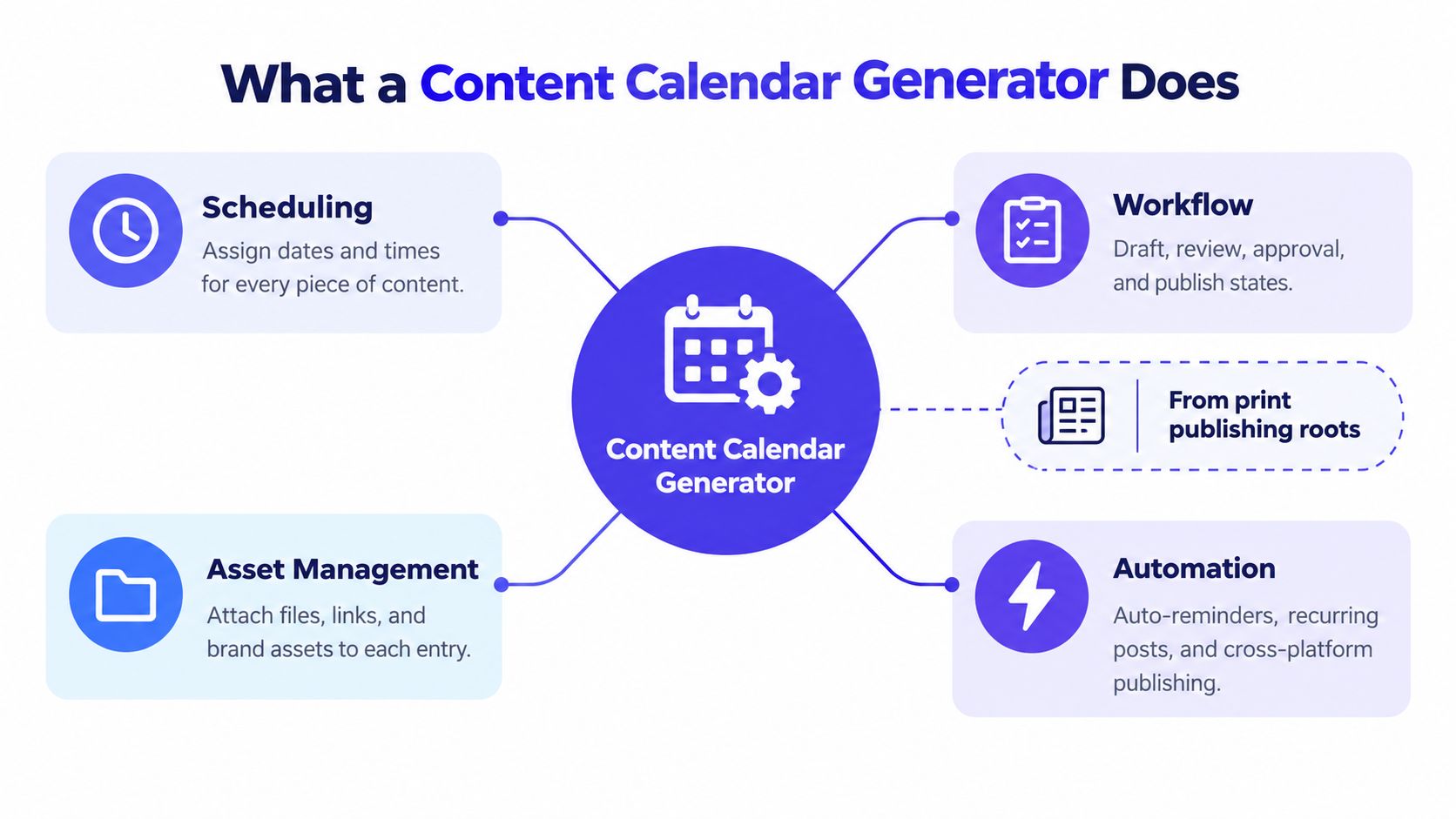
The term sounds simple, but the useful version is more than a calendar with an “add post” button. Editorial calendars have roots in print publishing, where newspapers and magazines planned recurring themes and advertising placements in advance. Digital calendars emerged in a more operational form during the early 2010s, as content marketing developed into a distinct business discipline and teams began coordinating blogs, brand publishing, and social networks (background on the evolution of content calendar software).
A modern generator adds production control to that publishing tradition. It turns an idea into a structured entry, then connects that entry to the people, files, decisions, and channels required to release it.
Think beyond the date
A paper pilot's logbook records flights. A flight operations system sequences the crew, aircraft, gate, fuel, timing, and safety checks needed to make those flights happen. A content calendar generator plays a similar role for publishing. It doesn't merely record that a post should go live. It connects the conditions that make publication possible.
At minimum, a serious system should track:
| Field | Why it matters |
|---|---|
| Topic and campaign | Shows what the content is about and which initiative it supports |
| Objective and audience | Prevents posts from existing without a clear purpose |
| Channel and format | Distinguishes a Reel from a LinkedIn document or blog article |
| Owner and reviewer | Makes the next action visible |
| Draft and asset location | Keeps the working material close to the calendar entry |
| Status and approval state | Shows whether the item is an idea, draft, approved, scheduled, or published |
| Publication time and KPI target | Connects distribution with later measurement |
A basic scheduler mainly dates posts and sends them to a network. A content calendar generator plans the work before publication, assigns responsibility, supports review, manages reuse, and helps the team learn from outcomes. Templates, labels, recurring slots, and approval states aren't decorative extras. They formalize decisions that otherwise live in memory or scattered messages.
For a practical planning reference, this ultimate guide to creating a social media content calendar can help teams think through topics, channels, and publishing details before selecting a platform. The important distinction is that planning should produce an executable system, not just a list of captions.
A tool that matches this broader definition should let the team connect strategy to execution. That is the lens to use when comparing content calendar software: does it help the team decide, prepare, approve, publish, and evaluate, or does it only display dates?
Benefits for Small Teams and Agencies
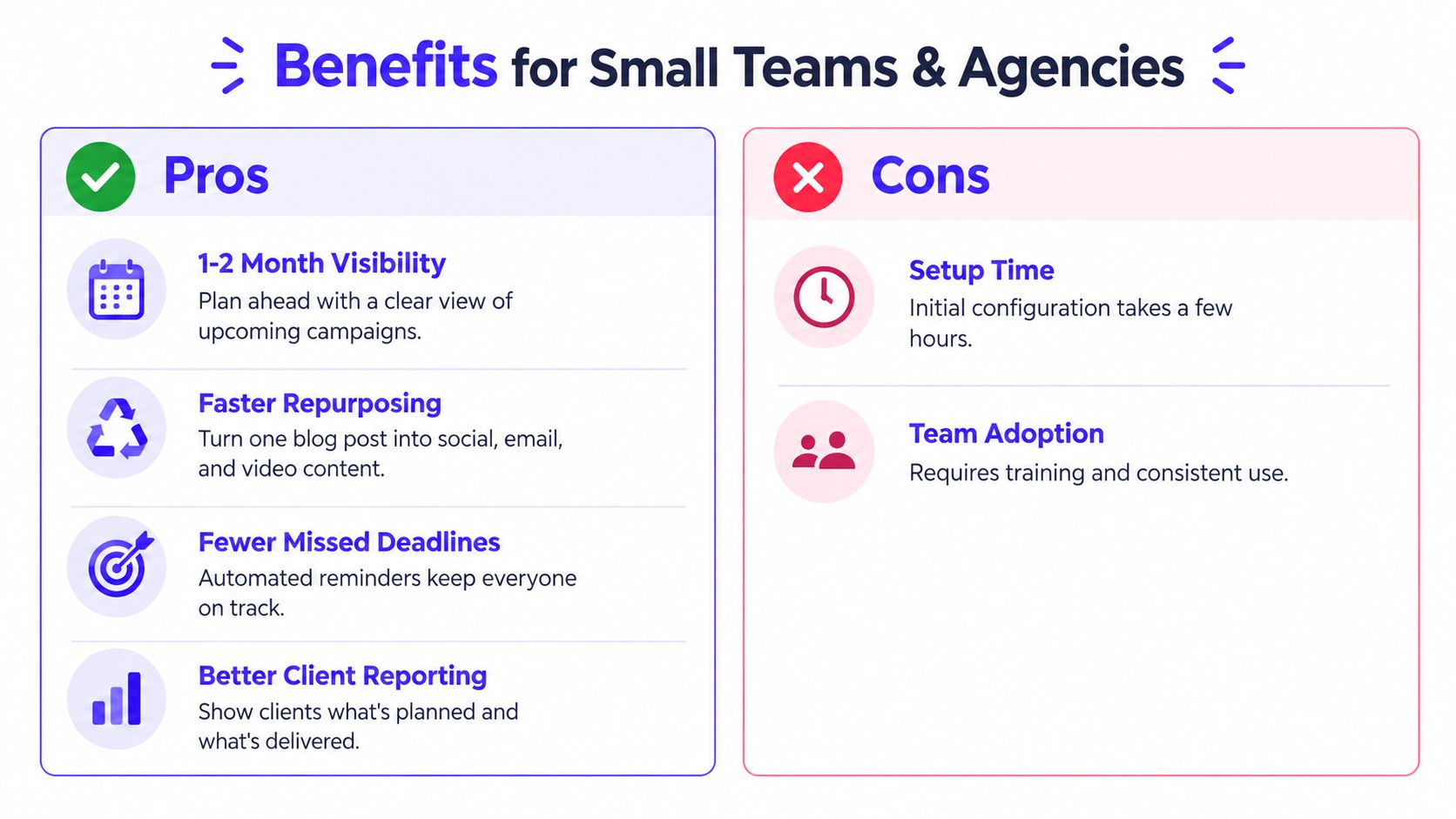
A small team can lose a campaign before publishing day, because nobody sees the missing asset, overloaded owner, or empty channel until the deadline is close. A content calendar generator brings those gaps into view early, giving the team time to assign work and repair the workflow.
Earlier research on planning horizons found that creators and marketers commonly plan weeks or months ahead. Planning that far ahead requires more than adding ideas to dates. Reusable templates, asset storage, recurring slots, and clear handoffs keep future entries actionable as campaigns grow.
Less last-minute context switching
A small team preparing a seasonal campaign may otherwise scatter the work across a document, a design folder, and a message thread. The writer drafts the caption, the designer saves the visual elsewhere, and the owner approves the result in conversation. By publication day, someone has to reconstruct what was decided and which version is final.
A structured calendar keeps the campaign's source article, social adaptations, owners, approval state, and missing deliverables together. It works like a shared production board: each entry shows what exists, what needs attention, and who acts next. The team spends less time recovering context and more time improving the content.
The practical gains include:
- Fewer dropped tasks: Visible owners and reminders expose unfinished work before the deadline.
- Less duplicated effort: Searchable entries reveal whether an idea already appears in another campaign.
- Clearer campaign coverage: Channel and format views show which adaptations remain unfinished.
- More reliable batching: Writers and designers can group similar tasks instead of switching context for every post.
Why agencies feel the difference
Agency work adds several layers of coordination. One team may manage multiple brands, each with its own voice, approval chain, assets, and publishing permissions. Separate workspaces protect those boundaries, while labels and filters help an account manager find content waiting for a particular client or reviewer.
An audit trail supports the client relationship as much as the calendar view. The agency should be able to identify who changed an entry, who approved it, and whether the published version matches the approved version. That record helps the team investigate mistakes using evidence rather than memory.
Analytics completes the operating loop. Recording performance by platform, format, and timing gives the next calendar a stronger starting point. Each cycle can leave behind clearer templates, cleaner ownership, and better evidence for the next round. In that sense, the generator functions as an editorial operating system, connecting ideas, people, channels, reuse decisions, and review work.
For a small-business comparison of scheduling workflows, this guide to the best social media scheduler for small business offers useful context. The right system makes planning easier to maintain week after week.
Key Features Worth Evaluating in Any Generator
A serious evaluation starts with the workflow, not the interface. A polished calendar can still fail if it can't represent the way your team creates and approves content.
Start with states and permissions
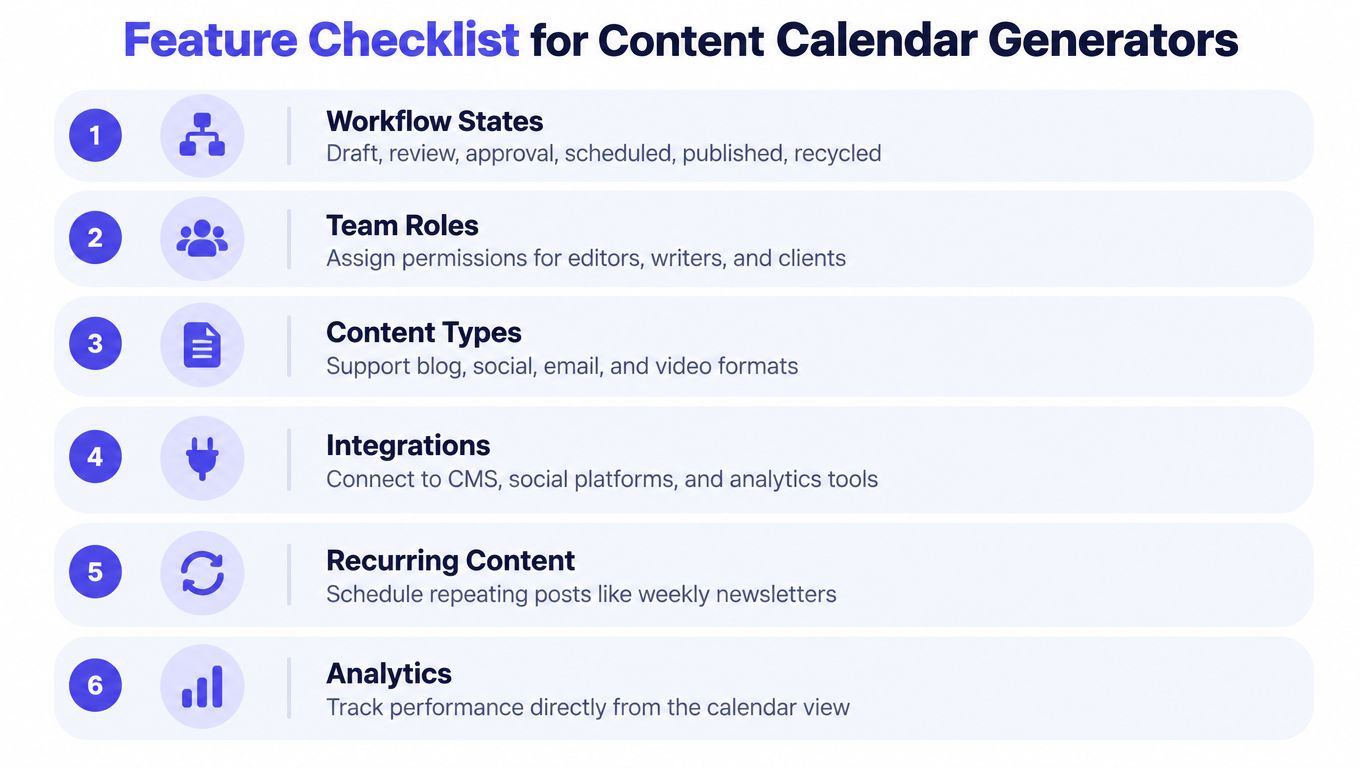
Use states that match real work. A useful sequence might include Idea, Briefed, Draft, Review, Approved, Scheduled, Published, and Recycled. Not every team needs all of them, but the system should distinguish “written” from “safe to publish.”
Approval controls matter for small teams too. A product claim may need a subject-matter check. A customer image may need rights confirmation. An AI-generated caption may need a human to verify its claims and tone. Assigning a reviewer makes that responsibility visible instead of leaving it implied.
Look for:
- Role separation: Writers, editors, clients, and publishers should have appropriate access.
- Approval gates: Publishing should be blocked when required review is incomplete.
- Audit history: The team should be able to trace edits and decisions.
- Labels: Campaign, funnel stage, format, market, and risk labels should be searchable.
- Multi-workspace management: Agencies should be able to separate clients without duplicating an entire system.
Examine the scheduling model
A useful generator should support platform-specific timing, audience time zones, and recurring queue slots. It shouldn't treat every network as if its audience behaves identically.
That distinction matters because the Sprout Social 2025 benchmark analyzed nearly 3 billion messages from 1 million public social profiles across Facebook, Google Business Profiles, Instagram, LinkedIn, Pinterest, TikTok, TripAdvisor, and X (Sprout Social's benchmark methodology and scheduling guidance). Aggregate benchmarks can provide a starting point, but your own account data should refine the recommendation.
Check the content and analytics layers
The tool should support the formats your team produces, including short-form video, carousels, Reels, Shorts, and the networks relevant to your audience. Support for channels such as Threads, Bluesky, and Mastodon can matter when a brand's distribution plan extends beyond the largest platforms.
AI features should live inside the workflow. Caption, hook, image, and video assistance can accelerate production, but the resulting draft should still enter a normal review state. URL-to-post or PDF-to-post conversion is useful only when the team can inspect the source, edit the output, and attach evidence where claims require verification.
Finally, connect performance to the calendar. The useful dimensions include platform, format, time slot, reach, engagement, clicks, and conversions where those measurements are available. For broader guidance on integrating organic visibility with small-business marketing, this SEO advice from Alpha Omega provides a helpful complementary perspective.
How Repurposing Should Work Across Channels
“Create once, share everywhere” sounds efficient until the same asset appears with the same hook, caption, crop, and call to action on every network. Audiences notice repetition. Each platform gives people a different reason to stop, watch, read, save, or respond.
Short-form video has become a major part of social content planning, but the useful lesson is broader than choosing one format. Adapt one source idea for the environment where it will appear rather than cloning the clip everywhere. A product tutorial may need a demonstration on TikTok, a self-contained explanation on YouTube, and an operational takeaway on LinkedIn.
Build a repurposing matrix
Start with one source asset, such as a product tutorial or customer question. Create a separate entry for each destination:
| Source idea | Platform adaptation | Change to make |
|---|---|---|
| Product tutorial | TikTok or Instagram Reel | Open with the problem, use a fast visual demonstration, and end with one clear action |
| Product tutorial | YouTube Short | Keep the explanation self-contained and make the title understandable without surrounding context |
| Product tutorial | Lead with the operational lesson, add business context, and use a more deliberate caption | |
| Product tutorial | Turn the core steps into a searchable visual sequence | |
| Product tutorial | Threads or X | Extract one sharp observation or question that invites discussion |
The entries can inherit the same campaign and source asset, while their execution changes. Adjust the opening hook, aspect ratio, caption length, CTA, sound, disclosure, and audience framing when the platform or objective calls for it.
A generator such as PostSyncer can support this structure by allowing one source record to produce several scheduled children. Each adaptation can have its own owner, draft, reviewer, format, publish time, and approval state. A small team can divide the work clearly, while an agency can track each platform version without losing the relationship to the original idea.
The goal is to make one idea useful in several native contexts.
Repurposing also protects audience attention. Repeating the same message to the same followers without meaningful variation uses distribution opportunities without adding value. A matrix creates controlled variation, so the campaign remains manageable and each version has a clear purpose.
Analytics should compare the adaptations rather than only the overall campaign. If the LinkedIn version earns thoughtful responses while the short video drives saves, those outcomes show how the team could develop the idea next. A date-picker records when content was published. A generator-driven workflow can show which transformation helped the source idea work.
Inside PostSyncer and a Modern AI-Assisted Workflow
A campaign may begin with one interview, product page, or customer question. The calendar becomes useful when that source can move through research, drafting, adaptation, approval, publishing, engagement, and measurement without losing its context. PostSyncer offers a concrete example of this editorial operating system. Its visual calendar supports planning and scheduling across TikTok, Instagram, Facebook, X, LinkedIn, YouTube, Threads, Pinterest, Telegram, Bluesky, and Mastodon from one workspace. The broader lesson is tool-agnostic: each content record should connect the idea, channel, owner, format, and next action.
A team can place entries on the calendar, rearrange them, apply labels, and move work through approval stages. An agency can separate brands with multiple workspaces, while unlimited team members can include writers, designers, clients, and publishers. These permissions matter because a calendar is also a responsibility map. If ownership is unclear, a polished interface will not prevent missed reviews or late posts.
AI should accelerate drafts, not bypass review
PostSyncer's AI Content Agent and AI Video Creator can use a URL, PDF, image, video, or text brief to help produce captions, hooks, images, and short-form video drafts. That supports ideation and adaptation when one source asset needs several platform-specific versions. A useful workflow treats each generated item as a draft with context, rather than as a finished post.
The handoff matters most: AI output must enter the same controlled workflow as human-written content. Apply the correct label, owner, reviewer, and approval state. Before publishing, a person should check factual claims, brand language, accessibility details, usage rights, and any required disclosure.
Teams comparing AI-assisted production can consult this overview of the top 12 AI tools for content to see how generation tools fit alongside planning and review.
Publishing is only one part of the operating system
A unified comments inbox connects scheduled content with the conversations it creates. AI-assisted replies, contact CRM functions, and spam filtering can help organize engagement, while human judgment remains available for sensitive or high-value discussions.
Analytics completes the loop. Compare platforms, formats, timing, and adaptations, then carry useful findings into the next calendar. For example, a post that prompts detailed LinkedIn discussion may deserve a different follow-up from a short video that earns saves. PostSyncer represents one practical version of this system, linking creation, approval, distribution, engagement, and measurement.
Apply the same test to any platform. Check whether it connects the fields, permissions, review controls, adaptations, and feedback loops your team needs in a live campaign, rather than only in a polished demonstration.
Choosing and Rolling Out a Generator the Right Way
Start with a trial, not a toy example. Connect at least one actual network, load a live campaign, attach the assets, and ask a stakeholder to complete the approval step. You'll discover workflow gaps quickly when the content has a genuine deadline and a reviewer.
Before importing ideas, define the data model:
- Campaign and objective
- Audience and funnel stage
- Format and channel
- Owner and reviewer
- Draft, approval, and publication status
- Asset location and KPI target
Then run the first week as a complete loop: capture ideas, create briefs, generate or write drafts, adapt them for each channel, review the work, approve it, schedule it, publish it, and inspect the results. Don't add every possible field on day one. Add the fields that answer recurring questions and remove the ones nobody uses.
Warning signs include a tool that can't represent your actual statuses, lacks an audit trail, provides no per-platform analytics, or lets AI-generated content bypass review. Also check whether the pricing and permissions still make sense as your team, clients, or channel mix expands.
Industry research indicates that 94% of social marketers use AI in their workflows, while 77% say authenticity matters more than production value (HubSpot's social media marketing report). That combination makes review and risk labels essential. The right content calendar generator is an editorial operating system, and its value grows each week because the team keeps improving the workflow instead of rebuilding it.
PostSyncer combines a visual multi-network calendar with AI-assisted captions and video creation, approval workflows, labeling, team collaboration, engagement tools, and analytics. Visit PostSyncer to test a generator-driven workflow with a real campaign and see whether it fits the way your team plans, reviews, publishes, and learns.