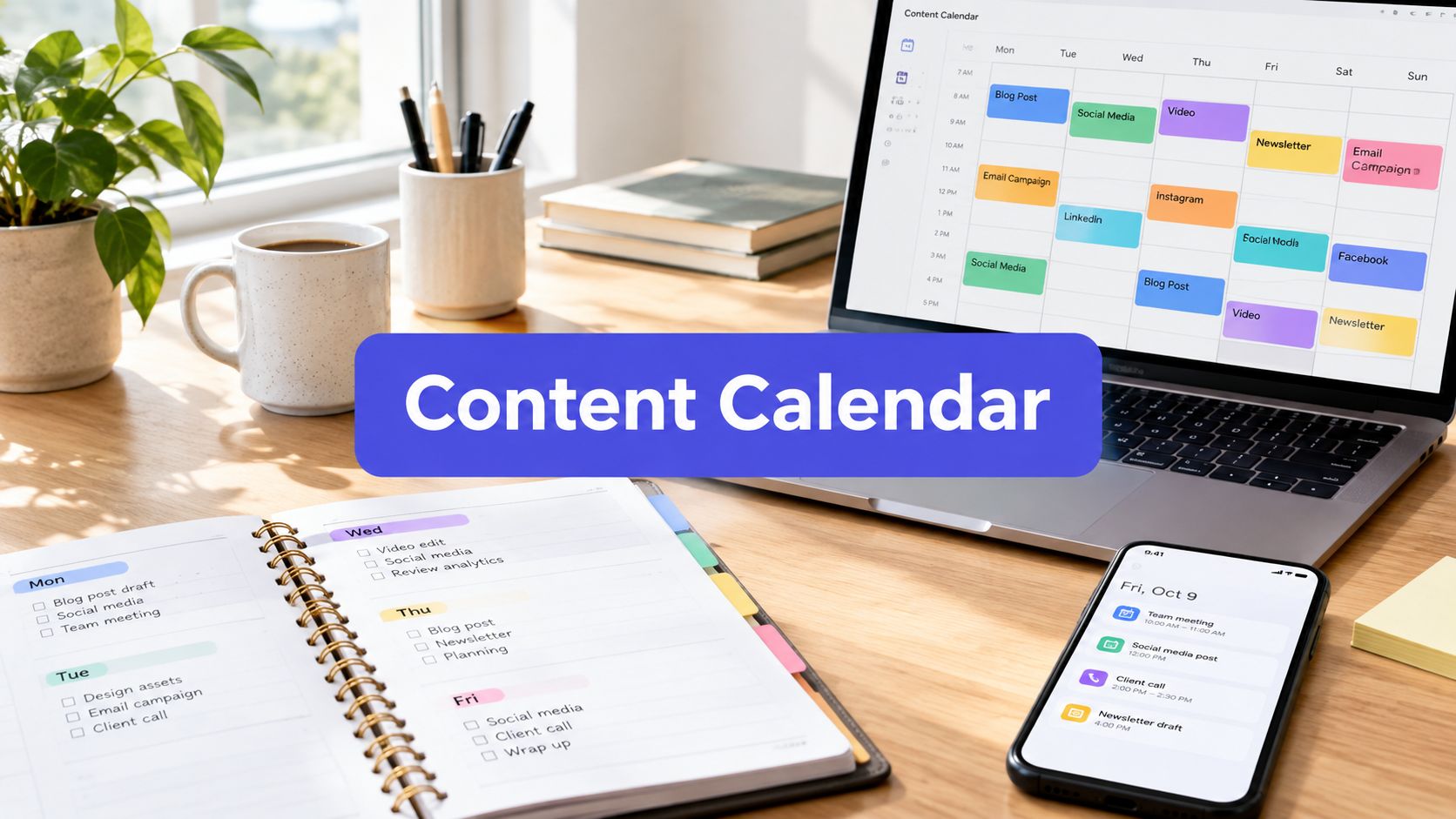












Wednesday arrives, and your content calendar has three empty slots, one recycled caption, and a vague note that says “post something useful.” Your audience still expects a LinkedIn insight, an Instagram carousel, and a short video, but the original article you published on Monday feels too important to reduce to the same paragraph five times.
That's the problem an AI content idea generator should solve. It shouldn't act like a vending machine for endless posts. It should help you find different ways to express the useful material you already have, then give each platform a reason to care. Used well, AI becomes a junior thinking partner for angles, hooks, repurposing, calendar planning, and controlled variation. You still decide what deserves your name.
The Blank Calendar Problem Every Creator Faces
A blank calendar rarely means you have nothing to say. More often, you have one useful source and no clear way to turn it into a week of distinct, audience-relevant conversations.
A solo founder may have a customer interview, a product update, and a half-finished article. An agency may have a folder full of client assets that all need different treatments. An in-house team may know the subject inside and out but keep returning to the same three formats because every new idea has to survive a rushed approval process.
The first mistake is treating the problem as a shortage of topics. The better question is: what value is hidden inside the material we already have, and which audience needs which part of it?
A practical content calendar should connect source material to formats, audiences, and publishing dates. A guide to social media calendar planning can help with that operational layer, but the thinking still starts before anything gets scheduled.
Five jobs AI can handle well
An AI content idea generator is useful when you give it a bounded problem:
- Angles: Find a contrarian, practical, beginner-friendly, or expert interpretation of one subject.
- Hooks: Turn a useful claim into an opening line for a video, carousel, post, or email.
- Repurposing: Translate one source into formats that fit different networks instead of copying it everywhere.
- Calendar planning: Build a balanced set of educational, promotional, conversational, and proof-based ideas.
- Variation: Produce several openings, calls to action, or narrative frames so you can choose rather than accept the first draft.
It's less useful when you ask for “content ideas about marketing” and expect originality to appear by itself. The model can generate fluent suggestions, but it doesn't know which customer conversation changed your product direction, which claim your sales team can prove, or which topic your audience has already seen too often unless you provide that context.
Practical rule: Use AI to widen the first draft of your thinking, not to replace the final act of judgment.
The weekly rhythm becomes calmer when you separate those jobs. First, collect a source. Next, ask for distinct interpretations. Then select a small group, adapt each one to its platform, and schedule only after review. The blank calendar becomes a translation task rather than a daily emergency.
How an AI Content Idea Generator Actually Works
Strip away the product language and an AI content idea generator is a prediction system. It receives instructions and context, then calculates which words and ideas are likely to follow based on patterns learned from large amounts of text.
A librarian analogy makes the process easier to understand. If you ask a librarian for “books about business,” you'll receive a broad selection. If you ask for practical books for a small agency owner who needs to improve client onboarding without adding staff, the librarian can narrow the shelf. The quality of the recommendation depends partly on the quality of the request.
The same principle applies to AI. A prompt usually works better when it includes:
- The role: “Act as a content strategist for a B2B software company.”
- The source: Paste the article, summarize the interview, or provide the URL if the tool can process it.
- The audience: Describe the reader's job, experience, concern, and desired outcome.
- The task: Ask for angles, hooks, formats, or a publishing sequence.
- The constraints: Specify tone, length, platform, forbidden clichés, claims that need proof, and themes already used.
- The output shape: Request a table, a list grouped by angle, or a brief with hook, proof, format, and call to action.
Why vague prompts flatten ideas
“Give me social media ideas about project management” gives the system very little to work with. It will likely return familiar subjects such as productivity, communication, planning, and team collaboration because those patterns are broadly associated with the topic.
A stronger request might say: “Use this customer interview from a small design agency. Generate six ideas for agency owners who lose time during client approvals. Each idea must use a different format, name one specific friction point, avoid generic productivity language, and include a proof requirement.”
That prompt creates boundaries without dictating the answer. It also gives you a way to reject weak output. An idea that doesn't identify a real approval problem or specify what evidence would support it hasn't completed the assignment.
Variation needs a purpose
Many tools offer settings that change how predictable or varied the output feels. More variation can produce surprising combinations, but it can also introduce weaker or less coherent suggestions. Lower variation tends to stay close to familiar patterns.
Treat that setting as a design choice, not a quality button. Ask for multiple candidates with different audience pains, formats, emotional frames, and points of view, then compare them. A batch of controlled alternatives is usually more useful than one supposedly perfect answer.
The organizational shift is already substantial. McKinsey's 2024 State of AI survey found that 65% of respondents said their organizations were regularly using generative AI in at least one business function, nearly double the roughly one-third reported ten months earlier. Marketing and sales were among the functions with the highest reported usage, which helps explain why ideation tools have moved from personal experiments into team workflows.
Real Benefits and Honest Limitations
AI helps most when the cost of getting started is higher than the cost of evaluating options. It can quickly turn one subject into several directions, expose an assumption you hadn't questioned, or give a tired topic a more precise audience and format.
That breadth matters for small teams. A person who has been writing about the same product for months may see only the familiar feature-led angle. A model can suggest a customer objection, a comparison, a behind-the-scenes explanation, or a mistake-based hook. Those suggestions aren't automatically publishable, but they can move the human writer out of a narrow loop.
A controlled experiment makes the benefit more concrete. In a study of 300 nonprofessional writers, participants received either no AI assistance, one three-sentence starting idea, or access to up to five AI-generated ideas. The group with access to up to five ideas produced stories rated 8.1% higher in novelty and 9% higher in usefulness than the no-AI group, according to the published study.
The convergence problem
The same evidence shows why “generate more” isn't a complete strategy. When writers received one AI starting idea, the similarity between their stories increased by 10.7%, as reported in that study. If many teams accept the first polished suggestion, their posts can become structurally and emotionally alike even when the wording changes.
That risk appears in ordinary marketing output: the familiar hook, the predictable three tips, the safe conclusion, and the same invitation to book a call. The copy may be clear, but clarity alone doesn't create distinction.
| AI can improve | Human work still matters |
|---|---|
| The number of directions considered | Choosing the angle that deserves attention |
| Speed during early brainstorming | Adding lived experience and first-party evidence |
| Format and hook variation | Removing ideas that sound interchangeable |
| A rough calendar structure | Deciding what the audience needs now |
| Expansion of a selected concept | Checking accuracy, risk, and brand fit |
The practical answer isn't to abandon AI. It's to change where you trust it. Generate several candidates, ask the system to make them meaningfully different, and then have a person select, combine, or reject them. The final idea should contain something the model couldn't have known without your source material.
Selection beats volume: a smaller set of defensible ideas will usually serve a brand better than a large pile of fluent variations.
Five Prompt Recipes That Actually Produce Ideas
Good prompts behave like creative briefs. They define the job, supply raw material, and make sameness easy to spot. The following recipes cover the recurring tasks a team typically assigns to an AI content idea generator.
1. Find angles on a tired topic
Use this when the subject is important but the obvious versions have already been published.
Prompt structure
Act as a senior content strategist. Use the source and audience details below. Generate five distinct angles on [topic]. Each angle must target a different audience pain, use a different point of view, and avoid these used themes: [list]. For every idea, provide the claim, the evidence needed, the recommended format, and why the audience would care.
Example input: A guide about reducing delays in client approvals, aimed at small creative agencies.
The useful output isn't five versions of “how to approve work faster.” You want an operations argument, a client-education post, a manager's checklist, a story about hidden revision costs, and a diagnostic for finding the actual bottleneck.
2. Build hooks around one useful claim
Hooks work better when they create tension without making promises the source can't support.
You're writing for [audience] on [platform]. Turn this verified claim into eight opening hooks. Use four different structures: a direct observation, a mistake, a surprising contrast, and a question. Keep each hook specific, avoid hype and unsupported statistics, and label the structure used.
For a claim about approval delays, one hook might begin with the process rather than the solution: “Your client may not be slow to approve. Your team may be asking for feedback before the work is easy to review.” The model supplies options, but you still verify whether the source supports the implication.
3. Translate one idea for another platform
Don't ask the model to “rewrite this for Instagram.” Tell it what the platform needs to do.
Convert the source idea into a [format] for [platform]. Preserve the core claim, but change the opening, pacing, proof, visual treatment, and call to action. State what should be omitted from the original. Do not reuse the original sentences.
The omission instruction matters. Native content often becomes stronger when it leaves out background that the new audience doesn't need.
4. Fill a calendar with deliberate variety
A calendar needs balance, not a random collection of topics.
Create a weekly content plan from this source library. Include educational, opinion, proof, community, and product-related ideas. Assign each idea a different format and audience pain. Avoid publishing two ideas with the same promise or opening pattern. Return the source, format, hook, approval question, and call to action for each entry.
IBM's 2023 Global AI Adoption Index found that 38% of surveyed companies were actively implementing generative AI, while 42% were exploring it. Marketing and sales represented 22% of reported AI use cases. Those findings describe broad business interest, but they don't remove the need for a disciplined brief.
5. Create controlled variations
Variation is useful for testing, but changing every element at once makes the result hard to interpret.
Produce four versions of this post. Keep the audience, claim, proof, and offer constant. Change only the opening frame: practical advice, contrarian observation, customer question, and short story. Flag any version that introduces a new factual claim.
This recipe protects the substance while giving the editor meaningful choices. It also helps prevent a common failure, where a request for “ten variations” produces ten sentences with the same structure and different adjectives.
Turning One Source Into Five Platform-Native Posts
A long-form article about reducing client approval delays contains more than one post. It may include a process explanation, a common mistake, a customer observation, a checklist, and an argument about ownership. Repurposing works when you map those units to audience behavior rather than paste the article into every channel.
A useful workflow begins by extracting claims from the source. Mark each claim as a lesson, example, objection, process, proof point, or opinion. Then decide which claim can carry a platform-native format.
The source
Suppose the article argues that approval delays often begin when teams send work without a clear decision request. The source includes a short explanation, an example of vague feedback, and a practical review checklist.
LinkedIn becomes an argument
Use the claim and the reasoning. Open with the tension: “Many approval delays begin before the client sees the work.” Explain why unclear decision requests create extra discussion, then give a concise correction. The call to action can invite agency leaders to compare their current review process.
LinkedIn doesn't need every step from the original article. It needs a point of view that a professional audience can agree with, challenge, or apply.
Instagram becomes a carousel
Break the checklist into a visual sequence:
- Slide one names the approval problem.
- The next slides show the questions a reviewer needs answered.
- The final slide gives a simple review template.
The caption can add context, but the carousel should carry the explanation. A carousel isn't a short article with smaller paragraphs. Its job is to guide the viewer through a sequence of decisions.
TikTok becomes a demonstration
Start with the weak version of a request: “What do you think?” Then show the stronger version: “Please approve the headline and choose option A or B by Thursday.” The video earns attention through contrast, not through a summary of the entire article.
The spoken script should focus on one visible behavior. Leave the deeper process for the caption, comments, or linked resource.
Threads becomes a discussion
Turn the observation into a sequence of connected thoughts. Explain why “send it over and let me know” creates a vague responsibility loop, then ask readers how they request feedback. This format can explore nuance that would be too slow for a short video and too informal for a formal professional post.
The newsletter becomes a lede
Use the customer-facing consequence. Open with a short story about a team that received five contradictory comments because nobody had defined the decision. Then link to the full article and offer the checklist as the immediate takeaway.
This is translation of audience value, not duplication of content. A 2025 creator survey reported that 38.7% of creators use AI throughout their workflow and 44.2% use it for parts of the process, while reporting on Meta's policy direction said Facebook would prioritize original content and reduce the reach of unoriginal material, as described by Digiday's coverage of creator AI workflows.
For a deeper operational approach, AI-powered content repurposing can help teams start from URLs, documents, or other source material while keeping the platform decisions explicit.
Plugging Ideation Into a Real Publishing Workflow
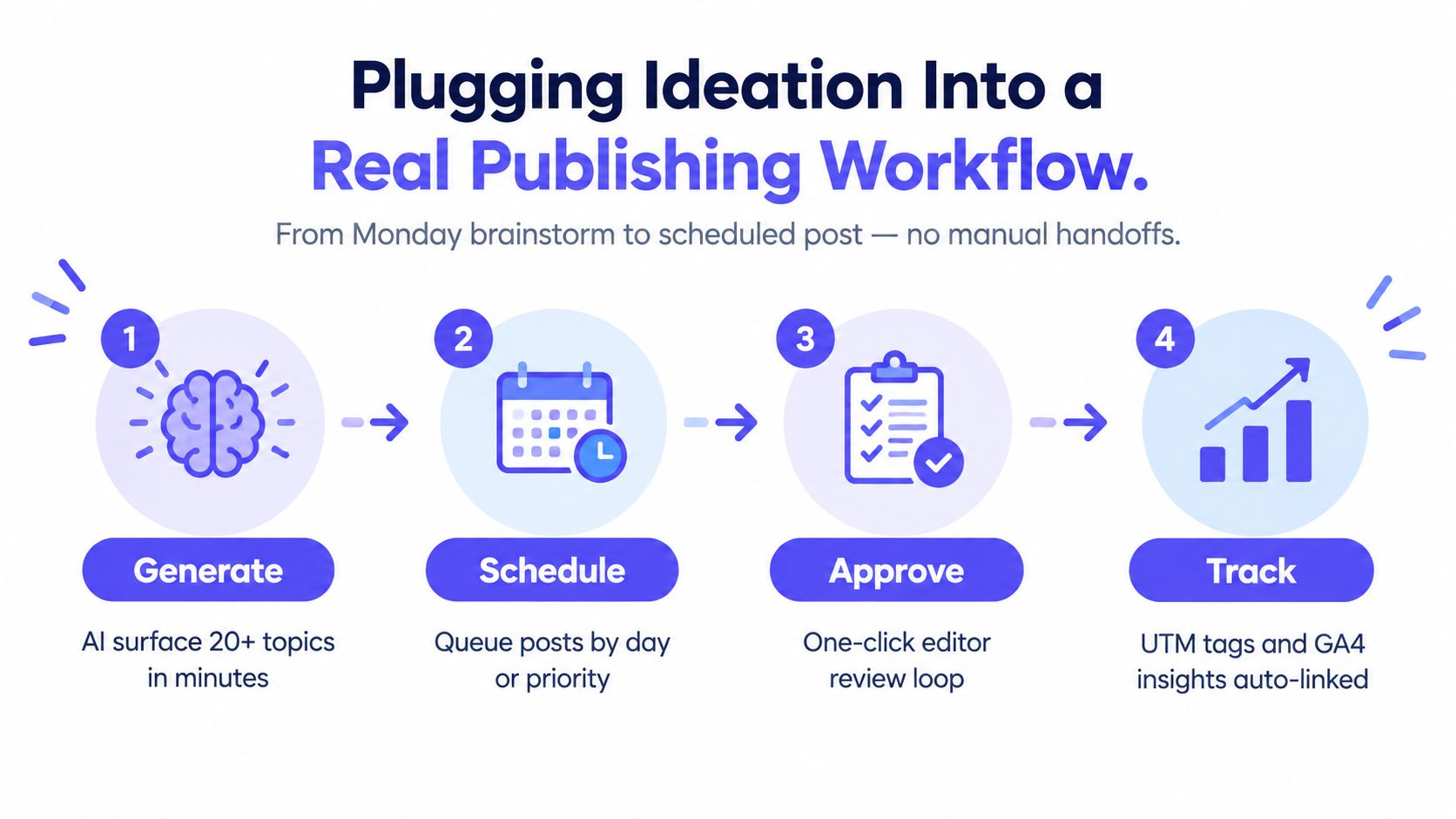
An idea has no business value until someone can review it, adapt it, publish it, and learn from the result. The useful workflow is a loop, not a single prompt.
On Monday, collect the source material and ask for differentiated angles. Select the strongest few based on audience fit, evidence, originality, and business relevance. On Tuesday, expand those choices into platform-specific drafts, then route them through an approval process that lets a subject-matter expert correct claims before scheduling.
A weekly operating loop
- Generate: Ask for angles from a URL, PDF, transcript, customer conversation, or internal brief.
- Select: Score candidates for distinctiveness, proof, audience pain, and platform fit.
- Expand: Create the hook, body, visual direction, and call to action for each chosen network.
- Approve: Give an editor or subject expert a clear review window and an easy way to request changes.
- Schedule: Queue each version in its native format, with labels that identify source, campaign, and content type.
- Track: Review reach, engagement, clicks, comments, and conversions by platform and format.
- Improve: Feed the useful lessons back into the next prompt, including formats or angles that underperformed.
A unified workspace such as PostSyncer can generate captions, hooks, and social copy from source inputs, then connect planning, approval, scheduling, and analytics in one publishing process. Teams comparing adjacent production needs may also benefit from reviewing tools for video and audio workflows, especially when a source begins as a recording rather than a written document.
Workflow test: If an idea can't be traced to a source, an owner, an approval decision, and a measured outcome, it isn't part of a repeatable content system yet.
The analytics step should change the next brief. If short demonstrations attract useful comments but broad educational posts attract little response, ask the generator for more demonstrations with different customer problems. If every platform version performs similarly poorly, revisit the source or the audience pain instead of producing more variations.
Teams that need a fuller publishing path can explore an AI content generator for social media, but the tool should remain inside the review loop. Automation removes handoffs. It doesn't remove responsibility.
An Originality Filter for AI-Generated Ideas
The strongest generator may be the one that helps you reject weak ideas. A list of thirty polished concepts can create the illusion of progress while filling your calendar with themes another brand could publish unchanged.
Run every candidate through four filters before you draft it.
Require something only your team can provide
An idea should contain a first-party observation, customer language, experiment, internal lesson, or proprietary evidence. If it has none of those, ask what would make it belong to your brand rather than the entire category.
“Ways to improve onboarding” is a subject. “The question new customers ask after they receive access, and what it reveals about our setup email” is an owned observation.
Compare it with your archive
Search recent posts for repeated promises, examples, hooks, and structures. An idea can be new in wording but old in meaning. Tag near-duplicates and ask the model to produce a different audience pain, narrative structure, or format.
A simple similarity check can support this process. Teams can compare proposed ideas with previous posts using embeddings or another text-similarity method, then send highly similar candidates back for regeneration. The tool doesn't make the editorial decision. It helps surface repetition that a busy reviewer might miss.
Name the pain and the proof
Every selected idea should answer two questions: which audience problem does this address, and what supports the claim? If the answer is vague, the idea probably needs more research or a narrower angle.
Disclosure belongs in the filter too. Adobe's 2025 creator survey found that 86% of surveyed creators use generative AI, while 69% worry about their content being used to train AI without permission. Separate consumer research cited in the same verified data found that 88.3% of social-media users recognize AI-generated content and 65% want brands to disclose AI use.
That doesn't mean every brainstorming session needs a public label. It does mean teams should establish a clear policy for cases where AI materially shapes the concept, wording, image, or video. Trust grows when audiences know what they're evaluating.
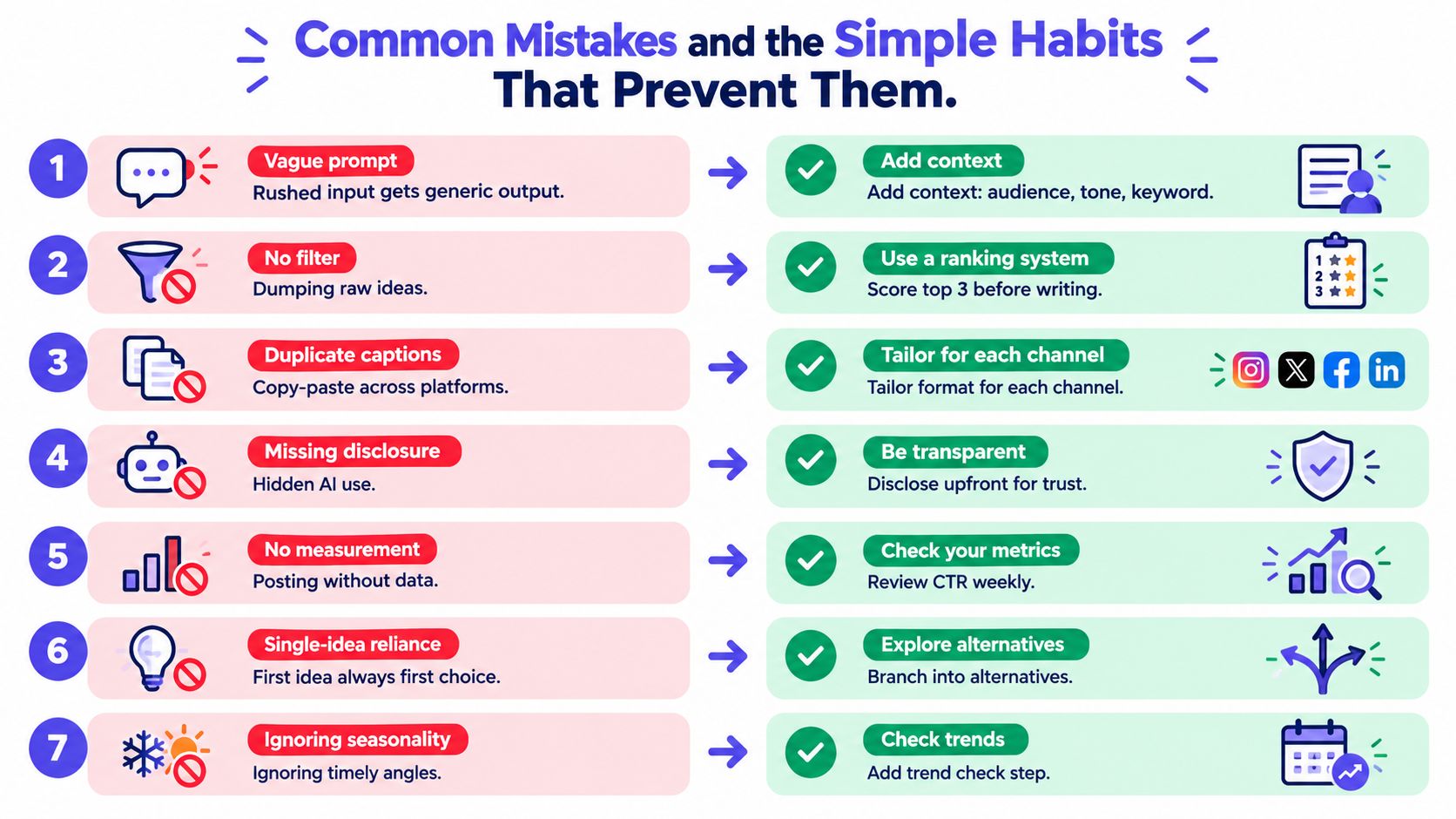
Common Mistakes and the Simple Habits That Prevent Them
Most weak AI content doesn't fail because the model lacks language ability. It fails because the team skips the editorial decisions around the prompt.
- Vague prompts: Add the audience, source, platform, tone, objective, and exclusions.
- Raw idea dumping: Score candidates before expanding them into drafts.
- Duplicate captions: Translate the claim into each platform's native format.
- Hidden AI use: Follow a disclosure policy when AI materially shapes the content.
- No measurement: Label posts and review performance so the next prompt reflects evidence.
- Single-idea reliance: Generate alternatives with different pains, formats, and frames.
- Ignored timing: Add a quick check for seasonality, current conversations, and audience context.
Before publishing, ask:
- Does the idea contain an original angle?
- Is there first-party evidence or a clear proof plan?
- Does it match a specific audience pain?
- Is the format native to the chosen platform?
- Have factual claims been reviewed?
- Is disclosure needed under your policy?
- Has the post been scheduled with tracking labels?
Keep that checklist beside your calendar. The best use of an AI content idea generator is not faster production at any cost. It's a more deliberate path from source material to distinct, reviewable, measurable publishing.
PostSyncer helps creators, teams, and agencies turn URLs, PDFs, images, videos, and text into hooks, captions, and platform-specific post ideas, then move approved content into scheduling and analytics workflows. Use PostSyncer to test this translation process with one source, three distinct angles, and a clear review step before anything goes live.