

62% of respondents spent at least an hour a day manually managing invoices, approvals, and spend reporting, according to the 2024 In-House Legal Technology Report cited by LawVu. That finding concerns legal operations, not marketing, but it exposes a familiar problem: skilled people spend their time moving requests instead of doing the work those requests support.
For a social media team, the answer isn't to remove every check. It's to decide which decisions need scrutiny, who has authority to make them, and exactly what their approval covers. A useful approval workflow in teams treats sign-off as permission to publish a particular version, not permanent permission to publish anything descended from it.
Why Approval Layers Slow Teams Down
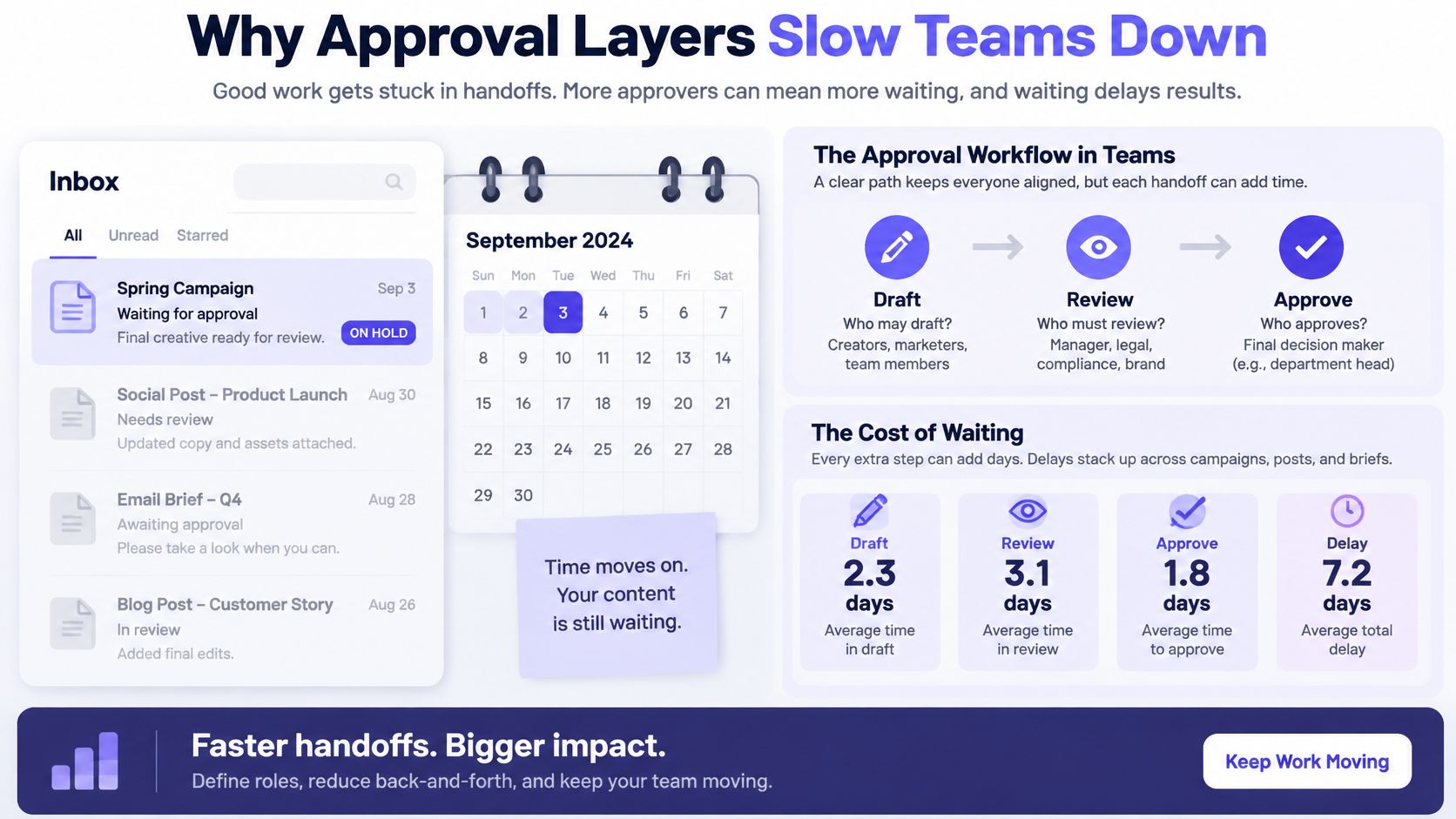
A campaign post is ready, but the social lead is waiting for the marketing manager. The manager thinks the founder needs to approve it. The founder assumes legal has already checked it. Nobody rejects the post, yet nobody schedules it either.
This isn't an inbox problem. In a 2026 West Monroe Partners survey of 1,000 managers and 214 C-suite executives at U.S. companies with annual revenue of at least $250 million, about one-third of both groups identified management layers or required approvals as the greatest contributor to delayed decisions, while approximately half estimated that slow decisions cost their organizations at least 4% of topline revenue, as reported by CFO.
Define the path before adding reviewers
An approval workflow is the agreed path that names who may draft, who must review, who can authorize publication, what status the work is in, and what happens when nobody acts. It's more specific than asking colleagues to take a look.
For the stalled campaign, the missing instruction might be simple: the social lead approves routine posts, while the marketing manager handles new offers. Legal joins only when the content contains claims or terms that require its expertise.
The diagram captures the difference between producing work and waiting for permission to move it.
Separate useful checks from waiting
A reviewer should have a defined question to answer. Can the business substantiate this claim? Does the offer match the landing page? Is the client comfortable publishing this announcement?
When nobody can name the question, another reviewer may add delay without adding protection. Start with these distinctions:
- Required decision: The approver must explicitly authorize the asset before it moves.
- Specialist input: A reviewer checks a defined issue, such as a disclaimer or technical assertion.
- Optional feedback: A stakeholder may suggest improvements but doesn't control publication.
Practical rule: Before adding a reviewer, write the specific failure that person is responsible for preventing.
For a small team, workflow optimization starts with these handoffs, not a more elaborate checklist. Every unnamed handoff creates another opportunity for finished work to sit untouched. Keep control by matching approval effort to risk rather than sending every asset through the same management chain.
Risk Tiers That Decide Who Signs Off
Place each recurring asset on a row before assigning people. The turnaround times below are proposed starting targets, not research benchmarks or promises. Adjust them to your team's working hours, contractual obligations, and specialist capacity.
Who signs off by risk tier
| Risk tier | Typical assets | Who signs off | Target SLA | Voids approval |
|---|---|---|---|---|
| Routine organic | Evergreen tips, reshares, low-stakes captions | Content owner or predefined rule | Same day, with an illustrative target under four working hours | New claim, link, or AI rewrite |
| Brand standard | Campaign creative, carousels, scheduled series | Brand or social lead | Proposed target of one business day | Visual, caption, or hashtag change |
| High risk or regulated | Financial claims, executive statements, regulated promotions | Brand plus legal or compliance plus leadership | Proposed target of two to three business days | Any text, disclaimer, or audience change |
| Paid or reputation sensitive | Ads, crisis notes, partnership announcements | Marketing lead plus specialist reviewer | Proposed target of one to two business days | Budget, targeting, or offer change |
| Client or multi brand | Agency work for an external brand | Internal reviewer, then client approver | Written SLA, for example 48 hours | Any network-specific adaptation |
Judge the consequences, not the creator
Risk isn't a measure of how senior the writer is. A founder can draft a harmless evergreen tip, while an experienced social media manager can accidentally introduce a sensitive financial claim.
Assess visibility, potential harm, reversibility, claims sensitivity, and material AI involvement. A post that can be deleted may still be hard to reverse if people screenshot it. A small audience doesn't make an unsupported claim safe.
Practitioner guidance from I Am On Demand supports separating routine content from assets requiring more specialized scrutiny. Apply that distinction to the content itself: an AI rewrite that adds a performance promise deserves a different route from an AI-assisted spelling correction.
Walk the rows in order:
- Routine organic: Keep the route light when the message stays within documented boundaries.
- Brand standard: Ask the brand or social lead to judge voice, presentation, and campaign consistency.
- High risk or regulated: Require the relevant specialist's decision and leadership authorization.
- Paid or reputation sensitive: Match the specialist to the exposure, such as advertising terms or partner commitments.
- Client or multi brand: Preserve the client's authority without asking them to perform your internal quality checks.
Give oversight a specific purpose
A 2021 field experiment published in the Quarterly Journal of Economics, summarized by GBEJ, found that greater autonomy among bureaucrats handling purchasing decisions reduced prices by 9% without reducing quality, with stronger effects where the designated monitor delayed approvals until fiscal year-end.
That isn't evidence that marketing teams should eliminate oversight. It is a caution against assuming centralized permission always improves outcomes.
When an asset fits multiple rows, use the stricter applicable requirements. A client-owned regulated promotion still needs specialist review; client approval doesn't substitute for it. Give each required stage a named decision-maker, and make clear which person releases the fully approved asset for scheduling.
Roles That Keep the Next Action Clear
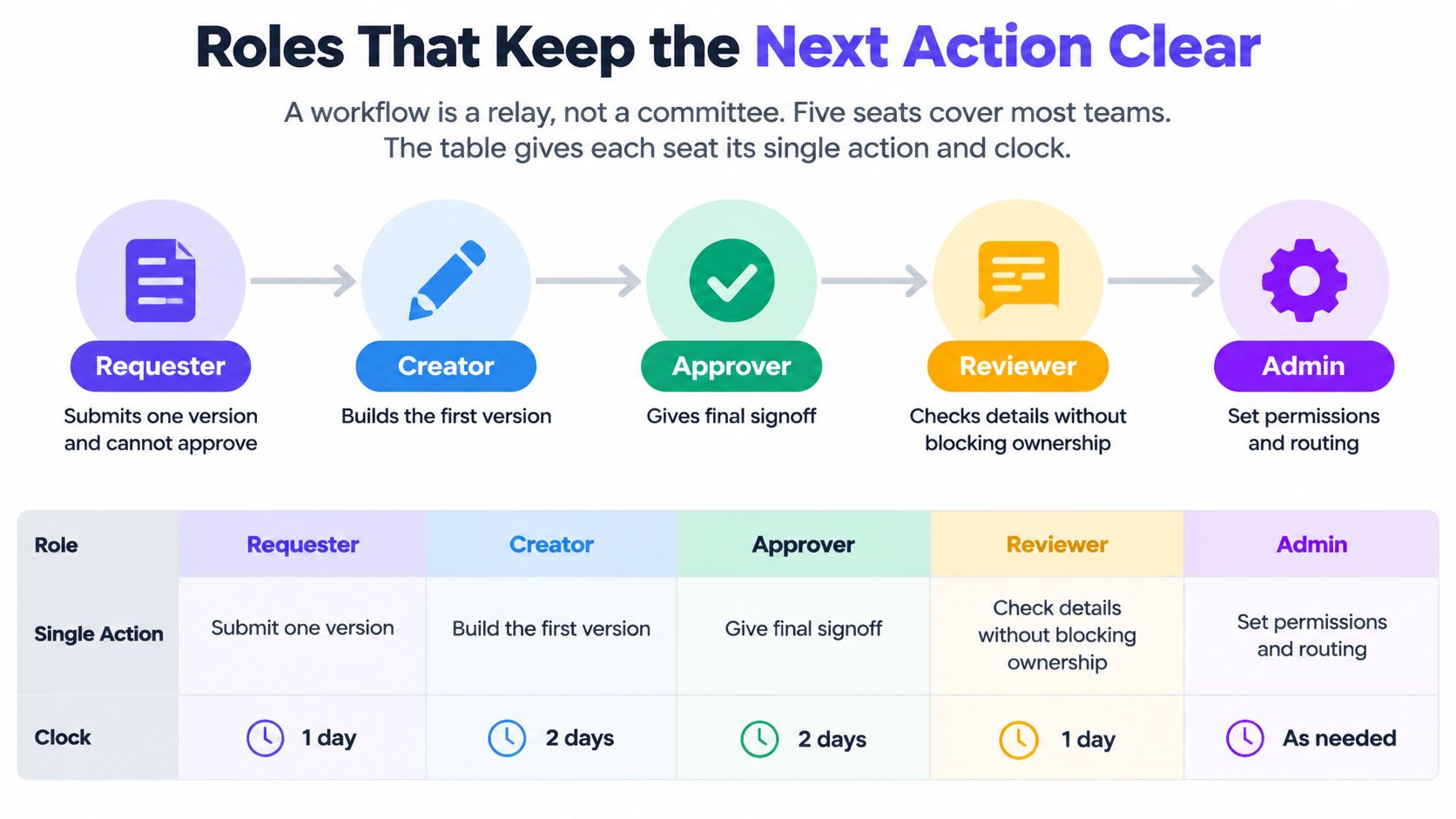
Think of approval as a relay, not a committee. People may fill several roles in a small business, but each request still needs a named person responsible for its next movement.
Roles and their single action
| Seat | Owns | Clock |
|---|---|---|
| Requester | Submits one version; cannot approve their own high-risk work | Submit once per version |
| Owner | Tracks status and chases the next actor | Checks the queue at each SLA deadline |
| Approver | Approves, requests changes, or rejects for the tier | Agreed tier SLA |
| Specialist | Legal, finance, brand, or subject check when required | Inside the tier SLA |
| Backup | Takes over when the approver misses the SLA or is away | Escalation when the SLA lapses |
The owner doesn't acquire approval authority just by managing the queue. Likewise, a specialist's favorable comment isn't automatically the final publishing decision. Make those permissions explicit in your digital marketing team structure.
Different workspaces may use different role labels. The important distinction is between creating, commenting, authorizing, and administering access.
Record the decision, not just the discussion
In a 2025 survey of 500 U.S. marketing and creative professionals, 58% said approved content still went live with errors during the prior year, often because of last-minute changes, according to StreamWork. The survey was commissioned by an approval-software vendor, so treat it as a directional warning rather than a universal measure.
The operational lesson is specific: record approver identity, timestamp, exact version, decision, and subsequent modifications. Keep comments separate from the approve, request changes, and reject actions.
Approval belongs to the version the approver actually reviewed.
Define which transformations preserve that decision. A resize that leaves all content intact might qualify as a documented mechanical change. A crop that removes a disclaimer, a translation, a changed destination link, or an AI rewrite needs fresh judgment.
The owner records why a change retained approval or routes the new version back to the relevant approver. Silence never counts as specialist clearance.
Keep central and local authority distinct
For a business expanding through franchise locations, central brand authority and local publishing authority need separate boundaries. Franchise Foundry's roadmap for founders offers useful business-building context for founders approaching that expansion; the approval policy should separately specify which local adaptations require central review.
Before an approver takes leave, name a backup with the necessary authority. At the deadline, the owner transfers responsibility visibly rather than continuing a private chase.
Example Workflows From Draft to Live
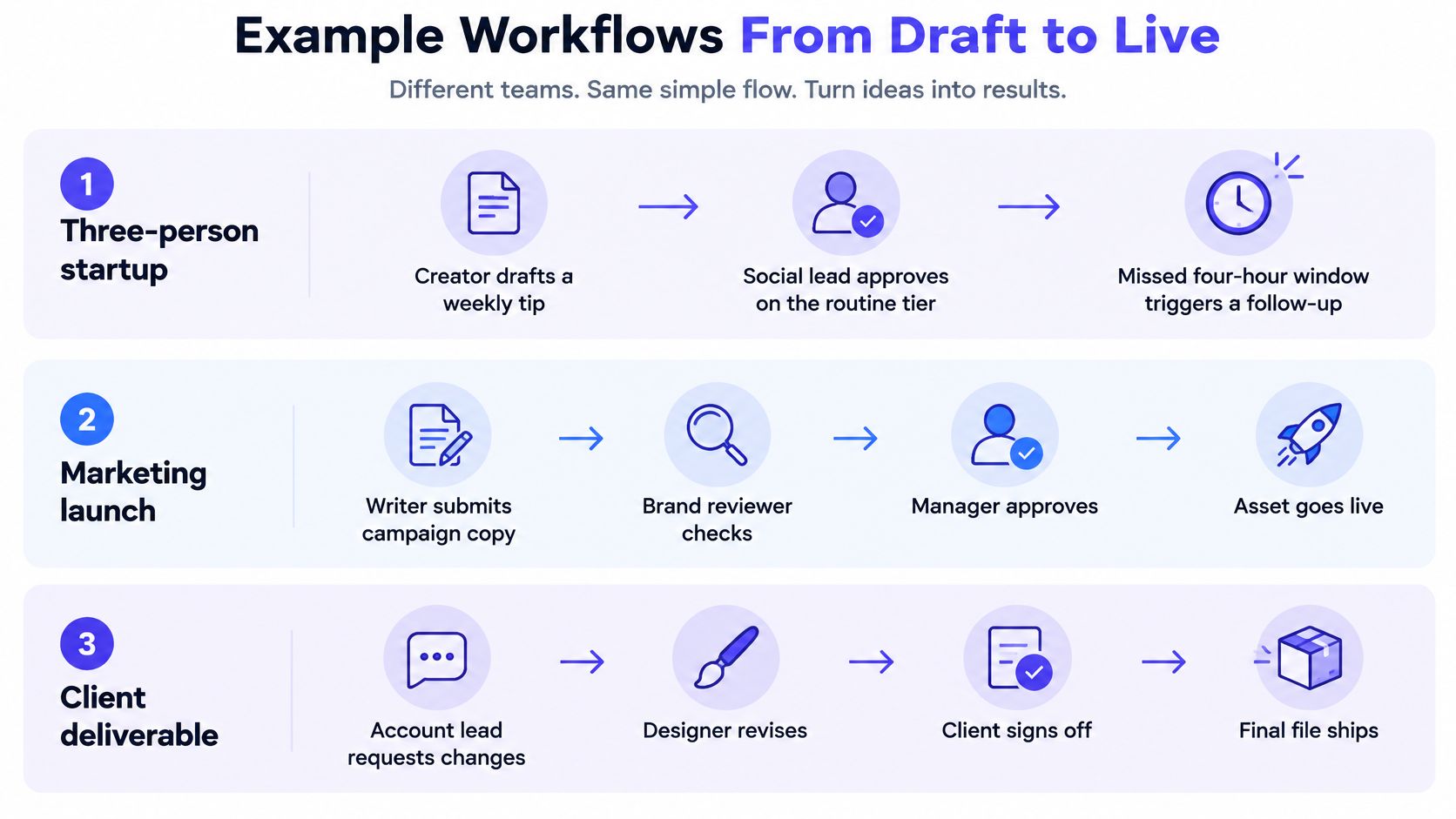
A master campaign may become captions, cropped graphics, short videos, and localized variants. Each destination adds versions to review, even when all of them begin with the same idea. The practical question is not how many people can review every asset. It is which decisions need a second set of eyes, based on the possible harm and how easily the work can be reversed.
A small startup publishes a weekly tip
A startup has a creator, a social lead, and a founder. The creator submits an evergreen tip with its final image and destination link. The social lead handles routine approval because the post contains no sensitive claim or offer.
For this example, the team sets a response window of four working hours. If the social lead is unavailable, the owner alerts the founder as backup. That keeps the next action clear without adding a second routine review to every post.
Example state sequence: Draft → In Review → Changes Requested → In Review → Approved → Scheduled → Live.
The main risk is a review that stalls because its owner is away. Set a backup before work enters the queue, and coordinate coverage using leave insights from HR Management 365. If someone changes the approved image or destination link afterward, send the changed version back for review. Approval follows the version, not just the idea.
An in-house brand launches a paid offer
A writer submits the campaign copy, landing-page destination, creative, and offer terms together. The brand reviewer checks presentation. A relevant specialist reviews the claim and disclaimer, then the marketing lead authorizes scheduling. Each person has a defined decision, so extra reviewers do not repeat the same check.
Suppose the writer edits the caption after brand approval. A tone adjustment returns to brand; a change to the offer or claim also returns to the specialist. If an AI rewrite or platform-specific edit changes the meaning, the earlier sign-off no longer covers that version. Route the affected parts back to the right reviewer rather than restarting unrelated checks.
Example state sequence: Draft → In Review → Changes Requested → In Review → Approved → Scheduled → Live.
The weak point is missing context. A caption reviewed without its destination page may promise something the customer will not find there. Keep the offer, disclaimer, creative, and destination together for review.
For a complementary walkthrough of approval workflows, use the video below.
An agency manages separate client queues
An agency supports separate client brands, each with its own queue and designated client approver. An internal reviewer checks quality before the client makes a decision under an illustrative written 48-hour SLA.
A network adaptation is a new client version, not an invisible update to the master. The account lead submits the caption and visual that will appear on that network. If the platform format requires a crop or rewrite that changes what audiences see, request approval for that adaptation.
Example state sequence: Draft → In Review → Changes Requested → In Review → Approved → Scheduled → Live.
The risk is assuming that approval of the master automatically covers every version. Choose the scenario closest to your team, then assign its states to a real asset before extending the process to more brands.
Features That Make the Policy Stick
A shared inbox can collect opinions, but a message saying approved may not identify the file, caption, or destination it covers. Evaluate the workspace against the failures you need to prevent, not the length of its feature list.
Approval features and the failure they prevent
| Feature | What it solves | Missing when |
|---|---|---|
| Role permissions | Only named people can draft or approve | Everyone shares a login |
| Status and queue | The next actor is visible | Status lives in email threads |
| Comments on the asset | Feedback stays with that version | Notes sit in chat and never attach |
| Version and audit trail | Approver, time, and exact file are stored | An approve button has no history |
| Invalidation rules | Material edits reopen review | Old approval survives a rewrite |
| SLA reminders and backup | Stuck items escalate | Work waits with no reminder |
| Separate workspaces | Brands and clients stay apart | A calendar mixes every brand |
Test permissions with real accounts
An administrator seeing an approval setting doesn't prove a creator can't bypass it. Sign in with the creator's access and attempt to schedule an asset that's still awaiting a required decision.
Then test the approver's view. They should be able to find the assigned asset, inspect its final presentation, resolve feedback, and record a clear decision without hunting through chat.
A written social media policy template can establish publishing boundaries. The workspace should make those boundaries practical to follow rather than relying on everyone to remember them.
Compare convenience with control
Bulk scheduling is convenient, but importing a CSV mustn't create an unreviewed publishing route. Imported posts still need classification, assigned decision rights, and the required checks before release.
Similarly, separate calendars aren't enough if members can access the wrong client's drafts or social accounts. Test workspace boundaries using the access level an external collaborator will receive.
Use this acceptance checklist during setup:
- Version test: Change an approved caption and inspect whether the workspace preserves or reopens approval appropriately.
- Routing test: Submit sensitive content and confirm the required specialist cannot be omitted without notice.
- Coverage test: Leave a request unanswered and inspect the reminder or escalation process.
- Isolation test: Confirm a collaborator can't view or approve another brand's work.
Buying test: Follow an asset through the whole path. A feature checkbox isn't proof that the publishing gate works.
Finish with contrasting assets: a routine post should move without leadership involvement, while a high-risk post must not skip its specialist. If the software can't enforce a rule, document the manual control and its owner before relying on it.
Roll Out the First Approval Path
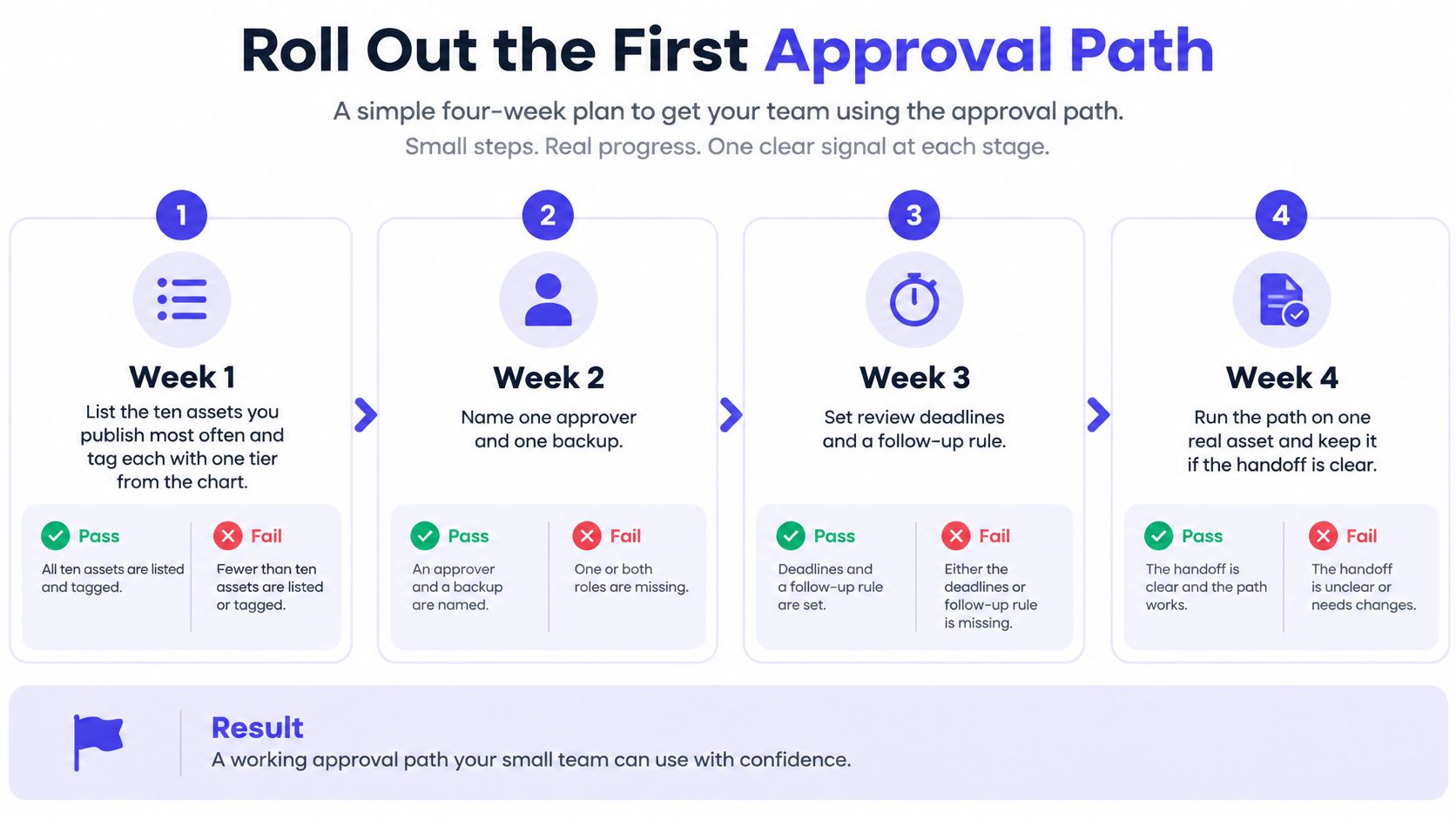
Start with a proposed four-week rollout, keeping the pilot deliberately narrow. The quantities and timing below are an operating example you can adopt, not measured benchmarks. Don't redesign every brand's process before testing whether colleagues can complete a basic handoff.
The rollout checklist provides a compact way to organize the work.
Build the pilot around observable decisions
Classify recurring work during the opening week. List your ten most frequently published asset types and assign each a risk tier. Pass: a creator can choose the route without asking the manager; fail: recurring assets remain unclassified.
Assign authority and coverage. Name an approver and backup for each active tier, then write the response window in working hours. Pass: every request has an accountable decision-maker and coverage; fail: the team still sends requests to a department rather than a person.
Run a limited pilot. Use a single brand or workspace for an illustrative two-week trial, initially restricting scope to routine and brand-standard work. Pass: eligible assets leave review within the agreed window; fail: the owner must repeatedly arrange decisions outside the workflow.
Introduce the specialist route after the pilot works. Submit a representative sensitive asset and inspect every required decision. Pass: the publisher cannot release it without specialist clearance; fail: deadline pressure lets someone remove that requirement.
Write the void rule. Use a direct sentence: a changed claim, link, offer, disclaimer, translation, or material AI rewrite returns the affected version to its required approver. Pass: an editor knows where the changed asset goes; fail: colleagues debate whether the old decision still counts.
Review delays and bypasses weekly. Inspect overdue items and changes made after sign-off. Pass: the owner can identify the cause and responsible next actor; fail: the review ends with a general request for everyone to respond faster.
Measure the path before expanding it
Track median submit-to-approve time, the share of assets edited after approval, and the share that miss their SLA. Define how you count working hours and revision cycles before comparing results.
Don't assume a missed target proves you have too many reviewers. Check workload, incomplete submissions, absence, and unclear authority before removing a stage. Equally, a fast decision isn't a success if someone bypassed a necessary specialist.
Once the pilot passes, consider holding the policy stable for an illustrative month before adding exception routes. Expand by copying the working pattern to the next brand rather than inventing another chain.
We support this setup through role-based permissions that define who can draft and approve posts, with review, comments, and approval in one place. The policy still needs a human owner.
Today, choose this week's highest-volume suitable asset, assign its tier, invite the approver and backup, and submit the draft. Before scheduling, confirm that everyone can see who must act next.
PostSyncer offers approval workflows with role-based permissions and a shared place to review, comment on, and approve content. Paid plans include unlimited team member access with no per-user charges, so you can include the people your approval path requires. Visit PostSyncer to set up your first team workflow and move a real draft through review before publishing.