











If your Instagram Story has disappeared, does that mean you've lost the chance to see who watched it? Not necessarily. The content's expiry and the availability of viewer names follow different rules, which is why checking only your live Story can leave you with the wrong answer.
If you're searching for how to see who viewed your Story on Instagram, start with the viewer list inside your own Story. Then check its posting time. For a social media manager, the useful habit isn't just knowing where to tap, it's collecting the right information before it disappears and resisting the temptation to read too much into a username.
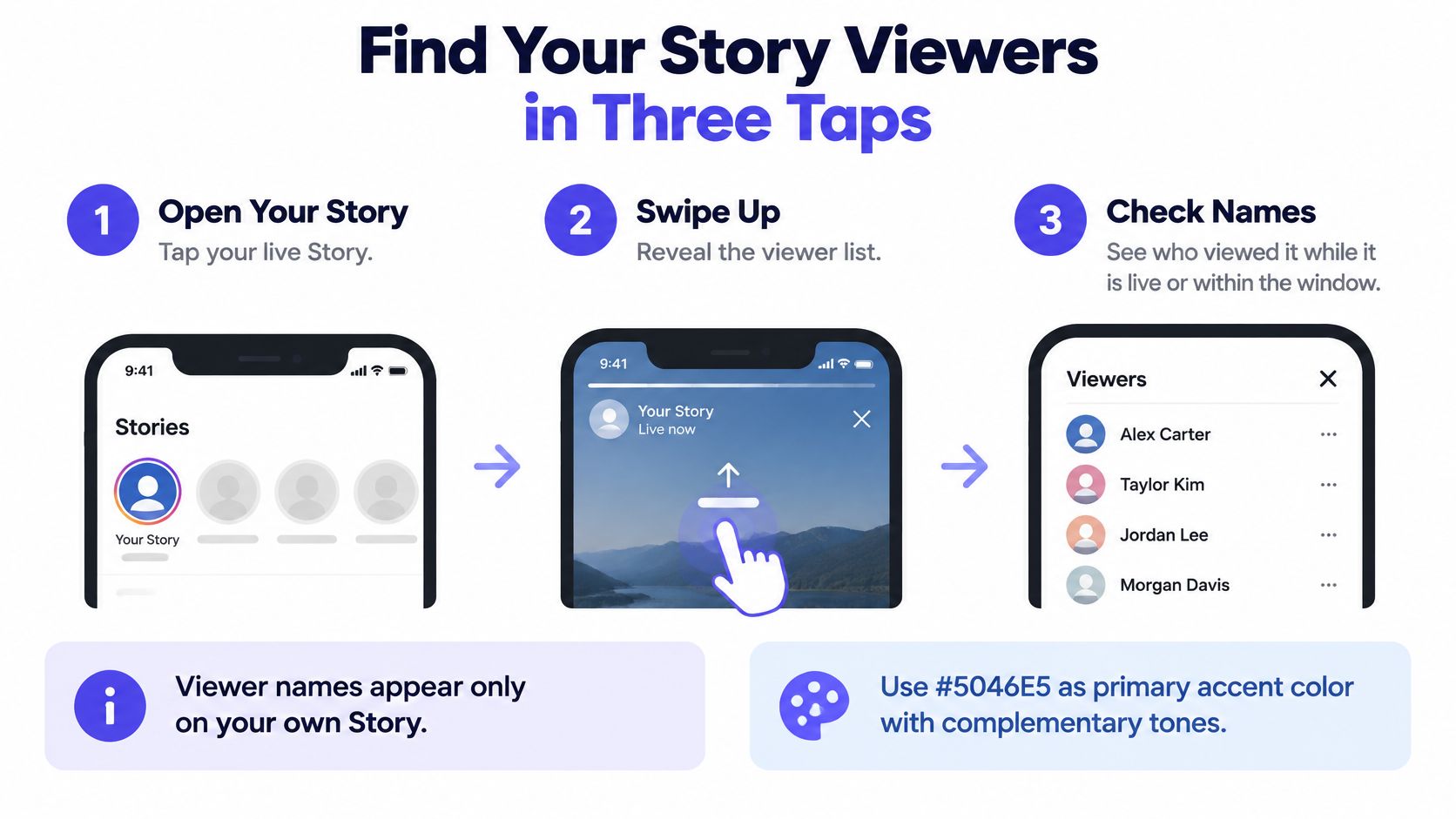
Find Your Story Viewers in Three Taps
Viewer names appear on your own Story, through its viewer control, while that information remains available. You don't need to switch to a business account just to identify the accounts that watched.
The Instagram Help Center's Story-viewing instructions explain that you can open your Story and swipe up to see who viewed it. Use the Instagram mobile app as your starting point so you can follow the Story controls directly rather than look through general account analytics.
Open the correct Story
- Open Instagram on your phone and confirm the account. If you manage client accounts alongside your personal profile, check the username before doing anything else. You need to be signed into the account that published the Story.
- Tap your profile picture to open your active Story. Open the actual photo or video, not your profile's post grid. If you published a sequence, move to the frame you want to inspect.
- Tap the viewer indicator at the bottom, or swipe up. The control's appearance can differ with the app interface. You're looking for the list of accounts, not just a performance summary.
- Scroll through the usernames. Each listed account watched that frame. Review the relevant frames separately rather than assume the audience stayed identical throughout the sequence.
Use this visual as a quick reminder of the navigation.
Check names, not just the headline total
The common wrong turn is opening someone else's profile and looking for their audience list. Your account's viewer controls aren't a way to inspect another publisher's audience.
Another mistake is checking the opening frame and treating it as the audience for the entire sequence. Say a bakery posts a product reveal followed by an ordering link. Check the ordering frame when you want to know which accounts reached that part of the message.
Quick check: Post a test Story, let your audience watch it, then open the viewer list. Compare the names with the viewer count for that same frame, not with a separate total labeled Views.
That test also helps you learn the current interface before you need the information for a launch, collaboration, or customer follow-up.
Views, Viewers and Insights Explained
A Views total higher than the Viewers total doesn't automatically mean something is broken. These labels answer different questions: how often the content appeared and how many distinct accounts saw it.
The practical distinction is identity versus performance. A viewer list helps you recognize accounts. Insights helps you evaluate what happened around the content, including engagement and follow-up actions.
Story metrics and who can see them
| Metric | What it counts | Who gets it |
|---|---|---|
| Viewers | Unique accounts that saw the Story at least once | Personal and professional accounts, with names in the list |
| Views | Times the Story was played or displayed | Professional accounts in Insights |
| Interactions | Replies, shares and sticker taps | Professional accounts in Insights |
| Accounts engaged | Unique accounts that interacted | Professional accounts in Insights |
| Profile visits, follows and link taps | Actions taken after viewing | Professional accounts in Insights |
Treat this as a working distinction, not a promise that every account will display an identical analytics screen. Check the labels your account exposes, especially when you're preparing a client report.
Read the metrics together
Consider a hypothetical product demonstration with more displays than unique viewers. That suggests repeat exposure across the audience, but it doesn't tell you which named accounts returned. You can't assign the extra views to a particular person by looking at the username list.
Now suppose that demonstration also generates replies and link taps. Those actions give you a stronger basis for evaluating the content against its purpose than a recognizable name alone.
For reporting, separate these questions:
- Audience size: How many distinct accounts did the Story reach?
- Exposure: How often was the Story played or displayed?
- Response: Did viewers reply, interact, visit the profile, or follow a link?
If your reports also include impressions, use the guide to what impressions mean on Instagram to keep exposure metrics separate from people.
For a practical content-review workflow, MyKaraoke Video explains how to use engagement data to improve content. Apply that approach by comparing the Story's intended action with the response it received.
Use Viewers to assess audience size and Views to assess repeat exposure. Neither replaces the engagement measures that show whether your message prompted action.
How Long Viewer Names Stay Visible
The deadline that matters isn't just when the Story disappears. A Story normally expires after 24 hours, while eligible Story Insights can remain accessible for up to two years, according to Instagram's Story Insights guidance.
The named viewer list sits between those timelines. Instagram guidance and third-party explanations citing it describe a practical deadline of up to 48 hours after posting for checking usernames. Treat that as a reason to check promptly, not permission to leave an important audience review until the last moment.
Viewer visibility windows after posting
| Window | What stays visible | Notes |
|---|---|---|
| While the Story is live | Full viewer list with usernames | Available to the Story owner in the viewer list |
| After expiry, until the viewer-name deadline | Usernames still readable from Archive | Check availability in your app rather than rely on a last-minute review |
| Longer-term access for eligible professional accounts | Views, viewers, interactions and accounts engaged in Insights | Aggregate analytics, not a retained username list |
The clock starts when you publish, not when you first inspect the Story. Opening an archived copy later doesn't create a fresh review period.
That distinction matters when you schedule content outside working hours. A manager who publishes in the evening and checks during the next working day should review names immediately rather than wait for the weekly reporting session.
Save time-sensitive audience information while the Story is live. Use later analytics reviews for performance, not for recovering identities.
Build your workflow around the shorter deadline
Keep the posting time beside the Story's campaign label or content-calendar entry. Assign someone to check the audience when the information matters for a partnership, event invitation, or customer-service conversation.
Don't confuse a saved piece of content with saved audience information. Being able to reopen the creative doesn't guarantee that the names remain available.
If the Story is still live, inspect its viewer control now. If it has disappeared from your profile, look for the archived frame before concluding that you've missed the opportunity.
What to Do When Your Story Has Expired
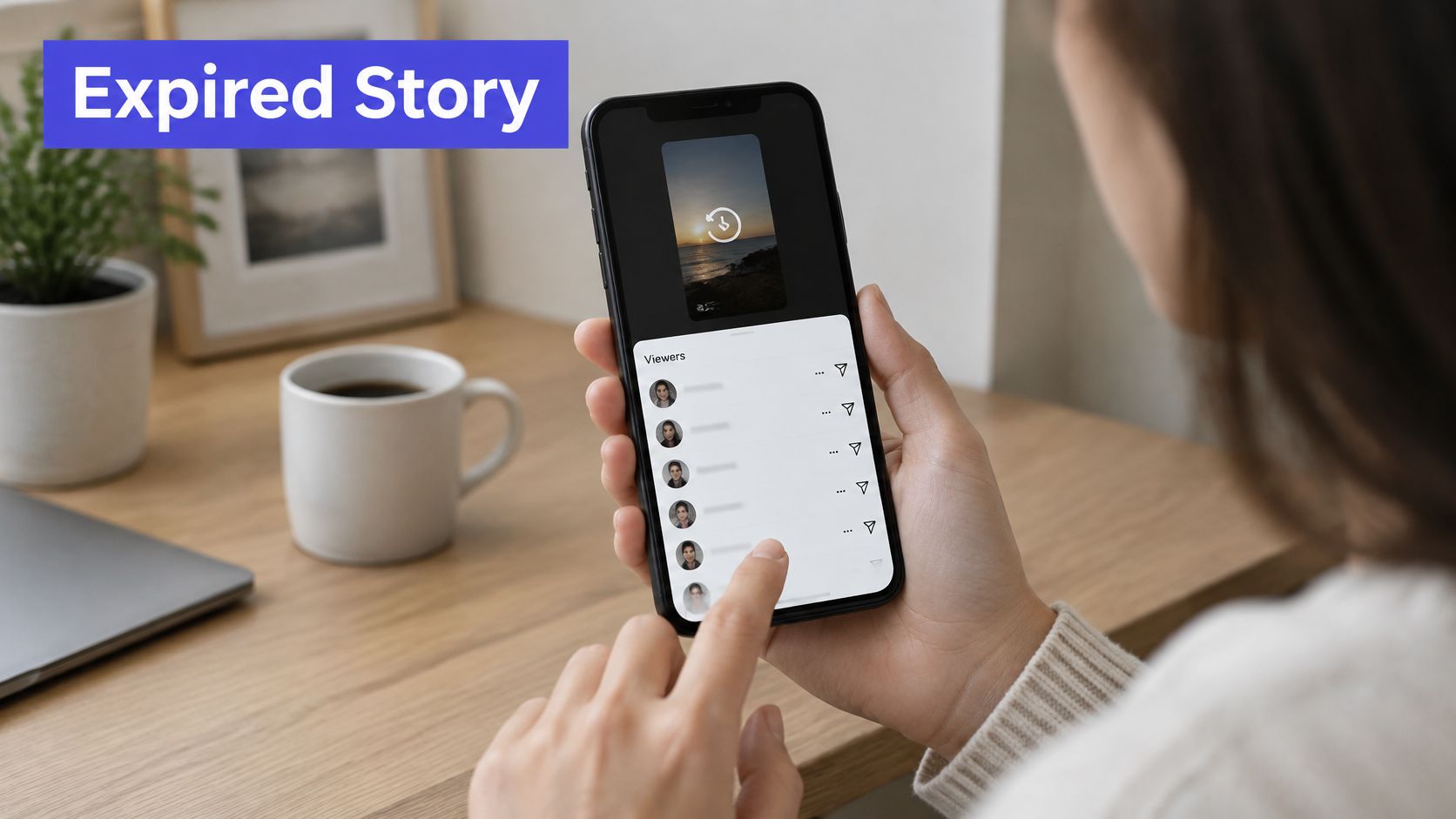
An expired Story may still have a readable viewer list in Archive. The key is opening the archived content before the identity window closes, rather than looking for the missing Story on your profile.
Keep the specific photo or video in mind as you go.
Find the archived frame
- Open your profile and tap the menu icon at the top right. Start from the publishing account, particularly if you switch between several brands.
- Choose Archive, then open the Stories archive. Make sure you're browsing archived Stories rather than another content archive.
- Select the Story and the relevant frame. Use the content and posting date to identify it. Don't substitute a similar creative from a different campaign.
- Swipe up to inspect the viewer information. If the names are available, review what you need immediately.
Instagram's guidance on checking Story viewers describes access to viewer usernames for up to 48 hours after publishing, including through the archived Story after its normal expiry. That makes Archive useful for overnight posts, weekend publishing, and agency handoffs, but not a permanent audience database.
For a visual walkthrough of the navigation, use this video alongside the controls in your app.
Highlights preserve content, not permanent viewer names
Saving a Story as a Highlight keeps the creative accessible on your profile. It doesn't restart the viewer-name deadline, which remains tied to the original publication.
This is an important distinction for evergreen content such as pricing explanations, menus, product tutorials, or testimonials. A Highlight can keep helping visitors without giving you an indefinitely available list of everyone who watched it.
Story viewing also shouldn't be confused with general profile browsing. The guide to whether you can see who views your Instagram profile addresses that separate question.
For client work, record whether you checked the live Story or the archived copy and identify the frame. That makes your notes useful to a colleague who wasn't present when the content went out.
If you can reopen the creative but the username window has closed, stop trying to recover names through the same screen. Use the aggregate Insights your account provides and plan an earlier audience check for the next publication.
What a Viewer List Cannot Prove
A username is evidence of an account viewing the Story, not a complete explanation of someone's behavior. It doesn't establish why they watched, how interested they were, or whether they intend to buy.
Instagram's documentation on Story audience visibility distinguishes owner-visible usernames and viewing that can involve Facebook when content is shared there. Don't treat an Instagram viewer screen as a complete, self-explanatory report of every distribution surface.
Separate observation from interpretation
Say a competitor's account appears on several product Stories during a launch. You can record that observation. You can't conclude that the competitor is copying your offer, preparing a purchase, or monitoring a particular employee.
A shared business account adds another uncertainty: an account name isn't proof of which individual was holding the phone. Use replies, explicit inquiries, and other relevant context before deciding whether follow-up makes sense.
- Intent isn't visible: A view doesn't distinguish curiosity, accidental browsing, customer interest, or competitive research.
- Repeat watching isn't assigned by name: Extra displays don't identify which account watched again.
- Distribution needs context: Cross-posted content shouldn't be evaluated as though the username list explains its entire route to viewers.
Treat a name as an observation to contextualize, not a verdict about the person behind the account.
Respect the privacy limits
Only the Story owner can inspect its viewer usernames. Watching someone else's Story through Instagram's standard experience isn't anonymous to that publisher.
Services promising hidden viewers, private identity details, or recovery of expired names go beyond Instagram's documented viewer tools. Don't hand over account credentials because a website claims it can expose more information.
If you're comparing privacy claims, read the cautions around viewing Instagram Stories anonymously rather than assume that every advertised method works.
Audience settings also shape the list. A private account restricts viewing to approved followers, a Close Friends Story restricts its intended audience, and a blocked account can't view your Story through that account. An absent username therefore isn't evidence that someone deliberately ignored your content.
Fixing Missing or Empty Viewer Lists
An empty list on a Story you expected people to watch calls for a basic diagnosis, not an immediate search for a viewer-recovery app. Confirm that you're inspecting the correct account and frame before troubleshooting the audience information.
Viewer list symptoms, causes and fixes
| Symptom | Likely cause | Fix |
|---|---|---|
| Story has zero viewers | Nobody has watched yet or the Story is brand new | Wait within the window and share the Story to your audience |
| No list on an older Story | Story expired past the window or is not in Archive | Check Archive first; after the window closes, use Insights |
Waiting may resolve a newly published Story's empty list, but it won't restore expired identity information. If you need fresh audience observations, you may need a new Story, not another refresh of the old one.
Troubleshooting order: Confirm the account, identify the frame, check Archive, then troubleshoot the app.
If the viewer indicator is missing altogether, update Instagram and reopen it before assuming the information is gone. An outdated app is a possible interface problem, not proof that the audience list has expired.
Use the Archive routine for expired content rather than repeatedly searching your live profile. Keep technical troubleshooting separate from a closed viewing window.
Check Viewers Within 24 Hours of Posting
Make the audience check part of publishing, not an afterthought in reporting. The safest working routine is to review names while the Story is still live and preserve only the information you need.
- Open the viewer list during the live period. Compare the names with the viewer count for the same frame, not the Views total.
- Record relevant usernames in a dated notes file or spreadsheet. Include the posting time, frame description, and campaign so the entry has context.
- Record performance separately. If your account provides Insights, capture views, viewers, interactions, and profile visits without presenting them as an identity report.
- Schedule a later performance review. Evaluate the Story against its purpose, such as generating replies, product interest, or website visits.
Group relevant accounts as customers, collaborators, or people who explicitly requested information. Don't label someone a repeat viewer unless you have separate observations supporting that description.
Our real-time analytics show performance across all connected platforms, which supports that broader review. Keep the time-sensitive username check in Instagram, and confirm the viewer and Archive availability in your own app before relying on it.
PostSyncer helps you plan, publish, and analyze social content from a shared workspace. Pair your Instagram viewer checks with a consistent publishing and reporting routine, then visit PostSyncer to organize your calendar and review performance across your connected accounts.