











A marketing team connects its accounts to a scheduler and sees a green Connected badge beside every network. That badge hides a different authorization system each time: providers ask for different permissions, issue tokens with different lifetimes, and impose their own app reviews and consent limits. A connection that works during setup can still fail when a token expires, a permission changes, or a provider rejects a publish request.
These OAuth examples focus on what happens after the consent screen. For each provider, the practical questions are the same: which flow authorizes the user, what tends to break in production, and what must a scheduling platform build to keep publishing reliable? OAuth separates access authorization from password sharing, but it's a framework, not a plug-and-play login protocol. The IETF's OAuth 2.0 specification defines the core roles and token concepts, while modern integrations still need to choose a secure flow and handle each provider's rules.
The examples below cover eight networks and identity platforms. The common engineering work is token storage, renewal, revocation, scope control, and clear recovery when a connection stops working.
1. Google OAuth 2.0 for Sign in with Google and YouTube API Access
A creator authorizes a scheduler to publish a video to a YouTube channel. Google's authorization-code flow lets the user approve specific access without handing the app their Google password. Google Identity Services can add OpenID Connect for sign-in, but identity claims and YouTube API permissions serve different purposes, so verify each for its intended use.
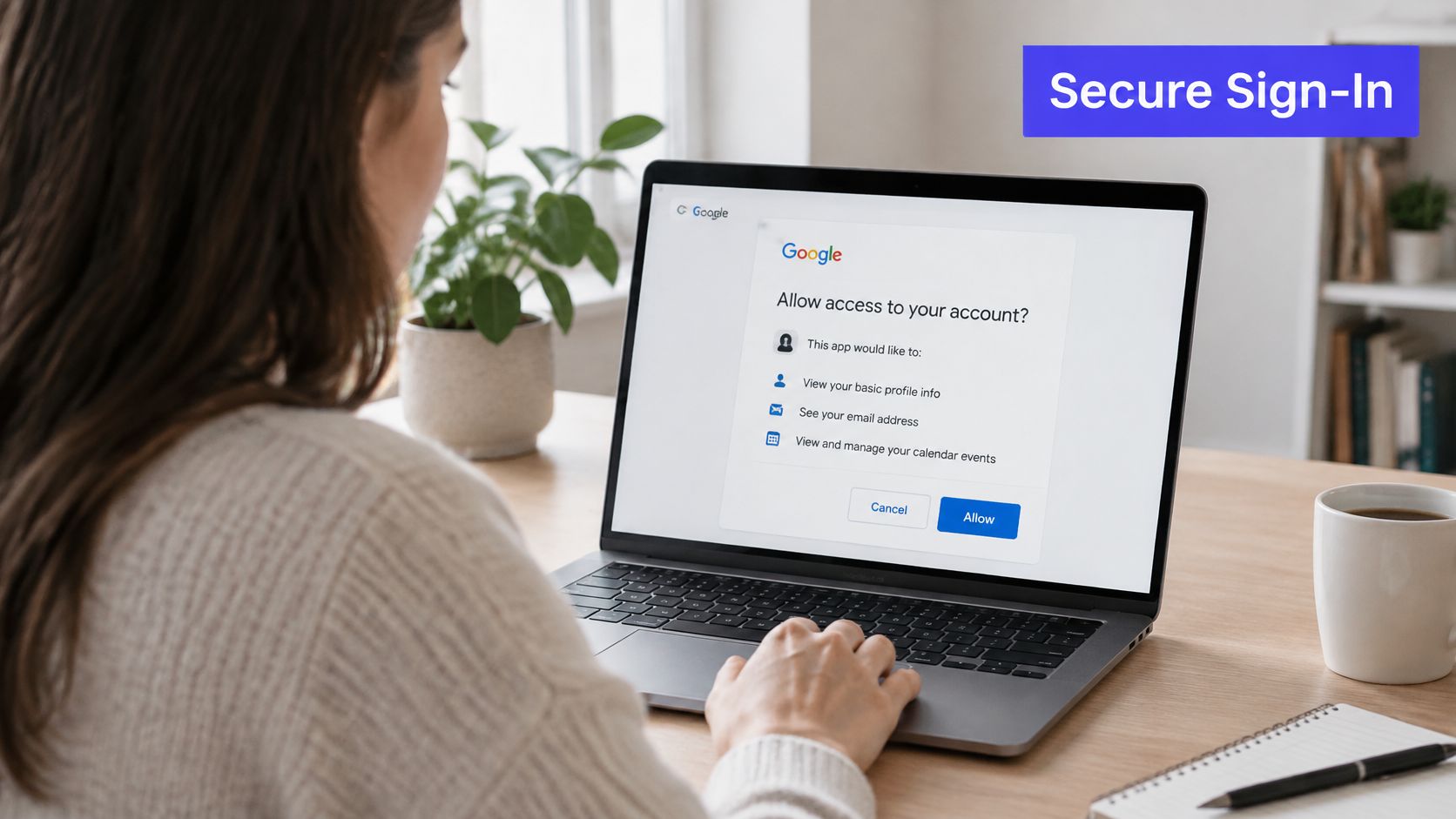
For a social scheduler, the key distinction is between authenticating the person and granting access to a channel. Request only the scopes needed for the first feature the user enables, then request additional scopes when they turn on a capability that requires them. Broad consent requests can make users wary and can trigger more demanding verification requirements.
Where the integration breaks
A successful callback doesn't mean the connection will stay healthy. Refresh tokens need encrypted storage and careful handling. If Google returns invalid_grant, treat the stored authorization as unusable and guide the user through consent again instead of retrying the same token indefinitely.
Google's app verification can also become a release dependency. Start the process early, and make sure the requested scopes, privacy policy, and demo video accurately describe what the app does. On sign-in callbacks, verify ID-token signatures and audience claims on the server. Don't trust user identity details just because they came from the browser.
Practical rule: Keep sign-in and channel authorization distinct in your data model. A person can still be signed in even when their YouTube publishing grant needs to be renewed.
If your workflow also involves managed video downloads for transcription pipelines, keep that capability separate from the OAuth permissions used to publish. For scheduling, store each authorized channel with its own scope and connection state so users can identify which account needs attention.
2. Meta Facebook Login and Instagram Graph API
An agency connects a client's Facebook Page and Instagram professional account in one onboarding session. Meta's authorization flow grants access to assets through the Graph API, but Instagram publishing depends on the account and Page relationship being configured correctly. The consent screen can't fix a missing Page link.

Before sending someone to Facebook Login, check whether the Instagram account is a Business or Creator account and whether it's linked to the Facebook Page the user manages. Explain those prerequisites before the connect button. Otherwise, users may grant access successfully and still see no eligible Instagram account in your app.
Treat consent and publishing as separate states
Meta permissions, account relationships, and content publishing are related, but they aren't interchangeable. Track which Page and Instagram account the user selected, which permissions were granted, and whether the account can publish the formats your product offers. Don't show a generic “connected” state when the authorization exists but the publishing setup is incomplete.
Long-lived access still needs active maintenance. Refresh tokens before they expire with a scheduled job, and handle renewal failures by prompting the user to reconnect. Pin the Graph API version in your code, monitor deprecation notices, and test before changing versions. A version update can alter behavior even when the OAuth handshake itself hasn't changed.
App Review is another operational dependency. Prepare screencasts that show each requested permission being used in the product, rather than submitting a consent flow with no visible feature attached to it. For teams managing client Pages, retain a clear account-to-workspace mapping so a user's authorization doesn't accidentally grant the wrong brand access.
When users need help completing setup, provide clear Facebook and Instagram video sharing instructions. The scheduling interface should report whether the failure is a missing account link, insufficient permission, or an expired grant. Those states call for different fixes, and a single reconnect button can't explain them all.
3. X OAuth 2.0 with PKCE
A user queues a thread in a publishing app, approves access on X, and returns to the scheduler. For user-context publishing, OAuth 2.0 with PKCE protects the authorization-code exchange: the app creates a verifier, sends its derived challenge during authorization, and presents the original verifier when exchanging the returned code.
That verifier has to survive the browser redirect without becoming available to an attacker. Bind it to the user's session, validate the callback's state, and reject a response that doesn't match the original authorization attempt. Don't treat the presence of an authorization code as proof that the callback is legitimate.
Build for rotation and API limits
Refresh-token rotation can turn a working integration into a broken one if the new token is lost. When a refresh succeeds, persist the replacement token atomically before another worker can try to use the previous value. If your application runs multiple workers, coordinate refresh operations so concurrent requests don't race to update the same connection.
Check the current X API access level before advertising a publishing feature. OAuth permission alone doesn't guarantee that the account or app can use every endpoint your product needs. Verify API access during development, then surface unsupported capabilities clearly instead of letting customers discover the limitation after they've composed a post.
For queued posts and community replies, handle 429 responses with exponential backoff and queue retries. Preserve the user's content and report the post's status while waiting; don't mark a rate-limited request as published. A community-management app should also distinguish user-approved replies from automated actions, so the authorization grant doesn't become a substitute for a clear approval workflow.
The integration earns trust when it makes failure understandable. Show whether the connection needs reauthorization, the API access level doesn't support an action, or a request is temporarily rate-limited. Those are separate operational problems, and each needs a different recovery path.
4. LinkedIn OAuth 2.0 Three-Legged Authorization
A B2B team wants to schedule both an employee's thought-leadership post and updates for a company Page. LinkedIn's three-legged OAuth 2.0 flow lets a member authorize an app to act on their behalf, subject to the permissions and LinkedIn products available to that app. Personal-profile publishing and organization publishing aren't the same authorization target.
Request only the scopes needed for the feature the person is connecting. A member's ability to publish to a company Page also depends on their role and the organization permissions the app has been approved to use. Store the member identity, organization selection, and granted scopes separately. That makes it easier to explain why a personal post works while a Page post doesn't.
Make reconnection part of onboarding
Build a reconnect prompt well before the token's stated expiry, rather than waiting for a scheduled post to fail. Validate state on every callback, and make the failure message tell the user whether they need to approve again, choose a different Page, or ask an organization administrator for access.
LinkedIn product approval can take time, so apply before your launch depends on organization posting. Test personal-profile publishing first, then enable Page publishing for customers only after the relevant access has been approved and the organization selection path works end to end.
For teams setting up a channel, these steps can sit alongside a practical guide to connecting to LinkedIn. In the product itself, don't equate “member authorized” with “all publishing destinations available.” Show the destinations the user can select, and retain a clear reason when an organization isn't eligible.
5. TikTok Login Kit and Content Posting API
A creator approves a scheduler's TikTok access, prepares a short video, and expects the app to publish it. TikTok's Login Kit uses OAuth 2.0 with PKCE, while Content Posting API scopes determine which posting actions the user can authorize. The consent screen is only one step: the app may also need to pass TikTok's audit before it can offer the intended production experience.
Use the user's consent to establish the grant, then check the actual publishing capabilities available to the app. Scopes such as video.upload and video.publish represent different actions, so don't ask for both by default if the product only needs one. Keep the requested scope tied to a visible feature.
Set expectations before the first post
The private-visibility limitation can surprise users who expect a video to appear publicly as soon as they connect. Explain the available visibility behavior during onboarding and show it again in the composer, where the user makes the publishing decision. That's better than returning an ambiguous success message after upload.
Keep the PKCE verifier protected across the redirect, and monitor refresh-token expiry so the app can offer a reconnect path before a scheduled post is due. Submit an audit demo that shows the user granting consent and the complete posting flow. A screencast that ends at the consent screen doesn't demonstrate how the app uses the permission.
For a broader view of how a scheduler can connect its publishing workflow to platform APIs, see this guide to a social media scheduling API. A production integration should track upload, processing, and publishing as distinct states. If a video is uploaded but not yet published, the interface must say so and retain enough context for the user to retry or take action.
6. Bluesky AT Protocol OAuth with DPoP, PAR, and PKCE
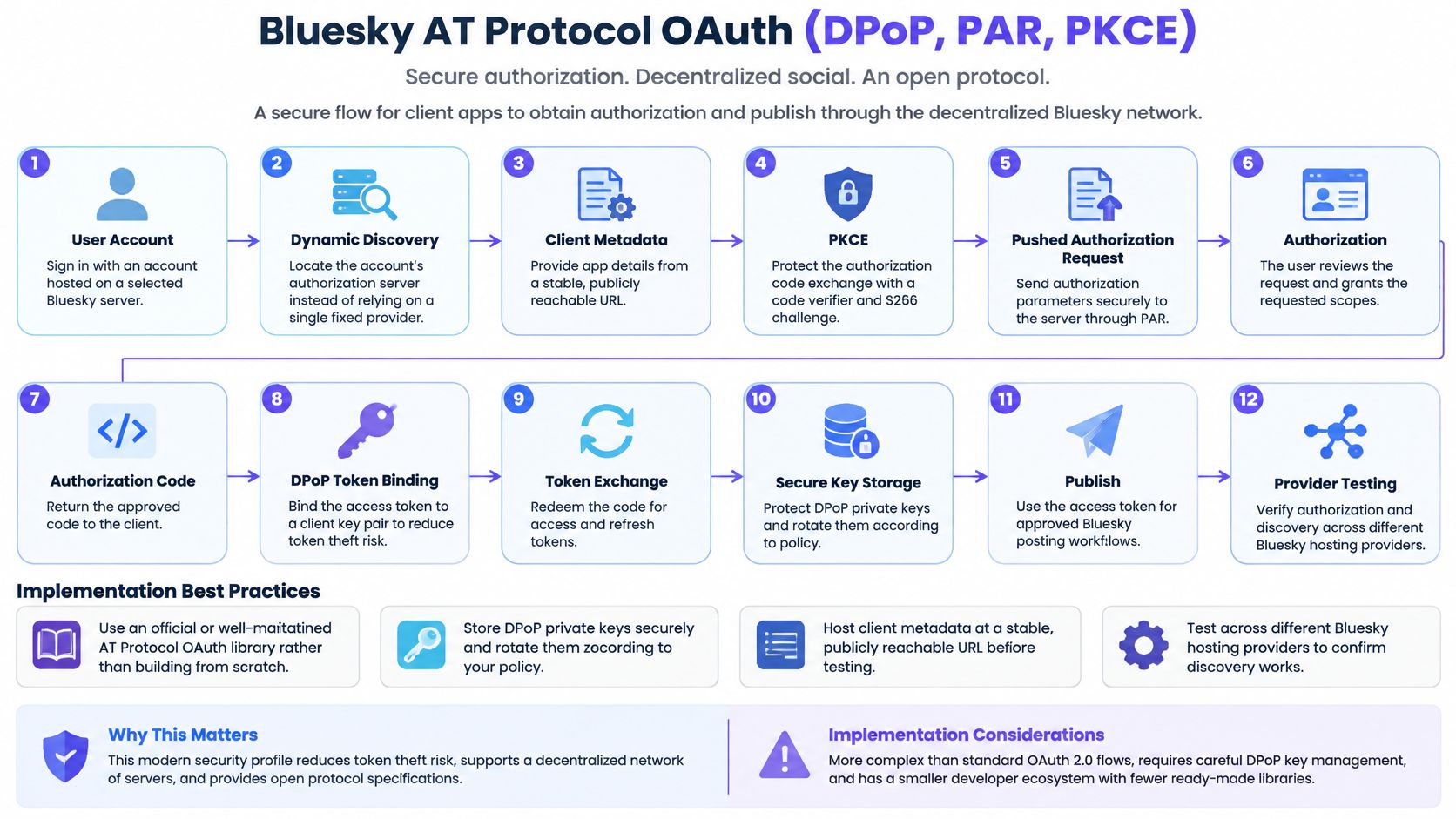
Bluesky adds a decentralized wrinkle: users may have accounts hosted on different servers, so a client can't assume one fixed authorization server. Its AT Protocol OAuth profile combines Pushed Authorization Requests (PAR), PKCE, and Demonstrating Proof-of-Possession (DPoP). A scheduler must discover the right authorization server for the user's account, then complete the provider-specific flow.
Treat the client key as part of the connection
With DPoP, the client proves possession of a private key when making requests. Store that key securely and associate it with the right authorization context. If the key is lost, rotated without coordination, or reused carelessly across connections, requests can fail even when the user's OAuth grant is still valid.
Use an official or well-maintained AT Protocol OAuth library rather than hand-assembling the protocol. Host client metadata at a stable, publicly reachable URL before testing, and verify that discovery works across different Bluesky hosting providers. A successful flow against one server doesn't prove that account discovery will work for everyone.
PAR also changes the authorization setup: the client sends the authorization request to the server before redirecting the user. Keep that request tied to the correct session and preserve the PKCE verifier through the callback. For a scheduling product, store the user's account identifier and the discovered provider details with the connection, so reconnecting doesn't assume the account still uses the same server.
The decentralized model gives users more choice, but it adds failure points that a single-provider login doesn't have. Make the interface report whether discovery failed, consent was denied, or a proof-of-possession request couldn't be validated. “Connection failed” isn't enough to help a user or support engineer find the break.
7. Mastodon OAuth 2.0 with Per-Instance App Registration
A scheduler connecting a Mastodon account first needs the server domain. It registers its client application with that instance, then redirects the user to authorize access. Because each instance runs its own authorization server, the domain identifies where the grant is valid and where publishing requests must go.
Validate and normalize the domain before discovering the instance's endpoints and registering the app. Cache client credentials by normalized domain. Re-registering on every connection attempt adds unnecessary work and complicates troubleshooting.
Keep instance-specific behavior visible
A token issued by one server does not authorize requests to another. Store the instance domain with each grant, and use it for API requests, revocation, and rate-limit handling. Encrypt tokens at rest, and give users a clear way to revoke access.
Instances can apply different rate limits and terms of service. Track API responses by instance, and pause retries when a server signals that the client should wait. This avoids applying one server's retry behavior to every account.
If a user connects a personal account on one instance and a community account on another, keep their grants and publishing queues separate, even if both accounts belong to the same person. Show the instance domain in the connection record and user-facing status instead of a generic “Mastodon connected” label, so users can see where each account lives.
8. Microsoft Identity Platform Multi-Tenant OAuth with Admin Consent
An agency connects a customer's Microsoft 365 environment through a shared app registration. Microsoft Identity Platform supports multi-tenant OAuth 2.0 and OpenID Connect, allowing organizations to authorize an app for their own Microsoft Entra ID tenants. Delegated permissions act on behalf of a signed-in user; application permissions let an app act without a user and therefore require a different justification and approval path.
Choose the permission type based on the job. Use delegated permissions when the feature needs to act as the signed-in person. Reserve application permissions for background work that needs to run without a user, because those permissions can grant broader access across a tenant. Admin consent can let an organization approve the app for users centrally, but it doesn't remove the need to explain the requested access.
Give enterprise administrators a clean approval path
Offer an admin consent URL in onboarding and show the administrator what the app will be able to do before they approve it. Complete publisher verification to improve the clarity and trust of the consent screen. Use the Microsoft Authentication Library (MSAL) for token caching and renewal rather than writing tenant-specific token behavior from scratch.
A practical scenario is an agency connecting multiple client tenants through one app registration. Store the tenant identifier with each connection, validate that the callback belongs to the expected tenant, and keep each customer's token set isolated. Don't assume that a successful authorization in one customer's environment applies to another.
PostSyncer's OAuth delegation API can support product teams building consent-based integrations by providing documented ways to create OAuth sessions, redirect users through provider consent, receive signed callback data, and verify its signature. Treat the callback signature as one part of the trust boundary, alongside state validation and secure token handling. The right setup depends on whether the integration needs user-delegated access or tenant-wide application access.
How the eight OAuth implementations compare for social publishing
The flow determines what a scheduler must handle after a user connects an account: token renewal, app approval, instance-specific setup, or admin consent. These differences matter most when a scheduled post is due and the connection can no longer publish.
| Item | Primary Flow | Token Lifecycle | Best For |
|---|---|---|---|
| Google OAuth 2.0 | Authorization code with PKCE; OIDC and scoped API access | Refresh tokens support long-lived access but may be invalidated | Google sign-in and YouTube publishing |
| Meta Facebook Login and Instagram Graph API | Facebook Login with permission and asset selection | Short-lived tokens can be exchanged for tokens lasting roughly 60 days | Publishing to Facebook Pages and Instagram professional accounts |
| X (Twitter) OAuth 2.0 with PKCE | Authorization code with PKCE; rotating refresh tokens | Access tokens last about 2 hours | Scheduling posts and managing X accounts |
| LinkedIn OAuth 2.0 (Three-Legged Authorization) | Three-legged authorization code flow | Access tokens last about 60 days; refresh tokens are limited to approved partners | Publishing to member profiles and company pages |
| TikTok Login Kit and Content Posting API | Authorization code with PKCE | Access and refresh tokens support ongoing access; the connection depends on the consent grant and token validity | TikTok video and photo publishing |
| Bluesky AT Protocol OAuth (DPoP, PAR, PKCE) | Authorization code with PKCE, PAR, DPoP, and dynamic discovery | The authorization grant persists until revoked; tokens must be managed according to the server's responses | Secure publishing across decentralized Bluesky servers |
| Mastodon OAuth 2.0 with Per-Instance App Registration | Per-instance app registration followed by authorization code flow | Refresh tokens expire after roughly two weeks in current Mastodon versions | Publishing across Mastodon instances |
| Microsoft Identity Platform Multi-Tenant OAuth with Admin Consent | Multi-tenant authorization code flow with PKCE and optional admin consent | The grant persists until revoked; consent and tenant policy govern continued access | Enterprise access across Microsoft Entra ID tenants |
For a scheduler, token expiry is only one failure point. Build provider-specific reconnect handling for invalidated grants, refresh-token rotation, expired Mastodon refresh tokens, and consent that an administrator or user can revoke. Keep app-review and permission requirements visible in connection status, since a valid token does not guarantee that the requested publishing capability is approved.
Turning Eight OAuth Flows Into One Reliable Publishing Pipeline
A user connects a social account, queues a post, then returns after the provider has changed or revoked a grant. The scheduler still needs to identify the affected destination, explain what failed, and keep unrelated accounts available. That depends on keeping each provider's authorization and token rules explicit in the backend.
Use a consistent connection record, with a provider adapter responsible for the authorization flow, redirect URI, requested scopes, token expiry and refresh behavior, app-review status, and selected accounts or assets. Encrypt tokens, limit access to the services that need them, and keep token values and client secrets out of application logs. Store grants by user, workspace, and destination where appropriate, so authorization for one account does not enable publishing to another brand.
Launch with failure paths already built
Test the failed paths as deliberately as the successful callback. Reject mismatched redirect URIs, missing or incorrect state, reused authorization codes, expired access tokens, revoked refresh tokens, and refresh-token replay where rotation applies. A failed refresh should not erase a stored token before the provider confirms its replacement. When refresh tokens rotate, save the new value atomically to prevent parallel workers from replacing it with a stale one.
Reconnect prompts should name the network that needs attention, explain the action required, and say whether queued posts will wait or pause. Start app review or audit work early, and prepare a demo showing how each permission is used in the product. The RFC 9700 OAuth security best practices update authorization guidance based on real-world implementation experience.
A study of OAuth-based authentication in 241 popular web, Android, and iOS applications reported vulnerable mechanisms, including issues involving impersonation and user enticement attacks, in its ACSAC study. For a scheduler connecting multiple networks, narrow scopes, exact redirect matching, PKCE, careful token rotation, and automated negative tests help contain the impact of a compromised or failing connection.
PostSyncer provides secure OAuth connections alongside a workspace for planning, approvals, and account management across networks. Pair provider-specific consent handling with a clear publishing process, and use HiveHQ's guide to social media marketing automation to plan how scheduling fits into the team workflow.
Connect social accounts, plan posts in a visual calendar, and manage approvals and publishing from one workspace with PostSyncer. Its secure OAuth connections support multi-network workflows, so teams can focus on content rather than managing tokens by hand. Visit PostSyncer to explore the platform and organize your publishing workflow.