











It's Sunday night, and your small team is planning a month of social posts. You add product announcements, a few motivational graphics, and placeholder captions to the calendar. By Wednesday, someone needs a new video, the customer story hasn't been approved, and nobody knows what to publish next.
For the rest of the month, posting depends on whoever has a spare moment. By the third week, the calendar is mostly a record of missed intentions.
The problem usually isn't effort. It's that the team planned publishing dates without deciding how to generate ideas, produce assets, handle approvals, or respond when priorities change. A full calendar can hide those gaps until production starts.
A repeatable structure makes those decisions easier:
- Choose the purpose: Decide whether you need education, demand, customer proof, or product adoption.
- Choose the production method: Build around original assets, recurring formats, or approved community contributions.
- Leave room to adjust: Don't schedule content so tightly that an urgent update requires rebuilding everything.
These content calendar ideas solve different planning problems. Each includes a practical layout, a production or repurposing detail, and a way to organize it in PostSyncer's visual calendar.
If AI already helps with your drafts, the 2026 playbook for AI content planning offers a complementary planning resource. Start with the structure, though. Faster caption generation won't fix an unclear publishing plan.
1. Content Pillar Calendar
Operational question: What should we post about consistently?
Start with subjects your audience needs help understanding, not formats you happen to enjoy making. For a project-management SaaS company, useful pillars could include workflow education, product guidance, customer outcomes, and team practices.
Each pillar should connect an audience problem to something your business knows well. Company announcements can have a place, but they shouldn't become the default whenever the team runs short of ideas.

A sample weekly rotation
- Monday, workflow education: Explain how to run a useful project handoff.
- Wednesday, product guidance: Demonstrate a handoff template inside the software.
- Friday, customer outcomes: Show how a customer changed their handoff process.
Notice that the topic stays connected while the purpose changes. That's more coherent than posting unrelated tips to fill dates.
PostSyncer setup: Create a label for each pillar, then apply it to every draft in the visual calendar. Use the social media content pillar examples to pressure-test your categories before scheduling.
Give the AI Content Agent an approved article and ask for different audience questions within each pillar. Review the suggestions yourself; otherwise, you may publish the same advice under different labels.
Keep pillars stable enough to assess, but change weak angles. A category isn't useful just because the team gave it a name.
2. Jab, Jab, Jab, Right Hook Calendar
Operational question: How do we sell without making every post a promotion?
A coffee roaster can explain grind size, demonstrate a brewing method, and introduce a producer before inviting followers to buy a featured blend. The educational posts help people make better coffee. The sales post gives them a relevant next step.
The mistake is treating useful content as a mandatory waiting period before an unrelated offer. Your value-led posts should prepare the audience for the product, not distract from it.
Give people something they can use even if they never buy. Then make the buying invitation clear.
A sample value-to-offer sequence
- Monday: Demonstrate how grind size changes extraction.
- Tuesday: Show a brewing adjustment for a bitter cup.
- Thursday: Explain the featured coffee's flavor profile.
- Friday: Present the blend, buying link, and recommended brewing method.
This is a suggested starting sequence, not a universal ratio. During a launch, your audience may welcome more direct product information. During a quiet period, repeated offers can feel unnecessary.
PostSyncer setup: Label drafts as value-led or offer-led. Drag them into sequence in the visual calendar, checking that promotional posts don't cluster accidentally.
Compare saves and shares on educational posts with clicks on offers. Don't judge both by the same metric. A useful brewing guide can support a later purchase without generating an immediate sale.
3. Hero, Hub, Help Calendar
Operational question: Which content deserves a major production effort?
Not every idea needs a campaign shoot. Separate high-investment campaign assets from recurring programming and straightforward answers.
Hero content introduces a major story or launch. Hub content gives followers a recognizable series. Help content answers a specific question, such as how to export a report or choose a product size.
For a home-improvement brand, that could mean a room-renovation film, a recurring DIY series, and short repair demonstrations.
A sample quarterly layout
- Opening month: Publish the renovation story and introduce the recurring project series.
- Middle month: Continue the series with practical demonstrations and audience questions.
- Closing month: Publish troubleshooting answers and revisit the project's finished results.
Plan production around the expensive asset, but don't make routine publishing dependent on it. If the campaign shoot slips, your how-to content should still be ready.
PostSyncer setup: Apply Hero, Hub, and Help labels to calendar posts. Schedule the recurring series first, then position the campaign assets around it.
Use the AI Video Creator to draft short clips from approved campaign footage. Check that each clip answers a complete question without requiring viewers to watch the original.
The trade-off is production depth versus flexibility. A polished flagship video may establish your visual identity, but a clear demonstration can be more useful when someone needs an answer immediately.
4. Hub-and-Spoke Repurposing Calendar
Operational question: How can we publish across channels without starting from scratch?
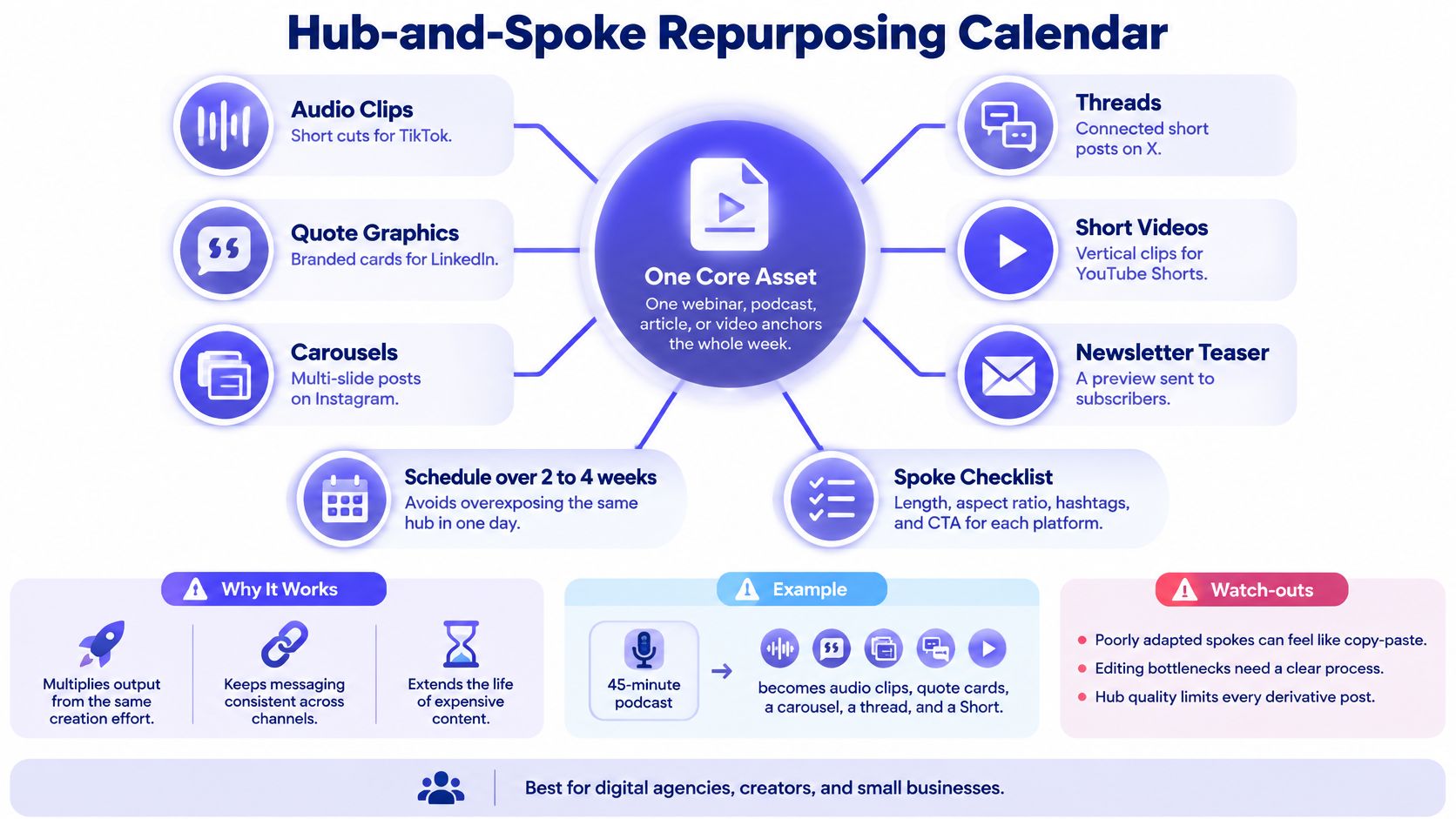
Choose a source asset with enough substance to support distinct follow-up posts. A detailed webinar, product guide, or customer interview works better than a thin announcement.
This concept map shows how a central asset can support different platform treatments.
In the Content Marketing Institute's 2025 technology benchmark, 87% of technology marketers published case studies or customer stories. Those assets can provide customer language, demonstrations, and objections for a repurposing calendar.
A sample distribution sequence
- Monday: Publish the customer interview.
- Wednesday: Share a LinkedIn post explaining the customer's original problem.
- Friday: Publish a short demonstration clip.
- Following week: Turn the implementation steps into an Instagram carousel.
PostSyncer setup: Feed the approved source into the AI Content Agent or AI Video Creator. Give related drafts a shared source label, then schedule them across the visual calendar.
The content repurposing strategy guide can help you define the derivative workflow. Change the opening, format, and call to action for each destination rather than copying the same caption everywhere.
For a video walkthrough of the workflow, watch the demonstration below.
Keep the original claim intact. Editing a customer's nuanced explanation into an absolute promise creates a review problem, not a productivity gain.
5. Seasonal and Holiday Calendar
Operational question: What must be ready before a predictable buying moment?
Work backward from the customer's decision, not just the holiday itself. A gift buyer needs inspiration before they need a delivery reminder.
For an ecommerce stationery brand, a back-to-school campaign could move from choosing supplies to product comparisons, packing demonstrations, and order-support information. Posting everything during the final rush leaves little room to answer questions.

A sample campaign week
- Monday: Publish a school-bag packing guide.
- Wednesday: Compare notebook formats by use case.
- Friday: Answer buying questions and explain current fulfillment information.
PostSyncer setup: Place the campaign posts in the visual calendar, then route drafts through approval before scheduling. Keep operational details, especially availability and delivery language, subject to a final check.
Use the unified comments inbox to manage questions during the campaign. Turn repeated questions into follow-up posts rather than leaving useful answers buried in replies.
The main trade-off is predictability versus relevance. You can prepare photography and evergreen guidance early, but inventory claims and fulfillment details can change.
Skip holidays that don't connect to your audience or offer. A relevant buying guide is more useful than a branded graphic acknowledging every date on a marketing calendar.
6. Trend-Responsive (Newsjacking) Calendar
Operational question: How do we react without disrupting the whole plan?
Keep some production capacity deliberately unassigned. An empty slot is useful when it lets you respond to a real audience question instead of forcing an outdated scheduled post.
For a bookkeeping app, a growing discussion about confusing expense categories could justify a practical explainer. An unrelated celebrity meme probably doesn't.
Publication gate: Join a trend only when you can explain its relevance, verify the underlying claim, and add something useful.
A sample flexible week
Schedule evergreen education early in the week and customer proof later. Keep a midweek production block available for a timely response, with an approved evergreen alternative if nothing relevant emerges.
Before creating the post, check:
- Audience fit: Does this affect customers or their work?
- Verification: Can you establish what happened?
- Sensitivity: Could participation trivialize harm or exploit someone's situation?
- Shelf life: Will the post still make sense when it publishes?
PostSyncer setup: Label candidate drafts Reactive and send them through the approval workflow. Agree on the reviewer and response expectations outside the tool so urgency doesn't become an excuse to skip approval.
Don't schedule a placeholder joke and forget it. Recheck the context before publication, then postpone or remove anything that no longer fits. Speed matters less than judgment when the conversation changes.
7. Product Launch Campaign Calendar
Operational question: What does the audience need before, during, and after release?
A launch calendar should explain the problem before announcing the solution. After release, it should help customers use what they bought.
Say a SaaS company is launching an approval feature. Teasers about something exciting won't explain why anyone should care. A demonstration of an approval bottleneck gives the feature a clear purpose.
A sample launch sequence
- Before launch: Explain the workflow problem, gather questions, and invite relevant people to a waitlist.
- Launch week: Publish the announcement, a demonstration, and practical availability information.
- After launch: Share onboarding guidance, objection-handling content, and approved customer feedback.
PostSyncer setup: Label posts Pre-launch, Launch, and Adoption. Arrange them in the visual calendar and route claims, screenshots, and offer language through approval before scheduling.
Keep partner publishing commitments in the campaign brief alongside the calendar. Don't assume a scheduled brand post means a creator's asset is also approved.
Sift AI's branded content playbook is a useful companion when shaping the story around the product rather than listing features alone.
Reserve production time for adoption content. If every asset is finished before anyone uses the product, you can't respond to the questions that emerge after release. Leave room for clearer demonstrations, corrected assumptions, and genuine customer examples.
8. Recurring Series Calendar
Operational question: When should we batch content, and what should stay flexible?
A recurring series removes format decisions from routine production. A fitness coach might publish a form demonstration each Tuesday and an audience-question answer each Friday.
Keep the name, visual treatment, and delivery consistent. Change the underlying problem each time, so recognition doesn't become repetition.

A sample production rhythm
Use Monday to collect questions and write outlines. Record evergreen demonstrations together, then leave audience-response episodes until closer to publication.
PostSyncer setup: Give each series its own label and schedule its drafts on the intended recurring days. Ask the AI Content Agent to suggest topics from approved material, then remove duplicates and questions your audience doesn't ask.
Batching works best when the setup stays constant. Record demonstrations together while the lighting, equipment, and presenter are ready; write captions in a separate editing session.
The risk is producing too far ahead. A batch of interchangeable tips can keep the calendar full while audience interest moves elsewhere.
Review the series as a group in analytics. If viewers engage with demonstrations but ignore introductions, shorten the opening before abandoning the entire format. Refresh the execution before deciding the subject has stopped working.
9. User-Generated Content (UGC) and Community Spotlight Calendar
Operational question: How can customers contribute without creating permission problems?
Customer content needs a workflow, not just a recurring repost slot. Track the contributor, original asset, permission, approved channels, credit, and any limits on editing.
Say a ceramics shop wants to feature customers' table settings. A tagged photograph gives the team a potential submission, not automatic permission for every future use.
A sample community week
- Monday: Invite customers to submit a specific type of photograph.
- Wednesday: Confirm permission, credit, and caption details.
- Friday: Publish the approved spotlight and respond to comments.
PostSyncer setup: Add a Community Spotlight label and place approved drafts in recurring calendar slots. Use the contact CRM to organize contributor details, with permission records kept in your submission workflow.
Use the comments inbox to handle questions on published spotlights. Keep a separate process for checking tagged posts and submissions so you don't miss contributions.
The user-generated content campaign guide can help shape a participation brief that customers understand.
Permission belongs in the production process, not in a message sent after publication.
Community content can reduce internal filming, but curation, permissions, and moderation still take time. Keep an evergreen backup ready so you never pressure a contributor or publish an unapproved asset to meet a deadline.
10. Funnel-Stage (Customer Journey) Calendar
Operational question: Which posts help people discover, evaluate, buy, and stay?
Label content by the audience's next decision. An awareness post introduces a useful problem. Consideration content explains options. Decision content makes the offer clear, while retention content helps existing customers succeed.
For an ecommerce clothing brand, that could mean styling advice, fabric comparisons, purchase guidance, and garment-care demonstrations.
A sample journey-based week
- Monday, awareness: Show ways to style a versatile garment.
- Wednesday, consideration: Explain fabric, fit, and care differences.
- Friday, decision: Show sizing guidance and link to the product.
- Weekend, retention: Demonstrate care techniques for existing owners.
PostSyncer setup: Apply stage labels to drafts and scan the visual calendar for gaps. Add UTM parameters to destination links so your web analytics can distinguish campaigns and placements.
Use PostSyncer analytics to assess platform response, then check site behavior and conversions in your web analytics. These answer related but different questions.
Choose a primary measure before publishing. Reach can help assess discovery; product-page clicks can indicate evaluation; purchases require conversion tracking.
If a comparison carousel earns saves but few qualified visits, test the transition to the destination page. Don't immediately conclude that the entire format failed. Keep a review date and a next action beside the campaign brief so measurement leads to a production decision.
How the 10 content calendar ideas compare on structure, cadence, and fit
| Item | Core Structure | Typical Cadence | Best For | Main Trade-off |
|---|---|---|---|---|
| Content Pillar Calendar | 3 to 5 recurring themes with a target share of posts for each | Weekly or monthly planning | In-house teams, agencies, and small businesses building a consistent brand voice | Can feel repetitive if pillars are too narrow or not refreshed |
| Jab, Jab, Jab, Right Hook Calendar | Three value-driven posts for every promotional post | Rolling 3:1 pattern or weekly sequence | Creators, e-commerce brands, and social media managers | Requires a steady supply of useful non-promotional content |
| Hero, Hub, Help Calendar | A few high-impact Hero pieces, recurring Hub content, and practical Help content | Regular Hub and Help posts, with a few Heroes per year | In-house teams, startups, and agencies, especially on video or search-driven platforms | Hero content requires significant budget and planning |
| Hub-and-Spoke Repurposing Calendar | One long-form anchor asset repurposed into shorter posts for different platforms | Spokes scheduled across days, often over 2 to 4 weeks | Agencies, creators, small businesses, and startups | Poorly adapted spokes can feel repetitive or copy-pasted |
| Seasonal and Holiday Calendar | Content planned around holidays, seasons, shopping events, and awareness days | Planned 4 to 8 weeks in advance | E-commerce brands, in-house teams, and businesses with seasonal sales | Early production can be wasted if plans change |
| Trend-Responsive (Newsjacking) Calendar | Flexible slots for timely trends, news, and cultural moments | Reserves 10 to 20% of calendar capacity for reactive posts | Creators, social media managers, and e-commerce brands | Requires constant monitoring and fast approvals |
| Product Launch Campaign Calendar | Pre-launch, launch, and post-launch content phases | Built around a time-bound launch, with at least four weeks of post-launch content | Startups, in-house teams, and e-commerce brands | Workload is intense, and product timelines can shift |
| Recurring Series Calendar | Branded, repeatable formats on fixed weekly or monthly slots | Fixed weekly or monthly schedule | Creators, social media managers, and digital agencies | Series can become stale and require ongoing topic research |
| User-Generated Content (UGC) and Community Spotlight Calendar | Regular slots for customer features, reviews, and community contributions | Weekly or monthly features | E-commerce brands, small businesses, startups, and consumer-focused agencies | Participation is unpredictable and permissions must be managed |
| Funnel-Stage (Customer Journey) Calendar | Content labeled by awareness, consideration, conversion, and retention stage | Ongoing mix adjusted to business goals | Startups, in-house teams, and e-commerce brands | Attribution is complex, and audiences do not always follow a linear journey |
Choosing the Right Calendar Idea and Setting It Up This Week
Choose a primary framework that addresses your biggest constraint, then add a supporting framework only where it solves a separate problem. Trying to run every model at once creates more labels, meetings, and maintenance than a small team needs.
If production time is scarce, combine content pillars with hub-and-spoke repurposing. Pillars define what deserves attention; the hub provides source material. That combination helps you avoid both random posting and endless original production.
Match the framework to the constraint
- Limited production capacity: Use pillars to narrow the subject range, then repurpose a substantial source asset.
- Time-bound revenue goals: Choose a seasonal or product-launch calendar and work backward from the buying decision.
- Conversion accountability: Use funnel-stage labels and define the action each post should support.
- Unpredictable audience interests: Keep a trend-responsive slot alongside a reliable evergreen schedule.
Don't confuse consistency with maximum volume. A realistic schedule includes time for writing, design, approval, publishing, and replies. If the plan only accounts for drafting captions, you haven't finished planning the workload.
The same applies to existing material. Before commissioning something new, review your guides, demonstrations, interviews, and customer questions. The approach behind unlocking library value through content planning fits this task: organize what you already have so useful material doesn't stay buried.
Build the working calendar
Open PostSyncer's visual calendar and map a suggested 30-day plan. Add your pillar or funnel-stage labels before filling dates, so every draft has a clear role.
Choose an approved hub asset and schedule platform-specific derivatives around it. Keep each derivative focused on a distinct question rather than repeating the original introduction.
Then check the calendar against actual capacity:
- Ownership: Name who prepares and approves each asset.
- Dependencies: Identify posts that rely on footage, permissions, or product availability.
- Flexibility: Leave space for corrections, customer questions, and relevant developments.
- Measurement: Decide what would make you repeat, revise, or stop each format.
I'd start with fewer scheduled commitments and protect the review process. It's easier to add a useful post than to recover from a calendar full of rushed work.
Build that 30-day calendar, schedule the repurposed hub asset, and set a review after four weeks as your initial working cadence. Use analytics to decide what to keep, while allowing more observation time for posts intended to support longer buying decisions.
PostSyncer brings a visual content calendar, scheduling, labels, approval workflows, and analytics into a shared workspace. Visit PostSyncer to turn your chosen framework into scheduled posts, organize repurposed assets, and review what deserves another place on the calendar.