











You're staring at a post that's getting traction in your niche. Your thumb is on the repost icon. A quick quote could put your brand in front of that author's audience, or it could carry a shaky claim to followers who never saw it, under your name. That choice, not the button tap, is the whole job. I treat quote a tweet as a context-and-risk decision, not a caption trick.
When to Quote a Tweet Instead of Replying
You're choosing among four different posts, not one action. A quote shows the original card inside a new post that must carry your words, so your followers see your framing first. A reply stays in that author's thread, where the conversation already exists. A repost forwards the post with no added text, which reads as endorsement. An original post lets you discuss the topic without attaching the card at all.
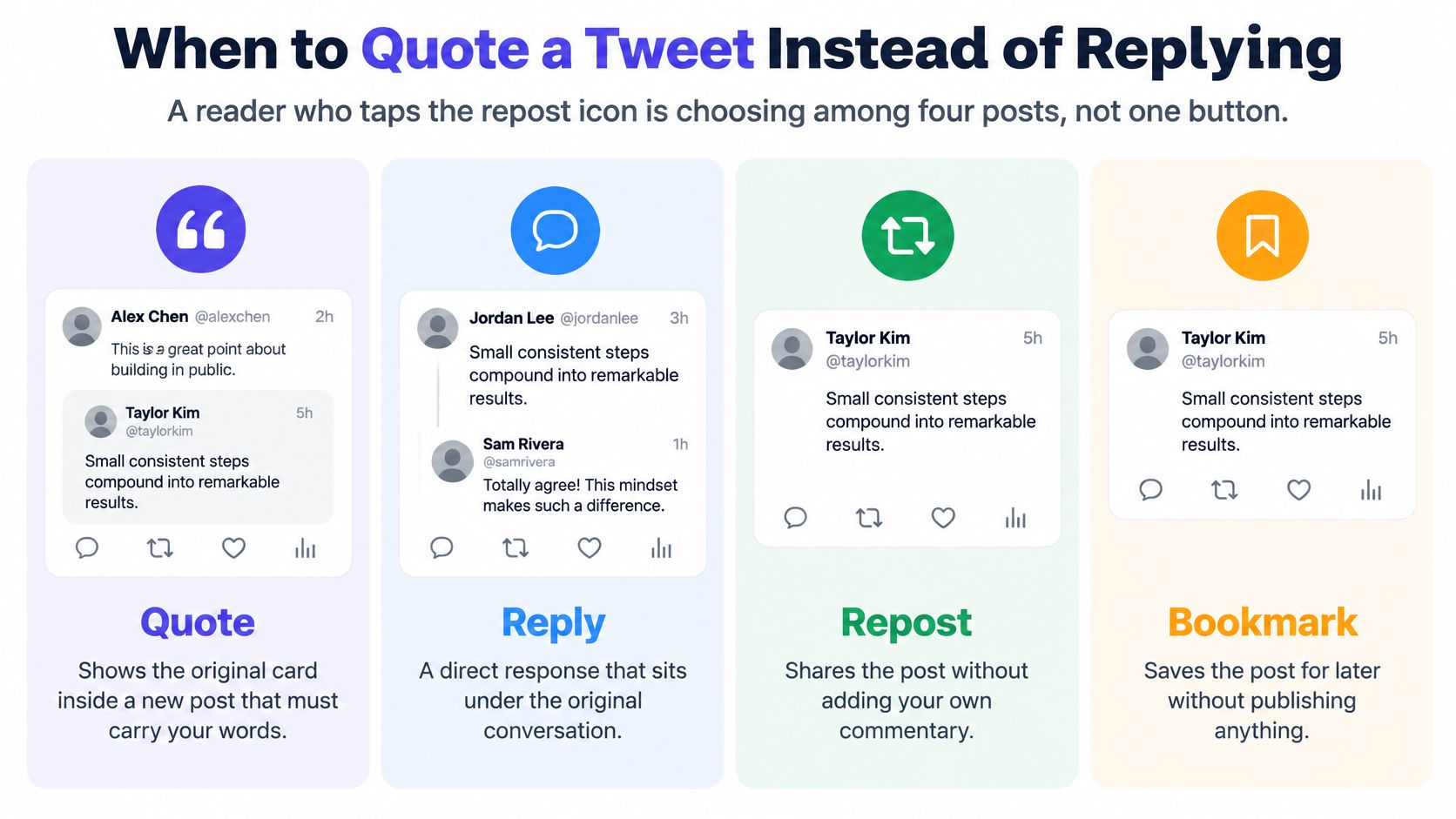
| Action | What followers see | Your words required | Main audience | Use it when |
|---|---|---|---|---|
| Quote | Original card inside your new post | Yes | Your followers, and often a wider public | You can add verified context, a takeaway, or a fair stance |
| Reply | Your text in the author's thread | Yes | Mostly the original poster | The point is for the author, not a new audience |
| Repost | The original post only | No | Your followers | You fully endorse it and have nothing to add |
| Original post | Your post, optional link, no card | Yes | Your followers | Quoting would amplify a misleading or harmful claim |
The Rule Most Button Guides Skip
Quote only when your line supplies verifiable context, a correction, or a takeaway your audience didn't already have. Don't quote an unverified or hostile claim just to disagree, because the card still travels. People who never followed the source now see the claim, screenshot it, and remember your account attached to it.
Context works when it's concrete. The analysis of approximately 285,000 Community Notes found adding contextual information reduced subsequent reposts by almost half and increased the probability that the original author deleted the post by 80%.
Gate for teams: If nobody can state the claim in one sentence and say why your audience needs it, reply in the thread or skip it.
That gate also protects routine planning. Say a retailer is looking for fresh angles, maybe browsing social content ideas for mattress retailers for post prompts. Quoting a supplier's sleep tip only helps if you add what it means for shoppers in your store. Without that layer, it's borrowed content with borrowed risk.
I would rather see a brand reply once, with a useful answer, than quote five posts with "Great point!" Your followers learn nothing, the source gains distribution, and you train people to scroll past you.
Commentary Patterns That Earn the Quote
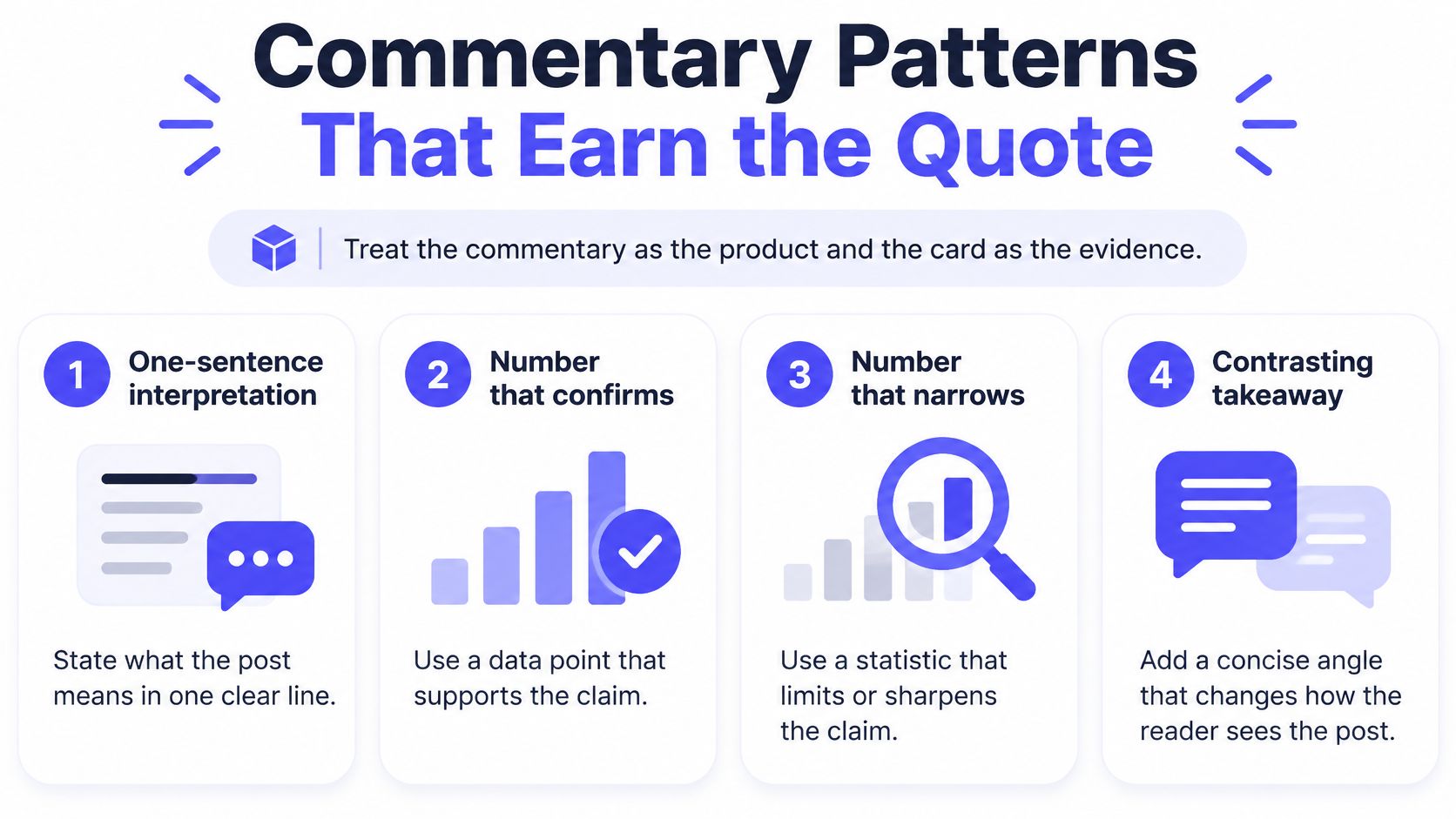
Treat your commentary as the product and the card as the evidence. If the card fails to load, your first line still has to make sense alone. That's the test I use before posting anything.
The visual below sums up the openings that hold up under that test.
Four Openings You Can Type Today
- One-sentence interpretation: State what the post means for your specific readers. "For a two-person shop, this means batch replies once a day, not hourly."
- Number that confirms or narrows: Add a sourced figure that supports the claim or limits it. Don't restate the post in louder words.
- Customer-proof example: "We tried this checkout copy in March. Abandoned carts fell because the delivery date was finally clear." Specific beats enthusiastic.
- One specific question: Ask something a peer can answer, not "Thoughts?" Try "Did this hold once ad prices rose in your market?"
Skip posting only "this," repeating the original wording, or chasing outrage with no sourced point. Those posts borrow reach and return nothing. They also create approval problems for regulated teams, which is why resources like Advisor Momentum on financial marketing compliance are worth reading if your quotes touch advice, claims, or disclosures.
What the Benchmarks Actually Say
Quotes can outperform, but don't treat the lift as a promise. The observational study of 204,905 posts from 53 older-adult advocacy organizations found quote tweets produced approximately three times the engagement of regular tweets after controlling for account-level variables, were twice as fast to reach median engagement, and were 3.15 times more likely to reach peak engagement. Those teams likely picked newsworthy topics to quote, so selection explains part of that gap.
Stay with that caution as you watch the walkthrough below and compare the format to your own posts.
Quotes are also selective. The study of approximately 7 million scholarly tweets found only 9% were quoted, while 44% received likes and 36% were retweeted. A post with a clear claim, fresh news, or useful data invites that kind of response. A pure promotion usually doesn't, no matter how polished the caption is. If you're tightening your wording, our guide to captions for Twitter covers how to keep that first line scannable.
Lead with your own insight in sentence one. Add evidence or implications in sentence two. Let the card prove you didn't invent the source.
Tag every quote post by purpose so you're not comparing unlike things. Use analysis, endorsement, rebuttal, customer proof, or trend response, then compare inside the same tag, platform, audience segment, and time window. Split likes, replies, reposts, quotes, and clicks instead of lumping them into one engagement total. A rebuttal that earns angry replies and no qualified clicks hasn't worked, even if the total looks large.
How to Quote a Tweet on Web and Mobile
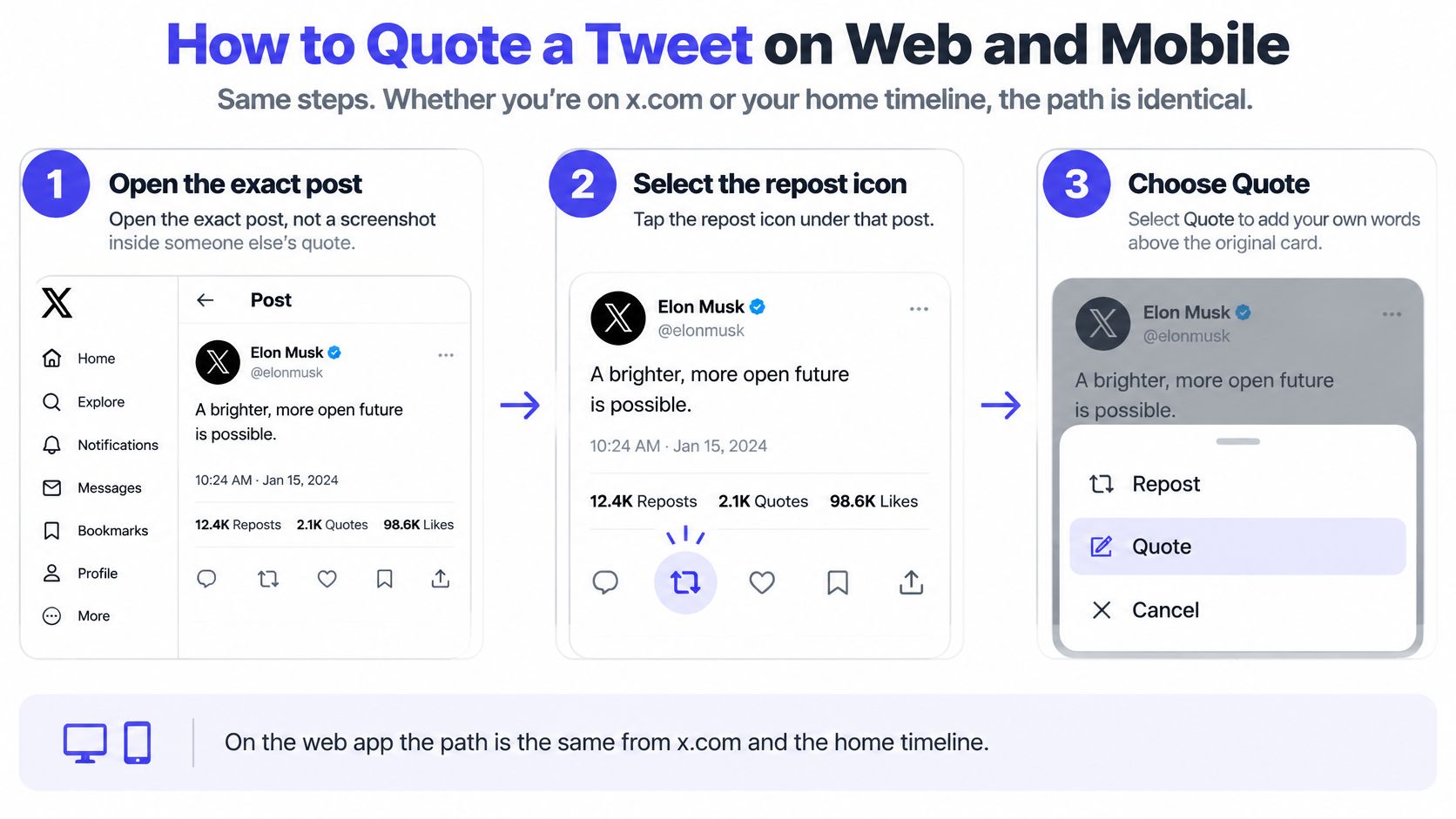
The path is the same on x.com and in your home timeline, and it's short. What breaks quotes isn't the tap sequence. It's quoting a screenshot inside someone else's post, landing in the wrong account, or writing commentary that depends entirely on a card that later disappears.
This three-step visual shows the core sequence before the detailed steps.
On the Web App
- Open the exact post. Click through to the source itself, not a screenshot or a quote of a quote, so attribution points to the right author.
- Select the repost icon under that post. It's the two-arrow glyph in the action row. Don't use the share menu if you want a native card.
- Choose Quote, not Repost. Repost publishes with no commentary slot. If you tapped it by habit, undo it and start again.
- Write in the composer above the attached card. Lead with your point. Don't paste the original text back in, since the card already shows it and repetition wastes your space.
- Add one image, poll, or link only if it changes the point. An extra chart that confirms a number earns its place. A decorative image pushes the card down and adds nothing.
- Check the preview. The author's name and the full card should be visible. If the card looks truncated or attached to the wrong post, close the composer and reopen the source.
- Post, or use X's schedule control if your account already schedules there. For time-sensitive topics, I would post live so you can watch the first replies and correct anything fast.
On iPhone and Android
The labels match the web flow, which makes training a team easier.
- Open the post in the X app and confirm you're signed into the correct brand account.
- Tap the repost glyph, then tap Quote.
- Write your commentary, check the card below it, then tap Post.
Your commentary still has to fit your account's current post length, and that length varies by account type. Don't draft to a single character cap someone quoted in a screenshot. Write to the composer in front of you and check its counter before you add a link.
Three Edges That Catch People Out
Protected posts can be quoted only by approved followers, and that quote stays limited to that circle. If you can see a post through a personal account that follows the author, that doesn't mean your brand account can quote it publicly. Switch accounts and check before you promise the post to a calendar.
Some authors turn quotes off. When that happens, the Quote row never appears in the repost menu, and there's no workaround inside X. Your fallback is a reply, if replies are open, or an original post that discusses the public topic without attaching the card. Don't screenshot a post to get around a setting the author chose.
If the source is deleted later, your commentary remains and the card becomes unavailable. Readers will see your words floating over an empty box. Write so those words stand alone, name the topic plainly, and avoid "He's absolutely right about this" as your entire message. This is also where quick, calm handling matters, as outlined in guidance on managing reputation crises on social media, because a deleted source under your quote can look like you endorsed something you can't show.
Copy the status URL immediately after posting. Your calendar, blog embed, and weekly report all need that canonical link, not a profile link you grabbed later.
One last habit saves time. After you post, open your own quote from a logged-out browser or a secondary account once in a while. You'll catch cards that render fine for you but look restricted to everyone else.
Embed a Quoted Post on a Blog or Newsletter
Start from the status URL you saved after posting, because an embed and a quote do different jobs. Quoting publishes commentary on X. Embedding places a post, including your own quote post with its nested card, on a page you control. Mixing them up is why people paste their commentary into a blog and wonder where the card went.
The Native Embed Path
- Open the source post or your published quote. Use the exact status URL, not your profile page.
- Use Share, then Embed post. X generates the code for that specific post.
- Copy the blockquote and the platform script. You need both parts for the card to render as designed.
- Paste both into an HTML block. Don't drop them into a visual-editor caption field, which often strips scripts and leaves stray code on the page.
If that sounds heavy, there's a lighter default. WordPress and many site builders turn a lone status URL into a card through oEmbed. Paste the URL on its own line, let the CMS fetch the card, and avoid adding another script to the page. I would use oEmbed first whenever the CMS supports it.
Picking the Right Method
| Method | Best for | What you paste | If the source changes |
|---|---|---|---|
| X embed code | Custom HTML on a blog | Blockquote plus platform script | Card can update or show unavailable |
| Status URL oEmbed | WordPress and many CMSs | The post URL alone | Card usually refreshes with the embed |
| Linked text quote | Email and newsletters | Short excerpt, @handle, and URL | Your excerpt stays fixed, link leads to current post or an unavailable notice |
| Screenshot | Last resort when scripts are blocked | Image plus alt text and a link | Frozen; misses edits and deletes |
Newsletters usually strip scripts and iframes, so an embed that works beautifully on your blog will arrive as a blank gap in an inbox. Quote the claim briefly in text, name the @handle, and link the status instead. Your reader gets the point and a working click-through, which is the whole reason you included it.
Rights, Alt Text, and Citations
Embed and link rather than re-uploading the author's image or video to your own media library. The embed points back to the source and preserves attribution. If a still image is the only option that will render in a given tool, write real alt text describing who posted it and what it says, and place a linked credit line directly under it.
Citation basics: Keep the author handle, a short quote of the post text, the date, and the URL together. That's enough for a reader to find and check the source.
For a student page or a sourced article, that same set covers you without turning the page into a style-manual reprint. Add the author's display name if it's visible, and keep the quoted words exact. Paraphrasing inside quotation marks is an error your readers will catch once they click.
Finish with a rendering check on the published page, not just the editor preview. Confirm you see one card, the correct account, and a working status link. Click it. If the link lands on a profile instead of the post, replace it with the status URL before you share the page.
Fix Failed Quotes and Queue the Follow-Up
Most failed quotes look like a broken app and turn out to be a setting, a wrong link, or a wrong account. Run your checks in a fixed order and you'll solve most of them without changing your whole approach. Start with the source, then the account, then the URL.
| Symptom | Likely cause | Fix |
|---|---|---|
| Quote is missing | Author limited quotes, or the account is protected or blocked | Reply, or write an original post if the claim is public and safe to repeat |
| Card says unavailable | Deleted, protected, or suspended source | Keep only commentary that stands alone; do not screenshot a disputed post |
| Scheduler rejects the link | Profile or search URL, or a disconnected X account | Paste the status URL and reconnect the account |
| Embed is blank | Script blocked by the site or newsletter | Use oEmbed, or a linked excerpt with the handle |
| Reach arrives with reports | Quote amplified a weak or hostile claim | Stop boosting it; correct in a reply or a standalone post |
The Check Order I Use
- Source is public: Open it signed out or from the brand account that will publish. If you can't see it there, your followers may not see the card either.
- Right account: Brand, personal, and client accounts sit one tap apart in the app. Confirm the avatar in the composer before you write a word.
- Quotes not limited: If the Quote row is missing, accept it and switch formats rather than hunting for a workaround.
- Status URL, not a profile or search URL: Your link should point to one post. Profile and search links break schedulers and embeds in predictable ways.
Drafting Separately From the Native Quote
For teams, separate drafting from the native quote action. Store the canonical status link and write commentary where a teammate can approve it, then publish the quote from X when the attached card matters. That keeps approvals honest. Nobody is approving a screenshot mockup that behaves differently once it's live.
A calendar slot fits evergreen context, like quoting your own earlier explainer with an update. It's a poor fit for breaking news that may be corrected within the hour, since your scheduled commentary can't react to the correction. Our notes on whether you can schedule tweets cover which posts belong in a queue and which should ship live.
There's also no dependable viral switch hidden in the wording. The summary of X ranking signals notes ranking weighs multiple positive and negative actions, including replies, reposts, quotes, clicks, dwell time, mutes, blocks, and reports. Treat first-30-minute tier claims as anecdotal. Judge your quote by qualified clicks and reply quality against a normal post at a similar time.
A post that reaches many people and earns reports is not a distribution win. It's a warning you amplified the wrong claim.
If the idea needs to travel beyond X afterward, a scheduler can carry the commentary as a thread or a community post on other networks. Just don't pretend it tapped Quote for you. Keep the native card native, and let the queue handle the follow-up.
Run One Measured Quote Post This Week
Give yourself 20 minutes and one post, not a new strategy. Small, measured tests beat a week of quote spam because you can see what your audience did.
- Pick one public post your audience already cares about, from an account you can quote without permission hurdles.
- Write two sentences that state your point before the card. Make the first one stand alone if the card disappears.
- Publish the quote from X on web or mobile, then confirm the card shows the correct author.
- Save the status URL and embed that quote on your site only if the same point belongs there for readers who never open X.
- After a day, log the purpose tag, impressions, replies, and link clicks, then compare them with one ordinary post from the same week.
Not sure what counts as a view in that log? Our explainer on what impressions are on Twitter defines the metric so you're comparing the same number each time.
If this repeats for a brand or agency, move drafting and the calendar into one workspace so commentary isn't trapped on someone's personal phone. PostSyncer works as that follow-up home, not as a substitute for the Quote button. There's no per-user fee on the plans, Threaded Posts publishes multi-part threads to X, Bluesky, Threads, and Mastodon, and Auto Plug automatically inserts links, hashtags, or CTAs into posts when your quote turns into a larger thread.
Don't schedule any quote you wouldn't defend if the original author replied in front of your audience. That's the simplest quality bar there is.
Turn your approved quote commentary into threads and follow-up posts without juggling drafts across phones and spreadsheets. Visit PostSyncer to plan that calendar in one workspace, keep your status links and tags together, and publish the next measured test on schedule.