












Let's get straight to it: Twitter impressions are the total number of times your tweet is shown to a user. It's that simple.
Think of it like a digital billboard. Every time someone's feed scrolls past your tweet, that’s an impression. It doesn't matter if they stop to read it, like it, or even consciously notice it—the platform showed it to them, and that's what counts.
What Twitter Impressions Really Mean for Your Content
Understanding impressions is your first step toward measuring your real impact on X (formerly Twitter). It’s the foundational metric that tells you just how often your content is being delivered into someone's digital space.
Imagine you own a coffee shop on a busy street. Impressions are the equivalent of every single person who walks past your storefront. They might not come inside (that's engagement), and they might not even really notice your sign (that's closer to reach), but their simple presence in front of your shop is a measure of potential exposure. In the same way, a tweet's impression count shows its potential to be seen.
The Anatomy of an Impression
So, where do these impressions actually happen? Every single time a user’s device loads your tweet, the counter ticks up. This can happen in a few key places across the platform.
- In a Follower's Timeline: This is the big one. When someone is scrolling their main feed and your tweet appears, that's an impression.
- In Search Results: Did you use a popular hashtag or keyword? If a user searches for it and your tweet pops up in the results, that’s another impression.
- On a Profile Page: If someone visits your profile directly—or the profile of someone who retweeted you—and sees your tweet, you’ve earned another impression.
The key takeaway here is that impressions tally every single display. Unlike reach, which only counts the unique people who saw your tweet, impressions count the total number of views. If one person sees your tweet three different times, that’s three impressions but only one person reached.
An impression doesn't confirm that a user read, liked, or even noticed your tweet. It only confirms that the platform served it to them. It’s a measure of opportunity, not attention.
To give you a quick reference, here's a simple breakdown of what impressions are all about.
A Quick Guide to Twitter Impressions
This table summarizes the core characteristics of Twitter impressions for easy understanding.
| Characteristic | Explanation |
|---|---|
| Measurement | Counts the total number of times a tweet is displayed on a screen. |
| Uniqueness | Non-unique. One person seeing the same tweet 5 times counts as 5 impressions. |
| User Action | Passive. No user interaction is required. The tweet simply needs to be loaded in a timeline, search result, or on a profile page. |
| Core Purpose | Measures visibility and potential exposure. It's the top of your marketing funnel. |
| Compared to Reach | Impressions are always greater than or equal to reach. Reach counts unique viewers, while impressions count total views. |
| Compared to Engagement | Impressions track views, not actions. Engagements (likes, retweets, replies) are a separate metric measuring active participation. |
Ultimately, impressions are the starting point for any successful content strategy. They show you how far your message is traveling. For a deeper dive, check out this excellent A Founder's Guide to Twitter Impressions which really unpacks what these numbers mean for your growth.
Navigating Twitter's analytics can feel like learning a new language, especially with terms that sound similar but mean wildly different things. The three metrics that cause the most confusion are almost always impressions, reach, and engagement.
Getting the distinction right isn't just about sounding smart—it's the key to building a content strategy that actually works.
Impressions vs Reach vs Engagement At a Glance
Let's break down the core differences between these key performance metrics to see how they fit together.
| Metric | What It Measures | Why It Matters |
|---|---|---|
| Impressions | The total number of times your tweet was displayed on screen. One person seeing it 5 times counts as 5 impressions. | Shows how well your content is being served by the algorithm. It’s your top-of-funnel visibility metric. |
| Reach | The number of unique people who saw your tweet. That same person who saw it 5 times only counts as 1 for reach. | Measures the actual size of your audience. High reach means you're breaking into new circles. |
| Engagement | The total number of interactions with your tweet (likes, replies, retweets, clicks). | Tells you if your content is actually resonating with people. It’s the ultimate measure of quality and connection. |
In short, impressions measure views, reach measures viewers, and engagement measures action. You need all three to get the full story.
A Simple Analogy: The Conference Speaker
Imagine you're giving a talk at a big conference. Your social media metrics would look something like this:
- Impressions: This is the total number of times people in the audience glanced at you on stage. If someone looks up, looks down at their phone, and then looks up again, that’s two impressions. It’s all about total views.
- Reach: This is the number of unique people sitting in the audience. Even if someone looks at you a dozen times, they’re still just one person. This tells you how big your crowd is.
- Engagement: This is how many people actually did something. They clapped, asked a question, or took notes. It’s a measure of active participation, not just passive viewing.
A high impression count is a great start—it shows your content is being delivered by the algorithm and getting screen time. But it doesn't tell you the whole story. You need reach and engagement to understand the real impact.
This is a great visual breakdown of where those impressions come from—your tweet doesn't just live in your followers' timelines.
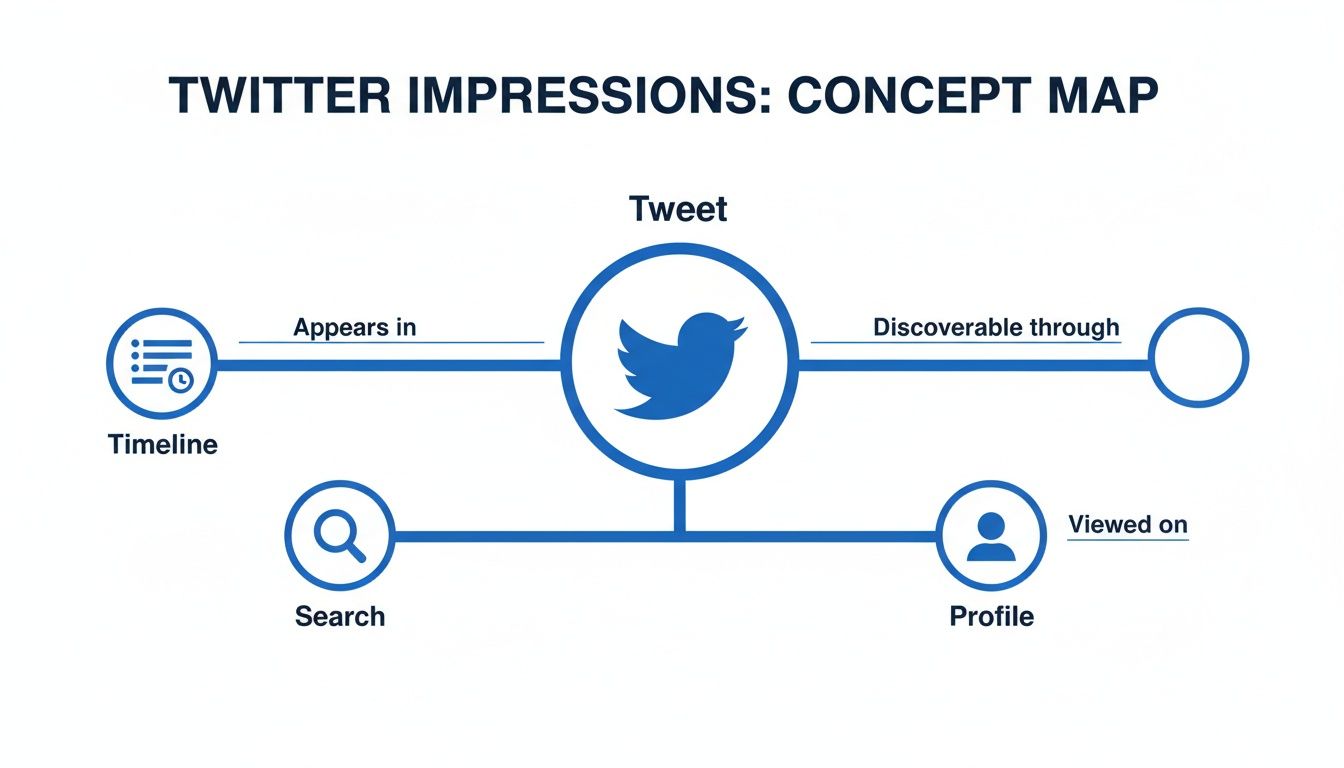
The map shows a single tweet can rack up impressions from multiple places, like search results and profile visits, pushing its visibility far beyond just your immediate followers.
Putting It All Together
So, how do these metrics work together? A tweet can easily have 10,000 impressions but only reach 4,000 unique people (reach), who then generated 250 interactions (engagement).
Seeing these numbers side-by-side paints a much clearer picture. Impressions tell you about exposure, but when you pair them with engagement, you start to understand content resonance. While impressions count views, the engagement rate (likes, retweets, and replies divided by impressions) shows the quality of those views.
With a median engagement rate of just 0.046% across major markets, there's a huge opportunity for most brands to do better.
Key Takeaway: Impressions tell you how often your content was seen, reach tells you how many people saw it, and engagement tells you how many people acted on it. You need all three for a complete performance analysis.
Knowing the difference helps you set better goals. Trying to maximize brand awareness? Push for impressions. Trying to build a loyal community? Engagement is your north star.
Tracking these different social media engagement metrics is crucial for growth. When you use a tool like PostSyncer, you can pull all these numbers into one central dashboard. This makes it so much easier to make data-informed decisions about what's truly working, letting you focus on creating content that hits specific, measurable goals.
How to Find and Read Your Twitter Analytics
Alright, now that you know what impressions are, it's time to roll up your sleeves and find your own. The good news is that Twitter (now X) has a free, built-in tool that gives you a direct window into your content's performance. Getting comfortable with it is your first step toward making smarter, data-driven decisions.
To jump right in, just head over to analytics.twitter.com while you’re logged into your account. This is your command center for all things performance. If you prefer clicking around, you can also get there by tapping your profile picture, selecting "Professional Tools," and then clicking "Analytics."
Navigating the Analytics Dashboard
The moment you land, you'll see the main dashboard, which serves up a high-level 28-day summary of your account's activity. Think of it as a quick health check—perfect for spotting recent trends and seeing if your momentum is heading in the right direction.
Here’s what that home screen typically looks like.

This view gives you an immediate glance at your total tweet impressions, profile visits, and follower changes over the last four weeks. No digging required.
When native analytics first rolled out around 2013, it was a total game-changer. For the first time, marketers could easily see impression data for up to 3,200 recent tweets, moving beyond simple likes and retweets. Today, these dashboards have evolved to show total impressions for custom periods, daily averages, and tweet-level breakdowns, offering a much richer picture of who your content is reaching. For a deeper dive into this, you can learn more about how Twitter analytics evolved on minter.io.
Finding Your Tweet-Level Impressions
To see how individual posts are doing, click on the "Tweets" tab at the top of the page. This is where the real gold is—you can pinpoint your star content and figure out what truly clicks with your audience.
Here you’ll find a list of your recent tweets, each with its own vital stats:
- Impressions: The raw number of times the tweet was seen.
- Engagements: The total count of interactions (likes, replies, link clicks, retweets, etc.).
- Engagement Rate: This is simply engagements divided by impressions, a crucial metric that shows how compelling your content was to the people who saw it.
By regularly checking your top-performing tweets, you'll start to see patterns emerge. Maybe it's a certain topic, a specific image style, or even the tone of your writing that generates the most visibility. Use these insights to double down on what works.
Making sense of these numbers is the heart of effective social media analytics and reporting. And when you’re ready to get serious, a centralized platform like PostSyncer can bring all these metrics together with data from your other social networks, giving you a complete, unified view of your entire digital footprint.
To really get a handle on your Twitter strategy, you have to know the rules of the game. So, what actually makes the impression counter tick? It’s simpler than you might think.
An impression is counted the second any part of your tweet pops up on someone's screen. That’s it.
This could be in a follower's main timeline, a search result for a hashtag, or even just on your profile page. The user doesn’t have to stop scrolling, click, or do anything at all. If Twitter’s system renders your tweet for a user to see, it gets counted.
This whole system is built to measure raw visibility, but it comes with some important boundaries you need to understand.
What Does Not Count as an Impression
Knowing what isn't counted is just as important for keeping your expectations realistic. Twitter is pretty strict about keeping this metric tied to its own turf to make sure the data is clean.
Here are a few common scenarios that do not add to your impression count:
- Embedded Tweets: If you embed a tweet on your blog or a news article, any views it gets there won't show up in your Twitter analytics.
- Third-Party Platforms: When a link to your tweet unfurls a preview in an app like Slack, Discord, or WhatsApp, those views don't count.
- Text Previews: The same goes for email notifications or other text-only previews of a tweet—they don’t register as impressions.
These distinctions matter. If a tweet goes viral because it's being shared everywhere but on Twitter, you won't see that activity reflected in your analytics, which can definitely be confusing.
How a Single Tweet Generates Multiple Impressions
One of the most common head-scratchers is how a single tweet can rack up way more impressions than you have followers. The secret lies in repetition and amplification.
A single person can be responsible for multiple impressions of the same tweet. For instance, if a follower sees your tweet in their timeline in the morning and then sees it again when a friend retweets it that afternoon, that’s two impressions from one user.
Key Insight: Retweets are the engine of impression growth. Every time someone retweets your content, they’re not just sharing it—they’re injecting it into a completely new timeline, creating fresh impressions for a whole new audience.
This is exactly why one well-timed, highly-shared tweet can easily pull in tens of thousands of impressions. It’s less about how many followers you start with and more about how many timelines your content manages to land in.
Actionable Strategies to Increase Your Twitter Impressions
Alright, so you know what impressions are. The next logical step? Making them grow. The good news is you don’t need a one-in-a-million viral tweet to get more eyes on your content. It’s all about a consistent, smart approach that works with the platform, not against it.

These aren't theoretical ideas; they're practical tactics you can start using today. Think of this as your toolkit for expanding your brand’s footprint on Twitter.
Optimize Your Posting Schedule for Peak Visibility
Timing is everything. Seriously. Posting when your audience is actually online is the lowest-hanging fruit for getting an initial impressions boost. You can find plenty of "best time to post" guides, but remember, your audience is unique.
Dive into your own Twitter Analytics and find out when your followers are most active. Look for patterns in your best-performing tweets. Did they take off on a weekday morning or a weekend afternoon? That data is your personalized roadmap.
Pro Tip: Don't just post and ghost. Jumping into the replies and engaging with retweets right after you post sends a strong signal to the algorithm that your content is creating a conversation. This initial momentum is crucial for getting it shown to more people.
A steady schedule keeps your brand top-of-mind and gives your tweets the best shot at landing in front of active users. This is where tools like PostSyncer are a lifesaver, letting you schedule your content for those peak times so you never miss a beat.
Master the Art of Hashtags and Trends
Hashtags are your express lane into much larger conversations. They’re like topic-specific channels where people are actively looking for content. Using them well exposes your tweets to a whole new audience of people who don’t follow you yet but are interested in what you have to say.
- Be Specific: Instead of a massive, generic tag like
#marketing, try something more focused like#SaaSMarketingor#ContentStrategy. This helps you connect with a more targeted, and usually more engaged, group of people. - Tap into Trends: Keep an eye on the "Trends for you" section on Twitter. If you can contribute to a relevant trend in an authentic way, you can put your profile in front of thousands of new eyeballs in a matter of hours.
Figuring out how to use hashtags effectively is a fundamental skill for growing on the platform. Our guide on the topic can help you build a much smarter strategy.
Make Your Content Visually Irresistible
Tweets with images, videos, or GIFs just do better. Period. In a timeline that moves at a million miles an hour, visuals are scroll-stoppers. They grab attention and make people pause for just a second—which is often all it takes for an impression to really count.
It's been shown that a simple image can boost retweets by as much as 150%. Every single one of those retweets multiplies your impressions by showing your content to a brand new audience.
Engage Authentically to Amplify Reach
Twitter is a conversation, not a megaphone. One of the most underrated strategies, especially for smaller accounts, is to become a "reply guy"—in the best possible way. Adding thoughtful, insightful replies to tweets from larger accounts in your niche is a goldmine for impressions.
When your reply adds real value, it gets seen by that account's huge follower base. One user even reported gaining over 500,000 impressions in four weeks almost entirely by replying to other tweets. It just goes to show the power of consistent, valuable engagement.
To make this even more effective, it helps to be familiar with broader content marketing best practices. The goal is to provide value everywhere you show up, which naturally brings people back to see what your profile is all about.
Common Questions About Twitter Impressions
Once you start digging into your analytics, a few questions always seem to surface. Impressions can be a bit of a slippery metric, so let’s clear up the most common points of confusion with some straightforward answers.
Think of this as your go-to guide for making sense of the numbers and getting a feel for the nuances of what impressions really mean on Twitter.
Why Did My Impressions Suddenly Drop?
It's easy to panic when you see a sudden drop in impressions, but it’s rarely a sign that the algorithm has secretly blacklisted you. More often than not, the answer is simpler and directly tied to what you’ve been posting (or not posting) lately.
A few common culprits for a sudden dip include:
- You Posted Less: It sounds obvious, but it’s true. If you took a few days off or just weren't as active, your total impressions will naturally go down. Consistency is everything on Twitter.
- You Didn't Have a Viral Hit: A lot of the time, our overall numbers are propped up by one or two tweets that just take off. If you didn't have one of those breakout moments recently, your average will simply settle back to its normal baseline.
- You Switched Up Your Topics: Trying out new content is smart, but if you pivot to topics that your current audience isn't used to, it can take a little time for visibility to catch up.
Do My Own Views Count as Impressions?
Nope. Your own views on your tweets are completely ignored. Twitter’s analytics are built to measure how your content performs with other people, not you.
You can refresh your own tweet a hundred times, and it won’t move the needle on your impression count. This is a good thing—it keeps the data clean and focused on genuine audience exposure.
Key Takeaway: Impressions are an outward-facing metric. They only tick up when your tweet shows up on the screen of another logged-in user, which keeps the focus squarely on audience visibility.
Why Do I Have More Impressions Than Followers?
When you see this, give yourself a pat on the back. This is an excellent sign! Having more impressions than followers is the clearest signal that your content is breaking out of your immediate circle and reaching new audiences.
It’s exactly what you want to see, and it usually happens when:
- Your followers retweet you, sharing your content with their networks.
- Your tweets pop up in search results when people look for specific hashtags or keywords.
- People discover you through replies you’ve left on other popular tweets.
Seeing impressions soar past your follower count is proof that your content has legs. It shows you’re not just talking to the same people over and over—you’re successfully reaching across the platform.
Ready to stop guessing and start growing? PostSyncer centralizes all your social media analytics, scheduling, and content creation in one place. Stop juggling tabs and start making data-driven decisions that boost your impressions and save you time. Discover how PostSyncer can transform your social media workflow today!



