











A marketing agency can now run an entire client portfolio from one workspace. The team connects Instagram, TikTok, LinkedIn, Facebook, and other networks through OAuth, stores drafts and analytics, feeds PDFs and brand material into an AI content tool, and gives creators, approvers, analysts, and clients different publishing permissions. That convenience also concentrates risk. One stolen session, overpowered token, careless AI prompt, or missed offboarding step can expose several brands at once.
The strongest best practices for data security don't rely on one control. They layer identity protection, least-privilege access, encryption, secure integrations, monitoring, retention rules, incident response, and team behavior. For social media operations, those controls must follow the data through its whole lifecycle, from a content idea and approval comment to an API call, published post, analytics report, backup, and eventual deletion. A privacy-minded approach to connected systems is also reflected in Purple's approach to guest data protection.
The priority order is practical. Start by protecting who can enter the workspace and what each person can do. Then secure connections and stored data, reduce OAuth and vendor risk, define safe AI use, monitor publishing activity, meet GDPR obligations, prepare for a breach, and reinforce the habits that keep the controls working.
1. End-to-End Encryption for Data in Transit
A social media platform rarely sends data in only one direction. Your browser communicates with the management workspace, the workspace communicates with Instagram or LinkedIn, and scheduled content may pass through several API services before publication. Encryption in transit makes those exchanges unreadable to an interceptor, which matters when they contain drafts, approval notes, personal information, credentials, or OAuth tokens.
Use HTTPS for every user-facing page, API endpoint, webhook, callback, and administrative route. Redirect insecure HTTP requests rather than allowing users to choose. HSTS headers tell browsers to use secure connections consistently, reducing downgrade and accidental insecure-access risks.
What to verify in practice
- Check certificate validity: Renew SSL/TLS certificates before expiration and confirm that every subdomain used for authentication, callbacks, media uploads, and analytics is covered.
- Protect OAuth callbacks: Require encrypted callback URLs and reject unexpected redirect destinations. A secure login flow can still be undermined by a poorly protected callback.
- Secure API synchronization: Content schedules, publishing instructions, and platform responses should travel through authenticated, encrypted API-to-API connections.
- Test the implementation: Review TLS configuration regularly, test certificate deployment, and monitor certificate transparency logs for unauthorized issuance.
- Avoid sensitive URLs: Don't place tokens, passwords, or private content in query strings, where they may appear in browser history and logs.
Encryption doesn't replace access control. If an authorized user connects a personal device to a compromised network, TLS protects the transmission, but it won't stop that user from approving a malicious post. Pair encrypted transport with MFA, scoped permissions, device security, and monitoring of unusual publishing behavior.
2. Multi-Factor Authentication
A password is a weak single point of failure for a workspace that controls multiple brands. Multi-factor authentication reduces compromise risk by 99.22% across the full population and by 98.56% even when credentials have already been leaked, according to Microsoft research summarized in KPMG's data-security toolkit. That makes MFA one of the highest-impact controls a social media team can deploy.
Require MFA for every person who can publish, approve, connect an account, change billing, invite users, or manage workspace settings. If a full rollout needs staging, protect workspace administrators and publishing roles first, then expand to every user without creating a permanent exception group.
Choose stronger factors
Authenticator apps using TOTP are generally preferable to SMS because phone-number attacks and message interception can weaken SMS verification. Phishing-resistant hardware keys provide stronger protection for administrators and agency owners. Biometrics can improve mobile access when they open a protected device, but they shouldn't replace an account-level recovery plan.
Store backup codes in a password manager, not in a shared document or an inbox. Train staff to reject unexpected MFA prompts and report repeated requests. Attackers may try to wear users down rather than defeat the technical factor.
Practical rule: Treat an unexpected MFA prompt as a possible incident, not as a nuisance to approve.
Review failed MFA attempts, recovery changes, new devices, and factor resets. A recovery email or phone number can become the easiest route around MFA, so secure it with the same seriousness as the main account. Onboarding should include MFA enrollment, recovery-code storage, and a short explanation of social-engineering tactics.

3. Role-Based Access Control
A content creator doesn't need the same authority as an agency owner. A client reviewer may need to approve a draft but not connect a new social account, export analytics, delete a workspace, or alter billing. Role-based access control turns those distinctions into enforceable permissions instead of relying on informal team instructions.
Design roles around real social media responsibilities. A creator might draft and schedule content without final publishing authority. An approver can review captions, media, links, and platform placement. An analyst can view performance data without changing content. A client can access only the assigned brand workspace. Keep finance users away from publishing functions unless their work requires them.
Make least privilege operational
- Define narrow roles: Use names such as Draft Creator, Brand Approver, Analytics Viewer, and Workspace Administrator so responsibilities are obvious.
- Separate workspaces: Agencies should restrict each person to assigned clients whenever the platform supports workspace boundaries.
- Control sensitive actions: Require re-authentication or elevated approval for account connections, exports, deletion, billing changes, and role updates.
- Review access routinely: Compare current permissions with current responsibilities, especially after a promotion, client change, contractor engagement, or team departure.
- Revoke promptly: Remove access immediately when someone leaves. Don't wait for a quarterly review.
Log role assignments, permission changes, invitations, and removals. Keep the role definitions in the team handbook so managers don't create inconsistent exceptions. Automation can help with onboarding, but an automated process that grants broad default access merely makes over-permissioning faster.
RBAC also protects against accidental publication. A junior employee who can prepare a draft but can't publish it can't turn a typo, incorrect link, or unapproved AI-generated claim into a live brand statement.
4. Regular Security Audits and Penetration Testing
A security control can look correct in a policy document and still fail in production. Social media platforms combine web applications, cloud infrastructure, OAuth callbacks, webhook handlers, media storage, scheduling queues, and APIs. Each integration creates a place where an authorization mistake or insecure configuration can expose content or account access.
Security audits should examine both technical controls and operating evidence. Review who has access, how tokens are stored, whether logs capture sensitive actions, how backups are protected, and whether deletion requests reach every relevant storage layer. A penetration test should include API authorization, workspace isolation, session handling, OAuth flows, webhook validation, file uploads, and rate-limit behavior.
Test the paths attackers will use
An API security review should ask whether a user in Client A can request Client B's draft by changing an identifier. An OAuth test should check whether a callback can be replayed or redirected. A publishing test should verify that a revoked connection can't continue posting through a stale token. Infrastructure audits should inspect storage permissions, secrets management, network exposure, and administrative access.
Build remediation into the process. Assign an owner, severity, deadline, and verification step for every finding. Track mean time to remediation so leadership can see whether serious weaknesses are closing.
A penetration test is useful only when the team fixes the findings and proves the fix.
Use an independent firm with SaaS and API experience, and supplement formal testing with code review, dependency scanning, configuration checks, and targeted testing after major integration changes. Guidance on protecting business information is also available in these business data protection tips.
5. Data Encryption at Rest
Encryption at rest protects information after it reaches a database, object store, backup, cache, or device. For a social media workspace, that may include scheduled captions, uploaded media, approval comments, analytics, client details, API keys, refresh tokens, and AI input files. If an unauthorized person obtains a storage snapshot, encryption adds a barrier between access to the storage system and readable data.
Use encryption for credentials, tokens, personal information, private drafts, analytics exports, and backups. Separate key access from ordinary application access, restrict key administration to a small group, and document how keys are created, rotated, disabled, recovered, and destroyed. Hardware security modules can provide stronger protection for high-value keys, but they also add operational complexity and require tested recovery procedures.
Protect every storage layer
Encrypt the primary database and the queues or object storage used for media and exports. Don't forget temporary files, generated AI assets, logs, and backup copies. A system can claim encryption at rest while leaving a debug export or an old backup unprotected.
Test restoration. Encryption that nobody has verified under pressure can turn a security feature into an availability problem. Maintain separate keys where data categories or environments require isolation, and ensure production keys aren't available to development systems.
When reviewing backup architecture, document where copies live, who can restore them, and how deletion requests interact with them. Teams can also review backup and storage solutions as part of that design.
6. Secure Password Management Practices
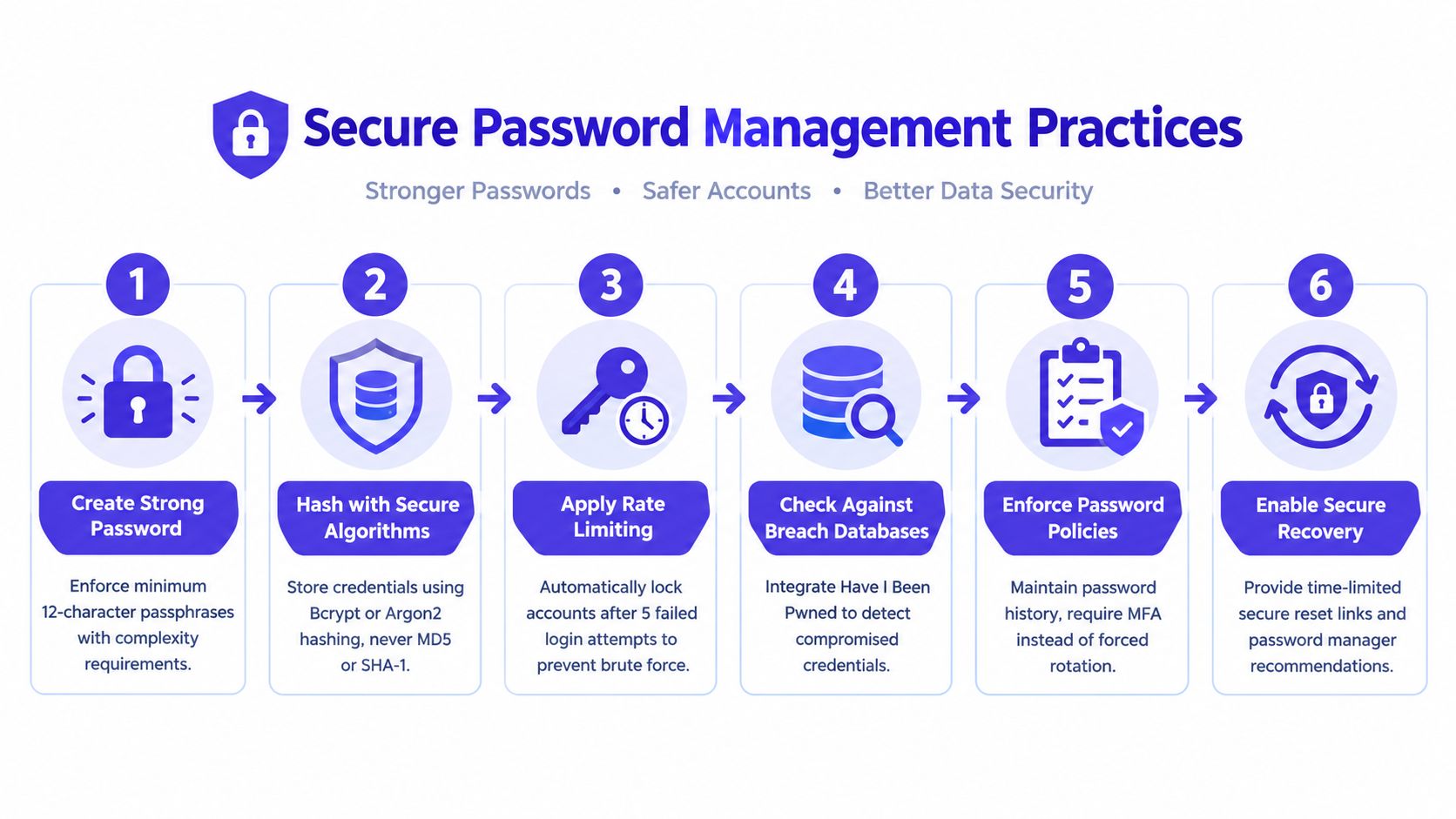
Good password management starts by reducing the number of passwords people handle. Staff shouldn't share a client's social password in chat, email, spreadsheets, or a team document. Use official account delegation and OAuth wherever available, then protect the management workspace with unique credentials and MFA.
For passwords that the application itself must handle, store only strong one-way hashes using a modern password-hashing function such as Argon2 or bcrypt. Never use obsolete approaches such as MD5 or SHA-1 for password storage. Password reset links should be single-use, time-limited, and invalidated after a successful reset or a new request.
Replace password folklore with safer workflows
- Use passphrases: Long, memorable phrases are easier to manage than short strings packed with symbols.
- Use a password manager: Bitwarden, 1Password, or another approved manager can generate and store unique credentials without exposing them to the whole team.
- Check for compromise: Screen new or changed passwords against known breach data without revealing the full password to a third party.
- Limit guessing: Rate limiting and account lockout should slow repeated failures without creating an easy denial-of-service tool.
- Prefer MFA: Don't force constant password changes that encourage predictable variations. Require a reset when compromise is suspected or detected.
A password policy should distinguish between user accounts, service credentials, and social platform access. If a platform still requires a password for an account connection, store it only in an approved secrets manager and restrict access to the smallest possible group. Further practical guidance appears in these LineVerifier password security tips.
7. API Security and OAuth Token Management
OAuth removes the need to give a social media tool your account password, but it doesn't eliminate risk. The resulting access token can still authorize publishing, account reading, comments, analytics, or administrative actions. A stolen or over-scoped token can therefore create damage without exposing a password.
Use OAuth 2.0 with PKCE where supported, validate the state parameter, restrict redirect URIs, and never accept arbitrary callback destinations. Request the smallest scope needed for the workflow. A scheduler may need permission to publish and read analytics, but it may not need broad account-management authority.
Treat tokens as credentials
Store access and refresh tokens encrypted, keep them out of client-side code and logs, and redact them from error messages. Refresh tokens securely before expiration, revoke them when a user disconnects an account, and invalidate them after a suspected compromise. Log token creation, refresh, revocation, and use without recording the token value itself.
Verify webhook signatures from platforms before processing events. Validate payload structure, reject replayed requests where the platform supports replay protection, and isolate webhook processing from administrative actions. Monitor unusual API behavior, such as unexpected publishing times, unfamiliar destinations, sudden content changes, or a burst of requests from a new location.
For teams evaluating delegation patterns, PostSyncer's OAuth delegation workflow illustrates why delegated access should be separated from password sharing.
A useful implementation principle is simple: a disconnected social account should stop publishing, refreshing, and reading data as soon as the authorization is revoked.
8. Data Retention and Secure Deletion Policies
GDPR work becomes difficult when a team knows what it collected but not where copies went. A social media workflow can create several versions of the same information: an uploaded image, an AI prompt, a generated caption, a draft, an approval comment, a scheduled job, a platform response, an analytics record, a log entry, and a backup.
Create a retention rule for each category. The rule should state why the data exists, who can access it, when it should be deleted or anonymized, and how the decision applies to backups and exports. Keep the schedule in the privacy documentation and connect it to automated jobs rather than relying on individual employees to remember.
Deletion must reach the whole lifecycle
Deleting a workspace record from the main database isn't enough if refresh tokens remain in a secrets store, media persists in object storage, or an export remains in a download folder. Use cryptographic erasure where appropriate, but verify that destroying a key won't affect unrelated tenants or active records. For physical devices and retired media, a controlled sanitization process matters too. A 2025 IT asset management benchmarking report found that 52% of organizations reported compliance with NIST 800-88, up from 34% the previous year, showing progress while leaving a substantial maturity gap.
- Map copies: Include primary data, caches, exports, logs, archives, and backups.
- Automate expiry: Apply retention jobs to drafts, tokens, temporary files, and request logs.
- Record evidence: Log deletion requests, completion status, exceptions, and verification results.
- Handle legal holds: Document when a legitimate compliance or legal requirement pauses deletion.
Teams can use PostSyncer's GDPR compliance guidance when translating these obligations into operational workflows.
9. Security Monitoring and Logging
A social media team needs more than login logs. The security-relevant story includes who connected a platform, who changed a role, who exported analytics, who edited an approved caption, who published outside the normal schedule, and which token called an API after an account was supposedly disconnected.
Log authentication, authorization decisions, workspace access, data exports, account connections, token events, role changes, content edits, approvals, publications, deletions, and administrative configuration changes. Each event should capture enough context to answer who acted, what they accessed or changed, when it happened, where the request came from, and whether the action succeeded.
Turn logs into decisions
Store logs in tamper-resistant or immutable storage and restrict access to investigators. Use consistent formats so events from the application, identity provider, cloud provider, and social platforms can be correlated. Rotate logs according to the retention policy, but don't delete evidence before the organization has assessed an alert.
Useful alerts include a new administrator, a role escalation, a login from an unusual location, a sudden burst of publishing, a token used after revocation, a webhook signature failure, and access to a client workspace outside normal patterns. Alerts need owners and response instructions. A dashboard that nobody reviews is an archive, not a detection system.
Visibility gaps become expensive in distributed environments. IBM reported that 40% of breaches involved data stored across multiple environments, and those incidents averaged more than USD 5 million and took 283 days to identify and contain, according to its 2024 data breach findings. Centralized monitoring is particularly important when a social team combines SaaS tools, cloud storage, devices, and many client accounts.
10. Employee Security Training and Awareness
Training works best when it matches the employee's actual decisions. A creator needs to recognize a fake collaboration brief and avoid pasting confidential client material into an AI tool. An approver needs to verify a suspicious link before publication. An administrator needs to handle MFA recovery, OAuth connections, exports, and offboarding safely.
Build onboarding around the workflow rather than a generic slide deck. Show staff how to use the password manager, report a suspicious login, validate a platform connection, classify AI inputs, approve content, and revoke access. Explain that client data can appear in captions, comments, direct messages, images, analytics, and attached documents.
Practice the moments that cause harm
Run phishing exercises and give immediate feedback, but don't turn them into punishment. Teach employees how attackers imitate platform alerts, agency clients, influencers, and internal managers. Technical teams need deeper training on secrets, API scopes, webhook verification, dependency risk, and logging. Nontechnical teams need clear escalation paths and examples they can recognize.
Hold tabletop exercises for scenarios such as a compromised administrator, unauthorized publishing, a leaked client export, or an AI tool receiving restricted information. Include marketing, legal, client services, IT, and leadership so the response doesn't depend on one security specialist.
Third-party risk deserves equal attention. Verizon's 2025 DBIR reported that third-party involvement doubled from 15% to 30%, as summarized by Quisitive's review of the report. Smaller teams can prioritize vendors by access, inventory every integration, monitor changes, and require contractual evidence of relevant controls instead of attempting a costly enterprise-style review of every supplier.
Top 10 Data Security Best Practices Comparison
| Security Control | Implementation Complexity 🔄 | Resource Requirements ⚡ | Expected Outcomes ⭐📊 | Ideal Use Cases 💡 | Key Advantages ⭐ |
|---|---|---|---|---|---|
| End-to-End Encryption for Data in Transit | Moderate, implement TLS, cert lifecycle | Moderate CPU overhead, certificate management | Strong protection against interception; improved compliance | All user-server and third-party API communications (OAuth flows) | Prevents MITM and token theft; builds client trust |
| Multi-Factor Authentication (MFA) | Low–Moderate, integrate TOTP/SMS/keys | Moderate support burden, user onboarding effort | Large reduction in account takeovers and credential abuse | Accounts with publish rights or high-value client access | Blocks credential stuffing and unauthorized access |
| Role-Based Access Control (RBAC) | Moderate–High, design roles & approval flows | Ongoing admin governance and tooling | Reduced blast radius from compromises; auditable permissions | Multi-workspace teams with distinct responsibilities | Enforces least privilege; simplifies onboarding/offboarding |
| Regular Security Audits & Penetration Testing | High, coordinate engagements and remediation | High cost, third-party testers, engineering fixes | Discover vulnerabilities proactively; compliance evidence | Annual/quarterly validation; pre-release security checks | Identifies real-world weaknesses and remediation roadmap |
| Data Encryption at Rest | Moderate, implement DB/TDE and KMS | KMS/HSM, key rotation operations, performance impact | Protects stored tokens/credentials if storage is breached | Databases, backups, and stored OAuth/API credentials | Defends against data exfiltration; supports GDPR/HIPAA |
| Secure Password Management Practices | Low–Moderate, hashing, policies, breach checks | Dev effort for hashing + breach integrations; UX tradeoffs | Fewer compromised accounts from weak passwords | User sign-up, auth flows, password reset systems | Reduces credential reuse risk; aligns with best-practice guidance |
| API Security & OAuth Token Management | High, PKCE, rotation, scope controls | Significant dev effort, encrypted storage, monitoring | Secure integrations; limits token abuse and scope misuse | Multi-platform OAuth integrations and webhooks | Minimizes long-lived credential exposure; fine-grained control |
| Data Retention & Secure Deletion Policies | Moderate, lifecycle rules, backup coordination | Dev work, backup handling, legal/compliance input | Reduced data exposure window; GDPR right-to-be-forgotten support | Retention of logs, drafts, tokens, analytics data | Lowers compliance risk and storage costs; clear deletion audit |
| Security Monitoring & Logging | Moderate–High, SIEM, alerting, log pipelines | High storage & analyst resources; tooling costs | Early detection and forensic capability for incidents | Detect anomalous access, API misuse, privilege changes | Enables rapid detection, investigation, and compliance audits |
| Employee Security Training & Awareness | Low, program setup; ongoing refreshers | Training vendors/platforms, time investment | Fewer human-error incidents; improved reporting of threats | Phishing resistance, social engineering, insider risk | Strengthens security culture; reduces successful attacks |
Turn Security Advice Into a Working Control Plan
A list of controls doesn't secure a social media operation until someone owns each one. Start with identity and access because those controls protect the front door and limit the damage caused by a stolen credential. Enforce MFA for every user, beginning with administrators, publishers, approvers, and billing roles. Remove shared accounts, define least-privilege roles, restrict users to the workspaces they need, and create an offboarding step that revokes sessions, tokens, invitations, and device access.
Next, secure the credentials and connections that move content between systems. Use a password manager, strong password hashing, protected reset flows, OAuth with PKCE where supported, narrow scopes, encrypted token storage, signed webhooks, and immediate revocation after disconnection. Don't treat an integration as safe merely because it uses OAuth. Review what it can read, change, publish, and retain.
Verify encryption in transit and at rest across the actual workflow. Test HTTPS, certificates, HSTS, databases, media storage, temporary files, analytics exports, and backups. Document key ownership and recovery procedures. Then write rules for AI content inputs. Decide which client documents, personal data, unpublished campaigns, credentials, and private messages may be submitted to an AI feature, which tools are approved, how prompts and generated assets are retained, and how a human checks output before publication.
Configure monitoring around business impact. Capture logins, role changes, OAuth activity, workspace access, exports, approvals, edits, publishing events, deletion requests, and failed webhook validation. Set alerts that a named person can investigate. Record evidence in protected storage so the team can reconstruct what happened.
GDPR requires more than a privacy statement. Map every data category, define its purpose and retention period, include backups and SaaS exports, automate deletion where possible, and document exceptions. For modern operations, centralized governance matters because IBM's 2024 findings linked fragmented environments with longer identification and containment periods, while its 2025 report found that extensive use of AI and automation shortened breach times by 80 days and lowered costs by USD 1.9 million. Those results support early detection and automated response, but automation still needs careful permissions and human oversight. See the IBM Cost of a Data Breach Report for the underlying breach-cost research.
Finally, rehearse response. Decide who isolates a compromised workspace, revokes tokens, pauses publishing, preserves logs, contacts the client, assesses notification duties, and restores approved access. Repeat audits, access reviews, training, deletion tests, and recovery exercises. ITRC reported that root-cause details in public breach notices fell from nearly 100% in 2020 to 30% in 2025, while more than half of 2025 notifications came from state agencies publishing summary data rather than underlying letters, according to its 2025 Annual Data Breach Report. Your own evidence therefore matters. Assign an owner, deadline, test method, and proof of completion to every control, and review the plan whenever your team, platforms, AI tools, or client obligations change.
PostSyncer supports multi-platform scheduling, approval workflows, multi-workspace collaboration, analytics, AI content creation, OAuth connections, and GDPR-oriented professional workflows in one workspace. Use PostSyncer to centralize publishing operations, then apply the access, encryption, monitoring, retention, and training controls that keep connected social data protected.