











You publish the campaign link, schedule the post, and move on to the next task. A few weeks later, GA4 shows traffic split across Instagram, instagram, IG, and an unhelpful collection of referrals. The campaign name is slightly different in the email brief, the ad platform, and the spreadsheet. Nobody can confidently say which creative drove the result.
That mess usually isn't caused by a difficult analytics platform. It starts earlier, when several people create links without a shared system. A UTM parameter builder can speed up link creation, but its real value appears when your team uses it as part of a governed process for naming, approval, testing, and reporting.
What UTM Parameters Are and Why Marketers Build Them
A campaign link can reach a landing page correctly and still leave GA4 with little useful context. UTM parameters are query-string tags added to an external destination URL. They identify the marketing activity behind a click, so Analytics can associate referral values with the Traffic acquisition report. The standard fields are utm_source, utm_medium, utm_campaign, utm_term, and utm_content, as described in Google's campaign URL documentation.
Each field answers a different reporting question:
utm_sourcenames the publishing platform, such asfacebook,newsletter, orlinkedin.utm_mediumgroups traffic into a channel, such associal,email,cpc, orreferral.utm_campaignidentifies the initiative, such asproduct_launch_q3.utm_contentdistinguishes creatives or placements within that initiative.utm_termrecords a paid keyword or other targeting detail, most commonly for paid search.
Consistent labels give GA4 enough context to compare campaigns, channels, and creative variations. Without them, relevant visits can appear as untagged or inconsistently named traffic. Reporting then requires manual cleanup, and return calculations become harder to trust. The issue is usually the links, not a missing GA4 report.
Practical rule: Treat UTM values as reporting inputs, not decoration added at the end of a launch.
A builder replaces repeated URL editing with controlled fields. Contributors select approved values instead of guessing syntax, capitalization, separators, or parameter order. That reduces copy-paste drift across brands and campaigns, while leaving the team responsible for the larger process. Set an approved vocabulary, assign ownership, and define who reviews links before publication.
Used this way, a UTM parameter builder becomes a governance tool. It can standardize requests from agencies, social teams, email specialists, and regional marketers, then support approval before links reach live channels. Automation can apply the same naming rules across contributors, but teams still need to check destination URLs and campaign details.
The convention began with Urchin Software, whose analytics product Google acquired in 2005 for around $30 million. The naming pattern continued into Google Analytics and later GA4 workflows, as documented in Google's campaign URL documentation. A modern builder adds an operational layer around that established measurement standard.
The Five Standard UTM Parameters Explained
A useful way to understand UTMs is to assign each field one question. If two fields answer the same question, your taxonomy will become difficult to maintain.
Source identifies who published the link
Set utm_source to the platform, publisher, or system that distributed the link. facebook and newsletter should remain distinct because they represent different origins. If a social manager uses facebook-post in one link and facebook in another, GA4 can't group those values cleanly without additional reporting work.
Medium describes how the visitor arrived
The medium should follow a fixed vocabulary. A team might use social, email, cpc, and referral, or it might distinguish paid social with paid-social. Either choice can work if everyone uses it consistently. The important decision is made before launch, not during the reporting meeting.
Campaign names the initiative
Use a readable slug such as product_launch_q3_us or spring_promo_2026. A campaign value should match the initiative in your brief and, where relevant, the platform campaign name. Lowercase values and hyphens or underscores prevent spaces and capitalization from creating separate report rows.
Content separates creative variations
Suppose two Instagram assets promote the same offer. Use hero_video_cta for the reel with the main video call to action and carousel_b_cta for the carousel variation. GA4 can then answer which creative value generated sessions or conversions within the same campaign.
Term records keywords or targeting
Use utm_term mainly when the link represents paid search or another activity with a meaningful targeting label. A Google Ads keyword can populate this field, while an organic social post usually has no keyword value worth recording. Keep it blank rather than filling it with irrelevant text.
| Parameter | Purpose | Example value | GA4 question answered |
|---|---|---|---|
utm_source |
Publishing platform or origin | facebook |
Where was the link published? |
utm_medium |
Channel or traffic category | paid-social |
What type of traffic arrived? |
utm_campaign |
Marketing initiative | product_launch_q3 |
Which campaign generated the session? |
utm_content |
Creative or placement | hero_video_cta |
Which asset drove the click? |
utm_term |
Keyword or targeting detail | project_management_software |
Which paid term or targeting label was involved? |
Google's current documentation also includes additional campaign fields such as utm_id in modern implementations. Don't assume every field belongs in every manually created link. Decide upstream how your team will handle campaign identifiers and cross-network deduplication, then enforce that choice in the builder and campaign log.
How to Build UTM Links Manually and With a Builder
Take the destination URL ` and tag it for a spring promotion. The manual version starts with a question mark, then adds each key-value pair with an ampersand:
`
If a value contains spaces, encode them as %20 or replace them with your approved separator. Hyphens are often easier for people to read, while underscores can work well for systems that use snake_case. Before publishing, inspect the full string, confirm that the destination still loads, and check that every parameter uses the expected spelling and case.
The manual method works for an occasional link. It becomes fragile when a launch includes several platforms, multiple creatives, and contributors working from different documents. One missing ampersand, duplicated question mark, or mistyped field can leave the link technically functional while damaging the report.
The builder workflow
Open a UTM generator for creating campaign links, paste the same destination, and fill the fields from your approved taxonomy:
- Enter ` as the destination.
- Select the approved source,
instagram. - Select the approved medium,
social. - Enter
spring_promo_2026as the campaign slug. - Add
hero_videoas the content value. - Generate the URL and review the output before copying it.
The builder should produce the same core structure:
`
A shortening option can make a long link easier to place in a social post or message, but shortening doesn't make a bad taxonomy better. It also adds another redirect or processing layer to test. Use it only after you've confirmed that the final destination preserves the query string.
A builder removes syntax mistakes. It won't decide whether your team should use
social,organic-social, orpaid-social.
That distinction matters. A form can generate a valid URL with inconsistent values just as quickly as a person can. Presets, locked dropdowns, and approved field values are what turn a convenience tool into a dependable team workflow.
Naming Conventions That Keep Your Reports Clean
The UTM specification isn't usually the source of broken attribution. Inconsistent naming is. GA4 can separate Instagram, instagram, and IG, but that doesn't mean your reporting team can compare them without cleaning the data first.
Write the convention before the campaign starts. Lowercase values should be the default, with hyphens or snake_case used consistently for multi-word values. Avoid spaces, punctuation that needs special encoding, internal shorthand that freelancers won't understand, and campaign labels that change halfway through the launch.
The hardest decision is often the medium. A paid social team might classify the channel as paid-social, while another team may keep all click-based paid traffic under cpc. Either approach can be defensible. Choose one, document it, and don't let individual contributors improvise based on the platform interface.
Build a campaign log
A shared campaign log gives every link a source of truth. It can live in Google Sheets, Airtable, or your campaign management system, provided contributors can find the current version and understand who approves changes.
Record at least:
- Campaign name: The exact approved
utm_campaignvalue. - Owner: The person responsible for the initiative and its links.
- Start date: When the campaign is expected to publish.
- Approved source and medium: The permitted combinations for the placement.
- Content and term values: Creative or targeting labels where relevant.
- Final URL: The exact link that passed review.
Agencies need this discipline across clients. A freelancer who works on several brands shouldn't have to infer whether one workspace uses paid-social while another uses cpc. Multi-brand teams should also separate workspaces or logs so a value approved for one client doesn't become the default for another.
| Rule | Do | Don't |
|---|---|---|
| Case | Use instagram |
Use Instagram in one campaign and instagram in another |
| Separators | Use summer-sale or summer_sale |
Use spaces or mixed separators |
| Source | Use facebook for Facebook placements |
Create facebook-post and fb as informal variants |
| Medium | Use the approved channel vocabulary | Alternate between paid, paid-social, and cpc without a rule |
| Campaign | Match the master campaign name | Let each contributor invent a variation |
| Review | Add the final URL to the log | Publish a link that exists only in an email thread |
Use the social media analytics report template as a starting point for connecting campaign labels with recurring reporting. The log isn't administrative overhead. It protects the dimensions your stakeholders use to judge channel and creative performance.
A single rogue source value can fragment a Traffic acquisition report. Approval matters because cleanup after publication is rarely as simple as renaming a row. Historical sessions retain the values they received, so prevention is cleaner than repair.
Ready-Made UTM Examples for Social Campaigns
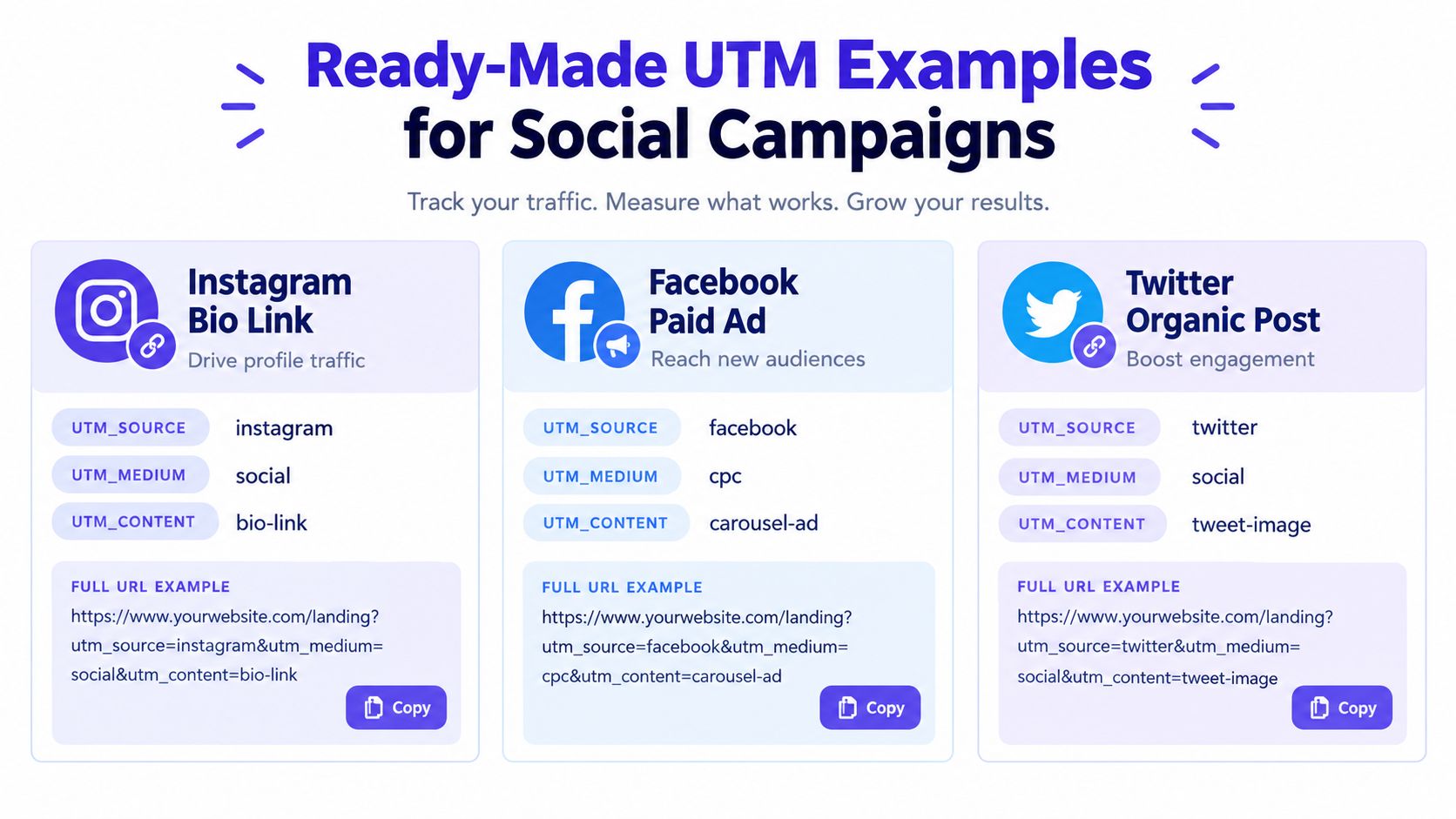
The examples below use one hypothetical campaign, summer-sale, so the campaign value stays stable while source, medium, and content change with the placement. The destination pages are illustrative. Replace them with the actual page for your offer, then run each link through your naming review.
Instagram Reel
For an Instagram Reel driving visitors to a product page, use the platform as the source and distinguish the video call to action in the content field:
`
Using reel as the medium can be useful if your team wants to compare Reels against other Instagram placements. If you prefer a broader social taxonomy, use social for the medium and keep the placement detail in utm_content. Don't switch between those approaches inside one reporting system.
LinkedIn paid post
A sponsored LinkedIn post aimed at B2B leads can use:
`
The content value identifies the ad format or lead-generation treatment. If your approved vocabulary uses cpc for all paid clicks, substitute that medium consistently. The source should still identify LinkedIn, not the objective or audience.
X link in bio
For an X profile link that drives newsletter signups, use:
`
The content value captures the placement, which helps separate profile traffic from a post or promoted link. Organic social usually doesn't need utm_term, because there isn't a paid keyword to record. Leave the field empty rather than adding a misleading value.
The infographic uses twitter for its organic-post example, while the copy-ready X example uses x. Your team should choose one source label for the platform and add it to the approved source list. That small decision prevents two names for the same network from appearing in reports.
Testing and Tracking UTM Links in Google Analytics
A tagged URL isn't finished when the builder generates it. Open the final link in a browser, inspect the address, and confirm that utm_source, utm_medium, and utm_campaign are present. Then use GA4's DebugView or Realtime report to verify that a test visit carries the expected campaign context.

Read the acquisition report
In GA4, open Reports, then Acquisition, then Traffic acquisition. Review dimensions such as Session source, Session medium, and campaign values. Compare what appears in the report with the links you published, the planned post inventory, and the campaign records your team approved.
For a more detailed reference on field behavior and report interpretation, use this guide to Google Analytics UTM parameters. Keep the review focused on mismatches. A missing campaign row, unexpected source spelling, or medium outside the approved vocabulary usually points to a workflow failure rather than a performance insight.
Check the link from the actual platform, not only a desktop preview. In-app browsers, redirects, and link-management layers can behave differently from a direct browser test. A short URL may resolve correctly while still dropping or rewriting query parameters, so test the complete journey.
Common breakages include:
- Redirect chains: A redirect can remove the query string before the landing page loads.
- Shortener rewriting: Bitly, Rebrandly, or another service may change the final path or parameters.
- Duplicate tagging: A link may carry repeated fields, such as more than one
utm_source, creating ambiguity. - Copied campaign links: A contributor may reuse an old URL and leave the previous campaign value in place.
- Platform substitutions: A social platform or publishing workflow may modify the link before distribution.
Launch check: Click the link from the live placement, watch the landing page load, and confirm the session in GA4 before reporting on the campaign.
Test one link per placement and creative pattern, not merely one link from the spreadsheet. The point is to validate the route your audience will use, including redirects and in-app browsing, before stakeholders discover the problem in a campaign report.
Automation, Integrations, and a Quick-Start Checklist
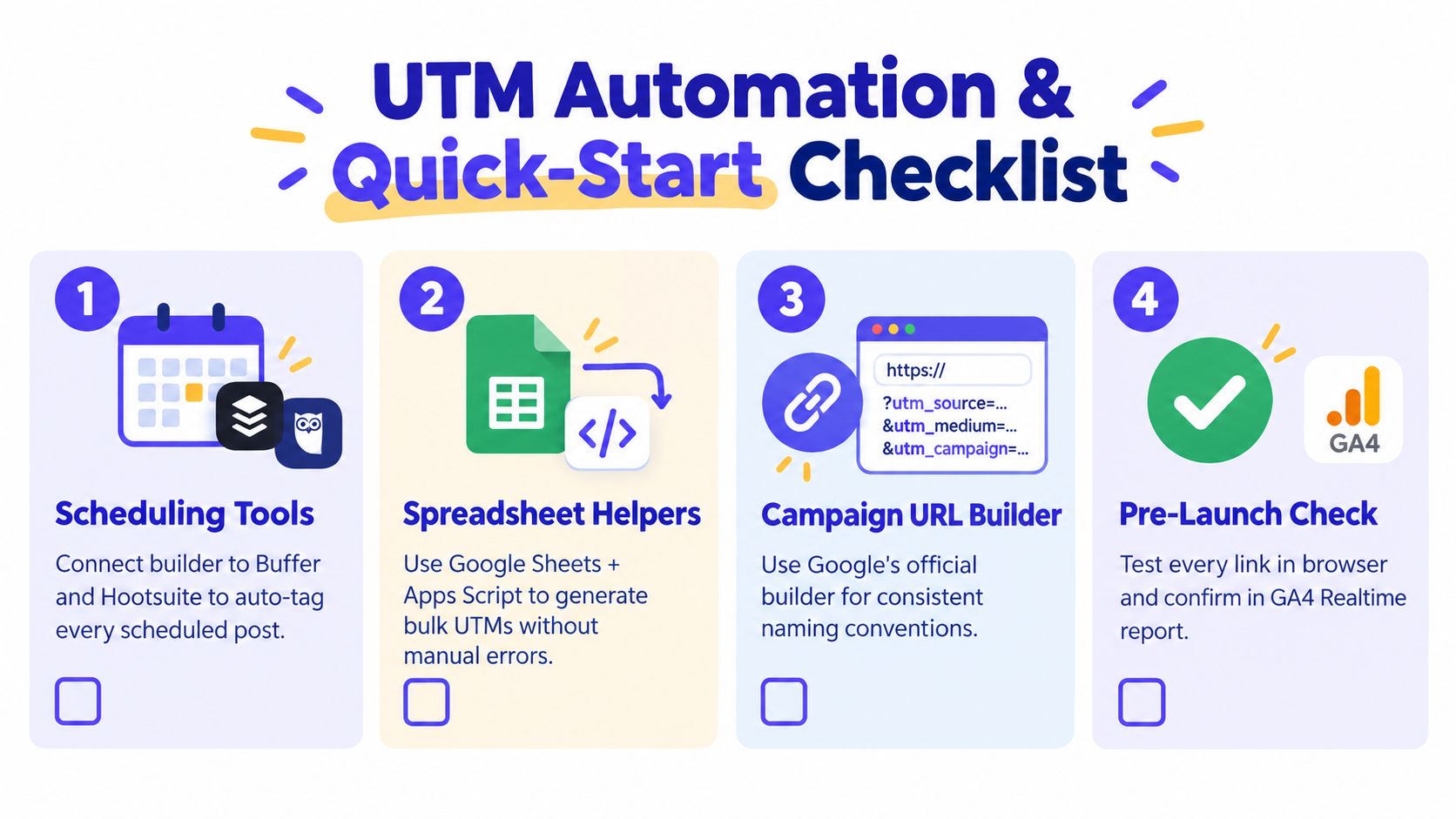
Governance becomes much easier when contributors don't have to request a link through email. Connect approved UTM fields to the systems where publishing already happens. Scheduling tools such as Buffer and Hootsuite can receive tagged URLs, while Google Sheets with Apps Script can generate consistent links in bulk.
A spreadsheet helper should pull from controlled values rather than accept unrestricted text. The same principle applies to Zapier, Make, or a custom API call. Pass approved utm_source, utm_medium, and utm_campaign values as structured fields, then derive content or term from the campaign record instead of asking each contributor to type them again.
Google's official Campaign URL Builder can support straightforward generation, while Bitly and Rebrandly can shorten links after the full tagged URL has passed review. PostSyncer provides a UTM Generator Tool for creating custom tracking URLs and supports social scheduling and analytics workflows, making it one option for teams that want campaign link creation close to content planning.
Quick-start checklist
Copy this into your campaign project document:
- Pin the naming sheet: Put the approved source, medium, campaign, content, and term rules where every contributor can reach them.
- Approve the medium list: Decide whether paid social uses
paid-social,cpc, or another controlled value. - Create the campaign record: Add the owner, launch timing, placements, and exact campaign slug.
- Configure builder presets: Lock recurring sources and mediums where your tool supports presets.
- Add the builder to the team wiki: Give contributors one official creation path.
- Connect scheduling workflows: Pass the approved URL into Buffer, Hootsuite, or your publishing system.
- Generate bulk links safely: Use Google Sheets and Apps Script only with controlled columns and review permissions.
- Test redirect behavior: Open shortened and full URLs from the intended platform.
- Verify in GA4 Realtime: Confirm the expected source, medium, and campaign values.
- Archive the final URLs: Store the published version beside the campaign record for later reconciliation.
The goal isn't to automate every decision. Automate repeatable construction, preserve human approval for taxonomy, and keep the final link visible to the people responsible for reporting. That combination scales better than either fully manual tagging or an unrestricted builder.
If your team is losing campaign context between content planning, publishing, and GA4 reporting, use PostSyncer to organize scheduled social content, approvals, multi-workspace workflows, analytics, and UTM link creation in a more consistent process. Start by standardizing one active campaign, test its links in GA4, and then make the approved workflow your team default.