

You've got a vertical clip sitting on your phone, an upload tab open in another window, and a decision you keep postponing: whether this one is good enough to post, and what you'd change if it isn't. The clip looks fine on the phone. The cover frame is a guess. The title is whatever you typed last.
That hesitation usually comes from doing the work in the wrong order. Creators often edit first, ask what the Short is for second, then look at analytics a week later and learn nothing they can act on. Knowing how to make YouTube Shorts is mostly a sequencing problem, not a talent problem.
The order that holds up is plan, shoot or reframe, edit, publish, read three numbers, repeat. Each step below exists to stop the next one from wasting your time.
Shorts Specs and Upload Limits You Need First
A vertical export can still miss the Shorts format if its runtime or rights status breaks YouTube's rules. Square and vertical uploads up to 3 minutes have counted as Shorts since October 15, 2024, according to YouTube's Shorts upload requirements. That gives tutorials, demonstrations, explainers and stories more room, but extra runtime only helps when the idea can hold attention.
The requirements at a glance
| Requirement | Value to use | What breaks if ignored |
|---|---|---|
| Aspect ratio | 9:16 vertical; square also qualifies | Wide 16:9 files are treated as long-form content and skip the Shorts feed |
| Maximum length | Up to 3 minutes for uploads from October 15, 2024 | Older uploads keep their original classification |
| Export size | 1080 × 1920 pixels | Landscape or mis-sized frames lose the vertical layout and may be cropped by the player |
| Upload resolution | 1080p | Higher exports add upload time without a playback benefit |
| Title length | Up to 100 characters | Put the key words near the start |
| Copyright status | Verify licensing for music and footage | Shorts over 1 minute with an active claim can be blocked globally |
Choose the format before filming: a brief hook designed to loop, or a longer piece that earns its runtime with useful information. Changing that decision after editing can mean rebuilding the video.
Copyright can stop a Short from reaching viewers. YouTube warns that a Short longer than one minute with an active copyright claim can be blocked worldwide. Check the rights for music and third-party footage before editing; replacing audio after a claim may require a new export and upload.
An active copyright claim can block a three-minute Short worldwide.
For a practical reference while setting up your export, see this YouTube Shorts size and specs guide.
Record, Edit and Caption a Short Step by Step
Write the first second before you write anything else. A Short is one promise delivered fast. If a phone repair shop posts a clip, the promise is a cracked screen made whole in 40 seconds, and the opening frame is the cracked screen, not the logo. Everything before that promise, the greeting, the brand sting, the two-second fade, is a tax you charge your own retention.
Below is the same sequence on one card, from the promise to the length test.
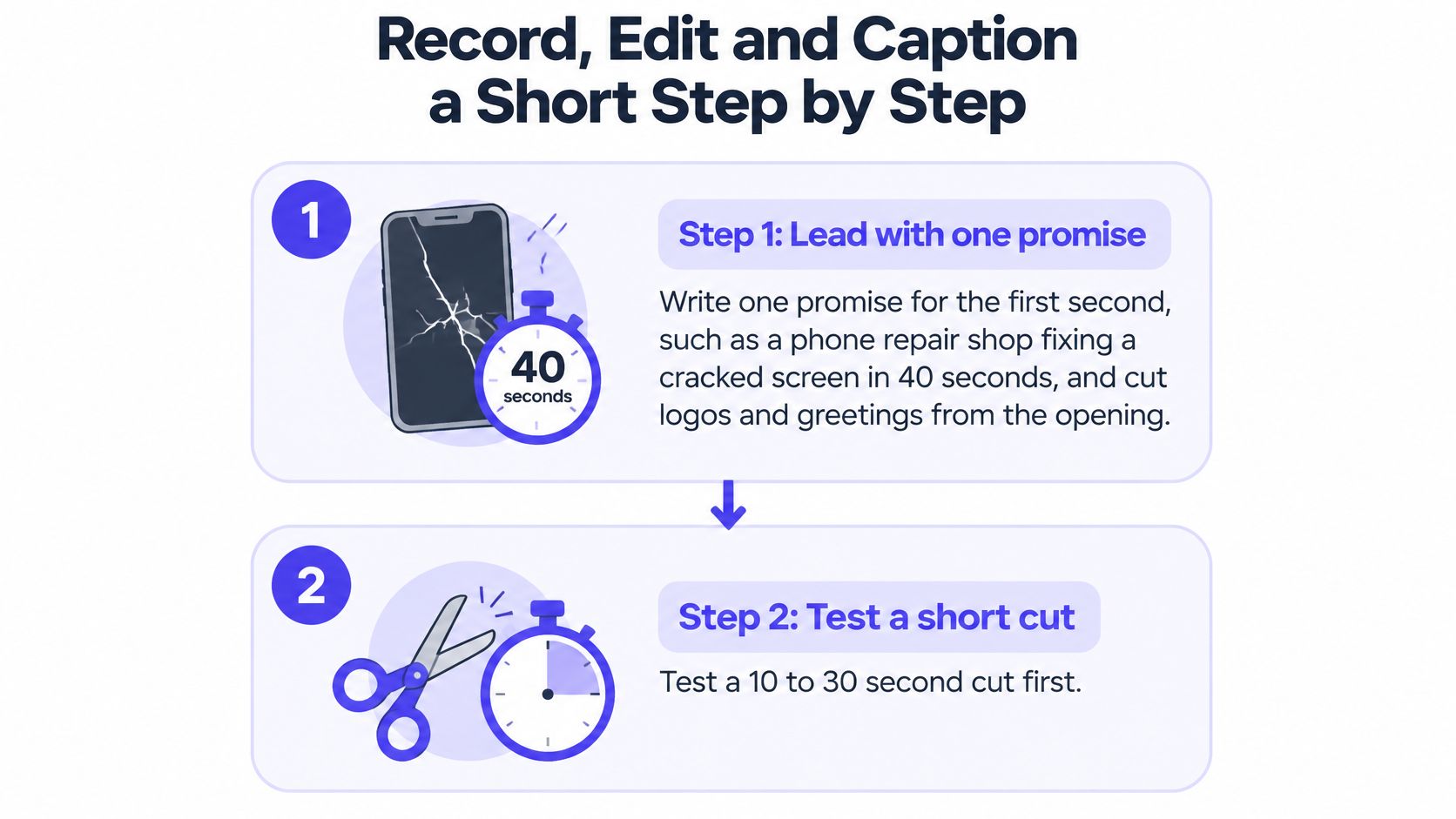
- Test a short cut before committing. For a commercial or educational piece, build a 10 to 30 second version first. Google's vertical video guidance recommends that range for action-oriented assets, and it notes that Shorts-feed ads longer than 60 seconds stop playing at the first minute. A tight 20 seconds usually beats a loose 90.
- Capture in the app or import a finished file. In the YouTube app, tap Create, choose Short, then hold or tap the capture control. If you shot elsewhere, import the finished vertical file instead. Neither path changes the edit, so choose based on whether you need a tripod.
- Build four beats. Visual proof or problem, rapid explanation, demonstrated payoff, then a loop or call to action. Four beats in 25 seconds is comfortable. Six beats in 25 seconds is a slideshow.
- Change something every one to two seconds where the subject allows: framing, a graphic, an on-screen number. Pacing is not the same as cutting. A static shot with new information on screen moves faster than five jump cuts that say the same thing.
- Caption for silence and for search. Burn in the essential context, switch on native captions for accessibility, and use minimal text where the visuals already carry the meaning. Then read the auto-captions by hand. Names, product terms, punctuation and timing all need review, and dialogue needs to sit clearly above the music rather than inside it.
- Keep the lower band clear. Faces, captions and product details belong above the zone where Shorts controls appear, or viewers lose the punchline behind a progress bar.
- Export deliberately. MP4 container, H.264 video, AAC audio, 1080 × 1920, source frame rate preserved, around 8 Mbps for 24 to 30 fps or 12 Mbps for 48 to 60 fps.
- End on a frame that reconnects to the opening. A clip that finishes on the same image it started with earns replays, and replays are counted.
Here's the same workflow walked through on camera, from capture to caption.
Take a 20-second clip for a yoga studio. The main instruction, "knees track over the second toe," is burned in at the top. Native captions carry the rest. A Spanish version gets exported from the same timeline with human-checked translations, not raw auto-captions, because a mistranslated cue is worse than no cue.
Before publishing, watch it once on the phone at arm's length. The hook should be readable without squinting, the payoff should land before the final third, and nothing important should sit under the controls.
Reframe Existing Footage Into a Vertical Short
A recording you already own is the cheapest Short you'll ever make, and the reframe is where it usually falls apart. The first check is the aspect ratio. Until that 16:9 master becomes 9:16, it isn't a Short and won't be treated as one, so the reframe isn't a nice-to-have stage.
Crop around the subject. Set a 1080 × 1920 frame, keep faces inside the central safe area, and move the crop with slow pans or gradual scale changes rather than jump-reframing mid-sentence. Resist the black bars. They shrink the picture on a phone and signal recycled television.
Take one moment, not the recording. A three-minute long-form video with a clear step, demonstration or result converts into a 30 to 60 second Short. If the sequence only makes sense as a whole, a two-minute tutorial works. Find the single claim that stands alone, move it to the opening second, and cut the setup that used to precede it.
If the source clip is already live under the older, shorter classification, sixty seconds stays your ceiling for that material. Trim to fit rather than re-uploading and hoping the platform reclassifies it.
Weak source footage shows up badly once you crop in, so a quick pass through an AI photo editor can clean and upscale the frame you plan to use as a cover. The image is the first thing anyone sees in the feed, and a soft cover wastes a strong hook.
When you want the extraction done for you, the segment-picking workflow in PostSyncer's guide to making clips from a YouTube video covers how to choose the moment and export it vertically. Finish by checking the reframed shot on a phone, confirming music and footage licensing, and exporting at 1080 × 1920 with the same encoding settings as a native recording so the file behaves like an original upload.
How to Upload and Publish Your Short
Open the YouTube app or YouTube Studio and upload the file directly. Add a title with your key words near the front, set privacy, and either publish or save a draft. The draft option earns its keep when a phone edit needs a second opinion on a desktop screen, and it costs nothing to use.
After publishing, YouTube Studio Analytics carries Shorts-specific data: views, comments, remixes, watch time and audience retention, as YouTube's Shorts upload and analytics help page explains. That page also marks the measurement change that reshaped how everyone reads these numbers. Since March 31, 2025, a view is counted whenever a Short starts or replays, with no minimum watch time, and the old definition survives under the name engaged views, which tracks viewers who chose to keep watching.
That distinction changes how you read a result. A Short with 5,000 views and a weak retention curve is a distribution success and an opening failure. The feed did its job. The first two seconds didn't.
Read this before you post again: views tell you the algorithm showed up. Engaged views tell you whether anyone stayed.
So the fix is to rewrite the opening, not to publish five more clips in the same style and hope volume covers the gap. If the same drop-off appears at the three-second mark across several uploads, you have a hook problem rather than a topic problem.
Record three numbers for every upload so future comparisons mean something. Views measure how widely the clip was distributed. Engaged views measure how many people actively chose to continue. Average percentage viewed measures how much of the runtime the average viewer watched. Keep them in a sheet beside the title and the hook you used.
When the file is ready, PostSyncer can schedule short-form video across platforms, so one vertical cut goes to Shorts, Reels and TikTok without a second round of uploading.
Retention Targets That Show Where a Short Fails
A Short can earn views and still lose the viewer before the payoff. Use retention checkpoints to locate the failure, then judge the clip by whether it brings viewers back or earns downstream clicks, not by raw views alone. Practitioner benchmarks suggest 80%+ retention through the first three seconds, 60%+ at the midpoint, and 70%+ average percentage viewed are strong directional targets, as described in Humble and Brag's Shorts benchmark analysis.
| Metric | Directional target | Where to check | Action if below |
|---|---|---|---|
| First three seconds retention | 80%+ | Viewed versus swiped away in Studio | Rewrite the opening outcome or claim |
| Midpoint retention | 60%+ | Retention curve in Studio | Cut setup and add a visual change every 1 to 2 seconds |
| Average percentage viewed | 70%+ | Shorts analytics | Tighten the ending and build a loop frame |
| Average view duration | Compare against your last 10 Shorts | Shorts analytics | Move the payoff earlier in the clip |
Treat these as diagnostic ranges, not guarantees. Compare clips of similar length and format, and use the YouTube analytics dashboard guide to understand where to find the relevant metrics.
Test one variable at a time. Keep the topic and payoff steady while changing the hook, then compare viewed-versus-swiped-away rates and retention curves. Change the hook, topic, and music together, and you will not know which edit affected the result.
Check the mechanics before rejecting the idea: footage that feels out of place in the feed, captions hidden by interface overlays, text too small to read at arm's length, a payoff buried late in the clip, or cuts so rapid that viewers cannot follow the point. Each can drive a drop even when the topic is sound.
A high view count does not show whether viewers stayed, returned, or clicked through. Read the retention curve in order: diagnose the opening first, then the midpoint, then the ending. Reworking an ending that few viewers reach is wasted effort.
Publish One Short and Track Returning Viewers
A bookkeeping firm posts a 25-second Short that points viewers to a free checklist. The right question is not how many people watched it. It's how many downloads came from Shorts traffic, how many of those viewers came back, and how that number compares to the same offer promoted in a long-form video.
Judge the funnel this way because Shorts revenue is thin on its own. Channel-level analysis found that Shorts RPM typically lands at only 3% to 14% of long-form RPM, meaning a creator needs roughly 7,000 to 33,000 Shorts views to generate revenue comparable to 1,000 long-form views, per AIR Media-Tech's Shorts RPM analysis. Treating the view count as the finish line hides what a Short earns for the business.
Build the funnel explicitly. The Short creates interest, the next action tells the viewer where to go, and returning viewers plus downstream clicks are the scoreboard. A lower-view Short with strong audience fit frequently outperforms a viral clip with weak conversion intent, because the viral clip gathers viewers who never come back.
Name the single action, put it in the description or a pinned comment, and log views, average percentage viewed, downloads and returning viewers for each upload. Every decision about the next clip then rests on the same numbers. Monetization is one outcome of that system, not the default one.
PostSyncer gives you one calendar for Shorts, Reels and every other channel you publish to, so a single vertical cut goes out everywhere it belongs. On a paid plan you can draft the next clip with the AI Video Creator or turn a blog post into a 9:16 video, then use real-time analytics to see what works by platform, content type and timing. Head to PostSyncer and publish the one Short you've been sitting on.