

Most explanations of batching answer the easy question. They tell you to group similar tasks into one block, promise the hours back, and stop there. What they skip is the question that decides whether the method helps you or buries you: which work survives a delay, and which work punishes you the moment you postpone it?
Get that distinction wrong and batching turns into a queue of content nobody reads and comments nobody answers. Get it right and the same afternoon of work covers a week. The definition comes first, then the boundary that keeps it useful.
What Batching Means in Plain Terms
Batching means gathering several items and processing them together as one scheduled group, rather than handling each item as it arrives. Payroll runs, card settlements, warehouse picking waves and a social media manager drafting a week of posts in one sitting all use the same basic idea: group similar work, then process it together.
Batch processing in computing goes back to early punched-card tabulation and became a standard mainframe practice in the decades that followed. The same operating model still runs backups, billing, reporting and analytics today.
The trade-off is straightforward. Results wait until a schedule, volume threshold or trigger allows the batch to run. In return, the cost per item drops and manual interventions fall, because one setup serves the group instead of being repeated for every item. Batching therefore creates a boundary between making work and releasing it. Low-urgency tasks can wait for a planned window; work that needs a response now should stay outside that queue.
A bakery shows how the timing works. One large tray baked at 6 a.m. supplies bread from a shared oven cycle. Baking one loaf whenever someone walks in keeps the oven running throughout the day for the same total output. The tray is the batch, and the clock is the trigger.
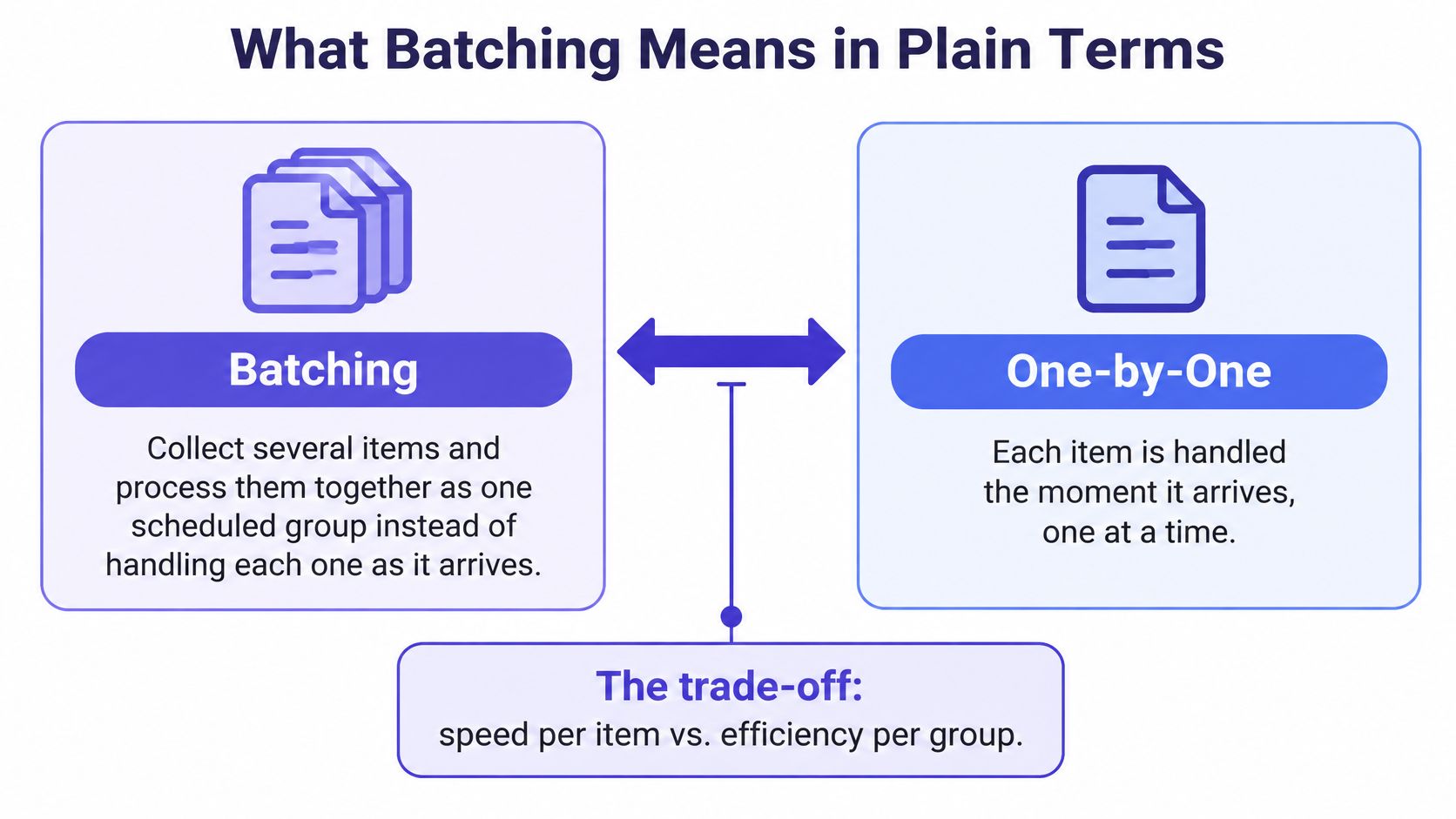
Batching compared with one-by-one handling
| Aspect | Batching | Immediate handling |
|---|---|---|
| Timing | Runs on a schedule, volume threshold or trigger | Runs as each item arrives |
| Cost per item | Lower, because setup is shared across the group | Higher, because setup repeats for every item |
| Speed of result | Delayed until the batch runs | Near instant |
| Best fit | Repetitive, low-urgency work | Urgent or interactive work |
| Typical example | Payroll run every Friday | Card payment authorised at checkout |
Use one question to decide which method fits: can the item wait without harming anyone? If so, it may suit a batch. If waiting costs a customer something, handle it immediately. Payroll can wait for its scheduled run; a card payment at checkout needs authorisation before the purchase is complete. Settlement can happen later in a batch, while the customer-facing decision cannot.
How Batching Works Step by Step
Every batch system, whether it posts journal entries or publishes LinkedIn posts, runs through five connected stages. The stages don't change with the tooling. Only the scale does.
- Collect. Items gather in a queue rather than triggering work on arrival: records, orders, invoices, caption drafts, footage.
- Group. A rule sorts the queue by same type, same destination or same deadline.
- Schedule. A trigger fires. It's a fixed time, a count threshold, or a person pressing start.
- Process. One run works through the entire group, with the setup performed once instead of once per item.
- Release. Results go out together. Whatever failed gets logged into the next batch instead of retried item by item.
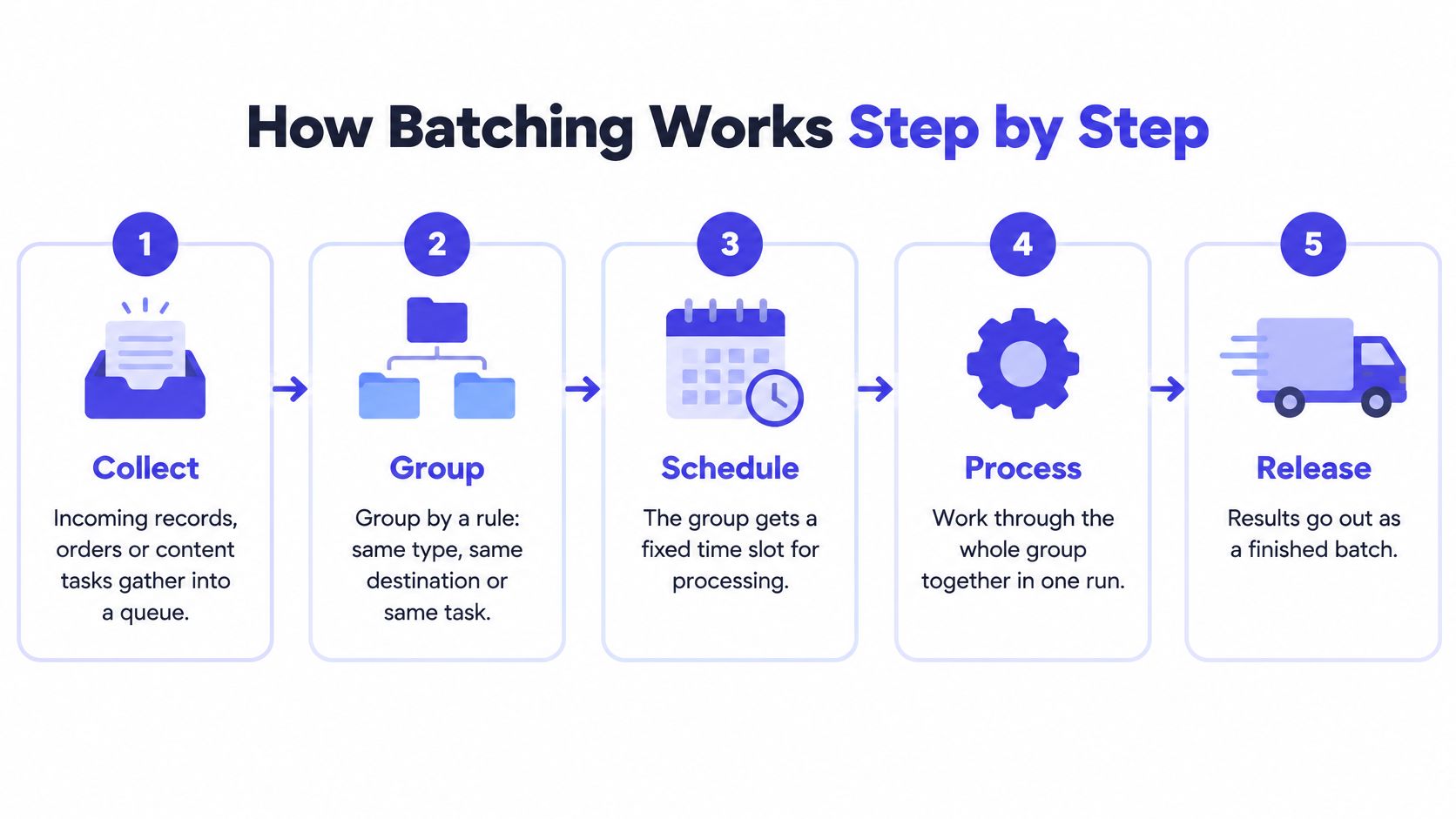
Why step two carries all the weight
Grouping is where the efficiency lives. If the items in a run share a setup, a template, a login, a location, a review pass, then the setup cost spreads across the whole group and per-item time collapses. Mix unrelated work into the same run and you're back to paying setup on every item, just with worse bookkeeping.
A bank shows this at scale. Ten thousand card and transfer records queued overnight post in a single run, with the reconciliation logic loaded once, instead of ten thousand separate postings each rebuilding the same context.
The two triggers you'll actually choose between
Time-based triggers suit work with a fixed deadline: payroll on the 15th, monthly reporting on the first business day, a content queue every Friday morning. The value is predictability, because everyone downstream knows when output appears.
Volume-based triggers suit work whose cost depends on load. A picking wave starts when enough orders have accumulated to make a full trolley run worthwhile; a data export fires at 500 rows rather than 5.
Here's the same five stages on a weekly content queue:
- Collect. Drafts and raw footage land in one folder Monday through Thursday.
- Group. Ideas get sorted by platform and theme, not by date.
- Schedule. The run starts Friday at 9 a.m.
- Process. Editing, caption writing and approval happen in a single pass while the same brand assets and templates are already open.
- Release. Posts get queued for the following week, and anything unapproved rolls into next week's group.
Run that cycle twice and you've built a repeatable content creation workflow that doesn't depend on anyone's memory.
Benefits and Applications of Batching
Five gains show up in almost every setting where batching takes hold, and each one has a reason behind it.
- Lower cost per item. Setup is shared across the group, so the expensive part happens once.
- Fewer manual interventions. One run replaces dozens of separate actions, and each action you remove is a chance for error you also remove.
- Less task switching. Similar work sits in one dedicated block instead of interrupting three other kinds of work.
- Consistency and planning visibility. One review pass covers the whole batch, so the same standard applies to every item in it.
- Better use of capacity. Machines and staff get scheduled rather than idling between single items.
The clearest industrial evidence for that logic came on October 7, 1913, when Ford Motor Company introduced a moving chassis assembly line at its Highland Park plant, a 150-foot line staffed by roughly 140 assemblers. Assembly time for the Model T fell from 12 hours 30 minutes to 5 hours 50 minutes, and continued refinement brought it to about 93 minutes by 1914, as an account of the assembly line records.
Four applications and the trigger that starts each one
| Application | Batched unit | Trigger |
|---|---|---|
| Payroll | Employee pay records | Fixed weekly or monthly date |
| Bank transactions | Card and transfer records | Nightly run |
| Warehouse picking | Customer orders | Order volume threshold that forms a picking wave |
| Social media | Posts and assets | Weekly production cycle |
Order picking shows the pattern under measurement rather than anecdote. A 2024 study in the International Journal of Production Research modeled integrated order batching for picking and packing, using numerical experiments to compare algorithms intended to reduce labour costs.
Every one of those gains rests on a single condition: the items can afford to wait. Remove that condition and the same system produces the opposite result, which is where the next problem begins.
Batching Social Media Content Without Repetition
The usual failure in content batching isn't laziness. It's sameness. Produce a month of posts in one sitting and you tend to write one asset, then push it to TikTok, Instagram, LinkedIn, Threads and Pinterest with the caption swapped.
The rule that prevents this is to separate production from publication. Batching is not one asset copied everywhere. It's one source idea branching into versions that each fit their network.
Take a single 40-minute interview clip. It becomes a short vertical video for TikTok and Reels, a carousel breaking the argument into slides for Instagram, a text post making the professional case on LinkedIn, an open question on Threads, and an evergreen graphic linking back to a guide on Pinterest. Same underlying idea, five different shapes.
A batch that ships the identical asset to six networks isn't distribution. It's duplication with extra steps.
Two things stay flexible even after the batch is built: final edits and publication dates. Analytics from the first few posts should change how later variants are cut, and a platform change can invalidate a format overnight. Recent research recommends using scheduling technology deliberately while treating AI as an assistant for routine work rather than a replacement for the creative contribution of social media professionals, as The Conversation's analysis of social media marketing work sets out.
Which tasks to batch and which to answer live
| Task | Handling | Reason |
|---|---|---|
| Research and ideation | Batch | Stable themes can be planned weeks ahead |
| Scripting and filming | Batch | Shared setup and location save time |
| Editing and caption drafting | Batch | Versions for each platform come from one source |
| Approval and labelling | Batch | One review pass covers the whole queue |
| Scheduling across networks | Batch | Dates can be set on a rolling basis |
| Comment replies | Respond | Audience expects an answer within a set window |
| Trend responses | Respond | Relevance fades within hours |
| Customer questions | Respond | Delay costs trust and sales |
| Crisis communication | Respond | Immediate judgement is required |
Then work in a rolling rhythm rather than one heroic production day. Evergreen themes can sit two to four weeks ahead. Trend-sensitive, promotional and community-led posts stay on short cycles so they're still relevant when they publish. Label every item as evergreen, campaign, experimental or reactive as it enters the queue, and the mix becomes visible at a glance instead of a mystery. A content repurposing strategy built on those labels keeps the branching disciplined.
Where Batching Breaks Down and How to Avoid It
Batching works best for work that can wait. Social media publishing often fits that pattern, while comments, customer questions, trend responses, and crisis messages lose value when they sit unanswered. The boundary matters: plan production in batches, then set clear windows for responsive work.
Social media staff may be asked to create posts, review analytics, answer customers, and monitor trends within the same stretch of work. Batching can make room for those responsibilities, but it cannot replace timely replies or extra staffing. Treat it as a way to separate focused production from ongoing audience care.
Check your queue for three signs that the boundary needs adjusting:
- The queue grows while comments sit unanswered. Set defined response windows and protect them like meetings. A batch should not consume the time reserved for replies.
- The same creative runs on every network. Draft platform-specific versions during production, when the original idea is still in front of you. This reduces the temptation to copy one post everywhere.
- Posts go stale before they publish. Keep trend-sensitive material on a short cycle. Evergreen content can sit longer because its usefulness is less tied to the moment.
How far ahead should content actually be batched
There is no reliable universal lead time. Use feedback to decide what belongs in the queue: review performance and accuracy at planned checkpoints, then keep, repurpose, or retire each item. A fixed 30-day rule can leave content scheduled beyond the point when it remains useful.
Rule of thumb: batch only as far ahead as the content stays accurate. If a post may need correcting before publication, shorten its schedule.
Batching stops helping when the work depends on fresh information or a quick human response. Keep those tasks in defined windows, and reserve longer production blocks for material that can safely wait. Like separating meal prep from serving dinner, the two rhythms support each other without becoming the same job.
Start Your First Content Batch This Week
The fastest way to learn where batching works is to run one small batch and watch what happens. Not a month. One week, one theme, three posts.

- Pick one goal and one repeatable theme. Say three educational posts for LinkedIn about how your customers use your product. Narrow beats broad for a first attempt.
- Collect the source material in one sitting. Pull the examples, numbers and customer questions you already have. Writing from a pile of raw material is faster than writing from a blank page.
- Branch into platform versions. One idea becomes the LinkedIn post, a short video, a carousel slide set and a Pinterest graphic, each shaped for its network.
- Label each item. Evergreen, campaign, experimental, reactive. Four labels are enough to keep the queue honest.
- Schedule the evergreen items and protect a response window. Bulk scheduling tools handle this step so you're not setting dates by hand: we built Bulk Scheduling to take a CSV or Excel file and queue up to 30 days of content in one upload, and our Post Queue lets you reorder, shuffle or auto-schedule the loaded batch rather than clicking through each post.
Lay the dates against a social media calendar, and keep the reactive items out of it on purpose. Those go live when the conversation does.
Then measure after two weeks, and measure the right thing. Engagement rate tells you whether the content held up. Reply time tells you whether the response windows survived contact with a real week. If either slipped, the batch was too large or the boundary was too loose, and the fix is a smaller batch, not more discipline. Retire anything that hasn't earned a repost, and repurpose whatever outperformed.
PostSyncer gives the scheduling half of batching a single entry point: upload a CSV or Excel file with your captions, dates and media links, and it queues up to 30 days of posts in one operation, then lets you reorder, shuffle or auto-schedule the result. Keep the evergreen batch moving through the queue while your response windows stay free for comments, questions and whatever the week throws at you. Visit PostSyncer to build your first queue this week.