

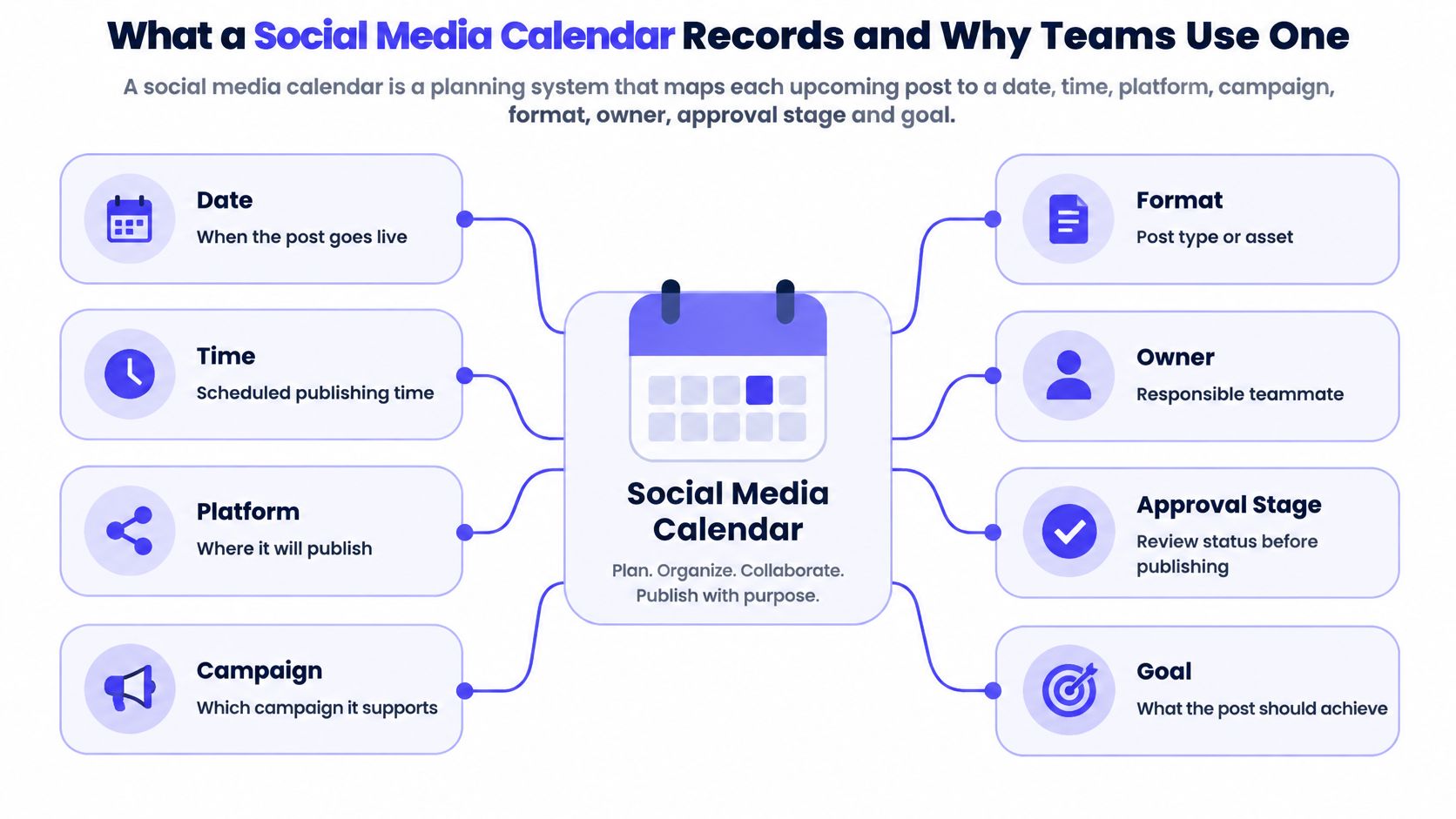
A social media calendar is a planning system that maps each upcoming post to a date, time, platform, format, owner, approval status, and goal, which is how a team stays organised among 5.24 billion active social media user identities.
You already know the feeling. It's 4:47 p.m., the product drop is tomorrow, and the only plan lives in your head. You open Instagram, rewrite a caption you posted last week, and remember the LinkedIn version on Friday. A reminder would ping you. It wouldn't say who writes the post, which network it belongs on, or how you'll judge it after it goes live. Memory stores a sentence. A calendar stores a unit of work you can assign, review, and measure.
What a Social Media Calendar Records and Why Teams Use One
A reminder says something is due. A social media calendar shows who builds the post, where it goes, and how it will be judged. Think of a restaurant prep board. Every dish has a station, a time, and a check before it leaves the kitchen. Nobody relies on the chef remembering the ticket.
A post is a planned, owned, reviewable unit, not a sentence in a notes app.
That unit is one row. These seven fields are the minimum, shown here for a small skincare brand.
| Field | What it holds | Example entry |
|---|---|---|
| Publish date and time | Exact slot the post goes live | Tuesday, 10:00 a.m. |
| Platform | Network and placement | LinkedIn feed post |
| Content pillar or campaign | Theme the post supports | Customer stories |
| Format | Asset type and specifications | 4-slide carousel, 1080 by 1080 |
| Owner | Person responsible for the item | Priya drafts, Marco approves |
| Approval status | Current stage in review | In review |
| Goal and metric | Outcome the post should move | Saves per reach |
A spreadsheet, a visual board, or a scheduling tool all work. The fields matter more than the file type. If a row is missing an owner or a metric, you still have a to-do list.
Why memory breaks once you post in more than one place
DataReportal's Digital 2025 social report put active social media user identities at 5.24 billion in January 2025, up 4.1% in 12 months, and GWI data in that report indicated that 97.3% of connected adults used at least one social network or messaging platform each month. A small brand uses the calendar to separate announcements, education, offers, and community posts across a week. An agency uses the same row to hold platform copy, assets, times, contributors, review status, and the campaign objective. After publishing, you compare the plan with reach, engagement, clicks, leads, or sales, and you keep the topics that earned a repeat.
The habit became necessary as the audience split across networks. Pew Research Center, as recorded in DataReportal's social media user overview, found that 65% of American adults used social networking sites in 2015, compared with 7% when tracking began in 2005, a rise of 58 percentage points. Facebook launched in 2004, YouTube in 2005, and Instagram in 2010, each with its own format. A single chronological list stopped being enough.
What the row prevents
- Missed launches: the date sits next to an owner, so a drop isn't a Slack memory.
- Duplicated work: two people can see the same message is already claimed.
- Stacked promotions: offers get spaced instead of landing on back-to-back days.
- Unclear approvals: the status shows who drafted, who reviewed, and who may publish.
Calendars fail when the row is pretty and the fields are blank. If two people on your team have posted the same message twice, or missed a product launch, you've outgrown memory-based posting. Which of the seven fields do you most often leave out?
Pillars, Platform Variants and Accessible Posts
A calendar row becomes useful when it records a choice you can test, not just a time and a caption. The UK Government social media playbook recommends organising output around three to five content pillars, after you set measurable objectives, name the audience, and write down campaign dates. A skincare brand might use education, proof, and community. Every row names its pillar so a month does not become five offers in a row. For worked mixes, these social media content pillar examples show how a small set stays distinct.
One idea, three native posts
A single idea should not become one pasted caption. Store linked variants. A "barrier repair" idea can become a short vertical video, a LinkedIn carousel, and an X text post. Each variant gets its own hook, dimensions, call to action, and alt text. The campaign idea stays shared; the post does not. The calendar becomes an experiment log rather than a reminder list. Say the carousel hypothesis is "an educational carousel increases saves." The metric is saves per reach, and the review date is seven days after publish. You write those fields before the post goes live, then compare the result. Winning formats get repurposed on purpose. Losing ones get retired, even if they were fun to make.
Accessibility is a production field
A study of 258 social-network users, published as an arXiv paper on disability and social media, found that people with disabilities participate at levels comparable to users without disabilities, while platform preferences can differ. Accessibility belongs beside the creative work, scheduled as a production field rather than checked at the end.
- Captions and transcripts: video is not finished until both exist.
- Image descriptions: alt text says what the picture means, not "photo of jar."
- Readable contrast and type: on-screen text stays legible on a phone.
- More than one cue: the message does not depend only on colour, sound, or fast motion.
Platform preference also shifts by user and by network. A calendar that only checks "did it go live" is a weak scorecard. Tie each row to reach, qualified traffic, saves, leads, sales, retention, or a community reply, then record the result by platform and format. That habit keeps the calendar accountable after publish, not just busy before it.
A sample three-pillar row: Thursday, Instagram Reel, education pillar, 15-second demo, captions attached, hypothesis "demo completion beats a static tip," review next Thursday. A profile that points to a changing destination, such as a musician's current set list or a product brand's latest offer, needs the same discipline; link in bio tools for DJs can keep that one link current while the posts around it vary. Write a hypothesis for your next post before you write the caption.
Workflow From Brief to Published Post
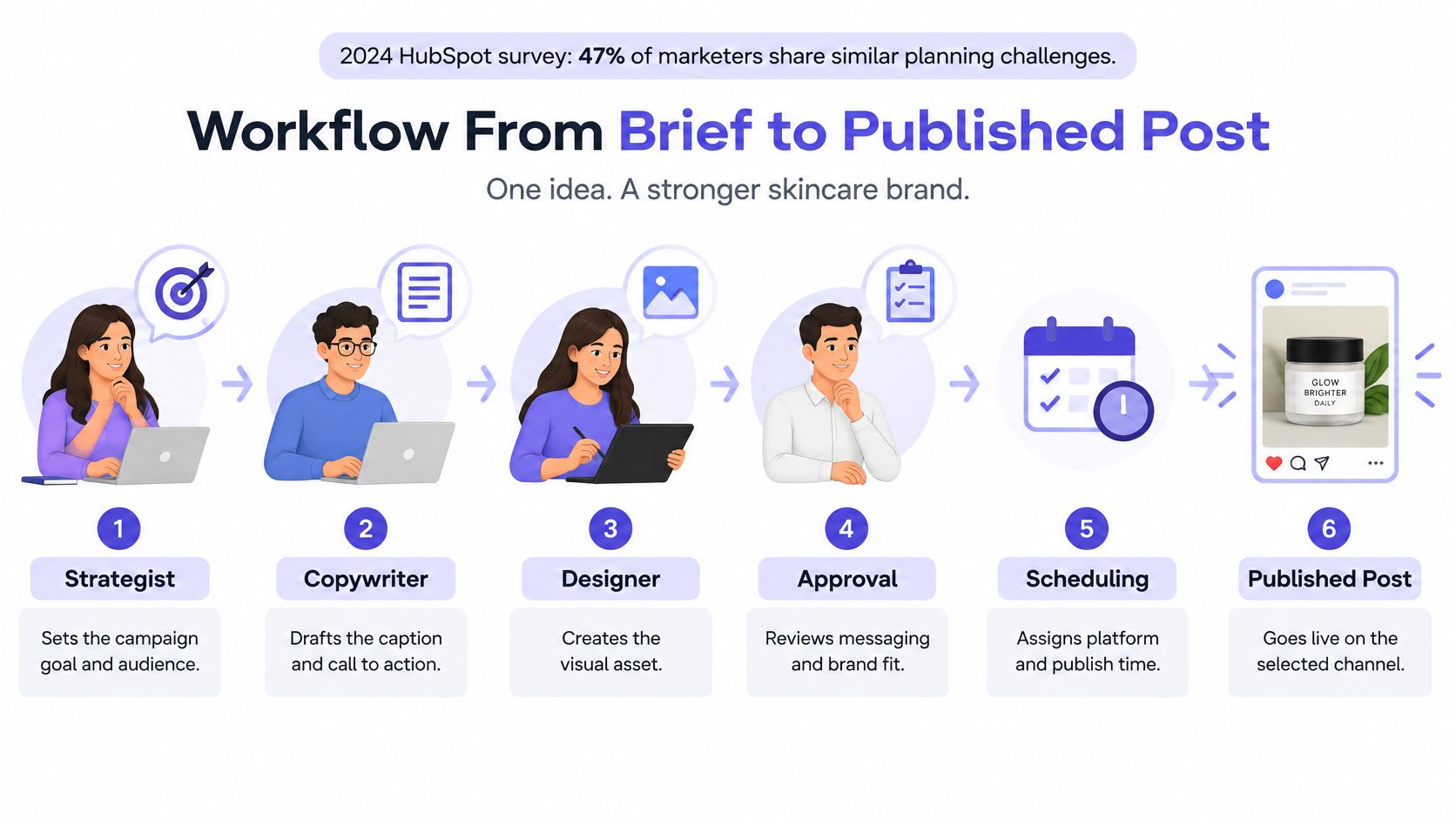
A post that ships from memory leaves no trace of why it existed. A post that moves through named stages leaves a record: the goal, the variant each network received, who approved what, and what the metric did afterward. That record is the point. The calendar row is an experiment log and an accountability document at the same time.
Both adaptation paths need that structure. In 2024, 47% of social-media marketers said they shared similar content across platforms, while 34% created brand-new content from scratch for each platform, according to HubSpot's survey of more than 1,500 marketers. Picture one campaign at a three-person skincare brand, staffed by a strategist, a copywriter and a designer.
- Write the brief against one pillar and one goal. The strategist names the audience and the metric, such as saves per reach for an education post. The slip is a brief that says "raise awareness," which nobody can fail or pass.
- Draft a master idea and a core message. The copywriter writes the claim once, in plain language. The slip is starting in three captions, so the variants drift apart before anyone agrees on the point.
- Adapt one variant per platform. Note the hook and the format, whether you're lightly editing a shared idea or writing a new one. The slip is changing the offer in one variant and not the others.
- Attach final assets, captions, and alt text. The designer delivers the file that will publish, with the image description written before approval rather than after. The slip is approving copy while the image is still a sketch, which forces a second round.
- Review in two stages. Copy approval sits with the strategist, then visual approval with the designer. Teams that skip named stages end up with five comments and no decision. A clearer approval workflow for teams keeps those stages visible on the row.
- Mark it approved and schedule each variant. Each network gets its own time slot. The slip is one publish time pasted onto every account.
- Record the review date and the outcome. After it goes live, the owner writes what the metric did and whether the hypothesis held. The slip is closing the row at "published" and learning nothing.
Two rows from the same month can then be compared on equal terms, because each one carries a stated expectation and a result. Without that, the calendar only proves someone remembered to post.
Handoff rule: no item moves to scheduled without a named approver. If the approver is "the team," the post will sit, or it will go out unreviewed.
Choosing a Calendar Format for Your Team
Pick the home for the rows before you argue about features. Four formats cover almost every small team.
| Format | Best for | Approval handling | Publishing | Results tracking |
|---|---|---|---|---|
| Shared spreadsheet | Solo creators and single-channel teams | Comments or a status column | Manual posting | Entered by hand |
| Design-tool template | Visual planning of one month | Shared links, no workflow | Manual posting | None built in |
| Dedicated scheduling platform | Teams on three or more networks | Built-in review stages | Automated per platform | Per-post analytics |
| Project board | Agencies managing many clients | Card status and assignees | Manual posting | Reported manually |
Decision rule: choose by the number of networks, the number of approvers, and whether results must be recorded per post. One person, one channel, and a status column is a spreadsheet. Three approvers and five networks is a scheduler with review stages. An agency with separate clients fits a board, as long as someone still types the result back onto the card.
Free templates from design and scheduling vendors are a fine way to lay out a single month. A template doesn't enforce approvals, and it doesn't pull analytics on its own. Someone still has to move the status and write the metric. Musicians comparing schedulers, caption helpers, and audience tools can start with a practical roundup of tools for music audience building, then apply the same test a product team should use: does this format hold an approver and a result, or only a pretty grid?
A tool doesn't fix a missing process. Name the roles and the approval stages before you buy software. Then pick the simplest format that covers your approval count and your analytics needs. Anything heavier becomes a second job.
Cadence, Timing and Measurement Rules
Posting more often isn't the point. A large benchmark summary from Rival IQ's social media industry benchmark report reports median monthly frequencies of about 35 Facebook posts, 17 Instagram posts, 8 to 9 TikTok posts, and 9 X posts. Treat those as directional baselines. Industry, audience size, content quality, and distribution algorithms all change the result.
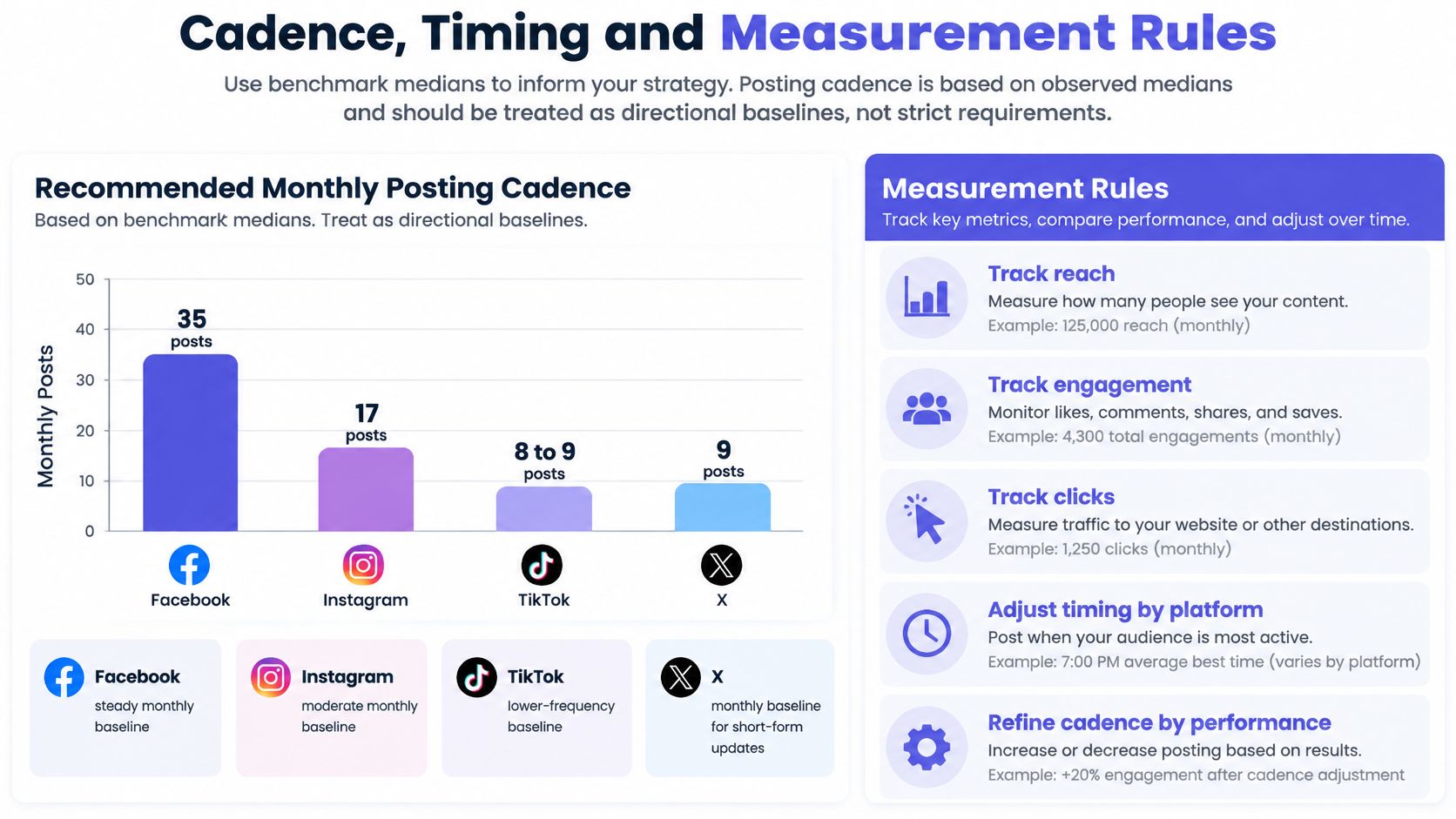
| Platform | Median posts per month | How to use it |
|---|---|---|
| About 35 | Test a range and compare engagement per reach | |
| About 17 | Start near this level and adjust by format | |
| TikTok | 8 to 9 | Measure completion rate before adding volume |
| X | About 9 | Compare click-through rate across post types |
Two ways to read engagement
Benchmark reporting usually defines engagement rate as interactions divided by follower count. A reach-based calculation is more useful when exposure swings from post to post. Start with a cadence you can sustain, then segment by platform and format. Normalised metrics do the essential work: engagement per reach, completion rate, saves per impression, click-through rate, and conversion rate. If those terms still blur together, this guide to social media analytics separates the denominators.
Raw likes lie. A post with more interactions might have reached a larger audience, or you may have published more often that week. Compare like with like.
A timing test you can actually finish
Run the same format in two slots for several weeks. A Tuesday 9 a.m. carousel against a Thursday 1 p.m. carousel, scored on saves per reach, is a fair test. A Reel against a static post in those slots is not. Keep a change only when it improves the KPI already written on the calendar row. If the number doesn't move, put the slot back.
Build Your First Month of Posts in the Calendar

Decide three things this week before you open a tool. Name the three to five pillars that match your goals. Choose a cadence you can hold for a full month, using the benchmark ranges as a starting band, not a quota. Name one approver for each stage, so nothing waits on "someone."
Then open the format you picked and fill the month, one row per post, with a hypothesis and a review date on every row. A visual calendar lets you drag posts to new dates as priorities shift, and you can lay out weeks of content in minutes. Where you manage several brands, keep a separate workspace for each, so accounts, calendars, and team members stay apart.
Watch the month get built in one pass, then come back to the rows.
Set a monthly review. Delete rows that have no hypothesis. Keep the rows that produced a lesson, even when the metric missed. That's the calendar doing its job as an experiment log, not a wallpaper of dates.
PostSyncer gives you a visual content calendar for planning and scheduling posts across weeks or months, with drag-and-drop rearranging, separate workspaces, and scheduling across the networks you already use. If you're ready to stop posting from memory, open a workspace and put your first month of rows, hypotheses, and review dates on the calendar. Start at PostSyncer.