

Hashtags serve a narrower purpose on Facebook than many pages expect: they can make public posts easier to find and group posts around a shared term, but they are not a proven News Feed reach multiplier. The practical question is whether a tag helps people discover or follow relevant posts. Judge it by that outcome, not by total reach alone.
The Short Answer and What the Studies Show
Hashtags don't measurably raise Facebook News Feed reach, but they make public posts findable and group them under a shared term. That's the verdict the evidence supports, and it's narrower than most advice suggests. Facebook presented hashtags as a way to join and locate public conversations, not as a distribution boost, and nothing in the available engagement data overturns that distinction.
The Engagement Pattern by Tag Count
The clearest pattern comes from comparative averages by number of hashtags. The Search Logistics hashtag statistics compilation reports 593 interactions per post with one hashtag, 416 with 3 to 5 hashtags, 307 with 6 to 10 hashtags, and 188 with more than 10 hashtags. The drop is steady, not a cliff at a single threshold, and it gets steeper as the caption fills up.
Average engagement per Facebook post by hashtag count
| Hashtags per post | Average engagements per post | Change vs one hashtag |
|---|---|---|
| 1 hashtag | 593 | Benchmark |
| 3-5 hashtags | 416 | About 30% lower |
| 6-10 hashtags | 307 | About 48% lower |
| More than 10 hashtags | 188 | About 68% lower |
| No hashtags | Run your own control | No baseline in cited data; run your own control |
Read the table as a warning sign, not as proof. It's one observational dataset comparing different brands, formats, audiences, schedules, and campaign goals, so tag count is tangled up with everything else that differs between those posts. A page that piles on twelve tags may also post weaker creative, chase colder audiences, or copy an Instagram caption that wasn't written for Facebook in the first place. The missing no-hashtag row matters most. Without it, you can't tell whether one tag beats zero tags, only that one tag beats many tags in this dataset.
Practical rule: Treat the table as a reason to test one specific tag against no tag, not as evidence that one tag is automatically better than none.
What Brand and Academic Comparisons Add
A second line of evidence points the same way. Marketing Dive's report on a study of the 100 largest Facebook brand pages found hashtag usage increased by 20% while posts using hashtags did not produce higher engagement, and visual posts averaged approximately 9,500 engagements per post. That contrast shows what drives results. The visual asset, opening line, and shareability carry the post. A tag added to weak creative doesn't compensate for it, and a tag added to strong creative isn't what made it strong.
A separate secondhand figure deserves more caution. A 2025 Hobo.Video summary citing an American Marketing Association study dated 2024 reports that Facebook posts using 3 to 5 relevant hashtags received 17% higher engagement than posts using more than 10 hashtags. That result is consistent with the table above, and the direction matches, but you're reading a summary of a study rather than the study itself. Verify it on your own page before treating 3 to 5 as a safe range, especially since the first dataset puts even that band about 30% below a single tag.
The Shared Flaw in Every Dataset
All of these comparisons share the same flaw. Hashtags tend to land on informational or promotional posts, the kind of content that earns less engagement regardless of tagging. A product announcement, a deadline reminder, or a copied cross-post gets a tag because someone wants it filed or found, and then the low engagement gets blamed on the tag. Content type and intent are confounded with tag count in every observational set, which is why none of them can establish cause and effect.
That flaw doesn't make the data useless. It tells you what to do with it. When three different sources find no engagement advantage for hashtags and a consistent disadvantage for large tag blocks, the burden of proof shifts. You don't need proof that tags hurt. You need a reason to include one, and that reason should be about findability, grouping, or attribution rather than reach.
So when people ask do hashtags work on Facebook, the honest answer splits in two. They work as lightweight topic labels and campaign indexes. They don't work as a dependable organic reach mechanism, and copying Instagram-style blocks of tags into a Facebook caption is the pattern most associated with the weakest results. Keep tags sparse and specific, one or two at most for a branded campaign, an event, a recurring series, or user-generated content collection. Then test before you assume a tag works, because your page's matched result is worth more than any cross-brand average.
How Hashtags Work Inside Facebook Search and Feeds
Think of a hashtag as a shelf label in a public library, not a billboard on the street. The label lets a visitor find every book filed under that topic, but it doesn't sell more copies of any single book.

Facebook's June 2013 announcement of public conversations introduced clickable hashtags on June 12 to 13, 2013, for an audience exceeding 1 billion members, then expanded them to the mobile site and apps on June 27, 2013, with related-hashtag recommendations based on tags frequently used together. Facebook stated during that launch that hashtags did not affect a post's distribution or engagement in the News Feed on desktop or mobile. That sentence is still the most useful one in the whole debate.
Three mechanics follow from it. First, clicking a hashtag or searching the term opens a feed of related public posts, including content from Pages and people whose privacy settings make the post visible. Second, the related-tag suggestions cluster terms that appear together, so one well-chosen tag can sit near adjacent topics. Third, privacy sets a hard ceiling. Nobody sees every post carrying a tag, and private posts never appear in that feed at all.
The short walkthrough below shows that search route in practice.
News Feed ranking is a separate system. SocialK's review of Facebook hashtag behavior notes that Facebook's recommendation explanations emphasize signals such as watch completion, topic-to-user relevance, post age, likes, and click-through rate, with hashtags not identified as a primary ranking signal. Back to the library, then. The shelf label gives your post a second route to discovery through search. Your creative, relevance, and early engagement still have to earn its place in the feed.
Where Hashtags Help and Where They Add Nothing
When a Facebook hashtag earns its place
| Situation | Value of a hashtag | Measure that shows it worked |
|---|---|---|
| Branded campaign with a unique tag | High, groups all public posts under one term | Hashtag search visits and branded-search activity |
| Live event or conference | High while the event runs | Posts, comments and profile visits during the event window |
| User-generated content collection | Medium, gathers public submissions in one place | Submissions per campaign |
| Recurring content series | Medium, builds a findable archive | Return visits to the series from other posts |
| Same tag on Instagram and Facebook | Low to medium, keeps the topic consistent | Comments that mention the tag |
| General post aimed at organic reach | Low, no measured feed lift | Reach and clicks against a matched post with no tag |
The strongest case is the distinctive branded tag. Say a local retailer runs a month of customer photos under one invented campaign name. That tag isn't chasing distribution. It's an index that gathers scattered public posts into one place the team can review, reply to, and count. A generic tag can't do that job because thousands of unrelated posts share it, which is why it helps to choose hashtags for your target audience based on who will search or use the term, not on how popular it looks elsewhere.
The second strong case is the live event. Attention is already concentrated in a short window, attendees want to find each other's posts, and organizers want one stream to monitor. A single event tag serves all three needs at once. Outside that window the same tag loses most of its value, so judge it during the event rather than weeks later.
The weakest case sits at the bottom of the table. A generic tag on an ordinary post aimed at organic reach adds visual clutter, signals a caption copied from another platform, and produces no grouping benefit because nobody is looking for that collection. If you're deciding how this fits a wider posting routine, our guide to using hashtags effectively across platforms sets out where Facebook's logic differs from networks built around tag discovery.
Apply one rule of thumb to any post. If the tag doesn't help people find or group something, leave it out.
Metrics That Show Whether a Hashtag Worked
Total reach is the wrong yardstick for a hashtag, because the tag's job is to bring people to a group of posts or a campaign, not to widen one post's feed distribution. A tag can succeed at its actual job while reach stays flat, and reach can rise for reasons that have nothing to do with the tag. Score it against what it was meant to do.
Metrics for judging a Facebook hashtag
| Metric | What it tells you | Trap to avoid |
|---|---|---|
| Hashtag-page impressions | How many people arrived through the tag | Counting them as reach for the page |
| Profile visits | Interest after seeing a tagged post | Attributing visits to the tag when other posts ran at the same time |
| Branded-search activity | Whether the campaign name is being remembered | Hard to tie to one post |
| Normalized engagement rate by reach | Quality of engagement per viewer | Comparing raw reactions between posts of different sizes |
| Click-to-impression ratio | Clicks per view on tagged posts | Relying on a vendor benchmark that is not independently verified |
Work down the table in that order. Hashtag-page impressions show whether anyone arrived through search at all. Profile visits show whether those people cared enough to look further. Branded-search activity shows whether the campaign name stuck after the post scrolled away. Normalized engagement rate by reach is the metric that keeps comparisons honest, since it divides engagement by the number of people who saw the post, so a small post can be compared fairly with a large one. Our explainer on how social media analytics work covers how to build that rate consistently across posts.
Treat click ratios with care. Cliptics reported in 2025 that effective Facebook hashtag strategies delivered a click-to-impression ratio above 3.2%, compared with below 1.7% for poorly optimized approaches. That's a vendor blog figure without independent verification, so use it as a benchmark to test against your own baseline, not as a threshold that proves a tag works.
A hashtag that produces no search arrivals, no profile visits, and no campaign grouping value has failed, even if the post itself happened to perform well.
For a campaign with a clear commercial goal, assisted conversions are the strongest test of all. They answer whether people who entered through the tag later enquired, registered, or bought, which is the outcome a page owner gets paid for.
How to Test Hashtags Against a No-Hashtag Control
Keep Facebook tagging to zero to two specific tags, because precision is what you're testing. A quantitative content analysis of 504 posts from Utah State University Extension Sustainability found that posts containing hashtags had statistically significantly lower engagement, posts without hashtags achieved a slightly higher engagement rate by reach, and prior findings it cites suggested more than two hashtags tended to reduce engagement, with about one-third of the analyzed posts using hashtags and counts ranging from zero to eight. It's a correlation in one organization's posts, not a verdict on your page, which is exactly why you run a matched test.
- Pick one recurring post type: Weekly tips or event announcements work well, because a mixed set hides the effect.
- Write matched pairs: Same topic, format, and posting time, one tagged and one untagged, because matching isolates the tag.
- Schedule both the same way: A consistent workflow keeps timing from becoming the variable, and our scheduling optimization guide shows how to hold those slots steady.
- Run at least four publishing dates: Multiple pairs smooth out audience differences between days.
- Compare engagement rate by reach: Normalized rates stay fair when one post reaches more people than its pair.
- Check link clicks and comments: New commenters and clicks on tagged posts suggest the tag brought in people you didn't already have.
- Keep or drop on the result: Retain the tag if it improves discovery or attribution, and cut it if it only adds clutter.
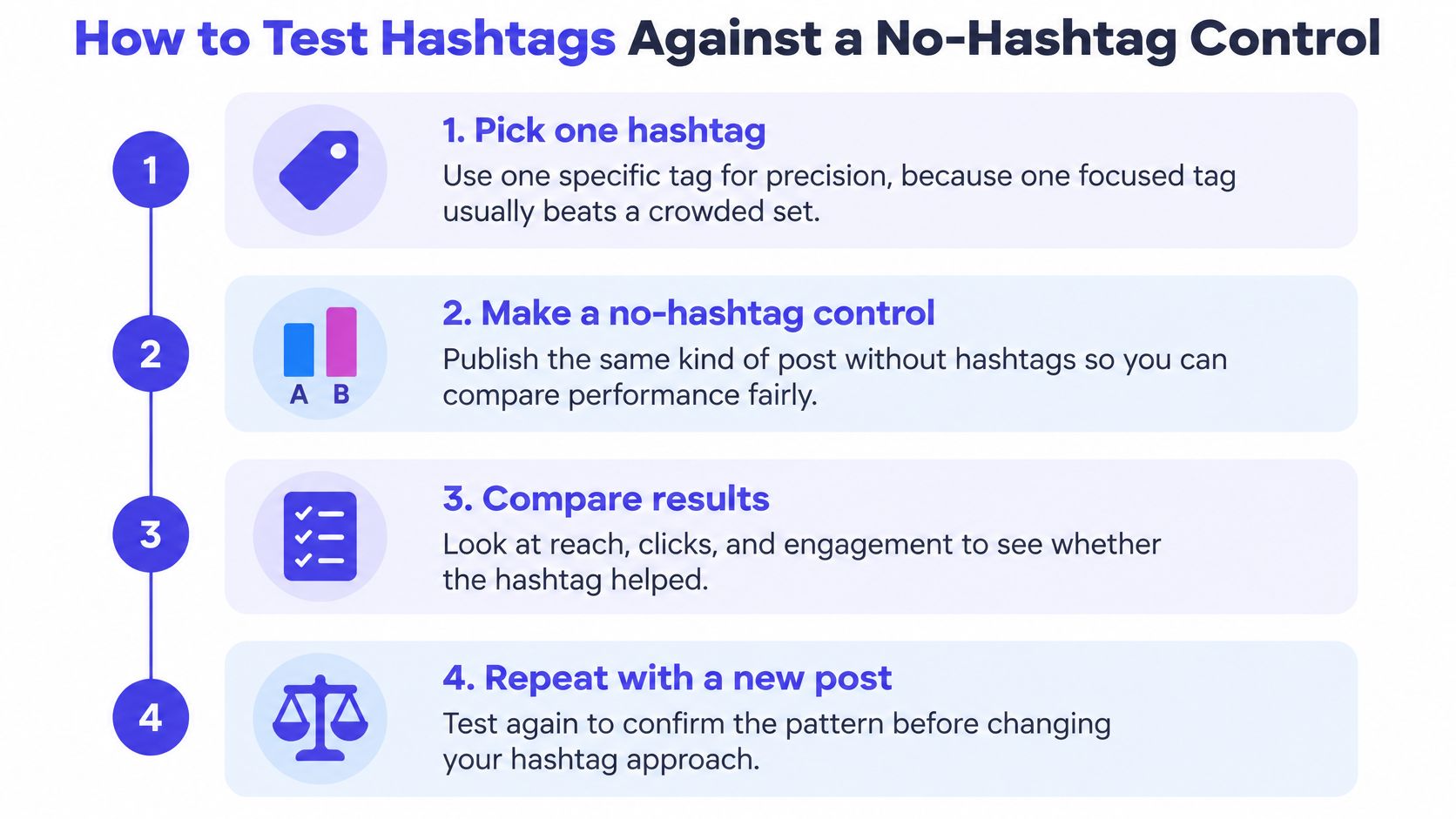
This is an A/B test, so borrow the discipline used on websites, where the same matched comparison is used to turn more website visits into enquiries rather than guessing from one busy week. A matched test shows what your page's audience does with a tag. It won't produce a universal rule, and it doesn't need to.
Confirm Your Facebook Hashtag Plan Before You Post
Decide before you publish, not after you've seen the reactions. Use hashtags only where they group public posts or support a campaign, keep the count at zero to two, and let matched results settle the question.
Three Questions Before Every Post
- Does it point somewhere: Will people search for this term, follow it, or use it themselves?
- Is it specific: Could a stranger tell which campaign, event, or series this tag belongs to?
- Can you measure it: Is there a matched untagged post to compare against?
If any answer is no, the tag is decoration. Cut it and spend the caption space on a stronger opening line instead.
Set Up the Comparison So You Can Find It Later
Label tagged and untagged variants in your scheduling workspace so they can be filtered and compared later. In our workspace, labels and tags let users organize, filter, search, and manage posts by category or campaign, which means your four test pairs stay retrievable as a set instead of dissolving into the calendar. Record reach-normalized engagement and link clicks for each variant in the same note, at the same interval after publishing, so a post measured after two days isn't judged against one measured after two hours.
If you need a starting term, don't invent one under time pressure. PostSyncer offers free tools including an Instagram Caption Generator, a YouTube Tags Generator, a YouTube AI Description Generator and a Hashtag Generator, and any candidate from a generator still has to pass the three questions above before it goes on a Facebook post.
Your First Action This Week
Pick one recurring post type you already publish. Schedule one version with a single specific tag and one matched version with none, then repeat across four publishing dates before you decide whether the tag stays. Don't extend the tag across the whole page until those results are in, because rolling out an untested tag everywhere removes the control you'd need to judge it. Small test first, page-wide habit second.
Stop guessing whether your Facebook tags help and run the matched test inside one workspace where tagged and untagged variants stay labeled, scheduled, and comparable. Visit PostSyncer to plan your next four post pairs, generate a shortlist of specific tags, and keep only the one that earns its place on your page.