











Let's be real for a moment. What exactly is a Twitter post scheduler?
At its core, it's a tool that lets you write and line up your X (what we all still call Twitter) posts to go live at a specific time in the future. Instead of frantically trying to post in real-time, you can sit down, map out your content calendar, and let the software handle the rest. This isn't just a convenience—it's the foundation for anyone serious about building an audience on the platform.
Your Strategic Command Center for Twitter
Think of a scheduler as your social media mission control. Posting everything by hand is like delivering individual messages across town yourself—it’s slow, exhausting, and completely reactive. You might have a burst of inspiration and post three brilliant things on a Monday, only to go completely silent for the next four days when you get swamped. That kind of sporadic activity just doesn't work; it confuses your followers and kills your momentum.
A scheduler, on the other hand, is your logistics network. It lets you batch, plan, and deploy your content exactly when it will have the biggest impact, even if you’re asleep, in a meeting, or on a plane.
Moving Beyond Simple Convenience
A good scheduler does more than just save you a few minutes here and there. It solves the real, nagging problems that come with trying to manage a social media account manually. By letting you plan ahead, these tools give you a massive strategic leg up.
- Solving Inconsistency: You can knock out an entire week or even a month of content in one focused session. Your brand stays visible and reliable, day in and day out.
- Capturing Peak Engagement: Your audience might be most active at 10 PM on a Friday. Are you? A scheduler is. It can post for you when it matters most, regardless of your time zone or work schedule.
- Improving Workflow Efficiency: It completely shifts your mindset. You stop worrying about "what do I post right now?" and start thinking about the bigger picture—engaging with your community and figuring out what content truly resonates.
The real magic of a scheduler isn't just about saving time; it's about reclaiming your strategic headspace. When your content pipeline is running on autopilot, you can finally dedicate your energy to what really matters: interacting with followers, analyzing what works, and building genuine connections.
The Power of Consistent Scheduling
This switch from reactive posting to a proactive strategy isn't just a nice idea—it delivers real, measurable results. Brands that use scheduling tools report 31-47% higher consistency in their posting habits compared to those still doing it all by hand.
But here's the kicker: businesses that schedule their content on a weekly basis grow 3 times faster than those who just post whenever they feel like it.
Learning how to schedule a social media post, even on other platforms like TikTok, shows you just how powerful this simple concept is. A Twitter post scheduler is far more than a handy gadget; it's an essential part of any professional, consistent, and effective social media strategy.
Exploring the Core Features of Modern Scheduling Tools
While the basic idea of scheduling—picking a time and date—is a good start, a modern Twitter post scheduler is so much more than a simple timer. It’s an entire ecosystem of powerful features built to amplify your content strategy, not just put it on autopilot.
Think of it like this: a basic scheduler is an alarm clock. It goes off when you tell it to. A modern scheduler is a personal assistant who not only wakes you up but also organizes your entire day for maximum impact.
At the heart of this shift is the visual content calendar. Imagine a drag-and-drop interface where you can see your entire month of Twitter content laid out at a glance. This isn’t just for staying organized; it’s about seeing the story your brand is telling over time, making sure you have a healthy mix of promotional, educational, and fun posts.
This bird's-eye view completely changes how you plan. You can instantly spot content gaps, shuffle posts around to jump on a trending topic, and ensure your brand’s voice stays consistent day after day.
Going Beyond Simple Text Posts
Today's top-tier tools get it: Twitter is a multimedia playground. They’ve moved way beyond scheduling 280-character text blurbs and now let you plan out the richer, more eye-catching content that actually stops the scroll.
- Multi-Image and Video Support: You can schedule tweets with up to four images, a GIF, or a full video, just like you would if you were posting live. This means your most compelling visual content can go out at the perfect time, even if you're away from your desk.
- Thread Scheduling: Got a longer story to tell? You can write and schedule entire multi-tweet threads. This is a game-changer for detailed explanations, event coverage, or narrative-driven content, making sure every part of your story posts in the right order, right on cue.
- First Comment Scheduling: Some of the savviest platforms even let you schedule the first reply to your own tweet. It's a clever trick for adding extra links, a call-to-action, or more context without cluttering up your original post.
The diagram below really breaks down the two paths you can take: posting by hand or letting a scheduler handle the heavy lifting.
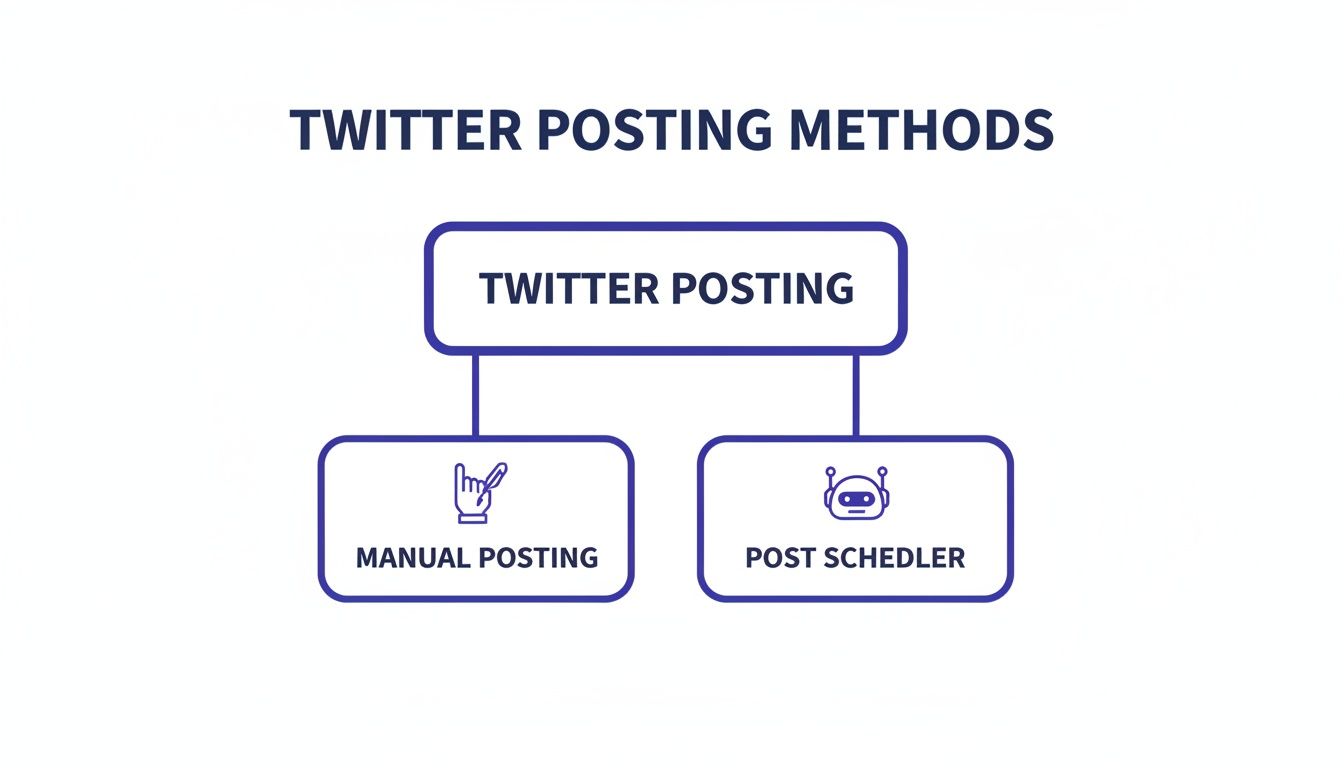
As you can see, while manual posting is direct, a scheduler adds a layer of strategy and automation that's absolutely essential if you want to scale up your efforts without burning out.
Unlocking Intelligent and Collaborative Workflows
The real magic, though, is in the smarts and teamwork features. This is what separates a professional-grade platform from a simple utility, turning it into the central command for your entire marketing operation.
One of the best examples is AI-powered scheduling. Instead of just guessing when your audience is online, these systems dig into your account’s past performance. They pinpoint the exact times your followers are most active and engaged, then recommend the optimal posting slots to get you the most reach and impact.
A modern scheduler doesn't just ask, "When do you want to post this?" It answers the far more important question: "When should you post this for the best results?" This shift from manual guesswork to data-backed recommendations is what truly effective social media management is all about.
The best tools are also incredibly flexible. Look for things like time zone support (a must for global audiences), bulk scheduling to upload dozens of posts from a spreadsheet, and queue management to automatically fill your content calendar with evergreen posts.
To help you understand what to look for, here’s a breakdown of the must-have features in any serious scheduling tool.
Essential Features in a Modern Twitter Post Scheduler
This table outlines the key features that transform a simple scheduler into a strategic asset.
| Feature | Description | Strategic Benefit |
|---|---|---|
| Visual Content Calendar | A drag-and-drop interface that displays all scheduled posts, giving a clear overview of the content plan. | Allows for easy strategic planning, helps identify content gaps, and ensures a consistent brand narrative. |
| Optimal Time Suggestions | AI-driven recommendations for the best times to post based on your audience’s historical engagement data. | Maximizes post visibility and engagement by reaching your audience when they are most active. |
| Multi-Media Support | The ability to schedule tweets with images, videos, GIFs, and polls. | Creates richer, more engaging content that captures attention and drives higher interaction rates. |
| Thread Scheduling | Functionality to compose and schedule multi-tweet threads to be published in a specific sequence. | Perfect for long-form storytelling, in-depth explanations, and maintaining context without manual posting. |
| Team Collaboration | Features like user roles, approval workflows, and shared asset libraries for multi-person teams. | Streamlines content creation and approval processes, ensuring quality and brand consistency across the team. |
| In-Depth Analytics | Built-in reporting that tracks key metrics like engagement, impressions, link clicks, and follower growth. | Provides actionable data to measure ROI, understand what content resonates, and refine your overall strategy. |
By prioritizing tools with these capabilities, you’re not just automating posts—you’re building a more intelligent and efficient content machine.
For teams, especially agencies juggling multiple clients, collaborative tools are non-negotiable.
- Team Workflows: You can set up specific roles and permissions. A writer can draft content, a designer can add the visuals, and a manager can give the final sign-off before anything goes live.
- Client Approval Queues: Instead of endless email chains, you can share a secure link with clients to review and approve scheduled posts. All the feedback stays in one place.
- Shared Media Libraries: Keep a central hub for all your approved brand assets, logos, and images. This ensures everyone on the team is using the right visuals, every single time.
When you bring all these features together, a Twitter post scheduler becomes the single source of truth for your social media. It’s where you plan, create, approve, and analyze everything in one dashboard. To explore this concept further, check out our guide on the power of centralized social media scheduling. This integration is what lets brands and creators build a sustainable and highly effective presence on the platform.
The Strategic Benefits of a Centralized Scheduler
Let’s be honest, using a Twitter post scheduler is about way more than just saving a bit of time. Sure, getting those hours back in your day is a huge win, but the real magic happens when you shift your entire social media operation from a constant state of reaction to a forward-thinking, cohesive strategy.
Think of it like this: you can be a short-order cook, frantically flipping burgers one at a time as orders come in. Or, you can be the head chef who has meticulously planned out the entire week's menu. One is pure chaos; the other is intentional, consistent, and designed to deliver an amazing experience. That’s the strategic shift we’re talking about, and it's where real growth on X begins.
Forge an Unbreakable Brand Voice
When you have multiple people tweeting from one account, keeping a consistent brand voice can feel like herding cats. One person is dropping witty, casual replies while another is more formal and data-focused. Without a central hub, your brand’s personality gets muddled, leaving your audience confused.
A scheduler completely solves this by becoming your single source of truth. Every piece of content—from tweets to threads and even replies—is drafted, planned, and reviewed in one spot. This collaborative space ensures everything aligns with your established brand guidelines before it ever goes live. That kind of consistency builds trust and makes your brand instantly recognizable in a sea of noise.
Elevate Content Quality Through Planning
We've all been there. You realize you haven't posted all day, so you rush to throw something together. That’s how typos, broken links, and missed opportunities happen. Rushing to fill a content gap almost always means quality takes a nosedive. A scheduler swaps that stressful scramble for a calm, deliberate planning process.
Working ahead gives your team the breathing room to actually think, create, and refine their work. You can build in proper review cycles for peer editing and final approvals, which makes a world of difference.
- Fewer Errors: A second pair of eyes is your best defense against those embarrassing grammar mistakes or factual slip-ups that are so easy to miss in a hurry.
- Tighter Strategy: Every post can be cross-referenced with campaign goals and marketing calendars to make sure it’s actually serving a purpose.
- More Creativity: With time on their side, your team can hunt down better visuals, punch up the copy, and tell more compelling stories.
A centralized scheduler isn't just a publishing tool; it's your quality control system. It gives you the structure to stop just posting things and start crafting high-impact communications that truly connect with your audience.
Turn Real-Time Data into Smarter Decisions
One of the best parts of a modern Twitter post scheduler is the built-in analytics. Instead of posting into the void and then digging through a separate tool for metrics days later, you get a direct feedback loop. You can see which posts are driving engagement, clicks, and follower growth, all from the same dashboard where you plan your content.
This instant access to performance data lets you be incredibly agile. If you notice a certain format is killing it, you can double down on it immediately. If a campaign is falling flat, you can pivot your strategy based on hard numbers, not just a gut feeling.
This data-driven approach connects what you do on social media directly to real business goals:
- Follower Growth: See which content themes and formats are actually attracting new, relevant followers.
- Increased Engagement: Pinpoint the topics and times that spark the most likes, replies, and Retweets.
- Stronger Lead Generation: Track link clicks to see which calls-to-action are successfully pulling traffic to your site.
Ultimately, a scheduler turns your X account from a simple broadcast channel into a fine-tuned engine for business growth. It delivers the consistency, quality, and insights you need to get measurable results.
How Different Professionals Leverage a Scheduler
A Twitter post scheduler isn't a one-size-fits-all gadget; it’s more like a Swiss Army knife that adapts to whoever is holding it. The real magic happens when you see how different pros put these tools to work. From a sprawling agency managing dozens of accounts to a solo creator building a brand from scratch, the simple act of scheduling becomes the bedrock for wildly different—and highly effective—strategies.
Let's walk through three real-world scenarios. Each one offers a practical blueprint you can borrow from, no matter what your own goals are.
The Digital Marketing Agency Juggling a Dozen Clients
Picture a busy digital marketing agency, let's call them "GrowthPro," handling the social media for twelve different clients. Before they got their act together with a scheduler, their workflow was pure chaos. We're talking a messy web of spreadsheets, shared Google Docs, and an endless volley of emails. It was a disaster waiting to happen, with the constant fear of posting the wrong content to the wrong client’s account.
Once they moved to a proper scheduling platform, everything changed.
- Dedicated Workspaces: The first thing they did was create a separate, locked-down workspace for each client. This simple move instantly killed the risk of cross-posting and kept every client's assets—logos, campaign images, brand guidelines—perfectly organized.
- Streamlined Approval Workflows: The email back-and-forth for post approvals vanished. Now, a junior team member drafts a week of tweets, their manager reviews them, and the client gives the final thumbs-up, all inside one dashboard. This alone cut their approval time by over 50%.
- Unified Reporting: Pulling end-of-month reports used to be a soul-crushing, manual task. Now, the platform’s built-in analytics lets them generate detailed performance reports for each client in just a few clicks, clearly showing follower growth, engagement rates, and the tangible results of their work.
For an agency like GrowthPro, a scheduler isn't just for posting. It's a full-blown client management and quality control hub that lets them scale without sacrificing an ounce of quality.
The Solo Creator Building a Personal Brand
Next up, meet "Alex," a freelance graphic designer trying to build a personal brand on X. The goal? Attract better clients and be seen as an expert. The problem? Between demanding project deadlines, finding the time to post consistently was next to impossible. Alex’s feed was a classic case of feast or famine: a burst of activity one week, then radio silence the next, completely killing any momentum.
Alex’s breakthrough came from a simple system: content batching, powered by a Twitter post scheduler.
For the solo creator, batching content is a superpower. It transforms social media from a daily chore that drains creative energy into a focused, strategic activity that fuels brand growth. You get the benefit of a constant online presence without the pressure of constant online work.
Now, every Sunday afternoon is Alex’s dedicated social media block. For three hours, Alex writes and designs all the content for the entire week ahead—a mix of design tips, behind-the-scenes project peeks, and questions to get the community talking.
All of it gets loaded into the scheduler, set to post automatically at the best times. This simple workflow keeps Alex's X profile buzzing with fresh content every single day, even while deep in the trenches of client work. The result? A 30% jump in follower growth and a consistent stream of new project inquiries.
The E-Commerce Business Driving Seasonal Sales
Finally, consider "LuxeDecor," an online home goods store. Their sales are incredibly seasonal, with huge spikes around holidays like Black Friday, Valentine's Day, and Mother's Day. Their marketing team needs their social media to be perfectly in sync with a promotional calendar that's often planned months ahead of time.
LuxeDecor uses its scheduler to build out entire campaigns far in advance. For Black Friday, their planning starts back in September. They schedule a complete sequence of posts:
- Teaser Posts: Two weeks out, they start dropping vague hints about a "massive sale" to build buzz.
- Product Spotlights: The week before, daily posts highlight specific items that will be on deep discount.
- Launch Day Blitz: On Black Friday, a rapid-fire series of tweets goes live announcing the sale, sharing doorbuster deals, and retweeting customer photos.
- Last Chance Reminders: In the final hours, countdown posts create a sense of urgency to drive those last-minute sales.
By getting this entire campaign locked and loaded weeks beforehand, the marketing team is completely freed up during the actual sale. Instead of scrambling to post, they can focus on engaging with customers in real-time and handling customer service. This strategic approach turns their Twitter post scheduler into a powerful tool that directly drives revenue.
How to Choose the Right Scheduler for Your Needs
With so many Twitter post schedulers out there, picking the right one can feel like a chore. It’s way too easy to get lost in a sea of feature comparison tables and marketing buzzwords.
Here's a little secret: the goal isn't to find the tool with the most features. It’s about finding the one that actually fits your workflow, your goals, and your budget.
Before you even start Googling, the first step is to look inward. Seriously. A few minutes of self-assessment will act as a powerful filter, immediately showing you which platforms are a waste of time and which ones feel like they were built just for you.
So, grab a notepad and ask yourself a few simple questions:
- Who is this for? Are you a solo creator building a personal brand? Or are you a busy agency juggling a dozen client accounts? The answer drastically changes whether you need things like team collaboration and approval workflows.
- What's my main goal? Is this purely about saving a few hours a week with basic scheduling? Or do you need in-depth analytics to prove ROI and justify your marketing spend?
- What's my budget? Be real about what you can spend. Free tools are great for getting started, but the paid plans are often where you find the features that truly move the needle.
Getting clear on these points is your best weapon in this search.
Core Evaluation Criteria to Consider
Once you know what you’re looking for, you can start looking at different tools with a much sharper eye. It’s time to move past the slick landing pages and think about the day-to-day reality of using the software. A pretty design is worthless if the core functions are clunky.
First, pay close attention to the user interface (UI) and user experience (UX). When you sign up for a free trial, notice how it feels. Is scheduling a new post a quick, three-click process, or are you hunting through confusing menus? A clean, logical design will save you a ton of frustration down the road.
Next up: customer support. What happens when a post fails to send or you hit a technical snag? Don't overlook this. Look for platforms that offer real support options—live chat, email, a solid knowledge base. Good support isn't just a nice-to-have; it's a must when your content calendar is on the line.
And finally, demand pricing transparency. The price on the page should be the price you pay. Be on the lookout for hidden fees, confusing add-on costs, or rigid annual contracts that lock you in. The best companies are upfront about what you get for your money.
Choosing a scheduler is a lot like hiring a new team member. You need someone reliable, easy to work with, and who can actually do the job you need them to do. Don't get distracted by a fancy resume—focus on the right fit for your team.
A Practical Checklist for Your Free Trial
A free trial is your chance to really put a platform through its paces. Don't just click around aimlessly—go in with a plan. To make it easier, we put together a simple checklist to guide you. Answering these questions will give you a clear picture of whether a tool is truly right for you.
If you want a wider view of the market, checking out a comparison of the best social media scheduling tools can give you great context for how different platforms stack up against these criteria.
Use this simple framework to guide your hands-on evaluation.
Scheduler Evaluation Checklist
This checklist is designed to help you methodically compare different Twitter scheduling tools. Use it during your free trial to make sure you're covering all the important bases before you commit.
| Evaluation Criteria | Questions to Ask | Importance (Low/Medium/High) |
|---|---|---|
| Ease of Use | How quickly can I connect my X profile? Is the content calendar intuitive and easy to navigate? Can I schedule a post in under a minute? | High |
| Core Functionality | Does it support thread scheduling? Can I schedule posts with videos and multiple images? Does it offer optimal time suggestions? | High |
| Collaboration | Can I add team members? Are there approval workflows to prevent accidental posts? Is there a shared media library for brand assets? | Medium (High for teams) |
| Analytics & Reporting | Can I track key metrics like engagement and follower growth? Are the reports easy to understand and share with stakeholders? | Medium |
| Customer Support | What support channels are available (chat, email, phone)? How quickly do they respond? Is there a helpful knowledge base? | High |
| Pricing & Value | Is the pricing clear and transparent? Does the feature set justify the cost for my specific needs? Are there flexible plan options? | High |
By running through these questions, you turn a fuzzy "this seems okay" into a confident, informed decision. This structured approach ensures the Twitter post scheduler you pick becomes a genuine asset that helps you grow, not another subscription you forget about.
Taking the Leap: Moving to a Centralized Social Media Workflow
Adopting a new tool can feel like a big move, but shifting to a centralized workflow with a Twitter post scheduler is the final, crucial step in truly mastering your social media game. This isn't just about scheduling posts; it's about creating a single source of truth for your entire content operation. It’s what sets you up for consistent, scalable growth.
The first part of the journey is getting your existing content plan into the new system. Don't just copy and paste. See this as a chance to audit and sharpen your strategy. You can make sure every single post aligns with your bigger marketing goals before it ever hits the calendar.
This strategic shift gets you out of a reactive posting cycle and into a proactive, organized one. Your team can finally stop the daily scramble for what to post next and start focusing on high-value tasks, like engaging with your community and analyzing what’s working. For many, this move is part of adopting comprehensive social media management packages that bundle scheduling with other key functions.
Building Your Implementation Roadmap
To make the switch seamless, you need a clear, step-by-step plan. A structured approach takes the guesswork out of the process and gets your team on the same page from day one. By breaking it down into manageable chunks, you avoid the usual headaches and build momentum fast.
Here’s what your roadmap should look like:
- Securely Connect Your Profiles: First things first, securely authorize your X/Twitter account and any other social profiles you’ll be managing. This is the foundation that ensures the platform can publish for you without a hitch.
- Import Existing Content Ideas: Get your content backlog out of scattered spreadsheets and docs and into the scheduler’s draft library. This puts all your creative assets in one place, ready for planning.
- Build Out Your First Content Calendar: Start by scheduling out your first week of posts. This is a great, hands-on way for your team to get comfortable with the tool’s features, from adding media to picking the best times to post.
Creating this centralized workflow is about establishing a single source of truth for your brand. It’s a commitment to consistency, quality control, and data-driven decision-making that pays dividends long after the initial setup is complete.
A Long-Term Vision for Growth
Embracing a Twitter post scheduler is your first step toward a much more integrated and efficient digital presence. A solid process is essential for scaling up, and you can dive deeper by exploring an effective content creation workflow that works hand-in-glove with your new tool. This unified approach turns social media management from a bunch of separate tasks into a cohesive, goal-driven system.
Ultimately, taking command of your content strategy with a centralized platform gives you the power to achieve predictable, scalable results. You gain the clarity and control needed to build a powerful brand voice, engage your audience in a meaningful way, and turn your social media efforts into a real engine for business growth.
Burning Questions Answered
Jumping into social media automation for the first time? It's a big change to your workflow, so it’s totally normal to have a few questions about how a Twitter post scheduler will impact your account and your content.
Let's clear the air on some of the most common worries.
Will Using a Twitter Post Scheduler Tank My Engagement?
No—this is one of those stubborn social media myths that just won't die. The short answer is that there's absolutely no penalty for using an authorized scheduler.
Reputable tools connect to X through the official API, meaning your posts are published in the exact same way as if you hit the "Post" button yourself.
In fact, it often works the other way around. A good scheduler gives you data on when your specific audience is most likely to be online and scrolling. Posting at these peak times can give your engagement a serious boost, making sure your best content gets the attention it deserves. At the end of the day, killer content is what drives engagement, not how it was published.
Am I Stuck Scheduling Just Single Tweets?
Not at all. Modern schedulers are built for the way X actually works today—rich, visual, and often more than 280 characters. You're not just limited to firing off simple text posts.
- Full-Blown Threads: You can write out and schedule an entire multi-tweet thread. This is perfect for deep dives, telling a longer story, or breaking down a complex idea.
- All the Visuals: Got a great video, GIF, or a carousel of images? You can schedule those, too, helping your content grab more eyeballs in the feed.
- The First Comment Trick: Some of the savvier tools even let you schedule the first comment right below your tweet. It’s the perfect place to drop an extra link or a CTA without making your main post look cluttered.
This kind of flexibility means you can plan and automate your most sophisticated content ideas without compromise.
A lot of people think schedulers are just for basic text updates. The truth is, a professional Twitter post scheduler is designed to handle all of the platform’s creative formats, letting you plan your most engaging content ahead of time.
How Far Out Can I Actually Schedule My Posts?
Most professional-grade tools let you plan your content calendar weeks, or even months, down the road. This is an absolute game-changer for big-picture planning.
Think about mapping out your content around a major product launch, a holiday marketing blitz, or a seasonal campaign. By getting your core posts locked and loaded well in advance, your team can stop scrambling and start thinking strategically.
Should I Bother with a Paid Scheduler, or is Free Good Enough?
Free tools can be a decent starting point if you're just dipping your toes in or have super simple needs. But for any serious business, creator, or agency, a paid scheduler is a non-negotiable investment.
Paid platforms are where you find the features that actually save time and drive results—things like deep analytics, collaboration tools for your team, AI-powered timing recommendations, and the ability to manage all your social profiles in one spot.
Ready to take command of your social media strategy? PostSyncer provides the powerful tools you need to plan, schedule, and analyze your content in one centralized platform. Start your free trial today and see the difference.



