











You've got a long video, podcast, webinar, or product demo that deserves more reach. The raw material is already there, but turning it into a useful Short still means finding the right moment, rewriting the opening, cropping the frame, fixing captions, checking the voiceover, and uploading a version that doesn't look like an automated export.
That's where an AI video generator for YouTube Shorts helps, but not in the way most demos suggest. The first render is rarely the hard part. The real work is deciding what to publish, checking whether the generated visuals make sense, and learning which opening and pacing patterns keep viewers watching.
Why Shorts Need a Workflow, Not a One-Click Fix
A creator can spend more time managing a queue of small decisions than editing the video itself. Should the Short begin with the speaker's conclusion or the question that led to it? Does the source clip need an AI voiceover, or is the original audio more credible? Should a caption stay on screen for a full phrase, or change word by word?
A one-click generator may produce a vertical draft, but it can't make all of those editorial decisions reliably. It may select a visually attractive scene that says nothing about the claim, place a caption over a face, or preserve a slow introduction that made sense in a long-form video but loses a Shorts viewer immediately.
YouTube Shorts developed from a regional beta in India on September 15, 2020, expanded testing to the United States in March 2021, and became available worldwide in July 2021, according to YouTube's account of the Shorts rollout. The format lowered the barrier to publishing, and YouTube reported that the average number of daily first-time Shorts creators more than doubled between September 2020 and September 2021. That made the opportunity larger, but it also made the feed more competitive.
Treat generation as one stage
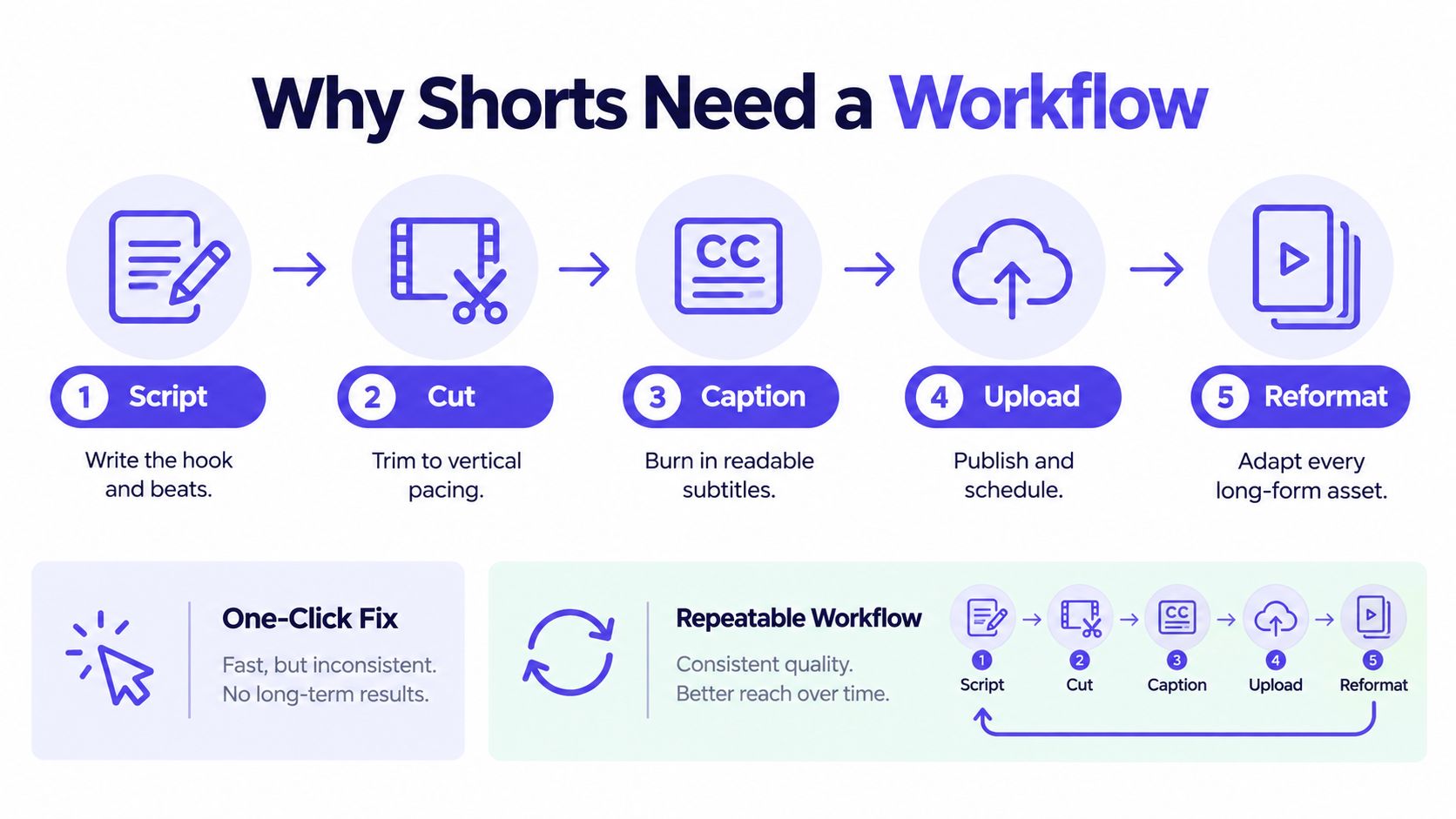
A durable pipeline has five connected jobs:
- Script: Define one message and a clear opening.
- Cut: Remove setup that only works in the original long-form context.
- Caption: Add readable text that matches the spoken words.
- Upload: Apply the title, description, disclosure setting, and schedule.
- Reformat: Adapt the source into additional clips without copying the same episode mechanically.
The generator belongs inside that sequence. It can assemble a draft, suggest scenes, produce a voiceover, create captions, and resize an asset. It still needs approved source material and a human review pass.
Practical rule: Automate repetitive production work, not the final editorial decision.
That distinction matters because YouTube's distribution is enormous. Shorts exceeded 30 billion daily views in 2022, passed 50 billion in early 2023, and reached more than 70 billion daily views by late 2023 and into 2024, as summarized in the documented history of YouTube Shorts. In June 2025, YouTube CEO Neal Mohan said Shorts averaged more than 200 billion daily views, though comparisons need care because YouTube changed how a view is counted on March 31, 2025.
A workflow gives a small team a way to publish consistently without accepting every generated draft. It turns AI from a magic button into an assistant that moves approved material through a repeatable queue.
Turning One Source Asset Into a Batch of Shorts
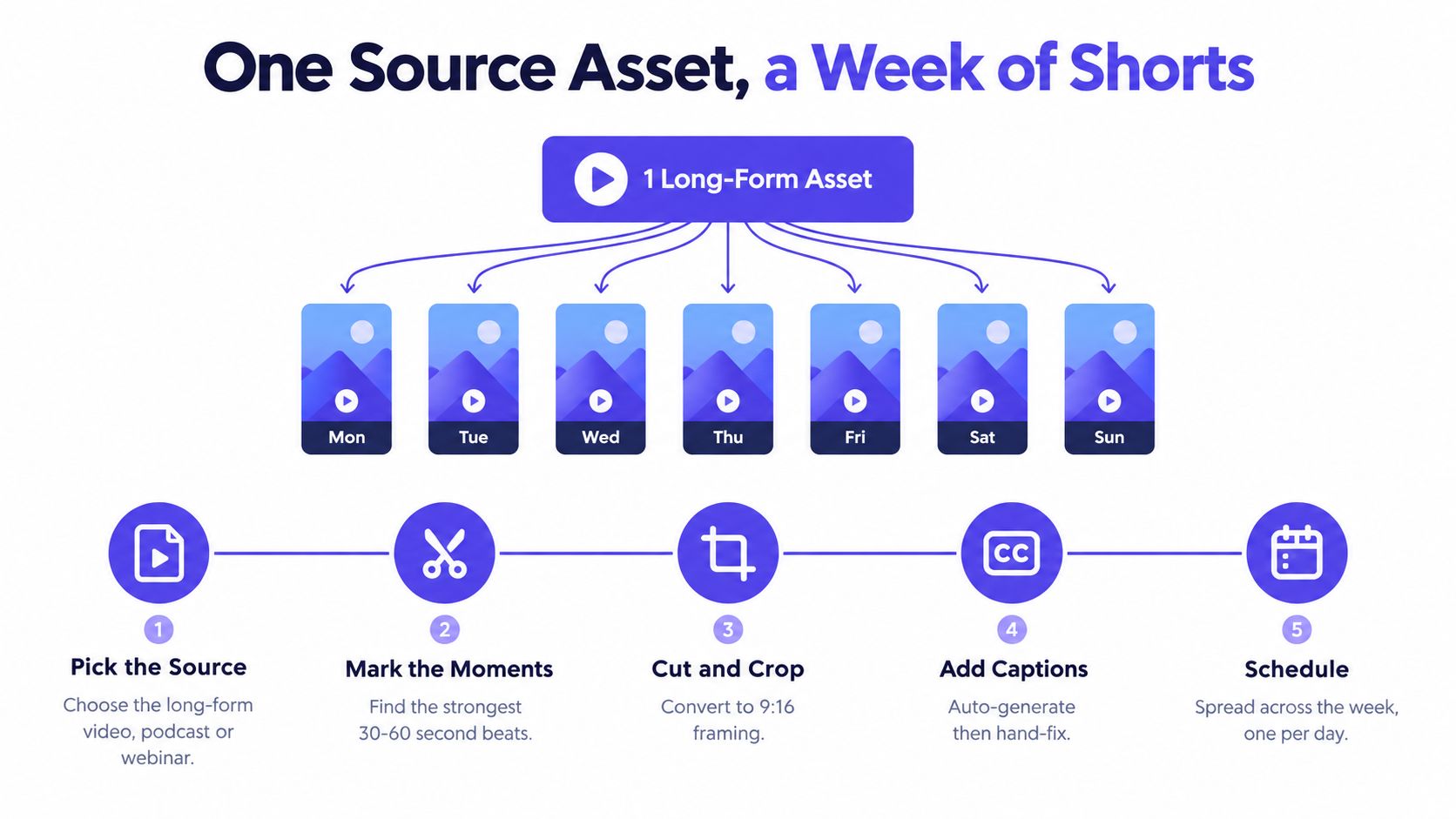
Start with the source, not the generator. Choose a long-form video, podcast, webinar, interview, or article that contains several independent ideas. A strong candidate has moments that make sense without the surrounding conversation, such as a surprising explanation, a useful demonstration, a disagreement, or a specific answer to a common question.
Search the transcript before scrubbing through the entire recording. Look for statements that contain a complete thought, then check the surrounding audio. A sentence may look strong in text but depend on an earlier question, a visual prop, or a reference the Shorts viewer won't understand.
Make a decision at every handoff
For each candidate moment, write a short brief before generating anything. Include the intended viewer, the central point, the emotional angle, and the visual evidence that should appear on screen. “Explain this topic” is a weak instruction. “Show a founder how to identify the first error in a campaign report, using the original screen recording as evidence” gives the system a usable direction.
Then decide whether the original audio should remain. A real speaker often carries hesitation, emphasis, and credibility that an AI voice won't reproduce. Synthetic narration can work for a script-led explainer or a translated version, but it becomes distracting when the visuals show one person and the voice sounds like another.
Use the generator for different jobs instead of repeating one prompt:
- Repurposing: Pull a self-contained segment from the original.
- Explaining: Rewrite the idea for viewers unfamiliar with the source.
- Demonstrating: Pair the claim with a screen recording, product shot, or physical action.
- Comparing: Build two opening variants around the same underlying point.
- Localizing: Change the narration or captions while preserving the editorial meaning.
A source clip that already has a strong opening may need almost no rewriting. Leave it intact when the speaker reaches the point quickly and the visual context is clear. AI should not add motion, stock footage, or a new voice merely because those options are available.
For more detailed guidance on choosing moments and structuring clips, use this guide to clipping videos as a reference point. The final review should cover three risks: factual drift between the source and the generated script, visual artifacts such as warped hands or unreadable text, and brand inconsistency in captions, colors, terminology, or tone.
The production problem looks like generation, but it's mostly curation. A useful batch contains distinct ideas, varied openings, and enough original context that each Short earns its place.
Formatting, Captions, and Hooks That Survive the First Two Seconds
A vertical Short can fail before the viewer hears the second sentence. Formatting, captions, and hooks each need their own decision. Combining them into one automated preset often creates a video that technically fits the platform but feels cramped and difficult to follow.
Build the frame around mobile viewing
Use a 9:16 vertical composition and export at 1080 by 1920 when your workflow supports it. Keep faces, product details, and essential diagrams away from the top and bottom interface areas. The right side also needs breathing room because platform controls and overlays can compete with important text.
Before approving a crop, watch the entire clip on a phone-sized preview. A centered wide crop may remove the person who is speaking. An automatic face tracker may jump between people. A product demonstration can lose the hand movement that explains what the viewer should notice.
Captions need a separate review. Use strong contrast, short lines, and enough screen time for the viewer to read without racing the narration. Word-by-word animation can add energy to a fast statement, but it can also create visual noise. Full-line captions work better when the speaker is explaining a complicated idea or when the viewer needs to compare several terms.
This reference on YouTube Shorts size and specifications can help standardize export settings across a team. The setting is only useful if someone still checks the final crop, caption position, and legibility.
Treat the opening as its own asset
The first one to two seconds should communicate a reason to stay. Start with the outcome, open in the middle of an action, name the audience's problem, or state the conflict plainly. “Here are three marketing tips” sounds interchangeable. “Your best-performing page may be hiding the actual conversion problem” gives the viewer a question to resolve.
Generate several opening variants while keeping the body of the Short comparable. Change the first line, first visual, or first action, but don't change every variable at once. A slow synthetic introduction, a generic office montage, or a logo animation consumes the part of the video that has the least tolerance for delay.
An AI video creator can produce caption tracks, hook variants, and reformatting cuts in one pass. Route those outputs to a review queue instead of publishing every version automatically. The useful automation is the ability to compare options quickly, not the removal of judgment.
A clean first frame should remain understandable without sound. If the viewer can't tell who the video is for or what is happening, better caption animation won't repair the opening.
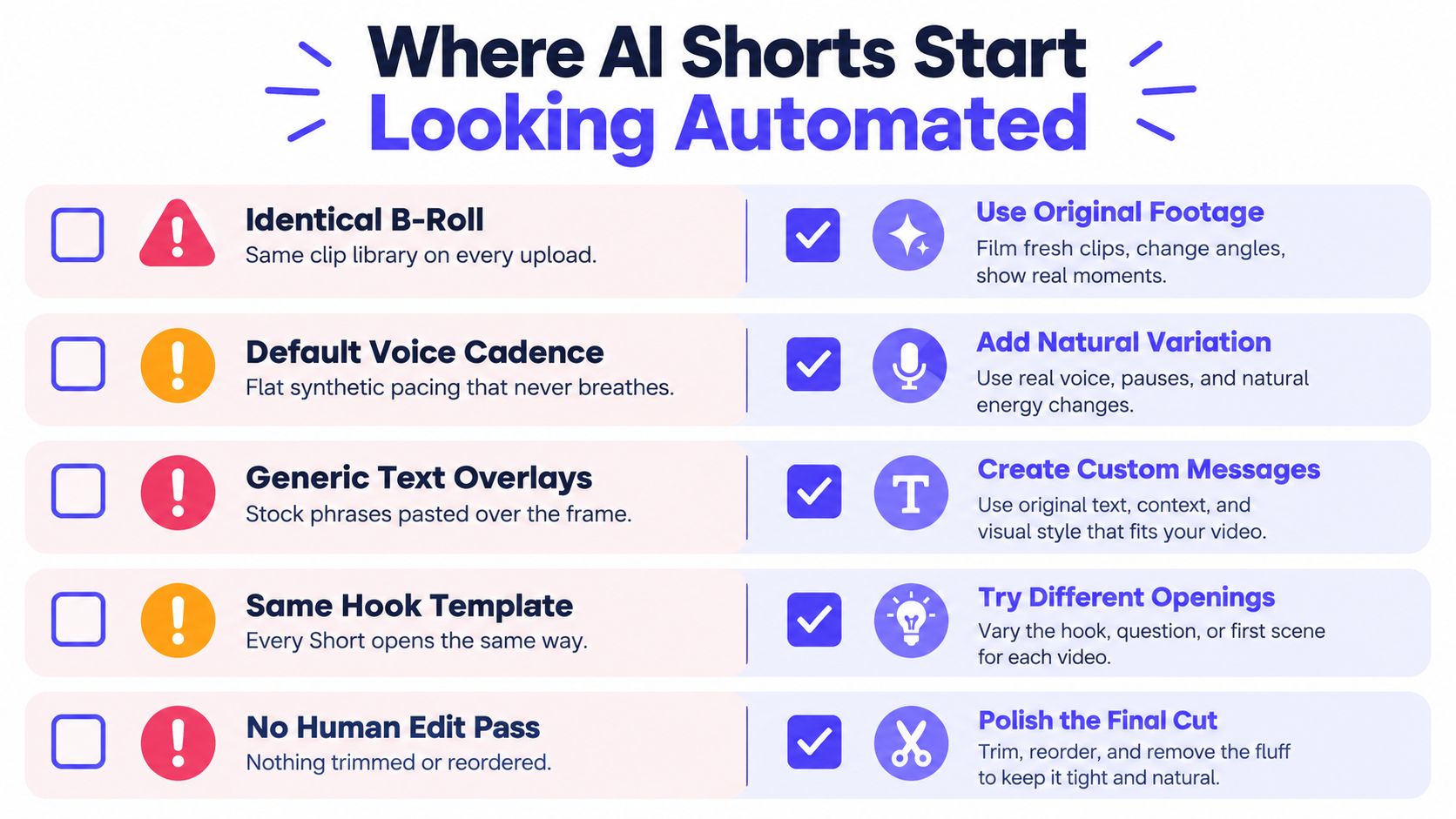
Where AI Shorts Start Looking Automated and How to Avoid It
High-volume publishing sounds like the main advantage of AI, but volume can expose a channel's production system. Viewers notice when every Short uses the same stock footage, the same voice rhythm, the same text animation, and the same opening sentence.
The result isn't merely bland. Repetition can make useful information feel interchangeable with dozens of other videos. A viewer may understand the topic but still have no reason to trust this particular creator.
Replace the tells with small human decisions
Identical B-roll is the easiest signal to spot. If the script discusses a specific product feature, use a product recording, customer workflow, or relevant demonstration instead of another generic laptop shot.
Default voice cadence creates a second problem. Synthetic narration often gives every sentence the same weight. Rewrite the script in the creator's spoken style, add natural pauses, and use original audio when the speaker's delivery carries meaning.
Generic text overlays weaken specificity. Replace stock phrases with the exact term, result, or question the viewer needs to understand. A caption should clarify the scene, not decorate it.
The same hook template eventually trains viewers to swipe. Vary the entry point between a question, a claim, a visual action, a correction, and a short story. The topic can stay consistent while the editorial approach changes.
No human edit pass leaves the system's first answer in charge. A reviewer should be able to remove a scene, reorder two beats, replace a generated asset, or cut a pause without rebuilding the entire video.
Research on AI-video evaluation identifies recurring problems with human anatomy, action continuity, object identity, and semantic body-part consistency. The practical quality-control framework described in this review of AI-video assessment methods recommends inspecting more than surface realism. A clip can look polished in one frame and still fail when a hand moves, an object changes shape, or an action jumps forward.
The fastest way to make an AI-assisted Short feel original is to add a specific human decision that the template couldn't have made.
That contribution might be a face-to-camera introduction, a real screen recording, a firsthand example, proprietary data, or a sharp editorial opinion. It doesn't need to make production slow. It needs to make the episode distinct.
Measuring What Actually Matters in Shorts Analytics
A Short can collect views without holding attention. It can also have a modest reach but reveal a strong opening that deserves another test. The useful question is not whether one upload “went viral.” It's where viewers stayed, where they left, and which creative choice caused the difference.
Use YouTube Studio to log each Short against the same fields. Track average view duration, early retention, viewed-versus-swiped-away behavior, midpoint retention, completion, replays, and subscribers attributed to Shorts. You don't need a complicated dashboard if the team records the opening variant, topic, duration, and result consistently.
A practical benchmark source places healthy Shorts average percentage viewed at roughly 70% or higher, with commonly cited guardrails of above 80% retention in the first three seconds, above 60% at the midpoint, and above 70% through completion. These figures come from Shorts benchmark guidance, but they aren't guaranteed platform thresholds. Use them as testing references, then compare each result with your own channel baseline.
| Metric | Target range | Red flag | Next action |
|---|---|---|---|
| Average view duration | Move upward against comparable Shorts | Viewers leave before the central point | Cut setup and move the payoff earlier |
| Early retention | Above 80% in the first three seconds as an operating target | The opening loses viewers immediately | Test a new first line, first frame, or visual action |
| Viewed versus swiped away | Improve relative to similar topics | The Short is shown but frequently dismissed | Make the subject clear before the viewer needs audio |
| Midpoint and completion | Above 60% at midpoint and above 70% through completion as benchmark guardrails | A sharp drop follows a scene change | Remove repetition, shorten the explanation, or change the visual |
The swipe-away rate is especially useful when a Short has a good opening but loses people later. A spike near the middle usually points to pacing, not discoverability. Try removing a repeated explanation or replacing a static visual with evidence tied to the claim.
For broader context on how recommendation behavior affects growth, this practical guide to growing with YouTube Shorts is a useful companion. Treat external benchmarks as prompts for experiments, not promises.
Review the log weekly. If the first seconds underperform, rewrite hooks. If the midpoint drops, tighten the body. If completion is strong but subscriber conversion is weak, make the channel's next step clearer rather than generating more clips. A YouTube analytics dashboard can centralize reporting, but the discipline of comparing like with like matters more than the interface.
Disclosure, Originality, and Publishing AI Shorts Safely
The disclosure question is narrower than many creators assume. YouTube requires disclosure when content is realistically generated or altered in a meaningful way, such as making a real person appear to say something they never said, changing a real event or place, or creating a realistic scene that never happened. Scripts, ideas, captions, clearly unrealistic animation, and ordinary production assistance generally don't require the same disclosure.
YouTube states that disclosure itself doesn't reduce reach or monetization eligibility, as explained in its guidance on altered or synthetic content. That doesn't mean every AI Short is safe. It means creators should separate the disclosure decision from the quality decision.
Use a practical disclosure test
Ask whether a reasonable viewer could mistake the generated element for real footage, a real person, or a real event. A fictional animated explainer is different from a realistic AI presenter describing a fabricated news event. A voiceover that summarizes an approved script is different from cloning a person's voice to make them deliver words they never recorded.
When disclosure applies, activate the relevant setting during upload. For sensitive topics such as health, finance, or news, add plain-language context in the video or description when the synthetic element could affect how viewers interpret the claim. If the Short contains a product demonstration, identify whether the footage shows the actual product operating or a generated scene representing an idea.
Originality is a separate test:
- Add a real point of view. Commentary, analysis, firsthand experience, or a clear editorial position gives the Short a purpose beyond rearranging source material.
- Use assets you can explain. Keep records for third-party footage, music, voices, and images. A generator doesn't remove licensing responsibility.
- Create meaningful variation. Adapting one source across platforms can be efficient, but exporting the same script and visuals everywhere can make the channel feel mass-produced.
YouTube's disclosure guidance also warns that repeated failure to disclose qualifying synthetic content may lead to enforcement consequences, including possible removal or suspension from the YouTube Partner Program. The larger strategic risk often comes earlier. A repetitive channel can lose audience trust even when every upload technically meets a disclosure requirement.
A short pre-publish checklist keeps the decision concrete:
- Label check: Confirm whether realistic altered or synthetic content appears.
- Claim check: Verify factual statements against the source material.
- Script check: Remove unsupported certainty, invented examples, and misleading edits.
- Originality check: Confirm at least one meaningful human contribution.
- Asset check: Verify that external footage, music, and voices are permitted.
- Viewer check: Watch once with sound and once without it.
Disclosure isn't a punishment for using assistance. Clear labeling can support trust. Low-effort repetition is the problem to avoid.
A Repeatable Weekly Loop for AI-Assisted Shorts
A sustainable Shorts operation starts with a committed source. Choose one long-form recording, podcast segment, webinar, article, or set of original visuals for the week. Mark the moments that stand alone, then brief each clip with a different angle rather than sending the same instruction through the generator repeatedly.
Run the work in five phases
Source intake should produce a shortlist of usable moments and the evidence needed to support each claim. Don't start with a blank prompt if the business already has interviews, demonstrations, customer questions, or published material.
Draft generation turns those approved moments into vertical cuts, caption tracks, scene variations, and alternative openings. Generate multiple candidates where the opening or visual treatment is uncertain. Keep the source audio when it carries authenticity, and use synthetic narration when it serves a clear production or localization purpose.
Human review checks the first frame, factual accuracy, caption alignment, visual continuity, brand voice, and disclosure status. The reviewer should rewrite the opening line, remove defective shots, and confirm that the final clip still communicates one message.
Scheduling separates production from publishing. Queue the approved Shorts across the week and vary topics or opening styles so the channel doesn't present a run of near-identical videos. A broader overview of automated social media for busy owners is useful for thinking about how scheduling fits into a wider content operation.
Analytics review compares retention curves, viewed-versus-swiped-away behavior, completion, replays, and subscriber contribution against similar uploads. Keep the winning hook, not necessarily the winning visual style. A strong result should generate the next experiment, not a batch of copies.
The bottleneck usually shifts as output increases. At first, finding source material takes the most attention. Later, review quality becomes the constraint because every defective caption, unsupported claim, or repetitive hook still needs a human to catch it.
When the schedule slips, don't remove quality control first. Triage in this order:
- Drop a low-confidence concept.
- Reduce visual variation in a clip that already has strong original footage.
- Reuse an approved caption style.
- Publish fewer distinct Shorts rather than filling the queue with near-duplicates.
- Keep the disclosure and final playback checks intact.
An AI video generator for YouTube Shorts becomes useful when it supports that loop. It can reduce repetitive assembly and make experimentation practical, but the channel still needs a point of view, a review gate, and a record of what viewers watched.
PostSyncer lets creators and teams generate short-form videos from text, scripts, URLs, PDFs, images, or longer videos, then add captions, voiceovers, visuals, and music before scheduling content across social networks. Visit PostSyncer to test a workflow that combines AI-assisted Shorts production, review, publishing, and analytics in one workspace.