











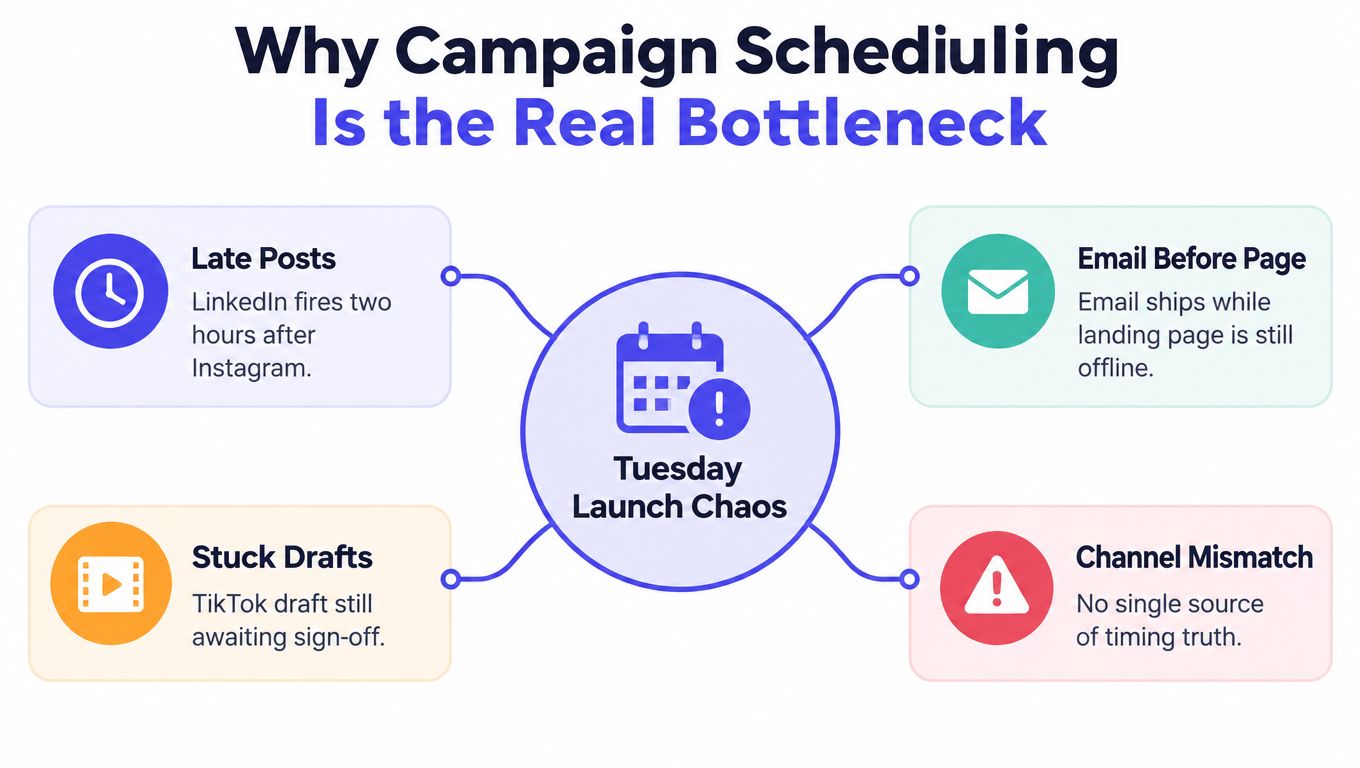
Tuesday morning arrives and the launch looks fine at first glance. Instagram publishes on time, LinkedIn fires two hours late, the email goes out before the landing page is live, and the TikTok draft is still sitting in someone's DMs waiting for approval.
Nothing failed in isolation. Together, the campaign feels improvised.
That's the core problem with campaign scheduling. A calendar isn't just a queue of posts. It's the operating layer that connects channels, owners, approvals, dependencies, audience habits, and paid distribution into one launch rhythm.
Why Campaign Scheduling Becomes the Bottleneck
A launch can have approved creative, a clear message, and a strong offer, yet still miss its moment because the landing page is not live, paid support starts too early, or the final post is waiting on legal review. Teams often start by asking, “What's the best time to post?” before confirming who owns approval, whether the destination works, or whether the asset belongs in the organic or paid plan.
That order creates avoidable rework. A product announcement may depend on final screenshots, while the email depends on a working landing page. Paid distribution may need an early organic signal before the team increases spend. Brand, legal, or product reviewers may also need to clear a social post before it enters the publishing queue.
Practical rule: If nobody can name the owner of the next action, the calendar is incomplete.
Campaign scheduling coordinates three operating decisions:
- Organic cadence: Publish when the audience is likely to notice, understand, and act on the content.
- Paid amplification: Set a deliberate promotion window for organic assets that show potential, rather than boosting every post automatically.
- Workflow control: Keep drafts, approvals, dependencies, and final assets visible so a scheduled item cannot move ahead of its prerequisites.
Timing also depends on distribution method and content type, not on one universal “best hour.” A 2018 Journal of Marketing study summarized here analyzed 5,706 Facebook posts across 366 days from a top-50 U.S. newspaper. Morning posts produced 8.8% more link clicks than afternoon posts, while afternoon paid activation generated 21% more link clicks than morning paid activation. Those findings are a planning input, not a schedule to copy. Match timing to audience attention, format, and the channel carrying the message.
A usable campaign calendar should answer these questions without a separate status meeting:
- What is being published?
- Where will it appear?
- Who owns it?
- What state is it in?
- What must happen first?
- When does paid support begin?
- What result determines the next move?
Teams reviewing campaign success from strategy to launch will find the same operating principle: execution improves when strategic intent connects to specific deliverables, owners, and timing decisions. A schedule earns its place when it makes those connections visible and gives the team a clear next action.
Set the Goals and Map Channels to Content
Start with one campaign objective. Don't open the calendar until the team can finish this sentence: “This campaign exists to produce…”
A product launch might aim to generate new signups. A brand campaign might aim to earn relevant mentions and shares. A recruitment push might focus on qualified applicants rather than broad impressions. The exact outcome depends on the business, but the objective must describe a result, not a scheduling activity.
Pair that outcome with two measures:
- Leading indicator: A signal that shows whether attention is building, such as reach, engagement, video completion, or qualified traffic.
- Lagging indicator: The business result, such as signups, applications, purchases, or booked demos.
This pairing prevents a common reporting mistake. A campaign can collect likes while failing to move people toward the business outcome. Conversely, a conversion-focused asset may look quiet in the feed but still attract the right visitors.
Map each channel to a job
Assign every channel a specific role. Instagram might carry visual proof, LinkedIn might handle the detailed explanation, TikTok might create discovery, and email might deliver the conversion prompt. The role should determine the format, message depth, and call to action.
A 90-second vertical video may need a new edit before it becomes a useful LinkedIn post. A long case study won't transfer directly to TikTok. Repurposing works when the idea travels, not when the team copies the same asset everywhere.
| Channel | Content Role | Primary Format | Owner |
|---|---|---|---|
| Visual proof and product interest | Reel, carousel, or image post | Social lead | |
| Explanation and professional context | Text post, document, or native video | Content lead | |
| TikTok | Discovery and problem awareness | Short vertical video | Video lead |
| Conversion and follow-up | Launch email or segmented sequence | Lifecycle marketer | |
| Website | Full detail and action | Landing page, guide, or comparison page | Web owner |
The table exposes trade-offs that enthusiasm can hide. A three-person team probably can't operate eight channels at flagship quality. Cut the channels that don't have a clear audience, owner, or content role. A smaller, coordinated distribution plan usually beats a wide calendar filled with weak adaptations.
Use labels for channel, campaign, and content role so the mapping stays visible during scheduling. That makes it easier to filter a launch by awareness assets, conversion assets, or platform owner instead of searching through a mixed queue.
Build a Calendar Your Team Will Actually Use
A calendar becomes useful when it reflects how work moves, not when it looks polished in a presentation. Build it across three views:
- 90-day overview: Show campaign arcs, major launches, seasonal moments, and broad resource pressure.
- 30-day working calendar: Add individual assets, owners, dependencies, and approval milestones.
- 7-day execution view: Show what must be reviewed, scheduled, published, monitored, or changed immediately.
The long view protects strategy. The short view protects launch quality.
Give every item a workflow state
Dates alone don't tell a team whether a post is ready. Use a status sequence that mirrors real work:
Draft → In Review → Approved → Scheduled → Published → Reported
Each entry needs one accountable owner. Add a secondary approver when the asset carries brand, legal, product, or paid-media risk. Avoid shared ownership labels such as “marketing team.” Shared responsibility often means nobody knows who should move the item forward.
A helpful entry includes the campaign name, target audience, channel, content role, format, owner, approver, publish time, destination link, and status. Add a dependency when another task must happen first, such as “landing page live” or “pricing approved.”
Make filtering effortless
Use a consistent label structure:
- Channel tag: Instagram, LinkedIn, TikTok, email, or website.
- Campaign tag: Product launch, recruitment, seasonal promotion, or evergreen.
- Role tag: Awareness, proof, education, conversion, or retention.
- Distribution tag: Organic or paid.
- Priority flag: Standard, important, or launch-critical.
A team member should be able to open a personal queue, view only paid placements, or isolate every launch-critical dependency without rebuilding the calendar. Default views matter because people tend to use the view that appears first.
The same principle applies to visual planning outside social media. A resource such as Nim's Ootdcalendar outfit planner shows how a visual arrangement can make a sequence easier to understand. Your marketing calendar needs that same clarity, but with owners, statuses, and dependencies attached.
For more detail on the mechanics, use this guide to creating a content calendar. Keep the calendar mobile-friendly, make approval actions obvious, and add handoff markers. A calendar nobody opens is worse than a simple one that the team updates every day.
Time Slots, Cadence, and Organic vs Paid Logic
Treat timing as a distribution problem, not a hunt for one perfect timestamp. Audience behavior varies by platform, region, format, and intent. The same campaign story may need several related placements rather than one synchronized blast.
Start with a cadence your team can sustain. A schedule that requires constant emergency production will collapse as soon as one approval slips. Set a baseline per channel based on available creative capacity, then reserve space for campaign moments and reactive content.
| Channel | Weekly Cadence | Organic Slot | Paid Boost Window |
|---|---|---|---|
| Sustainable recurring cadence | Audience-tested evening or high-attention window | After early engagement confirms the asset | |
| Sustainable professional cadence | Workday window matched to audience activity | After the explainer earns relevant interaction | |
| TikTok | Sustainable short-form cadence | Audience-tested discovery window | After a strong hook or completion signal |
| Planned campaign sends | Time zone and audience intent dependent | Follow-up to engaged or unconverted segments |
The timing evidence supports testing adjacent windows rather than treating one hour as sacred. A 52M-post analysis found different high-engagement windows by platform and daypart, including weekday evening activity for Instagram, weekday afternoon and evening activity for LinkedIn, weekend morning activity for TikTok, and weekday morning activity for Threads. The same analysis found no universal best time and recommended reallocating effort toward the strongest response blocks after testing.
That approach works better than copying a generic chart. Run the same campaign asset across a few nearby windows, compare meaningful responses, and keep the winner only if the difference matters to the objective.
Separate organic and paid distribution
Organic and paid posts should not automatically share the same slot. The Facebook research cited earlier found non-boosted content performed better in the morning, while boosted posts received more clicks in the afternoon. That supports a practical sequence:
- Publish the organic asset.
- Watch for relevant engagement and audience response.
- Refine the paid audience or creative if needed.
- Amplify the strongest version in a later window.
- Retarget people who engaged but didn't complete the desired action.
A teaser can appear on TikTok, a detailed explanation on LinkedIn, visual proof on Instagram, and a paid follow-up can reach people who interacted with the story. Staggering creates a journey instead of four disconnected announcements.
Use local time zones deliberately. If audiences span regions, duplicate the distribution window where the audience warrants it, and document rules for evergreen rotation so the same post doesn't appear too frequently to one group. The guide to choosing social media posting times can support the initial test plan, but your own response data should decide what remains in the calendar.
Approval Workflows and Automation Guardrails
Scheduling without approval rules creates a faster way to publish the wrong thing. A queued post can become inaccurate when pricing changes, a product update slips, a public event changes the tone, or a link points to an unfinished page.
Use three review stages:
Draft
The creator writes the copy, attaches the final working asset, adds the destination link, and assigns the owner. The draft should include the objective, audience, content role, and any required disclosures.
Internal review
An editor or channel owner checks clarity, spelling, format, brand voice, accessibility, and platform fit. Give this stage a clear service target, such as four working hours, so a post doesn't disappear in an open-ended review queue.
Legal and brand review
The designated reviewer checks claims, rights, regulated language, offer terms, and brand risk. A practical target might be eight working hours for ordinary campaign content, with a separate path for urgent or high-risk material.
Use visible labels such as Draft, In Review, Approved, Queued, and Live. People shouldn't need to ask in Slack whether a post is ready. If a post remains in review longer than 24 hours, trigger a notification to the owner and approver rather than sending routine alerts for every status change.
Automation needs limits. Pause items tagged “sensitive” outside business hours. Require two-person approval for paid spend above your internal threshold. Lock the final image, destination URL, and tracking parameters once approved. If someone edits a locked asset, return it to review instead of changing a queued post behind the scenes.
Guardrail: Automation should remove repetitive handoffs, not remove human judgment.
A reusable approval workflow template helps teams document these states before connecting them to scheduling rules. Add an emergency pause owner as well. Someone must have authority to stop a campaign when the context changes.
Measure What Worked and Feed It Into Next Cycle
A calendar earns its place when the next cycle becomes more informed than the last. Choose three to five core KPIs tied directly to the original objective, then separate them from supporting metrics that explain performance.
For a demand campaign, that might mean reach, click-through rate, qualified conversions, and cost per qualified action. For a brand campaign, share rate and relevant audience response may matter more than raw follower growth. Keep the set small enough that the team can discuss every metric without turning the review into a dashboard tour.
Tag every post consistently by campaign, channel, content pillar, format, and distribution type. Without those labels, teams tend to remember the loudest post rather than identify the repeatable pattern. A post that attracted broad attention may not have brought the audience the business desired.
Run a short retro
Hold a 30-minute review every two weeks while the campaign is active. Ask:
- Which time blocks underperformed against the campaign objective?
- Which hooks, formats, or proof points repeatedly attracted useful responses?
- Did organic engagement justify paid amplification?
- Which approval or dependency delayed publication?
- Did any channel consume more production effort than its result justified?
Write the answers back into the calendar. Change labels, retire weak formats, adjust owners, and update the distribution rule. If a platform consistently produces low-quality traffic, reduce its priority instead of protecting it because it appears busy. If a particular format drives qualified leads, give it more production support.
Review weekly rather than waiting until the campaign ends. Early evidence can justify moving a later slot, changing the creative, or pausing an underperforming sequence. Measurement becomes operational only when it changes what the team schedules next.
Sample Week and Pre-Flight Checklist
Use this fictional launch for a new project-management feature as a working model. The campaign has one message, but each channel performs a different job.
| Day | Scheduled activity | Workflow focus |
|---|---|---|
| Monday | Organic teaser video on TikTok and Instagram Stories | Confirm the audience problem and collect early reactions |
| Tuesday | LinkedIn explainer with product context | Publish the deeper explanation after final review |
| Wednesday | Paid amplification of the strongest launch asset | Confirm audience, budget, destination, and approved creative |
| Thursday | Instagram proof carousel and retargeting creative | Show the feature in use and address objections |
| Friday | Email launch message and website update | Verify that the landing page, links, and offer match |
| Saturday | Community replies and selective evergreen content | Monitor questions without adding unnecessary campaign volume |
| Sunday | Reporting snapshot and next-week queue review | Record results, unresolved issues, and follow-up owners |
This sequence avoids sending every message at once. The teaser creates awareness, the explainer adds context, the paid activity builds on observed interest, the proof asset handles objections, and the email gives the audience a direct conversion path.
Run the pre-flight check before launch
Complete the following check 48 hours before the first major publication:
- Confirm the goal: The objective and KPI pair still match the campaign brief.
- Verify the landing page: The page is live, readable on mobile, and aligned with the promised action.
- Test every link: Destination URLs work, redirects behave correctly, and tracking parameters are consistent.
- Lock the assets: Final copy, images, videos, captions, disclosures, and offer details are approved.
- Check ownership: Every item has one owner, an approver, and a clear escalation path.
- Verify time zones: Each audience receives the message in the intended local window.
- Review tags: Campaign, channel, content role, organic or paid status, and priority labels are accurate.
- Inspect automation: Recurring slots, queues, notifications, and pause rules behave as expected.
- Prepare support: Someone is assigned to monitor comments, replies, form submissions, or inbound questions.
- Log approvals: The final review is recorded where the publishing team can find it.
Bulk import can reduce repetitive calendar setup when a launch has many prepared assets. Recurring slots help protect the baseline cadence, while queue reordering makes it easier to respond when a dependency changes. Those features save time only when the underlying ownership and approval rules are already clear.
After the week ends, review what slipped, retire what never worked, and adjust the cadence before the next cycle. A campaign schedule should become more selective over time, not merely more crowded.
PostSyncer brings the operational pieces together with a visual calendar, multi-channel scheduling, approval workflows, labeling, bulk scheduling, queue controls, and analytics for comparing content by platform and timing. Use PostSyncer to turn your next launch into a coordinated distribution plan, then give your team one place to manage the path from draft to published result.