











It's 8:47 a.m. You've got coffee in one hand, Meta notifications in the other, and three Facebook Pages are lighting up at once. One post has a genuine customer question, another has spam replies piling up, and the giveaway thread you need to check first has one angry comment you can't even find.
If you manage comments on Facebook long enough, this stops feeling like “engagement” and starts feeling like traffic control. The hard part isn't only replying. It's knowing why one comment rises, why another disappears from view, when to hide instead of delete, and why a messy ad thread can hurt performance long before anyone notices in reporting.
What You Will Learn About Comments on Facebook
A lot of people learn Facebook comments by trial and error. They click around, hide a few obvious spam replies, answer customer questions when they spot them, and hope that's enough. It usually works until volume picks up.
Then the cracks show. A follower says their comment vanished. Your team answers the same product question ten times under the same campaign. An ad looks strong in creative review, but the thread underneath turns into a pile of complaints, fake giveaways, and unrelated links. That's when comment management becomes an operating skill, not a side task.
The five things that matter most
By the end of this guide, you should be able to work through comment chaos with a clearer mental model.
- How comments on Facebook work: what a comment is, where it lives, and why replies behave differently from top-level comments.
- Why some comments rise and others sink: Facebook doesn't sort every thread by simple recency. Visibility depends on signals tied to quality, relationships, and interaction.
- Which moderation controls you can use right now: hiding, deleting, replying, and other practical actions that shape the thread without overreacting.
- Why paid performance can suffer when comments go bad: many teams watch creative and targeting closely but ignore the conversation under the ad.
- How to build a repeatable workflow: so your team isn't stuck firefighting every time a post takes off.
Practical rule: If you can't explain what happened to a comment, you can't manage the thread well at scale.
Facebook comments have been high-volume for a long time. An early Facebook-era disclosure reported 3.2 billion likes and comments every day, which shows how central this behavior already was to the platform's activity (MarTech coverage of the disclosure). Later, the Facebook Comments plugin spread that behavior far beyond Facebook itself. BuiltWith tracking cited in the same source reported 246,897 live websites using the plugin and 752,209 additional historical sites, for 999,106 websites associated with it, including 99,013 in the United States.
That history matters. Comments on Facebook aren't a small feature bolted onto posting. They've become part of how brands publish, moderate, support customers, and influence both organic and paid outcomes.
What a Facebook Comment Actually Is
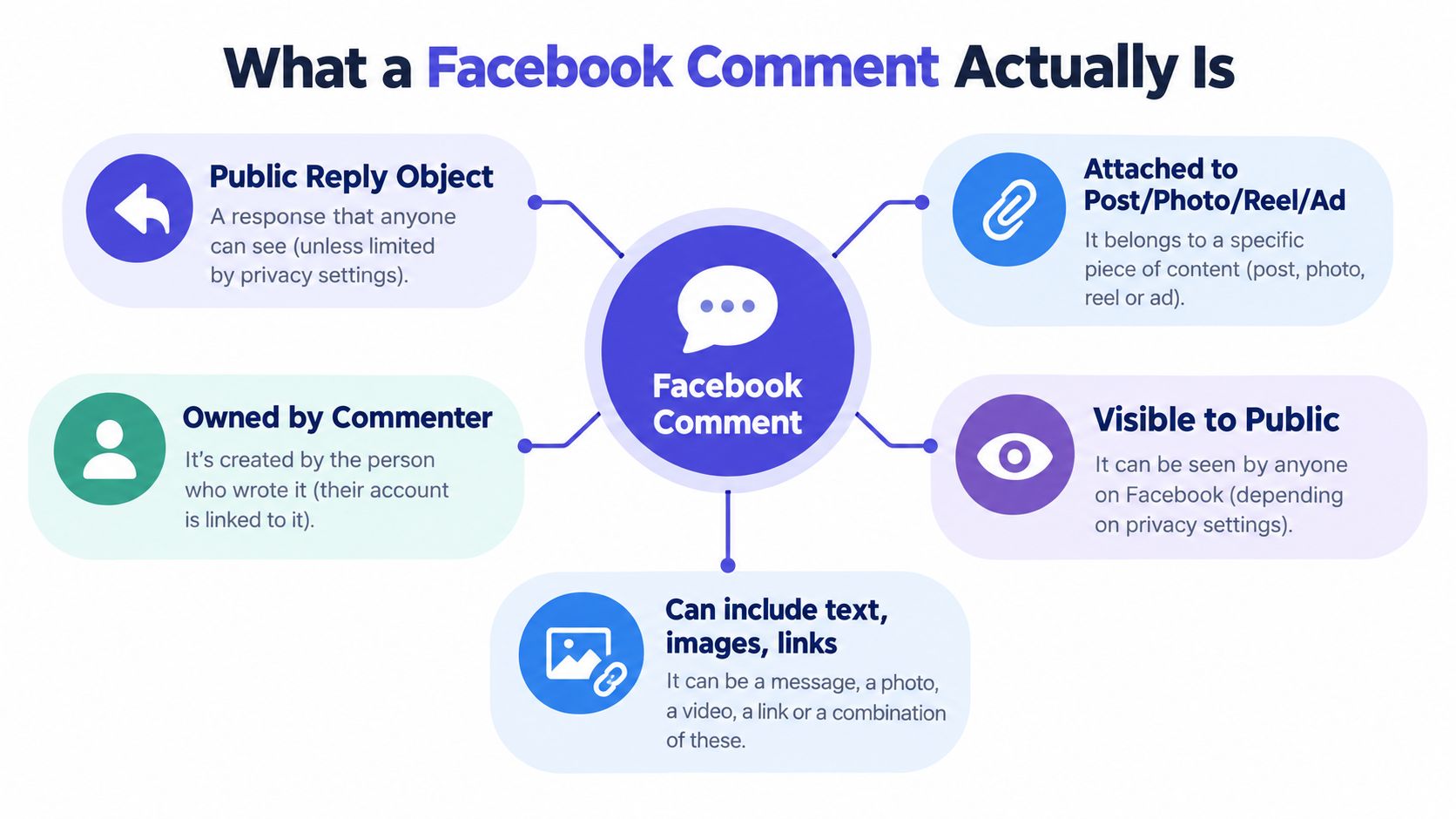
A Facebook comment is easiest to understand as a public reply object attached to a piece of content. That content might be a Page post, photo, reel, or ad. The person who writes the comment owns their words, but the comment appears on a surface your Page manages.
A notice board inside a shop. Visitors can pin notes to the board. The notes belong to the writers, but the shop owner decides what stays visible, what gets covered, and what gets removed.
Top-level comments and replies
Not every comment sits in the thread the same way. You need to separate two basic layers.
- Top-level comments sit directly under the original post. These are the main notes everyone sees first.
- Replies sit under a specific top-level comment. They inherit context from that parent comment, so they don't stand alone in the same way.
- Threaded conversations can become mini-discussions. As they deepen, Facebook often makes the thread feel flatter for casual viewers, especially when people only expand what interests them.
This matters in moderation. If someone leaves a harmless top-level question and another person replies with abuse, you may not need to remove the whole thread. You may only need to act on the reply.
Reactions are light, but they still matter
A reaction isn't a comment, but it often changes how a thread feels and how visible it becomes. If a comment gets likes or reactions, Facebook may treat it as a stronger signal than a comment no one acknowledges.
That's why a short customer testimonial can stay near the top while a longer but ignored reply sinks lower. Community managers sometimes confuse “best written” with “most likely to surface.” Facebook doesn't always reward them equally.
A comment section is part conversation, part interface. If you only read the words and ignore the structure, you'll miss how the thread actually behaves.
Personal profiles and Pages work differently
A comment under your personal profile post isn't governed the same way as a comment under a Facebook Page post. Moderation rights differ because the account types differ.
On a Page, your team may have direct moderation responsibility because the Page represents a business, creator, or organization. On a personal profile, the controls are more personal and less operational. If you manage brand activity, stay clear about which surface you're working on before you assume a setting or action applies.
How Facebook Ranks and Orders Comments
Comments on Facebook often do not appear in strict time order. Sometimes they do. Often they don't. Facebook has said its ranking system uses multiple signals, including integrity signals, user preference signals, and interaction signals (Meta's explanation of public comment ranking).
That means the first comment you see under a post may not be the newest, longest, or even the one your teammate sees.
Three signal groups shape visibility
Here's the simplest useful way to think about it.
| Comment Ranking Signals at a Glance | What It Measures | Effect on Comment Order |
|---|---|---|
| Integrity signals | Whether a comment looks spammy, abusive, or low quality | Can suppress a comment or keep it from surfacing prominently |
| Preference signals | The viewer's relationship to the commenter or original poster | Can raise comments from people the viewer knows or engages with |
| Interaction signals | Replies, reactions, and visible engagement around the comment | Can move active comments higher in the thread |
Integrity signals exist to protect the thread. If a comment looks like spam, repeats suspicious patterns, or triggers quality concerns, Facebook may reduce its visibility. Community managers often mistake this for a bug when it's really ranking pressure.
Preference signals are personal. Meta says commenters connected to the original poster can surface more prominently, and comment ranking is enabled by default for Pages and high-follower accounts. So two followers can open the same post and see a different order because their networks and histories differ.
Interaction signals are the social proof layer. Comments with replies and reactions tend to look more relevant to Facebook's system than comments with no activity around them.
Why a “missing” comment may not be missing
A buried comment isn't always deleted. It may still exist, just lower in the thread or visible to fewer people by default.
That's why community managers sometimes hear, “My comment is there on my phone but not on desktop,” or “I know I replied, but no one else saw it.” Before you assume a moderation mistake, consider ranking.
Field note: Treat comment order as viewer-specific, not universal. That one shift clears up a lot of confusion.
A few practical consequences follow from that:
- Admin and brand replies often matter more than their length: a short, useful answer can rise because people interact with it.
- Low-quality comment floods can crowd out thoughtful replies: if a thread fills with noise, the comments your customers need may become harder to spot.
- Prompt engagement helps shape the thread early: when your team replies fast to useful comments, you increase the chance that better discussion becomes the visible center of the thread.
How to Manage and Moderate Comments Effectively
The biggest moderation mistake I see is treating every comment problem like a one-button problem. It isn't. Good moderation is layered. You need fast reactive actions for what's already happening, and you need proactive controls for what you can predict.
Start with the reactive controls
Use the direct actions first when a thread is already live and moving.
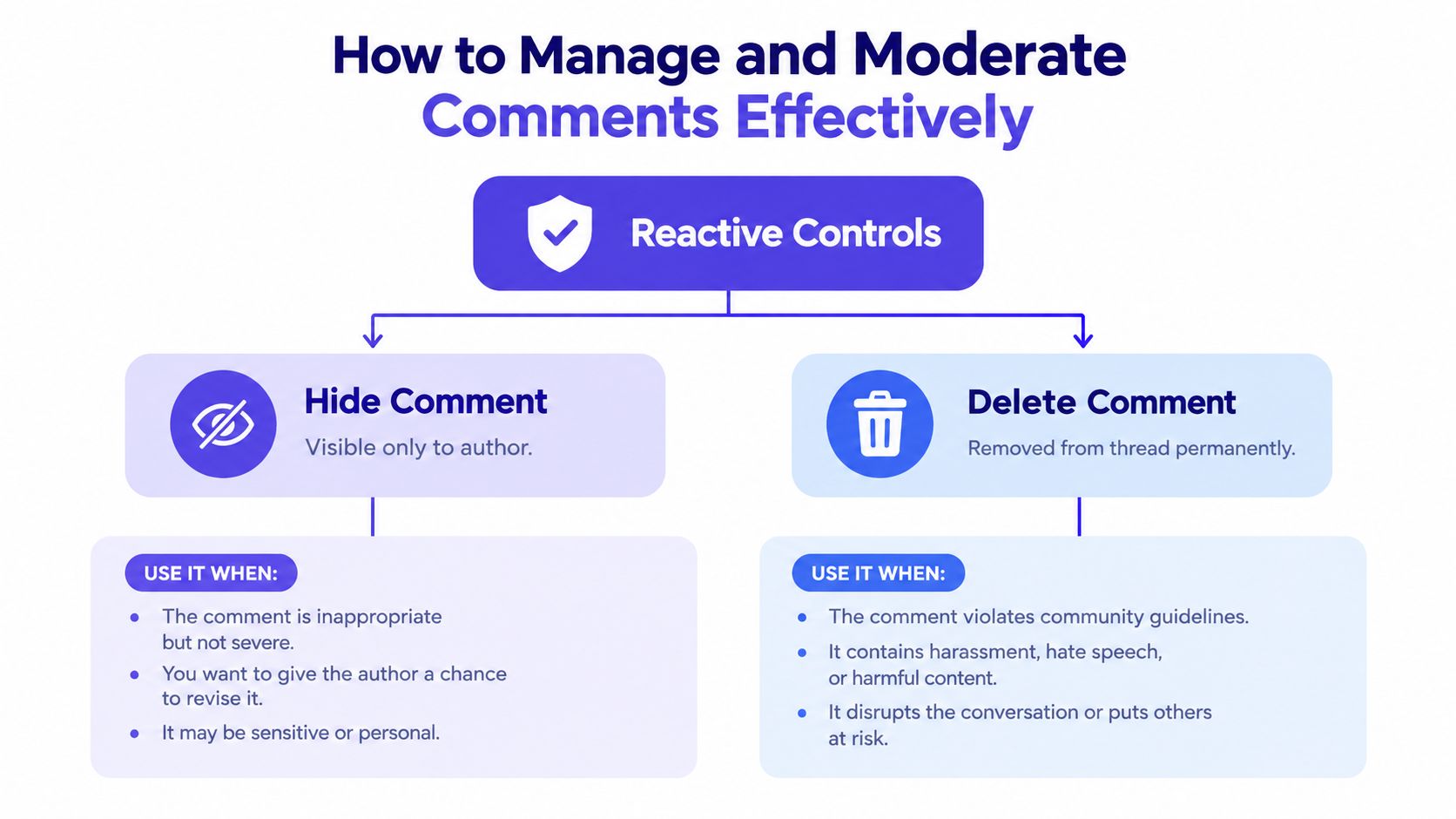
- Hide a comment: This is usually the safest first move for spam, bait, or low-value disruption. It reduces public visibility without immediately escalating the situation.
- Delete a comment: Use this when the content clearly doesn't belong in the thread, such as abuse, scam links, or repeated violations.
- Reply publicly: If the issue is confusion, a fair complaint, or a common objection, replying often works better than removing the comment.
- Block repeat offenders when needed: One troublesome user can consume more team time than an entire healthy thread.
Meta's developer documentation makes the operational side clear. Facebook comment workflows can be handled through APIs, and moderation actions such as hiding, deleting, replying to, and moderating comments are explicitly supported (Meta's documentation for Facebook comments workflows). That matters because serious teams don't want every action trapped inside manual review.
Add proactive controls before the pileup starts
Moderation gets easier when you prepare before the post goes live.
Here's a simple setup I'd use for a product launch, giveaway, or paid campaign:
- Build a campaign-specific keyword list. Include known spam phrases, competitor hijacks, fake coupon language, and obvious slurs.
- Decide your public-response threshold. Some comments deserve a reply. Others only need to be hidden. Don't debate that in the middle of the surge.
- Assign ownership. One person triages. Another handles escalations. If everyone “checks in when they can,” nobody owns the thread.
- Review your moderation stack. If you need a process reference, Nerdify's tips for community management are a useful companion because they frame moderation as relationship work, not only cleanup.
- Use a dedicated moderation workflow. If you want a practical system view, PostSyncer's comment moderation guide maps the core actions into a workflow that's easier to repeat across multiple Pages.
A short walkthrough helps if you're training someone new:
Order matters more than people think
A messy thread tempts teams to start deleting at random. Don't. Work in this order instead.
First, remove obvious harm. Second, answer legitimate questions. Third, clean up noise that distracts from the useful conversation. That sequence keeps you from scrubbing away important customer context while chasing every annoying comment.
Moderation is customer service under public pressure. The job isn't to make the thread look empty. The job is to make it usable.
The Hidden Impact of Comments on Paid Posts
Your ad can be doing its job, then a prospect taps the comments and sees spam, angry side arguments, or an unanswered product concern. The creative did not fail in that moment. The comment thread changed the sale.
That is the part many paid teams miss. On Facebook, comments under an ad are not just a moderation task. They are public context for the click. They shape trust, and on paid posts they can change CTR, conversion rate, and even how expensive it becomes to keep scaling a winner.
Recent independent coverage found that nearly one-third of Meta Ads comments were hidden for spam or toxicity, and the same report cited a 14.7% conversion drop and 11.3% CTR drop on paid posts with harmful comment sections (CustomerThink coverage of the Respondology report). Analysts did not need to claim that comments are the only cause. The practical takeaway is enough. Comment quality belongs on the paid media checklist, right next to spend, frequency, and landing page behavior.
What bad ad threads usually do to performance
A paid comment thread works like the store line outside a restaurant. People judge what is happening before they step inside. If the first few comments signal confusion, scams, or hostility, the ad starts carrying extra friction that does not show up in the creative brief.
| Comment Quality vs. Ad Performance Impact | Typical CTR Impact | Conversion Risk |
|---|---|---|
| Answered questions, visible brand presence, low spam | Lower risk qualitatively | Lower risk qualitatively |
| Mixed thread with off-topic jokes and unresolved objections | Increased risk | Moderate risk |
| Toxic, spam-heavy, complaint-driven thread | 11.3% CTR drop cited in the report above | 14.7% conversion drop cited in the report above |
The contrarian point is simple. Some Facebook ads do not stall because the targeting is off or the hook is weak. They stall because the social proof under the ad turns against the advertiser.
This matters even more on campaigns with broad reach. Organic posts can absorb some mess because people already know they are entering a public conversation. Paid posts are different. A cold prospect often sees the ad and the thread at the same time, then makes a split-second judgment about whether the brand looks responsive, careless, or risky.
A Facebook Page management workflow gets stronger when paid comments are treated as a live performance variable, not a cosmetic cleanup job.
What strong paid comment hygiene looks like
You do not need a perfect thread. You need a thread that feels tended.
- Monitor the first hour closely. Early comments set the tone, especially on ads that are spending quickly.
- Answer repeated objections near the top. One clear brand reply can reduce doubt for dozens of silent readers.
- Remove obvious spam and scam bait fast. Junk comments steal attention from buying signals.
- Watch complaint patterns by ad set or offer. If the same criticism keeps appearing, the issue may be the promise in the ad, not the people in the thread.
- Share ownership between paid and community teams. If nobody owns ad comments, performance issues sit in plain view and keep draining results.
That last point is where a lot of wasted spend hides. Paid specialists watch CPM, CPC, and ROAS. Community managers watch replies and sentiment. Facebook comments on ads sit right in the overlap, so they often get watched by neither team closely enough.
Streamlining Engagement With a Unified Comments Inbox
Native Facebook tools work. They just get awkward when you manage more than one Page, multiple campaigns, and several people touching the same queue. You end up bouncing between notifications, individual posts, Page views, and dashboards, trying to remember what was handled where.
That fragmentation creates a familiar problem. The team doesn't fail because they ignore comments. They fail because the work is scattered.
Native juggling versus one stream
A unified comments inbox changes the task from hunting to triage.

With the native setup, your morning often looks like this:
- Open Page A notifications
- Jump to a live campaign post
- Switch to Page B because a teammate tagged you
- Lose track of which comment already got a reply
- Return later and realize the duplicate question is still unanswered
With a unified inbox, the structure is tighter. Every comment, reply, and reaction lands in one operating view. That lets the team sort by urgency instead of by where the comment happened to appear.
What to look for in a comments tool
If you're comparing options, focus on workflow features rather than broad promises.
A useful setup usually includes:
- Cross-Page visibility: one place to review multiple Facebook Pages
- Spam filtering: so junk is quarantined early
- Auto-replies for repeat questions: helpful for shipping, hours, pricing basics, or event details
- Tagging or prioritization: so risky threads surface before minor chatter
- Analytics tied to response work: unresolved threads, response time, and volume by post
One example is PostSyncer, which offers a unified comments inbox, AI-powered auto-replies, spam filtering, and cross-platform engagement management. If you want a broader explanation of the operating model, this guide on what a unified inbox is is useful background.
Teams get faster when they stop searching for comments and start sorting them.
The practical difference in a real week
The gain isn't abstract. A unified inbox lets a manager do a morning sweep, let common questions route through saved logic, and leave only edge cases for human judgment.
That changes the emotional texture of the job too. Instead of feeling like you're behind from the moment you log in, you can work from a queue. For anyone running several Pages, that's often the difference between “we respond eventually” and “we respond while the thread still matters.”
Troubleshooting Common Comment Problems
Comment problems are frustrating because they don't all come from the same place. Some are user-side. Some are Page settings. Some come from ranking or moderation filters. Some appear when connected tools lose access.
The fastest fix comes from isolating the layer before you start changing things.
When a comment was posted but doesn't seem visible
Start by asking where the problem appears.
- Only one user can't see it clearly: check whether they're dealing with app lag, cached views, or account-level quirks.
- The Page team can't find it natively: inspect whether a moderation rule, hidden state, or visibility control affected it.
- The comment exists but sits far down the thread: ranking may be the issue, not removal.
A common mistake is jumping straight to “Facebook ate the comment.” Sometimes the comment is still there, but the thread is sorting it differently for different viewers.
When your tools and Facebook don't match
If a comment shows inside your engagement tool but not where you expect on the Page, treat that as a sync and permissions question first.
Check these in order:
- Recent access changes: a Page role adjustment can break expected visibility.
- Expired permissions or tokens: connected workflows can lose access until refreshed.
- Moderation actions taken by another teammate: someone may already have hidden or deleted the comment in the native interface.
A simple triage sequence
Use one repeatable rule when something feels off:
Reproduce the issue, isolate the layer, fix at the layer, then verify on desktop, mobile, and your engagement workspace.
That prevents random troubleshooting. If the issue is ranking, don't waste time editing keyword lists. If the issue is permissions, don't blame the commenter. If the issue is a hidden state, don't tell the customer to repost before you confirm what happened.
Most comment problems become manageable once you stop treating them as one category.
A Simple Weekly Comment Workflow You Can Adopt
Many organizations don't need round-the-clock comment monitoring. They need a rhythm that catches risk early, protects response quality, and turns recurring conversations into reusable knowledge.
A weekly routine works better than constant reactive checking because it gives the team a default cadence.
Four passes that keep the thread healthy
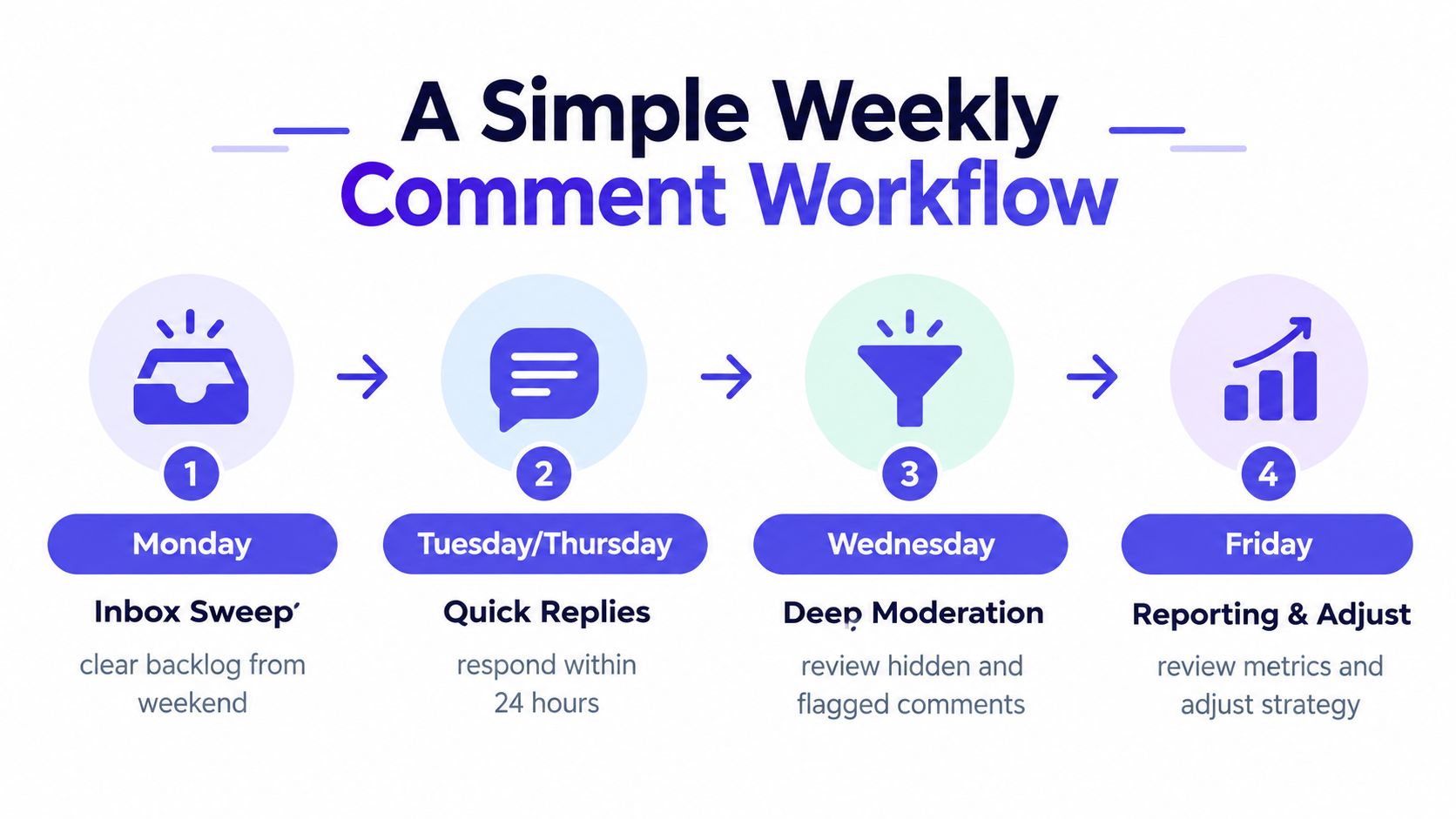
- Monday inbox sweep: clear the weekend backlog, sort unanswered questions, and archive anything already resolved.
- Mid-week engagement pass: reply to the strongest threads, surface useful answers, and make sure common objections aren't sitting unanswered.
- Paid-post quality check: inspect live campaign comments separately from organic chatter because ad threads can deteriorate faster.
- Friday review and adjustment: look for repeated questions, recurring complaints, and patterns that should influence next week's content.
The habit behind the workflow
The schedule matters less than the discipline underneath it.
Respond during business days while the conversation is still warm. Archive aggressively so old noise doesn't bury active issues. Watch for patterns. If the same question appears all week, that's not a comment problem anymore. It's a messaging problem.
A lot of Facebook comment management gets easier when you stop treating each reply as a one-off event. Threads are feedback loops. They tell you what buyers don't understand, what customers distrust, and what content creates friction before support tickets arrive.
The best comment workflow doesn't chase every notification. It builds enough order that the important ones are impossible to miss.
If comments on Facebook are eating time across multiple Pages, PostSyncer gives you one place to view, filter, reply to, and moderate those conversations without jumping between tabs. It's especially useful when you need structured triage, spam filtering, and faster responses on both organic and paid posts. You can see how it fits that workflow at PostSyncer.