











You've scheduled a product post, answered a few comments, and returned to the rest of your work. Then a customer sends a direct message asking why nobody has helped them. Their original question is under an Instagram post, their complaint is on X, and their purchase history is in a CRM your social team hasn't opened.
The problem isn't necessarily a slow reply. It's that nobody can see the whole conversation. Connecting social media and customer relationship management means treating those interactions as service work and relationship history, not just notifications to clear.
Why Social Conversations Fragment Customer Relationships
Consider a hypothetical customer asking whether a replacement part fits something they bought previously. They comment under a campaign post, send a private message with more detail, and later mention the business elsewhere because they're still waiting.
A marketer sees a product question. A support agent sees an unexplained complaint. The account owner sees an existing customer with no open case. Everyone has a plausible view, but nobody has enough context to act confidently.

The customer sees continuity
From the customer's perspective, they've contacted the same business throughout. They don't distinguish between the person managing Instagram and the colleague responsible for order support.
The team, however, may be organizing work around applications rather than customer needs. Notifications indicate that something happened, but they don't necessarily show who owns the next action, whether somebody already replied, or which promise remains outstanding.
A unified inbox provides a shared place to review supported conversations. It becomes useful for CRM when the team also connects that queue to customer context and follow-up responsibilities.
Practical rule: A visible message isn't a managed conversation until someone owns the next action.
In the replacement-part example, the assigned agent should be able to locate the original question, verify the purchase through an appropriate private process, and document the answer. A colleague joining later shouldn't need to reconstruct events from screenshots.
That distinction matters when evaluating an integration. A dashboard that displays comments might improve visibility, but it hasn't solved the relationship problem if staff still copy details between tools without clear ownership. Useful social CRM connects context, action, and follow-up. Publishing more frequently doesn't accomplish that by itself.
Understanding Social Media and CRM Connections
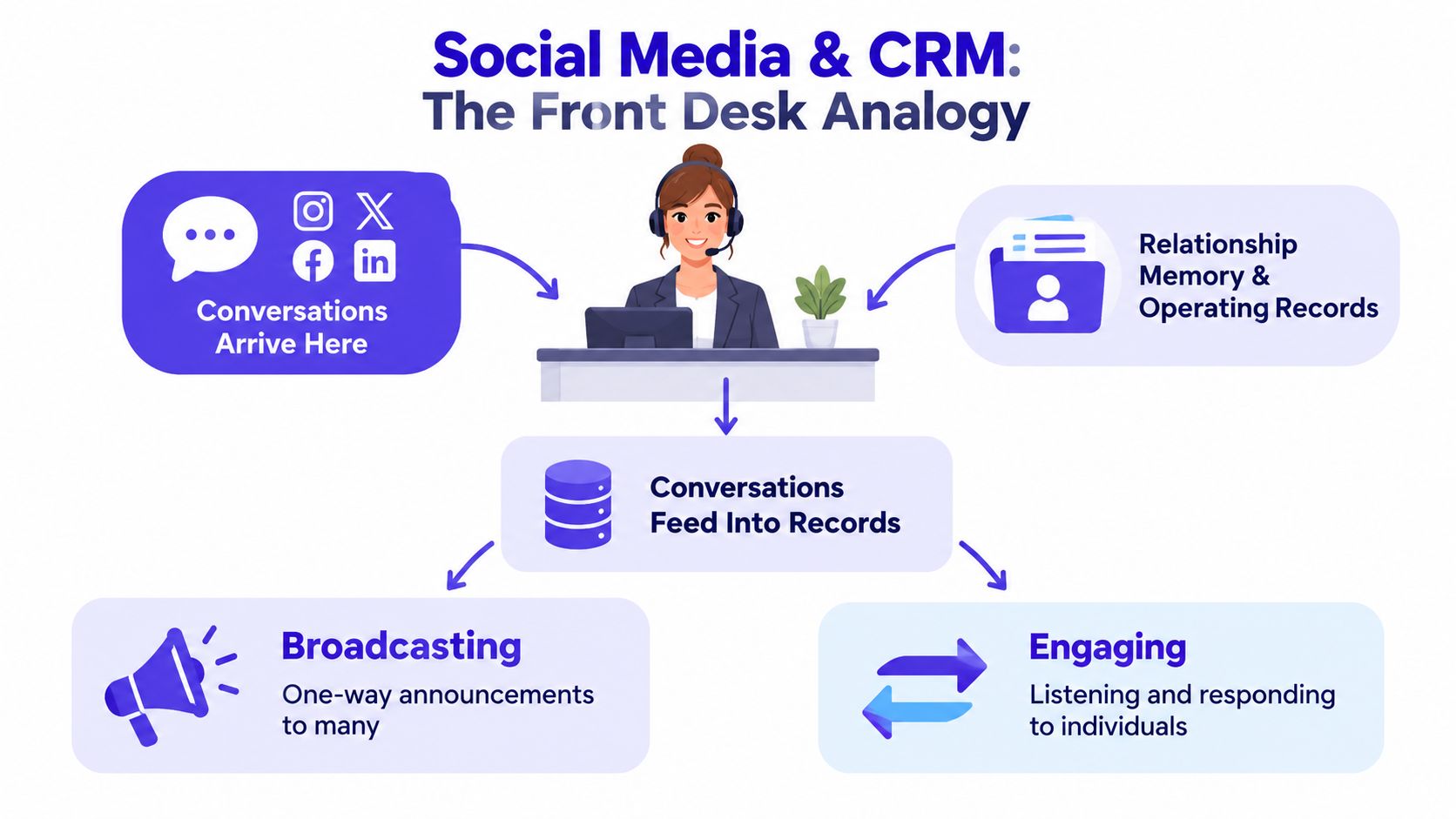
Think of social platforms as the front desk of a business. People arrive with questions, complaints, recommendations, and purchase intentions. The CRM is the operating memory behind that desk: who the person is, what happened before, and what the business agreed to do next.
This isn't a new purpose for social channels. Social CRM became a formal business practice during the late 2000s and early 2010s, and an IBM-sponsored study published around 2010–2011 found that 74% of surveyed businesses used social media to communicate with customers.pdf).
Different jobs, overlapping responsibilities
These terms describe related work, but they aren't interchangeable:
- Social media management covers planning, publishing, and managing activity around social accounts.
- Social listening involves noticing relevant discussions, themes, and mentions, including conversations outside your own posts.
- Customer service addresses a person's question or problem and establishes whether it was resolved.
- CRM preserves customer context, responsibilities, communication preferences, and relationship actions.
The overlap happens when a social interaction requires more than a public response. A comment asking about availability may carry purchase intent. A complaint may reveal frustration and an unresolved service issue. A direct message may provide information needed to connect the conversation to an existing account.
Not every signal deserves the same treatment. A friendly reaction doesn't automatically justify creating a sales opportunity, and a public profile isn't permission to collect unrelated personal details. Record information because it supports a defined service or relationship purpose.
From engagement totals to usable records
Broadcasting asks whether people saw or reacted to a message. Relationship management asks what a particular person needs and what happens next.
A useful record might contain the originating post, the customer's question, a verified identity connection, the assigned owner, and the agreed follow-up. Keep a common workflow across networks while preserving platform-specific conversation links and formats.
For teams deciding how social support fits alongside other contact options, SignalZen's channels and best practices guide is a useful companion resource. The practical question is where each conversation belongs, not merely where it started.
Key Benefits of Social CRM Workflows
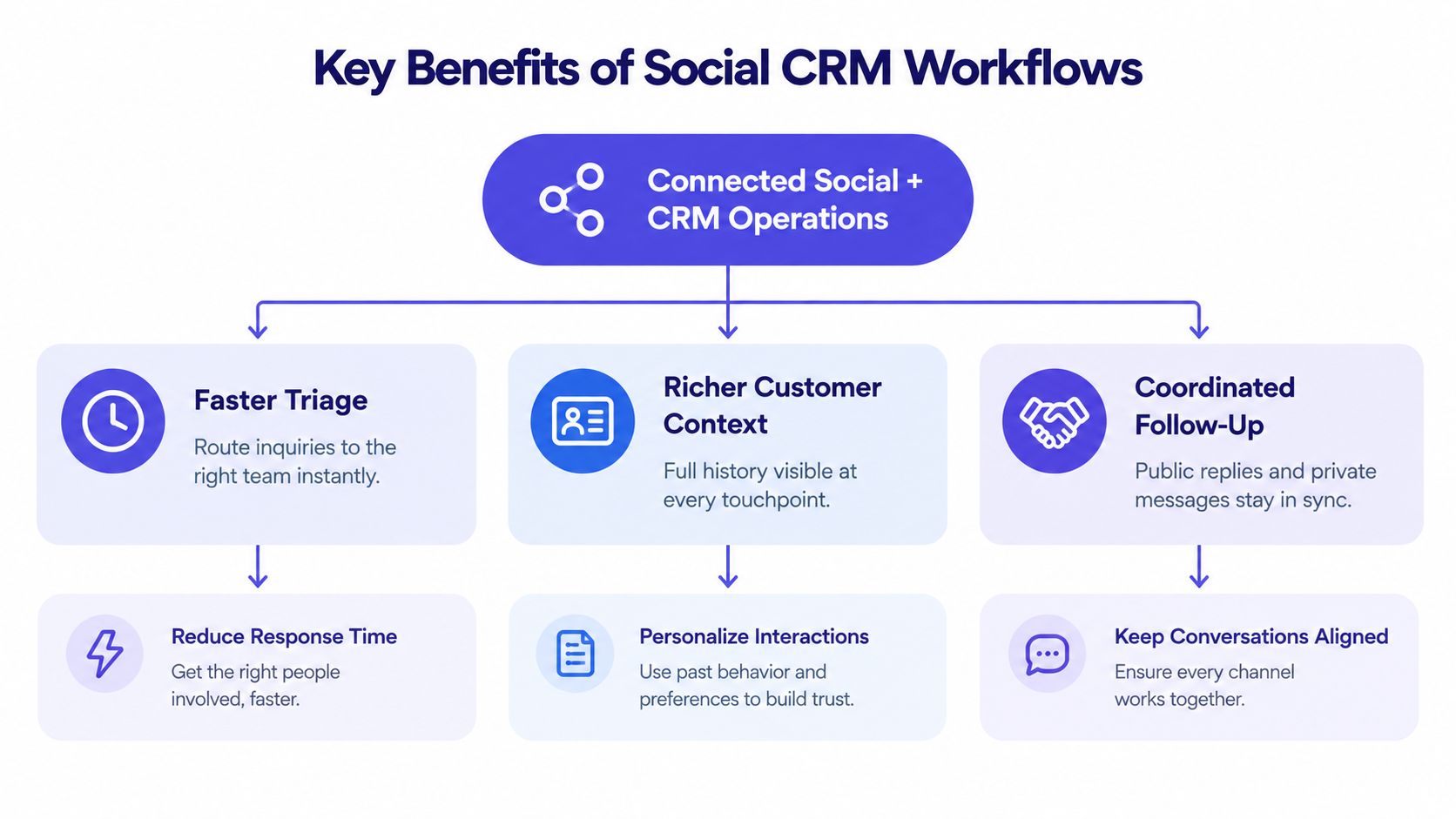
Speed matters, but coordination makes speed useful. A Salesforce Research survey of 7,037 consumers and business buyers found that 64% expected real-time interaction, while 50% expected a response within six hours of posting on social channels. A quick acknowledgment followed by an abandoned case still leaves the customer waiting.
The benefits below depend on operational connections, not putting social data on a CRM dashboard.
What changes in everyday work
Faster triage comes from classification and ownership. Labels such as product question, delivery issue, or account access help staff distinguish work types. Assignment rules then direct the conversation to someone equipped to handle it, rather than whoever notices it first.
Richer context comes from connected history. An agent can check earlier commitments before making another promise. That helps avoid contradictory answers and gives colleagues a factual starting point when they take over.
Coordinated follow-up comes from shared case status. Marketing can see that support is investigating, while support can see what the brand already said publicly. Internal notes explain the next action without exposing internal discussion to the customer.
Useful social CRM converts an interaction into coordinated action, with an owner, relevant context, and a recorded outcome.
Benefits you can actually inspect
Campaign attribution becomes more useful when the team retains the originating post and campaign label. You can distinguish a campaign that attracts general reactions from one that produces product inquiries requiring follow-up.
Consistent labels also support relationship learning. If agents repeatedly classify questions as compatibility concerns, the content team has a concrete reason to improve product explanations. That's more actionable than a general observation that engagement increased.
Use a workflow demonstration as a prompt for evaluating those connections, rather than judging a platform by its dashboard alone.
During evaluation, follow an actual conversation through assignment, response, and closure. If staff can't explain who acts next or find the final outcome, the integration still has an operational gap.
Build a Unified Social CRM Workflow
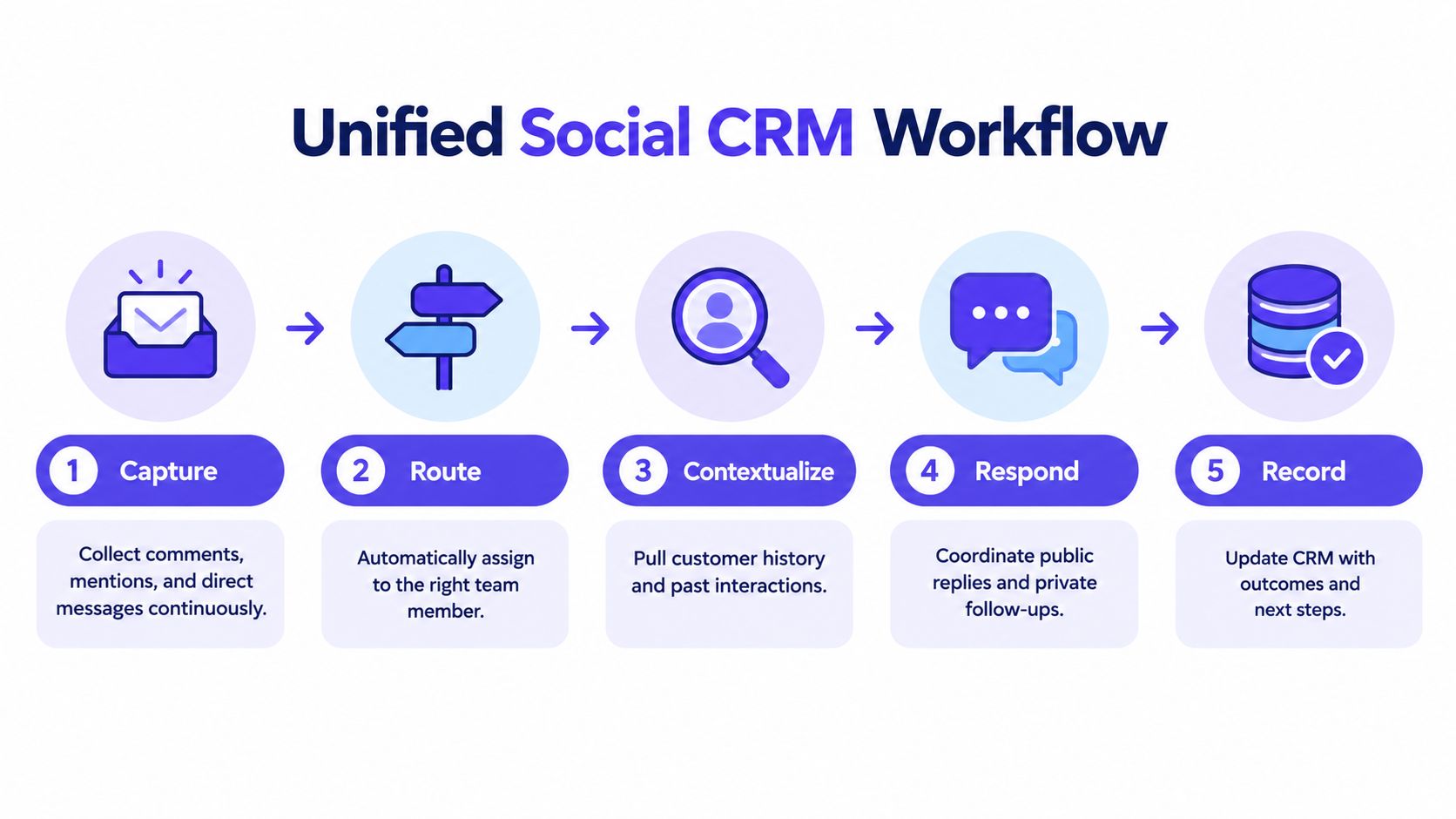
Start by separating message receipt, customer identification, and case resolution. They're connected tasks, but completing one doesn't mean the others are finished.
Response expectations also vary by situation. A customer-service benchmark reports that 76% of consumers expect a social response within 24 hours; on X, 53% expect one within an hour, rising to 72% for complaints. Treat those expectations as context for staffing and prioritization, not a promise your team can make without coverage.
Capture, identify, and assign
Collect supported comments, mentions, and direct messages continuously. Normalize each event into common fields: platform, account, external user identifier, conversation identifier, timestamp, message type, source post, consent status, and owner.
Prefer deterministic identity matching, meaning a connection supported by verified information such as authenticated account details or an established CRM relationship. Don't merge profiles because their display names resemble each other. Keep uncertain matches separate until verified, with any proposed match and review decision logged.
Good contact management also requires deciding what information to retain, who can access it, and when it should be removed. Permission to answer a support question shouldn't suddenly become permission for unrelated marketing.
Social CRM routing examples
| Conversation type | Initial treatment | Human review condition | CRM record |
|---|---|---|---|
| Routine | Suggest an approved factual answer | Missing or conflicting information | Topic, response, status |
| Ambiguous | Request clarification | Unclear intent or low confidence | Question, uncertainty, owner |
| Sensitive | Acknowledge without exposing details | Refund, personal data, or account dispute | Restricted notes and verification status |
| Reputationally risky | Alert the responsible lead | Safety issue, legal claim, or serious allegation | Escalation trail and approved response |
Respond without losing the handoff
Review intent and sentiment before drafting. AI can propose wording, but uncertain answers and sensitive decisions should go to a person rather than directly to publication.
For a public complaint, acknowledge the issue visibly and explain the next step. An illustrative reply might be: “We're sorry your delivery hasn't arrived. Please message us privately so our support team can check the order.” Don't ask customers to post account details publicly.
Assign the private follow-up to an owner, preserve the connection to the public thread, and collect only necessary information. Moving to a DM is a handoff, not a resolution.
Close with evidence
Update the CRM with the action taken, any outstanding commitment, and the resolution status. Where appropriate, return publicly with a privacy-safe update, without revealing account details or implying the customer endorsed the outcome.
Record first-response and resolution timestamps separately. Use median first-response time, the share answered within six hours, resolution time, and repeat contact to check whether the process works. Define business-hours treatment and what qualifies as a meaningful response before comparing results.
Choose Tools That Connect Content and CRM
Choose software by testing the work your team needs to complete. A solo operator answering product questions has different requirements from an agency separating client permissions or a service team handling account disputes.
The category labels below are starting points, not guarantees. Individual products differ, and support for publishing to a network doesn't necessarily include access to its comments, mentions, and private messages.
Social CRM tool categories compared
| Tool category | Strongest fit | Common gap | Best evaluation question |
|---|---|---|---|
| Native platform inboxes | Work within an individual network | Cross-network history requires separate coordination | How will we track a customer who contacts another account? |
| Standalone social tools | Publishing, content approvals, and social reporting | Customer records or service workflows may need integration | Can agents retain case context after the post is published? |
| Conventional CRM systems | Contact records, account history, and relationship tasks | Social capture and publishing may depend on connected tools | Which social events reach the customer record? |
| Integrated social CRM platforms | Connecting content, engagement, and contact history | Specialized service or sales functions may remain elsewhere | Can we trace a conversation through to its outcome? |
Test the boundaries, not just the features
Run a realistic demonstration: receive a question under a scheduled post, assign it, request approval for a sensitive reply, and update the associated contact. Then ask the vendor to show what happens if the integration fails or the customer can't be confidently identified.
Check aggregation, publishing, approvals, contact records, campaign context, automation, reporting, and human review together. An attractive calendar doesn't compensate for missing conversation ownership, and a rich contact profile doesn't help if agents can't locate the original message.
PostSyncer is one option for consolidating planning, publishing, and analysis across major networks, with a unified comments inbox, contact CRM, AI-assisted replies, spam filtering, approvals, analytics, and API access. Treat that workspace as a consolidation layer, while checking which specialized CRM or support functions should remain in existing systems.
Match the system to your responsibilities
Compare network coverage, team permissions, data access, retention controls, and integration maintenance. Ask where human approval occurs and whether staff can disable automation for selected topics.
For teams connecting social activity to broader campaign systems, Grou's B2B marketing automation vendor selection resource can support the wider buying discussion. Keep the decision grounded in your operating model: who uses the system, what they're authorized to do, and how they verify that work is complete.
Apply Social CRM Across Real Scenarios
The following scenarios are illustrative workflows, not reported customer results. Each shows a different reason to connect social activity with a relationship record.
A small business answers a product question
A customer asks beneath a shop's Instagram post whether an accessory fits a previous purchase. The shop answers the general compatibility question publicly, then invites a private conversation if the customer needs help identifying their model.
An employee checks the necessary purchase information privately and records the recommendation. If compatibility remains uncertain, they escalate to someone with product knowledge rather than approving an AI guess.
The useful outcome is a documented answer with any remaining uncertainty clearly marked. Review whether the customer had to ask again, not just whether the employee replied.
An agency separates client responsibilities
An agency manages comments for unrelated brands. A shared working method helps staff apply consistent labels, but each client's records, permissions, and approved responses need clear boundaries.
Suppose a customer requests a refund under a client's campaign. The agency can acknowledge the request using approved language, then route the decision to the client's authorized support contact. The social manager shouldn't invent an exception to finish the conversation.
- Escalation lesson: Route commercial decisions to someone authorized to make them.
- Documentation lesson: Record the client owner and approval trail inside the correct workspace.
- Measurement lesson: Review pending client decisions separately from unanswered agency work.
An e-commerce team follows a campaign inquiry
A scheduled product post generates a question about suitability. AI suggests a draft based on approved product information, but the customer then describes a previous purchase problem. A human should review the concern before the team continues with sales-oriented messaging.
Retain the source-post identifier and campaign label. Record the concern, the support action, and any permission for later follow-up. If the customer eventually purchases, classify the conversation as an assisted touchpoint where the evidence supports that interpretation, not proof that the reply caused the sale.
These examples require different brand voices and approval rules, even though the underlying recordkeeping is similar. A social media customer service playbook helps staff apply those distinctions consistently.
Handoff test: The receiving colleague should understand the problem and the next commitment without asking the customer to repeat the story.
Measure Relationship Outcomes Beyond Engagement
Likes, reach, and follower growth help marketers evaluate content. They don't establish whether someone received an accurate answer, completed a private handoff, or got a promised follow-up.
Cross-channel measurement also needs careful identity handling. A global Salesforce survey reports that business buyers use an average of 10 channels to engage with companies, while consumers use eight, with regional differences in preferred platforms. Counting every channel interaction as a different customer can distort the picture.
Social CRM measurement layers
| Measurement layer | Core questions | Example measures | Review focus |
|---|---|---|---|
| Activity | What arrived, and what still needs attention? | Inbound volume, response coverage, queue status | Daily backlog and ownership |
| Service quality | Did customers receive useful, coordinated help? | Median first response, response within six hours, resolution time, escalation, public acknowledgment, handoff success, repeat contact | Weekly exceptions and recurring failures |
| Relationship outcomes | What documented action followed? | Attributed CRM tasks, assisted conversions, repeat purchases, churn where available | Periodic trends and attribution limits |
Make the calculations interpretable
Calculate response coverage as answered eligible conversations divided by eligible inbound conversations. Exclude spam according to a documented rule, not whichever definition makes the report look better.
For handoff success, compare completed private transfers with conversations that required a transfer. Investigate cases where customers were invited to message privately but never reached the receiving team.
Define repeat contact around the same issue and a consistent review window. Otherwise, a useful follow-up question can be mistaken for a service failure.
Diagnose before claiming improvement
Pair response speed with resolution and repeat contact. Faster replies alongside more reopened cases may indicate that staff are clearing the queue before resolving problems.
For relationship outcomes, preserve attribution limits. A campaign-linked purchase can show an observable connection, but product quality, pricing, earlier interactions, and other channels may also influence the decision. Use the scorecard to improve decisions, not to manufacture certainty.
Build a Practical Social CRM Operating Model
A workable operating model makes responsibility visible. Staff need to know which queue to check, what they can decide, and when they must stop automation.
Human oversight deserves explicit rules. Consumer research cited by Emplifi found that 71% were satisfied with AI-supported social care, yet 56% preferred human support, 60% worried about inaccurate responses, and 83% wanted AI use disclosed. Satisfaction with assistance doesn't imply permission to automate every decision.
Keep the operating agreement short
- Ownership and labels: Maintain a shared engagement queue with named owners and consistent case categories.
- Identity and privacy: Verify connections, retain consent status, and restrict sensitive records.
- Public communication: Establish acknowledgment rules and responsibility for private transfers.
- AI boundaries: Set confidence requirements, disclose AI use, and provide an accessible human handoff.
- Context and accountability: Preserve campaign references, response targets, approval decisions, and outcomes.
An AI confidence score shouldn't be the sole approval criterion. Topic risk, missing account context, repeat contact, and a direct request for a person should also trigger review.
Start with a recurring customer journey
Choose a familiar journey, such as a product question that needs account-specific follow-up. Map where the message arrives, who verifies details, who approves exceptions, and what counts as completion.
Configure the workspace around that journey before expanding. Use the visual calendar and approval process to connect campaign preparation with engagement readiness, then use the contact record and analytics to inspect what happened afterward.
Review unresolved examples with the people doing the work. Expand only when records are reliable and colleagues can follow the handoff without guesswork. Better social CRM comes from resolving relationships well, not merely automating more replies.
PostSyncer offers a shared workspace for social publishing, a unified comments inbox, contact CRM, and AI-assisted engagement. Visit PostSyncer to explore how those tools could support a recurring customer journey, from the first public question to a documented follow-up.