












Your junior community manager schedules a product update after everyone else has logged off. The next morning, the post is live, the comparison graphic contains an obvious error, and nobody can answer a simple question: who approved this version?
That isn't a creativity problem. It's a control problem. A reliable social media approval process treats every post as a decision with an owner, a risk level, a deadline, and a record. It doesn't force every routine update through the same bureaucratic chain. It sends low-risk content through a light review and reserves legal, executive, or client approval for posts that can create material exposure.
When a Post Goes Live Without Approval
At 6:47 p.m., a junior community manager at a mid-size SaaS company schedules a product update for the next morning. The caption announces a pricing change, but the figure is wrong. The comparison chart also misspells a competitor's name. The post sits in the scheduler overnight because nobody has been assigned to review it.
By breakfast, the post is visible to 2.3 million followers, and the mistake has become a public conversation involving the CEO, legal team, and journalists.
That scenario is deliberately specific, but the failure pattern is common. The post didn't go wrong because the community manager was careless. It went wrong because the company had no named approver, no defined review window, and no mechanism that recognized pricing language and competitor comparisons as high-risk content.
A final “publish” button can't fix a workflow that never established what should happen before publication. The team needs to know:
- Who owns the decision: One person must have authority to approve, reject, or return the post.
- When review happens: A deadline prevents content from waiting indefinitely in an inbox.
- What risk triggers escalation: Pricing, regulated claims, customer information, litigation, and crisis statements need more scrutiny than an evergreen repost.
- Which version is approved: The published asset must match the version that received sign-off.
Platform governance has moved in this direction as well. Etsy published the first internet-platform content-moderation transparency report in 2015, followed by YouTube in 2018, Facebook and Twitter later that year, Reddit in 2019, and Pinterest, Snap, and TikTok in 2021, as documented in research on the development of moderation transparency reporting. The European Union's Digital Services Act introduced broad transparency obligations on February 17, 2024, including reporting requirements for moderation activity and automated-system accuracy.
Your marketing team doesn't need to copy a platform's regulatory reporting system. It should copy the underlying discipline: document the decision, preserve the reason, and make the responsible person visible.
The practical standard: if your team can't reconstruct who changed, reviewed, approved, and scheduled a post, the post wasn't governed.
A lightweight tool can help smaller teams establish that discipline. For visual channels, teams can use resources that let them approve pin drafts with your team instead of passing screenshots through private messages. The same principle applies to every network: review the actual asset, capture feedback beside it, and prevent an unapproved revision from replacing the approved one.
With a structured workflow, the SaaS post would have been flagged during intake, routed to the right reviewer, corrected before scheduling, and published on time. The mistake would have remained an internal edit rather than becoming an executive incident.
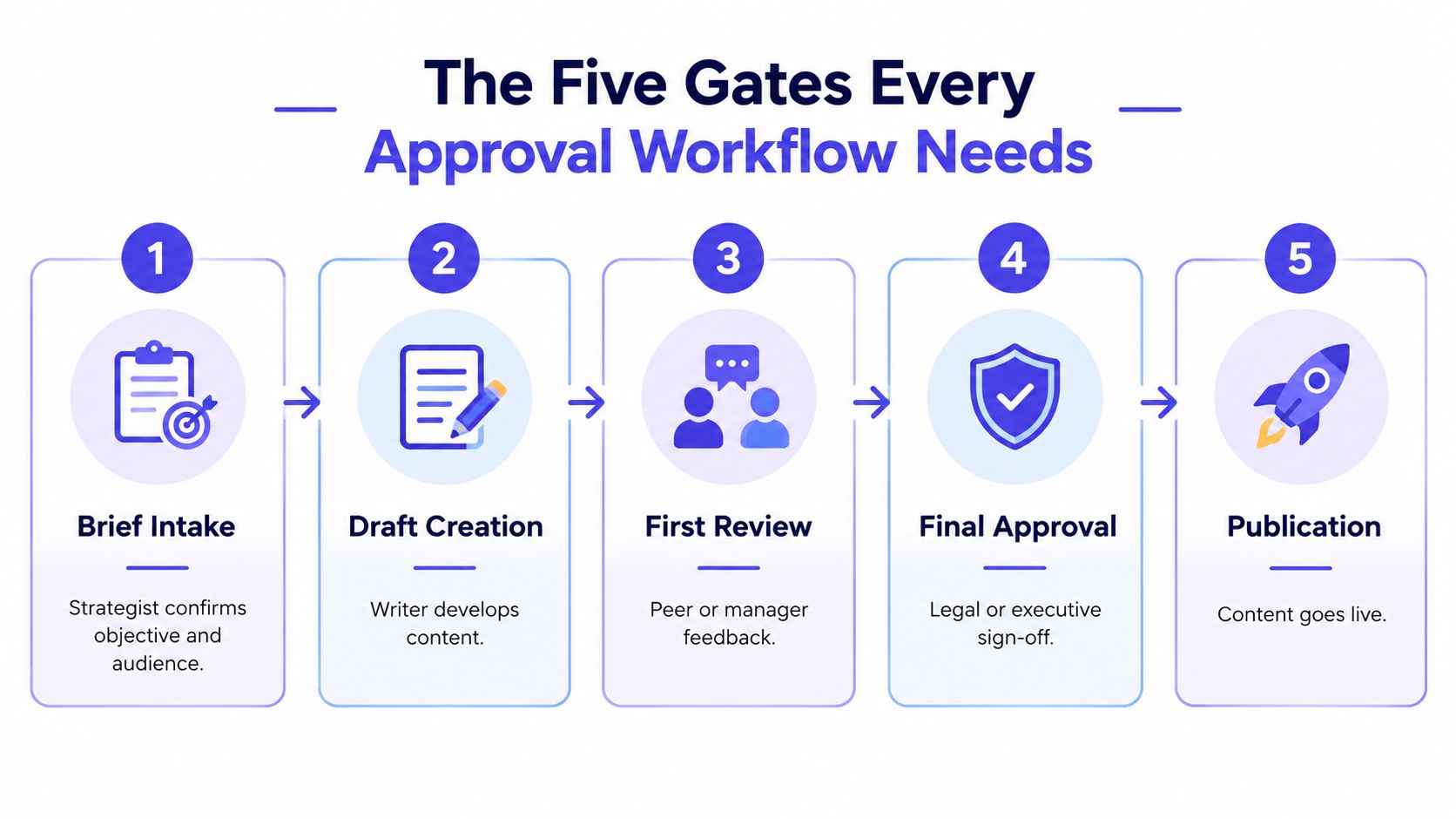
The Five Gates Every Approval Workflow Needs
A post can pass through five gates without receiving the same scrutiny at each one. Set the workflow around risk: intake, creation, and editorial review apply to every post, while compliance and final sign-off expand when the consequences of an error rise. Assign a named owner at each gate and preserve every decision in an immutable audit trail.
Gate one starts with a complete brief
The content strategist or social lead owns intake. They record the objective, audience, platform, campaign, caption direction, creative requirements, links, disclosures, proposed publishing time, and preliminary risk label. The brief should also name the accountable approver and the deadline for each required review.
“Make a launch post” is not a workable request. A reviewable brief defines the intended result, gives the creator usable constraints, and tells each reviewer what to verify.
Gate two turns the brief into an asset
The writer, designer, or video editor builds the post from that brief. They attach the caption, creative, destination link, platform-specific version, accessibility information, and supporting source material.
The gate closes only when the draft is complete. Legal or compliance reviewers should assess risk, not repair an unfinished caption or search for the missing audience definition. Lock the submitted version so later edits cannot replace the asset under review.
Gate three applies editorial judgment
A senior editor, content lead, or brand reviewer checks message clarity, factual accuracy, audience fit, voice, platform format, and brand safety. This review catches quality problems before senior stakeholders spend time on the post.
The editor records one decision: approved for the next gate, changes requested, or rejected. Comments should state the defect and required correction. A named reviewer, timestamp, version, and decision belong in the audit trail. That record prevents repeated debates and shows which version received approval.
Gate four is conditional compliance review
Legal or compliance joins when the post includes regulated claims, pricing, customer data, copyright questions, privacy concerns, required disclosures, financial language, health claims, or sensitive market-specific material. Routine evergreen content should follow the standard path instead of waiting in a legal queue without a defined risk trigger.
For regulated work, use a 72-hour legal or compliance stage, alongside a 24-hour internal SLA and a 48-hour client SLA for agency work, as outlined in guidance on structuring content review operations. Record the assigned reviewer and escalation contact before the clock starts.
Gate five locks the decision
The accountable owner, often an account lead, marketing manager, or designated executive, gives final approval. The publisher schedules only the locked version that passed every required gate. Final approval should capture the approver, timestamp, version identifier, and any conditions.
A crisis-response post may require all five gates, including legal and executive review. A pre-approved evergreen post may need intake, creation, editorial review, and a delegated final approver. Teams can review RedactAI approval workflow strategies for practical methods of separating responsibilities and documenting approval paths.
The sequence creates clear accountability. Creators produce, editors improve, specialists assess risk, and the accountable owner authorizes publication. One person may hold several roles in a small team, but the roles, SLAs, and decision record must remain explicit.
Mapping Post Risk to Required Approvers
Approver count should follow content risk, not seniority. A chief executive doesn't need to review a routine article reshare, while a junior employee shouldn't be expected to publish a crisis statement without escalation.
Start by assessing four dimensions:
- Potential harm: Could the post create legal, financial, safety, privacy, or reputational exposure?
- Audience sensitivity: Does it address customers, investors, regulated audiences, minors, or people affected by an incident?
- Irreversibility: Can the team correct the message easily, or will screenshots and media coverage preserve the error?
- Time pressure: Does delay create more risk, or does speed matter because the post responds to a live event?
Use those answers to assign a tier before drafting begins.
| Risk Tier | Post Examples | Required Approvers | SLA |
|---|---|---|---|
| Low | Evergreen reposts, curated articles, routine product highlights | Content lead or delegated editor | Standard internal review window |
| Medium | Thought leadership, executive posts, partnership announcements | Content lead plus account or marketing owner | Defined stakeholder review window |
| High | Pricing changes, policy updates, customer data references, regulated claims | Content lead, accountable owner, and legal or compliance when required | Priority review with named escalation |
| Crisis | Incident responses, executive apologies, litigation-related content | Communications owner, executive decision-maker, legal counsel, and publisher | Immediate on-call route |
These labels aren't a substitute for judgment. They make judgment repeatable. A routine blog reshare can usually be evaluated by one content lead because the team isn't introducing a new claim or responding to an active incident. A same-day response to a data breach needs the full stack because the wording, timing, facts, privacy implications, and executive accountability all matter.
A useful rule is to escalate when the post contains one of these triggers:
- A claim that could be interpreted as a guarantee.
- A reference to price, contract terms, refund policy, or eligibility.
- A customer name, testimonial, image, account detail, or personal information.
- A competitor comparison or claim about another company.
- A response to an outage, security event, complaint, lawsuit, or regulator.
- A disclosure obligation involving sponsorship, affiliates, influencers, or paid promotion.
- A translation or localization where regional meaning may change the risk.
Don't solve risk by adding every possible reviewer to every post. Industry guidance reports that each additional approver can roughly double total approval time, while simple posts can face approval cycles of up to eight days, as discussed in agency approval workflow guidance. Those figures are a warning against indiscriminate routing, not a reason to skip review.
The better approach is delegated authority. Give the content lead permission to clear low-risk posts, require specialist review for defined triggers, and maintain an on-call path for urgent content. Measure whether the risk labels are producing the right route by reviewing corrections, escalations, and missed publishing windows.
SLAs, Deadlines, and the Metrics That Matter
An SLA is an operating rule, not a hopeful target. It must define when the clock starts, which named approver owns the next decision, what happens after a missed deadline, and whether the post can proceed. Record each decision against the approved version so the audit trail cannot be rewritten after publication.
Start the clock when the creator submits a complete asset for review, not when they save an unfinished draft. The submission should contain the caption, creative, platform, link, disclosures, proposed timing, and risk label. Missing metadata sends the item back to the creator before it reaches the approver queue.
Set different deadlines by risk and ownership. A practical operating model uses a 24-hour internal review SLA, a 48-hour client review SLA for agency work, and a 72-hour legal or compliance stage for regulated content, based on the operational guidance in video review workflow research. Assign one approver by name, add a backup, and define an on-call route for urgent posts. Do not promise instant responses from every reviewer.
Escalation should happen automatically:
- First miss: Notify the assigned approver and backup approver.
- Continued delay: Route the item to the skip-level owner or account lead.
- Repeated breach: Recheck the workload, risk label, and approver assignment. Do not blame the creator for a routing failure.
Measure the points where work stalls, not just the final approval time. The Kadince analysis of marketing approval bottlenecks reports that 74% of marketing and advertising professionals believe approval consumes more effort than creative production, more than 60% spend up to a full workday each week chasing approvals, and over half say already-approved content still went live with errors during the previous year. Those findings support stronger ownership, version control, and audit trails, not more reminder messages.
| Metric | Healthy | Warning Sign |
|---|---|---|
| Time to first review | Review begins within the assigned SLA | Posts sit untouched until the deadline |
| Time to approval | Matches risk and reviewer requirements | Routine posts wait behind crisis content |
| Rework rate | Revisions address defined issues | Reviewers keep adding subjective changes |
| Queue depth per approver | Workload is visible and distributed | One person becomes the universal bottleneck |
| Post-publish incident rate | Corrections are rare and investigated | Approved content regularly needs emergency edits |
Review queue depth weekly and rework trends monthly. If post-approval edits remain common, inspect the control failure. The publisher may be using a different version, the approved asset may not be locked, or a specialist may be signing off after the post has already cleared. Each approved item should retain its final preview, named approvals, timestamps, and immutable change history.
Three Ways Teams Actually Run Approvals Today
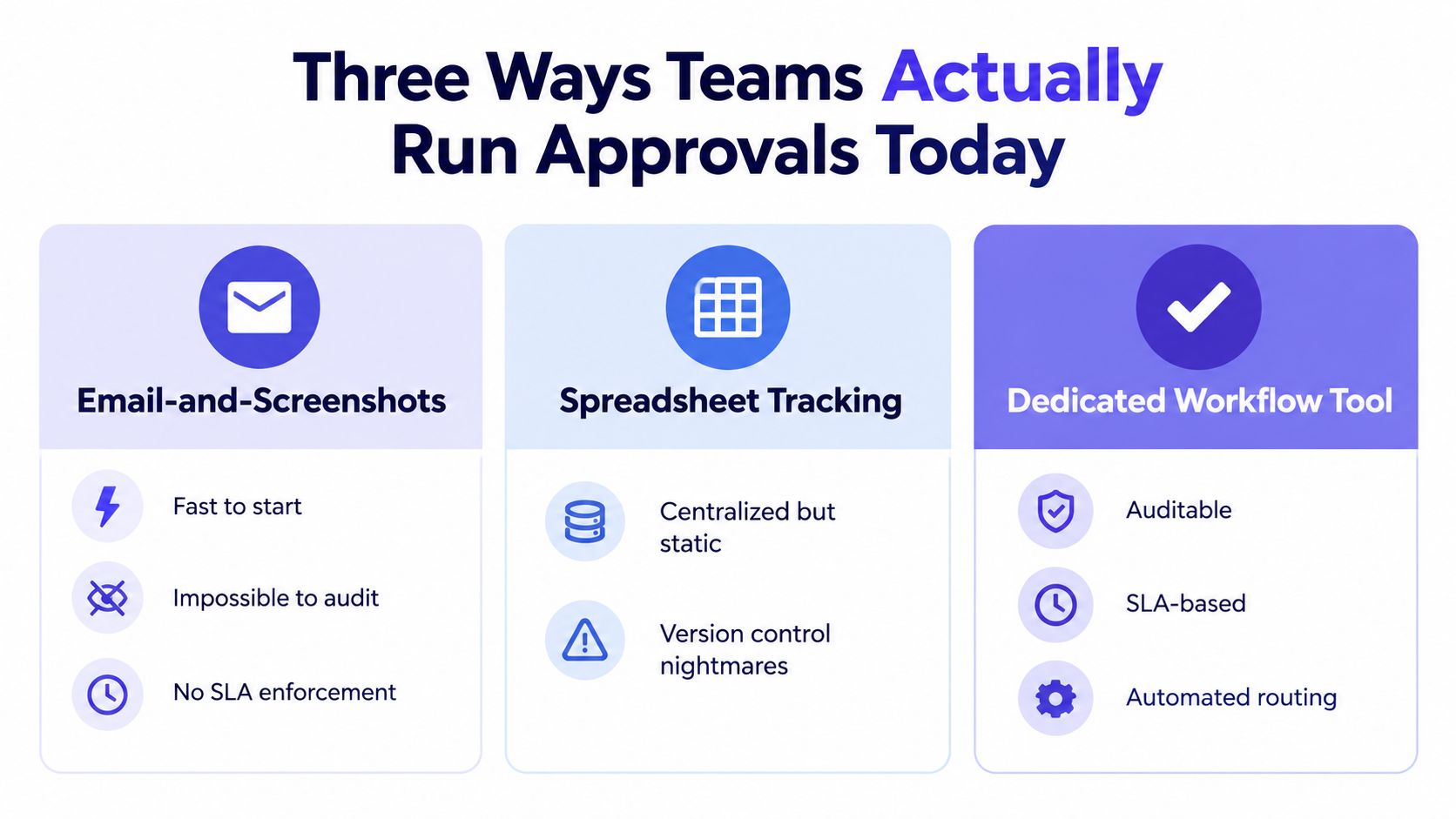
Teams settle into one of three approval paths. Each can work in the right context, but the trade-offs become obvious as account count, stakeholder count, and risk increase.
Email and screenshots
Email is easy to start. A creator sends a screenshot, the manager replies “approved,” and the publisher schedules the post. The problem begins when someone edits the caption after the screenshot, replies to an older message, or approves an image without seeing the final platform version.
This route has no dependable status model, no automatic SLA enforcement, and no reliable connection between the approval message and the live scheduled post. Attachments disappear into threads, and new team members can't reconstruct the decision without interviewing everyone involved.
Trello, Asana, and generic project boards
A project board improves visibility. The team can see whether an item is drafted, under review, or ready for scheduling. It also gives managers a central place to assign work and monitor deadlines.
But a checkbox isn't necessarily an approval control. Generic boards may not show the exact scheduled version, preserve platform-specific previews, enforce role-based permissions, or require re-approval after an edit. They work well for planning and status tracking, but they often leave the final publishing control somewhere else.
A scheduler with native approvals
A native workflow connects the review decision to the post that will publish. Role-based approvers can return content with notes, approved versions can be locked, and the system can preserve the route from draft through scheduling. This is the model to choose when a team manages multiple accounts, handles regulated content, or needs client accountability.
PostSyncer combines social scheduling with approval stages, labeling, team permissions, and a shared calendar. Teams comparing these options should also review this social media approval tool guide and evaluate whether the product connects approval to the final scheduled asset rather than merely recording a checkbox.
The choice doesn't need to be ideological. A solo creator may be fine with a personal checklist. A small team can begin with a board if it has strict version rules. Once three or more accounts, multiple clients, or regulated claims enter the picture, native approvals remove too much avoidable ambiguity to ignore.
Teams expanding production should think about creative team scaling solutions as an operations question, not only a content-volume question. More output without stronger routing creates more opportunities for an unreviewed version to reach the audience.
Setting Up Approvals, Labels, and Audit Trails in PostSyncer
A policy becomes useful only when the platform enforces it. Configure the workspace around roles, risk labels, escalation, and evidence.
Define roles before importing content
Open the workspace settings and create distinct roles for creators, editors, approvers, legal or compliance reviewers, publishers, and administrators. Assign a backup approver for every required gate. A process that depends on one unavailable person isn't controlled, it's paused.
For regulated industries, add a legal or compliance route rather than giving every reviewer permission to approve everything. Keep publishing rights narrower than drafting rights. The creator should be able to prepare an asset without being able to bypass the required approval.
Route risk automatically
Create labels for low, medium, high, and crisis content. Add keyword or metadata rules for terms such as “recall,” “lawsuit,” “compliance,” pricing changes, customer information, and incident response. A label should route the post to the appropriate approver path, not merely decorate the calendar.
Use mandatory fields for channel, audience, objective, links, disclosures, accessibility checks, localization status, and proposed publish time. Missing information should block submission.
Turn on timers and escalation
Set review timers according to the approved SLA for each route. Send notifications through the workspace, Slack, and email, then escalate automatically when the assigned reviewer misses the deadline.
Don't treat notifications as the control. The control is the combination of an assigned owner, a visible deadline, a backup route, and a status that shows whether the post is blocked.
Preserve the approved version
Enable audit capture for edits, comments, approvals, rejections, overrides, and scheduling events. The record should identify the approver and timestamp, and the approved asset should be immutable or require a new approval after any change.
A post that changes after approval must return to review. Otherwise, the organization can prove that someone approved a post, but not that they approved the version that went live.

Accessibility and localization belong in this configuration. A public-sector social media strategy requires spoken-word video to be subtitled, image information to be repeated in post text or alt text, and minimum contrast ratios of 4.5:1 for normal text and 3:1 for large text, as specified in the public-sector social media strategy guidance. Assign those checks to a named reviewer and retain the result.
A central team can protect brand consistency while a local reviewer checks language, dates, cultural references, currency, and regional disclosure requirements. For a reusable implementation pattern, teams can adapt this approval workflow template to their roles and risk labels.
Why Governance Makes Your Team Faster, Not Slower
Governance becomes slow when teams add reviewers, meetings, and policies after a crisis, without assigning decision rights. The result is a second layer of confusion. A working system removes ambiguity before the post reaches review.
A useful social media approval process assigns a standard, reviewer, deadline, and escalation path to each post. Writers know which rules apply. Editors know what to inspect. Legal joins only when the risk requires it. Publishers can schedule the approved version without restarting the decision across email, chat, and spreadsheets.
Speed comes from controlling rework. Informal workflows often take 5–7 days from draft to publication, while structured workflows with clear ownership and SLAs can reduce the cycle to roughly 48 hours, as described in workflow review benchmarking. The gain comes from preserving context, preventing duplicate edits, and giving every pending decision an owner.
| Metric | No Approval Process | Governed Workflow with PostSyncer |
|---|---|---|
| Ownership | Implied or shared | Named approver for each route |
| Review timing | Chased manually | SLA with reminders and escalation |
| Version control | Screenshots and attachments | Approved version tied to scheduling |
| Risk handling | Same path for every post | Routing based on content risk |
| Reporting | Reconstructed after an incident | Audit record available during review |
Automate low-risk evergreen posts when the rules are stable. Reserve senior review for pricing, regulated claims, executive statements, customer data, and crisis communication. A junior creator should see the required checklist and route, rather than guess whether a post is ready.
That clarity changes daily operations. Approval chases decline, investigations into “who approved this?” become faster, and published corrections occur less often. The team can spend more time on strategy, creative development, and community response. Governance increases velocity by assigning decisions and preserving an immutable record of each approved version.
Teams replacing scattered sign-offs with a controlled publishing system can use approval workflow software to organize named approvers, review states, SLAs, and audit-ready records.
PostSyncer combines social scheduling, role-based approvals, labels, team collaboration, and publishing in one workspace. Set up risk-based routes, assign SLAs and backups, and visit PostSyncer to replace screenshots and approval chasing with a workflow your team can audit.