

You've got five carousels queued for four brands this week. The files are exported, the captions are written, the dates are set, and then a designer messages to say slide three is square while the rest are portrait, and nobody can remember who wrote the alt text. That's the moment carousel scheduling stops being a timing question and becomes a production one.
Most advice about how to schedule Instagram carousel posts covers when to hit publish. In practice, the posts that go wrong go wrong for reasons that have nothing to do with the clock: a crop that trims the headline, a slide that lands out of order, an alt text field left blank because it wasn't on anyone's checklist. Fix those and the timing question gets a lot easier to answer.
Carousel or Reel for Each Scheduled Slot
A business queues a carousel in every slot for a month, watches engagement hold up, then wonders why reach has gone flat. The format did exactly what it does. It was asked to do a job it isn't built for.
That's the reach-versus-engagement trade-off, and it decides format long before it decides timing. Buffer's summary of Instagram algorithm research cites a 2026 analysis of more than 4 million Instagram posts that found Reels delivered 36% greater reach while carousels produced 12% greater engagement. Metricool's 2024 benchmark, published via PR Newswire, recorded carousel engagement at 10.15% against 6.27% for Reels.
Neither number makes one format better. They make it clear that every slot needs an objective attached to it before anything is queued.
| Goal | Better format | Reason |
|---|---|---|
| Awareness and new reach | Reel | Reels produced 36% greater reach in the 2026 analysis |
| Saves, comments and education | Carousel | Carousels produced 12% greater engagement in the same analysis |
| Product comparisons and decision content | Carousel | Several points fit in one post the reader can revisit |
| Discovery followed by depth | Reel then carousel | Reel attracts viewers, carousel gives the full explanation a week later |
Carousels accounted for just 5.63% of the content Metricool analyzed across 391,490 professional accounts in 2024, per a ContentBanks breakdown of the data, so the format still stands out in a feed when it carries real depth.
Set objectives per slot, not per format. A carousel scheduled for awareness and a Reel scheduled for saves will both look like failures if you judge them on the same number. Give each slot one primary metric, then compare results by audience segment and funnel stage. The breakdown of Instagram Reels versus carousel posts covers how differently the two formats read at each stage.
The working rule: judge a Reel on reach and a carousel on saves. Swap those and you'll spend a quarter optimizing the wrong thing.
Say a bakery wants to explain its custom cake process. The Reel goes out Monday, 15 seconds of piping and a finished cake, judged on reach and new profile visits. The carousel follows Thursday with six slides on lead times, sizing, and what to send in a brief, judged on saves and DMs. One idea, two objectives, three days apart, each measured on its own metric.

Carousel Sizes and Limits to Check First
Carousels break at export far more often than at publish. Instagram applies the first slide's crop across the entire set, so one square file dropped into a portrait run gets trimmed differently on every swipe, usually straight through the headline. Pick one ratio before a single file reaches the scheduler.
| Setting | Value | Where it applies |
|---|---|---|
| Portrait feed carousel | 1080 × 1350 px (4:5) | Default for most feed layouts |
| Square carousel | 1080 × 1080 px (1:1) | When every slide must match a square grid |
| Items per carousel | Up to 20 mixed images and videos | Meta publishing documentation |
| Scheduling lead time | Up to 30 days ahead | Meta consumer scheduling help |
| Posts per day | 25 scheduled posts | Meta consumer scheduling help |
| Recommended buffer | At least 24 hours before publish time | Reliability guidance for scheduled carousels |
Meta's Instagram content publishing documentation sets the technical envelope: 1080 × 1350 px for portrait, 1080 × 1080 px for square, and up to 20 mixed image and video items in one carousel. The same documentation confirms the first asset's crop carries across the set, which is why validating dimensions, file type, compression, and safe areas before you build the media container saves a rebuild at 11 p.m.
Mixing video into a set doesn't hurt, either. Sydium's benchmark summary puts mixed-format carousels at 2.33% engagement against 1.86% for video-only and 1.80% for image-only sets.
Two limits hide behind the publish button rather than in the composer. Scheduled posts can be queued up to 30 days ahead and are capped at 25 posts per day per account, so a shared brand account with three people queueing content can hit that ceiling without anyone noticing. Keep at least a 24-hour buffer before publish time, retain the original files and caption, and check the post against the account's published media after release.
Then the slide count question. Plenty of guides still say 10 because the format launched in August 2017 with a 10-item cap, and there's decent evidence for staying in that range: YouGov's analysis of carousel performance found posts using all 10 available slides exceeded a 2% average engagement rate. Third-party tools also cap carousel publishing below the platform limit, so confirm how many pictures you can post on Instagram through your own scheduler before designing an 18-slide set. For tutorials, FAQs, and comparisons, 2 to 10 slides is the range people finish.
A set that passes looks uniform: same ratio on every slide, text held inside the safe margins, a cover that still reads at thumbnail size, and compression consistent enough that no slide looks softer than its neighbours. Before any of that, confirm the account is a professional account connected to a scheduler that supports carousel publishing. Without that connection, the schedule won't save at all.
Preflight and Scheduling Steps
Slide-level accessibility is where carousel scheduling often falls apart. Every image in a carousel supports its own alt text, and the University of Michigan social media accessibility guidelines treat that description as part of the content rather than a metadata field bolted on after the date is chosen. For a multi-slide post, that's the right framing: the alt text is the version of the carousel a screen-reader user receives, in order.
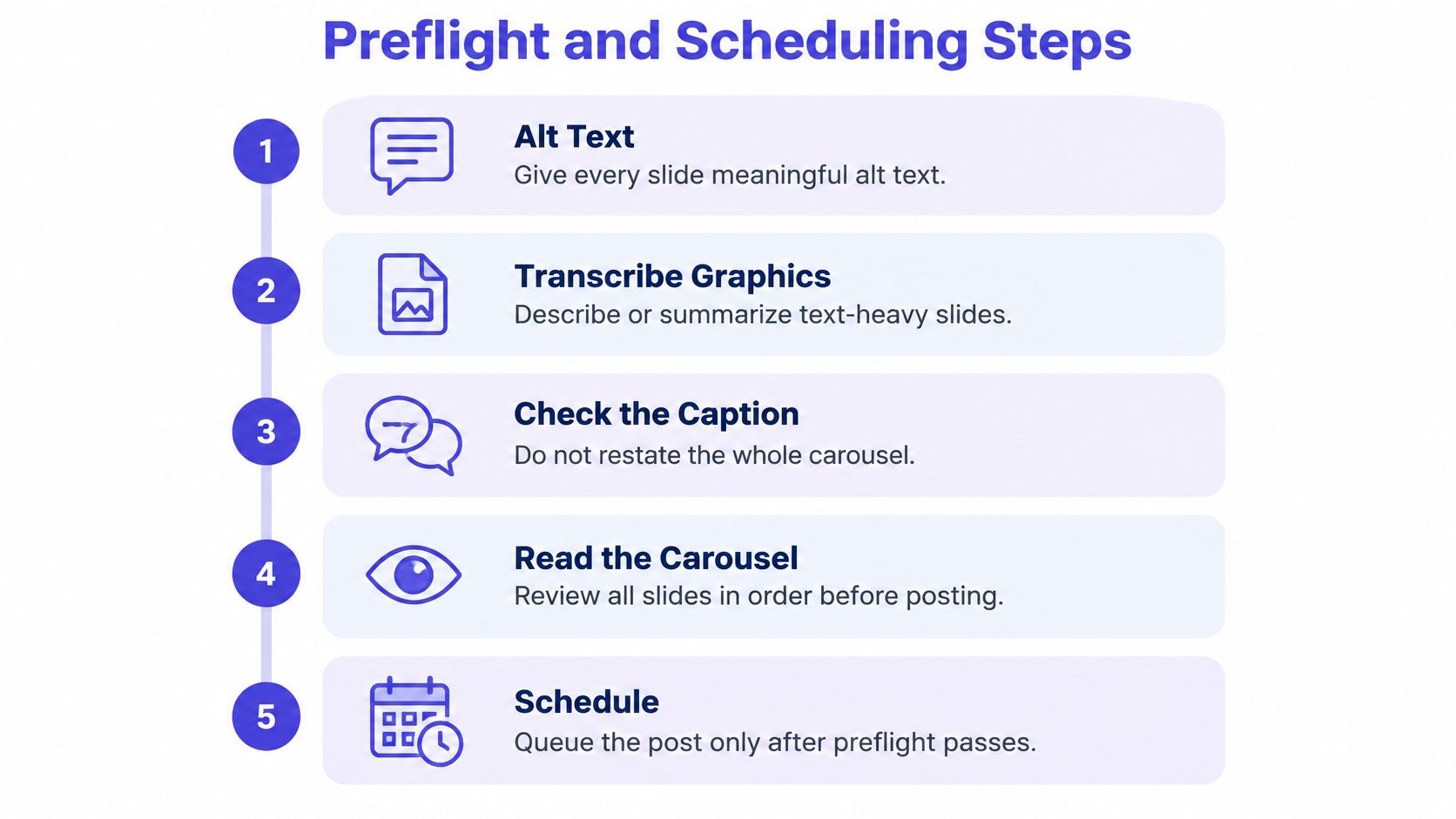
Here's the preflight I'd run before anything is queued.
The preflight checklist
- Alt text on every slide: one or two sentences describing what the slide shows and why it matters, not a repeat of the words already on it.
- Text-heavy graphics transcribed: if a slide is a chart, a quote card, or a dense list, put the content in the alt text or summarize it in the caption.
- Caption checked against the slides: the caption should add a hook or a takeaway, never restate the carousel slide by slide.
- Read in order, out loud: the cover opens the story, the middle builds it, the last slide closes with something to do.
- Named approver: one person signs off on captions, tags, alt text, and the publish date before a batch moves.
At agencies running several brands, this only holds if the work is split. A writer drafts slide copy and alt text, a designer checks export dimensions and safe areas, a reviewer signs off. Say an agency runs four client accounts across two languages: putting alt text on the same checklist as the caption check is the difference between every batch shipping with it and no batch shipping with it. Add a language column to that checklist and the reviewer catches a translated slide that describes an image the designer has since swapped.
The seven-step scheduling order
- Export in sequence and name the files
01-cover,02-step,03-cta. Reordering inside an uploader is where slides get swapped. - Upload in narrative order (cover hook, evidence or steps, clear CTA) and preview on a phone. The desktop preview hides the crop.
- Write the caption last. Open with the hook, keep it short, and check you haven't repeated every slide's text.
- Add alt text per slide while the file is open. Adding it after upload means writing it from memory.
- Set the date and time with the buffer in hand. A slot inside that buffer can fail without a visible error.
- Check the day's total and the queue horizon. Shared accounts hit the daily ceiling fastest when three people queue the same morning.
- Verify after release on mobile. Confirm slide order, cover, and that the published media matches the originals.
Teams that also run audio drops, a podcast trailer or a single release, follow the same pattern of queueing early and checking metadata days before: automating your SoundCloud premiere workflow is the audio-side version of that discipline, and the habit transfers directly to a carousel batch.
A queue entry is clean when the date and time zone are right, every slide is present in order, alt text is saved on each one, and an approver is logged. That's the standard to hold, because none of those checks can be done properly after the post goes live.
For the composer side of the workflow, this walkthrough shows the build in practice:
Fixing a Scheduled Carousel That Fails
A scheduled carousel misses its slot for a short list of reasons, and each one has a different fix. Find the post in the queue first, then match the symptom to the cause.
- It was edited inside the buffer, and didn't publish. Move anything queued within that window to a later slot and re-save. A caption edit made an hour before publish time is the usual culprit.
- The queue went past the daily cap. When a shared account carries more scheduled posts on one day than the platform accepts, the extras drop out. Shift the overflow to the next day and check who else queueing to that account.
- The date sits beyond the horizon. A post set past the maximum lead time won't save at all. Rebuild it closer to the publish date and keep the original files.
- The time zone belongs to the team, not the audience. A post built in one region's zone lands hours off in another market. Check the zone on the post itself, not on the calendar view.
- The slides came out in the wrong order. Almost always the files weren't named in sequence. Re-export with numbered filenames and re-upload rather than dragging thumbnails around in the composer.
- The crop is wrong from slide two onward. A single square file in a portrait set gets trimmed by the first slide's crop. Re-export at one ratio and replace before publish.
Check the ratio before you check the clock. Nine out of ten broken carousels are an export problem wearing a scheduling costume.
If a post still fails after rescheduling, reconnect the account in the scheduler and queue the carousel again. Publishing it by hand from the phone is the fast fix that costs you the alt text, the approval trail, and any record of what shipped.
Test Times and Lock Your First Carousel
There's no universal best time for a carousel, and treating one as if it exists burns weeks. The productive approach is a controlled experiment: same topic, same audience, same caption length, same cover design, same slide count, two publication windows across comparable weeks. Only the time changes.
The benchmarks you're optimizing against move depending on the denominator, which is the first trap. Socialinsider's Instagram benchmarks, drawn from 67.5 million posts across 579,000 brand accounts in 2025, put carousels at 0.55% engagement by followers, ahead of Reels at 0.52% and images at 0.37%. By reach the picture shifts: Contentdrips' 2026 comparison of Reels and carousels cites another analysis at 6.90% carousel engagement by reach against 3.31% for Reels. Because those two sets use different denominators, they can't be compared to each other, and neither is a target you can promise a client.
Record the same fields for every cell in the test, or the comparison means nothing.
| Metric | What it tells you | Mistake to avoid |
|---|---|---|
| Reach | How many accounts saw the carousel | Comparing it directly with follower-based rates |
| Saves | Whether the slides are worth returning to | Treating saves as equal across all topics |
| Shares | Spread beyond existing followers | Ignoring shares when the post is educational |
| Profile visits | Interest in the account after viewing | Reading one post as a trend |
| Engagement rate by reach | Overall response per person reached | Mixing it with engagement by followers |
Three habits wreck these tests. Mixing denominators makes a follower-based rate look like a reach-based one and vice versa. Changing two creative variables at once means you can't tell which one moved the result. Calling a winner from one or two posts hands the decision to whichever carousel got a lucky share. Use several posts per cell, compare medians alongside averages so one outlier doesn't decide it, and weight saves and shares heaviest when the carousel's job is education or evergreen discovery.
A sample decision: if the 6 p.m. cell wins on saves across four posts each and reach is close, lock 6 p.m. as the default, note the date of the test, and retest in a month. If you're still choosing that first window, the best time to post on Instagram explains why audience activity beats generic time charts. PostSyncer's calendar holds carousels alongside everything else in the queue, with specific posting times per platform and recurring posts, so four weeks of test cells can be laid out in one sitting.
Then pick the first carousel idea, name the approver who signs off on alt text, set two test windows for the next four weeks, and queue that first post at least a day ahead.
A carousel is scheduled well when the slides are correct, the alt text is approved, and the time is tested rather than guessed.
PostSyncer lets you queue multi-image Instagram carousels next to Reels and every other format in a visual content calendar you can drag into shape weeks ahead, with a specific posting time for each platform and recurring posts for the ones that repeat. That's enough structure to run the format test above on a real schedule instead of a spreadsheet, and to see how carousels and Reels perform once the results land. Set up your first two test slots and compare them side by side at PostSyncer.