











"So, when is the best time to post on Instagram?"
It's the million-dollar question, and if you're looking for a quick rule of thumb, it's generally between 11 AM and 1 PM and again from 7 PM to 9 PM on weekdays. Think about it—that's prime scrolling time during lunch breaks and when people are unwinding after work. Posting then gives your content an immediate audience.
But let's be real. That's just a starting point. Your true golden hours are entirely unique to your audience, and that's what we need to figure out.
Why Your Instagram Posting Time Still Matters
There's a persistent myth that with Instagram's smart algorithm, timing is irrelevant. I've heard it a thousand times, and it's just not true. The reality is that posting when your followers are most active is one of the most powerful signals you can send to that very algorithm.
That first hour after you hit "publish" is make-or-break. A flurry of initial engagement—likes, comments, shares, and saves—tells Instagram, "Hey, people like this!" In response, the algorithm is far more likely to push your post to a wider audience, including on the Explore page and in hashtag feeds.
Timing isn't just about being seen; it's about being seen at the right moment to spark a conversation. High initial velocity gives your content the momentum it needs to break through the noise.
I like to think of it as launching a rocket. A perfectly timed launch under ideal conditions gives it the best chance of reaching orbit. Sure, you can launch in a storm, but you're making the whole mission a lot harder on yourself.
Finding a Reliable Starting Point
While your own account data is the ultimate source of truth, it helps to have a map before you start exploring. Broad, industry-wide benchmarks give you that map. They help you avoid posting in universally dead zones, like the middle of the night for most of your followers.
Take a look at this table. It's built from aggregated data and gives you a solid, general idea of Instagram's daily rhythm.
General Best Times to Post on Instagram
| Day of the Week | Generally Recommended Time Window (Local Time) | Peak Engagement Potential |
|---|---|---|
| Monday | 11 AM - 2 PM | High |
| Tuesday | 10 AM - 3 PM | Very High |
| Wednesday | 10 AM - 1 PM | Very High |
| Thursday | 11 AM - 2 PM | Very High |
| Friday | 10 AM - 12 PM | High |
| Saturday | 9 AM - 11 AM | Moderate |
| Sunday | 7 PM - 9 PM | Low to Moderate |
Notice the trend? Tuesdays through Thursdays tend to be the sweet spot, with engagement dropping off over the weekend. Use this as your baseline, not your bible, as you start testing what works for your specific account.
The Real Goal: Strategic Timing
Finding your best posting times isn't just about chasing a few extra likes. It's about building a predictable, effective content strategy that connects with your audience when they're actually listening.
When you get your timing right, a few things happen:
- You Maximize Immediate Engagement: Your content gets that crucial early traction the algorithm loves.
- You Improve Overall Reach: Posts that perform well initially get shown to more people over time. Simple as that.
- You Strengthen Your Community: Posting when people are active naturally leads to more comments and conversations.
- You Get Better Data: Consistent, well-timed posts give you cleaner analytics, making it easier to see which content truly resonates.
Of course, timing is just one piece of the puzzle. It works best when combined with a strong overall strategy. You should explore more tips and strategies to boost your overall social media engagement to build a truly comprehensive approach.
The goal is to move beyond generic advice and pinpoint the "golden hours" that are unique to your brand. To do that, you first need to have a solid grasp of what an https://postsyncer.com/blog/what-is-engagement-rate is and how to measure it effectively.
Using Instagram Insights to Find Your Golden Hours

While those industry benchmarks give you a fantastic starting line, the real power is already sitting inside your own account. Think of it as a personalized treasure map, and Instagram Insights is the free tool that helps you read it.
Available to all Creator and Business accounts, this is where you'll uncover the unique digital habits of your audience.
The best part? You don't need a degree in data science to make sense of it. Instagram lays out the information in a simple, visual way that’s perfect for busy creators and marketers. This is the moment you stop guessing when to post on Instagram and start making decisions based on actual follower activity.
Navigating to Your Audience Data
Getting to this goldmine of information is surprisingly simple. It's built right into your profile, and learning your way around is a non-negotiable step toward a smarter content strategy.
Here’s the quick path:
- Head to your Instagram profile.
- Tap the Professional Dashboard button right below your bio.
- Under Account Insights, hit See All.
- From there, select Total Followers to dive into your audience analytics.
Once you’re in, just scroll down until you spot the Most Active Times chart. This little chart is your command center for figuring out when your followers are most likely to be online and scrolling.
This chart isn't just a bunch of bars; it's a direct reflection of your community's daily rhythm. It shows you exactly when your audience is most receptive, giving you a clear advantage for scheduling your most important content.
The chart visualizes activity with a simple bar graph, broken down by both days and hours. Taller bar, more active followers. It's that easy. This simple visual is your key to unlocking higher engagement.
Decoding the Most Active Times Chart
At first glance, it might just look like a grid of blue bars. But if you look closer, you can start to see powerful patterns that will inform your entire posting schedule.
By tapping on each day, you can see the hourly breakdown. What you're looking for are consistent peaks. For instance, you might notice that activity consistently spikes around 9 AM on weekdays as people commute or settle into work. Then maybe it dips mid-morning before surging again around 6 PM as everyone clocks out.
These kinds of patterns are often confirmed by broader studies. One analysis of over 2 million posts found that midafternoon and early evening are prime time, with 3 p.m. and 6 p.m. on weekdays showing the highest visibility. This often lines up with what you'll see in your own data, confirming these windows are excellent starting points for your tests.
Connecting Data to Your Content Performance
Finding your peak times is only half the battle. The real magic happens when you cross-reference this data with your best-performing posts to find powerful correlations. This is where you move into higher-level social media analytics and reporting.
Don't just look at when your audience is online; look at when your best content absolutely crushed it.
- Identify Your Hits: Go into your post insights and filter for your top posts by reach or engagement from the last three months.
- Check the Timestamps: Jot down the exact day and time you published each of these winners.
- Find the Overlap: Now, compare those successful timestamps with the peak activity hours you found in your Audience chart.
See a pattern emerging? Maybe your educational carousels always pop off when posted at 11 AM on a Tuesday, just when your audience is looking for a mid-morning knowledge boost. Or perhaps your funny, behind-the-scenes Reels take off on Thursday evenings at 7 PM, catching people as they unwind for the week.
These connections are your strategic sweet spots. They tell you not just when to post, but what to post at those times. This allows you to build a content calendar that’s both data-driven and perfectly in tune with what your audience wants to see, transforming your analytics from a passive report into an active tool for growth.
Building Your Custom Content Schedule
Alright, you've done the digging and unearthed a goldmine of data about your audience. That's the hard part done. Now, let's turn those numbers into a smart, repeatable workflow that actually grows your account. This isn't about jotting down a few random times in a notebook; it’s about building a strategic framework for your content.
I personally swear by two simple but powerful concepts: content bucketing and time blocking.
Think of content bucketing as sorting your posts by their goal or format. Time blocking is just assigning those buckets to specific, data-backed slots in your calendar. It sounds almost too simple, but this one-two punch is how you start publishing with real intent, every single time.
Aligning Content Buckets with Audience Mindset
Here's where the magic really happens. The goal is to match the type of content you post with your audience's likely mood at that exact moment. You’re not just posting when they happen to be online; you’re posting what they’re actually in the mood to see.
Just think about your own scrolling habits. What you engage with over your morning coffee is probably worlds apart from what grabs your attention while you’re winding down in the evening. Your audience is exactly the same.
Let's make this real with a few examples:
- Educational Carousels: Did your data show a big spike around 11 AM on weekdays? That’s prime time for learning. People are taking a mid-morning break from work, looking for a quick hit of industry knowledge. Slot your in-depth tutorials and "how-to" carousels right here.
- Entertaining Reels: Seeing another peak from 5 PM to 7 PM? That's the classic after-work commute and relax-on-the-couch window. This is the perfect time for your funny, behind-the-scenes, or trending Reels. Your audience wants a laugh or a lighthearted distraction, not a dense business lesson.
- Inspirational Quotes or Stories: Notice a quieter, more reflective period on Sunday afternoons? This can be a fantastic opportunity for more thoughtful content. A simple, inspiring quote graphic or a casual Story Q&A connects with people when they're in a more relaxed, "planning-for-the-week-ahead" state of mind.
By matching your content's purpose to your audience's daily rhythm, you drastically increase the odds of engagement. You're not just showing up; you're showing up with the right conversation starter at the right time.
This approach forces you to think about the "why" behind every single post. It shifts you from being a reactive content creator to a proactive strategist who anticipates and delivers what your audience wants before they even ask.
Managing a Global Audience and Multiple Time Zones
So, what happens if your Insights show you have a big following in New York, another in London, and a growing base in Sydney? Posting at 2 PM EST is fantastic for your American followers but a total miss for everyone else. This is where a rigid schedule breaks down and a more flexible strategy wins the day.
First off, don't try to post 24/7. That's a one-way ticket to burnout. The goal is to make smart compromises that serve the largest or most engaged segments of your audience.
Here are a few strategies I've seen work time and again:
- Prioritize Your Core Audience: Dive into your Instagram Insights and find out where most of your followers live. If 70% of them are in North America, it just makes sense to optimize your main posting times for their peak hours (like late afternoon EST, which conveniently catches the PST lunch crowd).
- Stagger Your Content: Dedicate specific days to different time zones. For instance, you could aim your Monday and Wednesday posts at your North American audience, then schedule Tuesday and Thursday posts to go live during peak UK hours. This way, you’re consistently reaching each major segment.
- Use Stories for Global Reach: Instagram Stories are your secret weapon here. Since they last for 24 hours, you can post them at a time that works for you, knowing followers in every time zone will see them as they log on throughout their day.
This kind of strategic scheduling is a critical piece of the puzzle. To see how it fits into the bigger picture, it helps to understand broader social media content planning strategies, which cover everything from brainstorming ideas to reviewing performance.
Ultimately, think of your custom schedule as a living document. It's a hypothesis built on solid data, one that you'll constantly test and tweak. It provides a reliable framework to give every single piece of content you create the best possible shot at success.
How to Test and Refine Your Posting Times
So you’ve used your insights and content buckets to build out an initial schedule. That’s a massive step forward, but the work isn't over. The truth is, your audience's habits are always shifting. A truly effective posting schedule isn't something you set and forget; it's a living document that you constantly tweak.
This is where A/B testing comes in. It’s a simple but incredibly powerful practice that turns you from a content publisher into a genuine strategist.
The idea is straightforward: you run a controlled experiment where you change only one variable—the time you post—to see what happens. This scientific approach strips away the guesswork. You start making decisions based on real performance data, not just a hunch about when you think your audience is scrolling.
By consistently testing and refining, you build a habit of continuous improvement. Each test gives you a new piece of the puzzle, helping you understand the subtle rhythms of your audience's behavior and what really drives them to engage.
Setting Up a Simple and Controlled Experiment
For a test to be effective, you have to isolate the variable you're measuring. In this case, it’s the posting time. If you post a Reel at 5 PM one day and an educational carousel at 8 PM the next, you can't be sure if the performance gap was because of the time or the content format. Consistency is your best friend here.
Let's walk through a real-world scenario. Imagine your Instagram analytics suggest Thursdays at 11 AM are a strong performer for your educational carousels. But you've got a feeling that a later slot, maybe 4 PM, could do even better by catching people as they’re mentally checking out from their workday.
Here’s exactly how you’d set that test up:
- Pick Your Content Type: Stick to one format. For this experiment, we're only using educational carousels.
- Establish Your Control (Group A): This is your current, proven posting time. For the next two weeks, keep posting your carousels on Thursdays at 11 AM.
- Introduce Your Test (Group B): For the following two weeks, post similar educational carousels on Thursdays, but at your new test time of 4 PM.
The most important part is to keep everything else as similar as possible. The topics, visual style, and calls-to-action in the carousels should be consistent across both testing periods. This ensures you're truly measuring the impact of the time change, not something else.
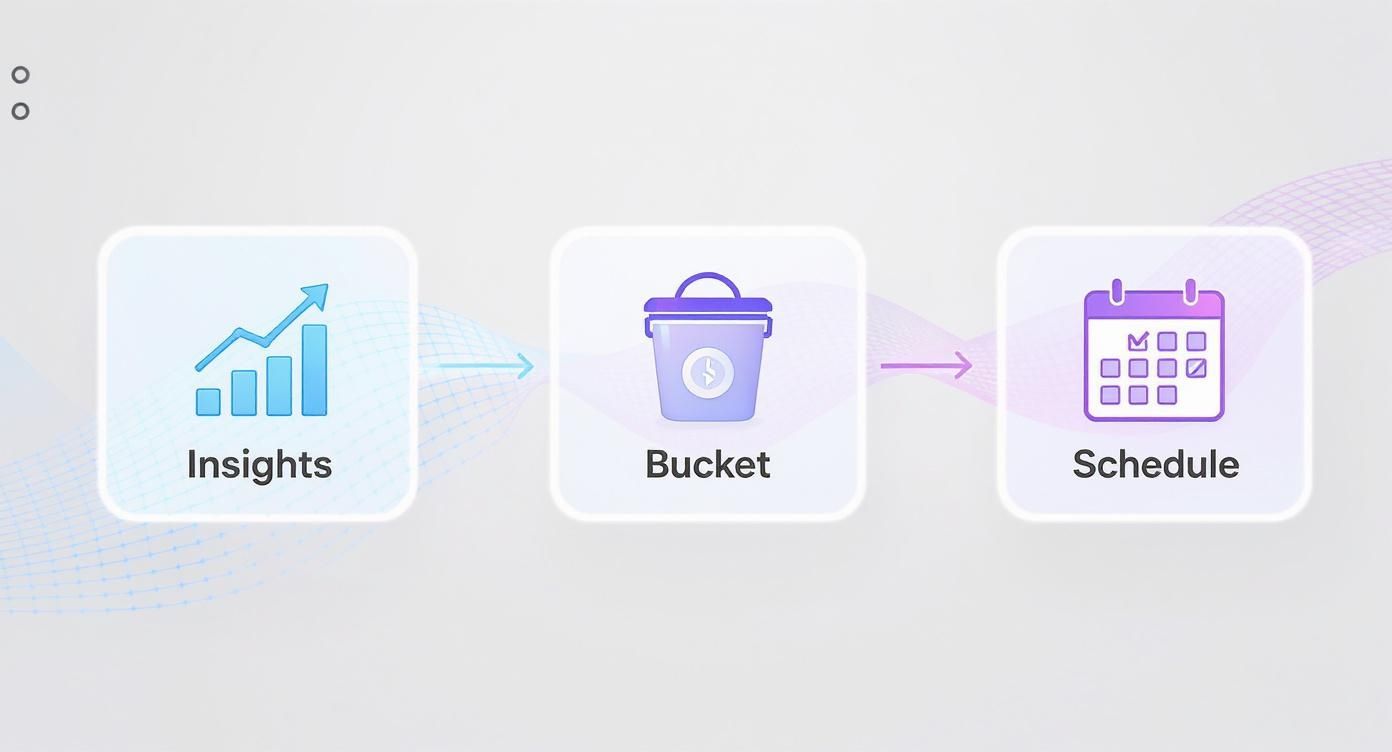
This simple flow—from insights to bucketing to scheduling—is the core of a smart, data-driven Instagram strategy.
Here's a simple framework to help you visualize and organize your own A/B tests.
Simple A/B Testing Framework for Instagram Times
Use this structure to test new posting times for a specific content format, such as educational carousels, and find what truly works for your audience.
| Element | Control Group (A) | Test Group (B) |
|---|---|---|
| Content Format | Educational Carousel | Educational Carousel |
| Posting Day | Thursday | Thursday |
| Posting Time | 11 AM (Current Best Time) | 4 PM (New Test Time) |
| Duration | 2 Weeks | 2 Weeks |
| Key Metric | Reach in the first hour | Reach in the first hour |
By keeping the content format and day consistent, you can confidently attribute any performance difference to the change in posting time.
Tracking the Right Metrics for a Clear Winner
Once your two-week test is done, it's time to dive into the numbers. But which numbers actually matter? Likes are nice for the ego, but we need to look deeper to see what's really going on.
Focus on these key performance indicators (KPIs) to figure out which time slot came out on top:
- Reach in the First Hour: This is a huge indicator. How many unique accounts saw your post within the first 60 minutes? A higher number here suggests you caught your audience at peak activity, giving the post strong initial momentum with the algorithm.
- Total Engagement Rate: Calculate this by adding up likes, comments, shares, and saves, dividing by your total followers, and multiplying by 100. This gives you a standardized way to compare posts apples-to-apples.
- Shares and Saves: I call these "super-engagements." A share or a save means your content was so valuable that someone wanted to either pass it on or come back to it later. These actions are powerful signals to Instagram.
- Comment Quality: Don't just count the comments. Did one time slot generate more thoughtful questions and conversations, while the other just got single-word replies and emojis? Quality over quantity.
By comparing these specific metrics between your 11 AM posts and your 4 PM posts, you'll get a clear, data-backed answer. If the 4 PM slot consistently pulled in higher early reach and more saves, you've just discovered a new, more effective "golden hour" for that content bucket.
This testing process isn't a one-and-done deal. You should make it a regular part of your quarterly strategy review. As your audience grows and platform trends change, your best times will almost certainly shift. Continuous testing is what keeps your strategy sharp and effective.
Using Smart Tools to Automate Your Schedule
You’ve done the hard work. You’ve crunched the numbers, run the tests, and pinpointed your audience’s most active hours. But let's be real: actually being online to post at 5 AM on a Tuesday or during a weekend peak is a fast track to burnout. Consistency is the engine of Instagram growth, and this is where smart automation tools become your secret weapon.
Using a scheduler isn’t about setting it and forgetting it. It’s about working smarter, not harder. It’s about executing your carefully planned strategy with total precision, so you never miss a golden opportunity to connect. Most importantly, it frees you up to focus on what actually moves the needle: creating fantastic content and having real conversations with your followers.
Let AI Handle the Guesswork
Modern social media tools have evolved far beyond simple scheduling. Platforms like PostSyncer now come equipped with AI-powered features that can analyze your account’s entire performance history to recommend the best times to post, automatically. Think of it as having an on-call data analyst who does all the deep-diving for you, constantly refining its suggestions based on your latest engagement patterns.
Instead of staring at spreadsheets and trying to connect the dots, the tool just shows you a calendar with your peak engagement slots highlighted. It removes the guesswork and gives every single post the strongest possible launchpad for success.
You're still the creative director—the one deciding what to say and why it matters. The AI is simply your brilliant operations manager, handling the when with data-backed perfection.
This approach doesn't just save you a ton of time; it also adapts on the fly to subtle shifts in your audience's behavior, keeping your schedule perfectly tuned without needing a manual overhaul every month.
The Power of Batching and Preparation
One of the biggest wins you’ll get from a scheduler is the ability to batch your content creation. Forget the daily scramble of figuring out what to post. You can now set aside a single block of time each week to plan, create, and schedule everything in one go.
This workflow is a game-changer for a few reasons:
- Creative Consistency: When you create several posts in one session, your visual style and brand voice stay much more cohesive.
- Stress Reduction: The daily "What do I post today?!" panic is gone. You can create from a place of inspiration, not desperation.
- Strategic Hashtagging: You have the breathing room to properly research and prepare effective hashtag groups for each post ahead of time.
Batching transforms content creation from a chaotic daily chore into a calm, structured, and efficient process. If you want to really nail this workflow, our guide on how to automate social media posting offers a much deeper dive.
Unlocking Deeper Performance Insights
While Instagram’s built-in analytics are a decent starting point, third-party tools offer far more robust data that directly connects your posting times to specific outcomes. You can see, at a glance, which time slots are driving the most shares, saves, or even clicks to your website.
These tools also provide crucial context for your posting frequency. For instance, data shows that while the median engagement rate on Instagram is about 0.36%, the top-performing brands are hitting closer to 1.02%—and they’re doing it by posting around four times per week. This proves it's not about posting more, it's about posting smarter. You can discover more insights about Instagram engagement rates on rivaliq.com to see how you stack up.
When you integrate scheduling with advanced analytics, you create a powerful feedback loop. You schedule a post based on data, measure its performance in the same place, and then use those fresh insights to fine-tune your schedule for the next week. This continuous cycle of scheduling, measuring, and refining is what separates amateur efforts from a truly professional Instagram strategy.
Common Questions About Instagram Posting Times
Even with the best data in hand, real-world questions always pop up when you start digging into your Instagram posting schedule. Let's tackle some of the most common ones I hear from creators and brands to clear up any confusion.
These are the practical challenges that come up time and time again. The answers aren't always black and white, but getting a handle on them will help you schedule with confidence.
How Often Should I Revisit My Posting Schedule?
A great rule of thumb is to do a full-on review of your posting schedule quarterly. This gives you enough time to gather solid data and spot real trends, but it's also short enough that you can pivot if audience habits or the algorithm shifts.
Think about it—user behavior can change with the seasons, around major holidays, or after a sneaky algorithm update. A quarterly check-in keeps your strategy sharp without making you panic over every small daily dip in engagement.
There is one major exception, though. If you see a big, sustained drop in your reach or engagement for more than a couple of weeks, don't wait for your quarterly review. That’s your sign to dive into your Instagram Insights right away and figure out what’s going on. The easiest way to stay on top of this? Set a recurring calendar reminder and treat it like any other important marketing task.
Does Posting Time Matter for Stories and Reels?
Yes, absolutely—but the strategy isn't exactly the same for each. Timing isn't just for your feed posts; it’s a huge factor in how your Stories and Reels perform, too.
- For Instagram Stories: Timing is everything because they disappear after 24 hours. To get the most eyeballs on them, you need to post during your audience's peak activity windows—think morning commutes, lunch breaks, or when they're winding down in the evening. This ensures the largest chunk of your audience actually sees your Story before it vanishes.
- For Instagram Reels: That first hour after you post is make-or-break. A quick burst of engagement—likes, comments, shares, and especially saves—is a massive signal to the algorithm that you've got a winner. This initial momentum dramatically boosts its chances of getting pushed out to more people on the Reels and Explore tabs. While a truly viral Reel can take off at any time, posting during a peak window gives it the strongest possible launch.
Think of it this way: for Stories, timing is about maximizing visibility in a short window. For Reels, timing is about creating the initial spark needed for the algorithm to take over and do the heavy lifting.
What if My Followers Are in Different Time Zones?
This is a classic problem for any account with a global or growing audience. The biggest mistake you can make is trying to please everyone at once—it's a fast track to burnout and a watered-down strategy. Instead, let the data guide you.
First, head straight to your Instagram Insights and see where the majority of your followers live. If you have a clear primary region—say, 60% of your followers are in the United States—then it makes sense to optimize your main feed posts for their peak times.
For your other big audience pockets, you can get a little more creative:
- Alternate Your Post Times: Dedicate certain days to different regions. Maybe you post on Monday and Wednesday for your US audience, and then Tuesday and Thursday for your European followers.
- Use Stories to Bridge the Gap: Since Stories last for 24 hours, they are the perfect way to connect with your entire global audience, no matter when you post them.
- Focus on Your Most Engaged Segment: Look past just follower numbers. If your followers in the UK are way more active and conversational, it might be worth prioritizing their time zone, even if they aren't your largest group.
Is It Possible to Post Too Often or Not Enough?
Definitely. Finding that "sweet spot" for posting frequency is a delicate balance, and getting it wrong can hurt your growth.
Posting too little—like only once a week—makes it incredibly hard to stay top-of-mind with both your audience and the algorithm. You risk losing momentum and just becoming another account they scroll past.
On the flip side, posting too much—like multiple times a day to the feed—can cause serious follower fatigue. When you bombard people with content, they start to tune you out, leading to lower engagement on each post and maybe even a few unfollows.
For most brands, posting to the main feed 3-5 times per week is a solid goal. It keeps you consistent without overwhelming anyone. But the most important rule of all is to stick to a schedule you can actually maintain with high-quality, valuable content.
Ready to stop guessing and start scheduling with data-backed precision? PostSyncer uses AI to analyze your unique audience data and automatically recommends your optimal posting times. Take the guesswork out of your Instagram strategy and unlock consistent growth. Start your free 7-day trial of PostSyncer today