

A post is live, the price in the caption is wrong, and everyone's asking the same question. Who said this was ready? Someone drafted it, someone else skimmed it in chat, a third person made a quick edit, and nobody can point to a final decision. That confusion is exactly what what is an approval workflow is meant to clear up, in practical terms.
What an Approval Workflow Means in Plain Terms
An approval workflow is a defined, repeatable process that routes a post, document or purchase to designated reviewers, records their decisions, and decides whether the item proceeds, is rejected or needs revision. Microsoft's guide to approval workflows describes them as processes that route a document or item to one or more people for approval or rejection while streamlining and standardizing the full process.
Say a caption with the wrong price goes live because it was emailed around and nobody knew who had the final say. The workflow replaces that informal handoff with explicit stages, assigned responsibilities, decision rules, notifications and status tracking. You can see who holds the item, what they decided, and what's still waiting.

Two Everyday Analogies
Think of a cheque that needs a signature before money moves. The person who fills it out isn't the person who authorizes it. A hospital discharge checklist works the same way, where each sign-off opens the next step and no one skips ahead.
The typical path runs in one line. A trigger starts it, the item reaches a reviewer, conditions such as a budget threshold or content category set the route, and it ends as approved, rejected or escalated. Keep one distinction in mind throughout. Submitting work isn't the same as authorizing it.
Why Approval Workflows Matter for Social Teams and Agencies
A product launch post may need an account manager, a brand manager and a client contact to sign off. If each review happens in a separate inbox, deadlines can slip and nobody may know which draft is final. A shared workflow gives each person a clear role and keeps the decision attached to the content.
Approval is common in other departments too, though invoice processes are not a direct measure of social publishing. In 2024, the average invoice-approval process in the United Kingdom took 35.75 hours, according to a finance-automation report based on a survey of 1,550 finance and procurement professionals by Sapio for Yooz. Social posts tied to a launch or a timely moment face a different deadline, so delays between reviewers can mean missing the opportunity.
More Than One Approver Is Normal
A post can pass through several hands because each person checks something different. An account manager may confirm the brief, a brand manager may review the message, and a client contact may give final approval. Assigning roles makes those handoffs visible.
For social teams, the practical gains are straightforward:
- Fewer missed posts: A visible queue makes it easier to spot content still waiting for review.
- One decision record: The team can see which version was approved and who made the decision, instead of searching chat threads.
- Clear ownership: Each contributor knows whether they are drafting, reviewing or approving the post.
Approval applies to a specific version. If someone changes the caption or asset after sign-off, the earlier decision no longer confirms that the revised content is acceptable. Keeping the approved version linked to its record helps prevent that drift, while clear ownership keeps review from becoming an obstacle to publishing.
The Stages, Roles and Outcomes Every Workflow Shares
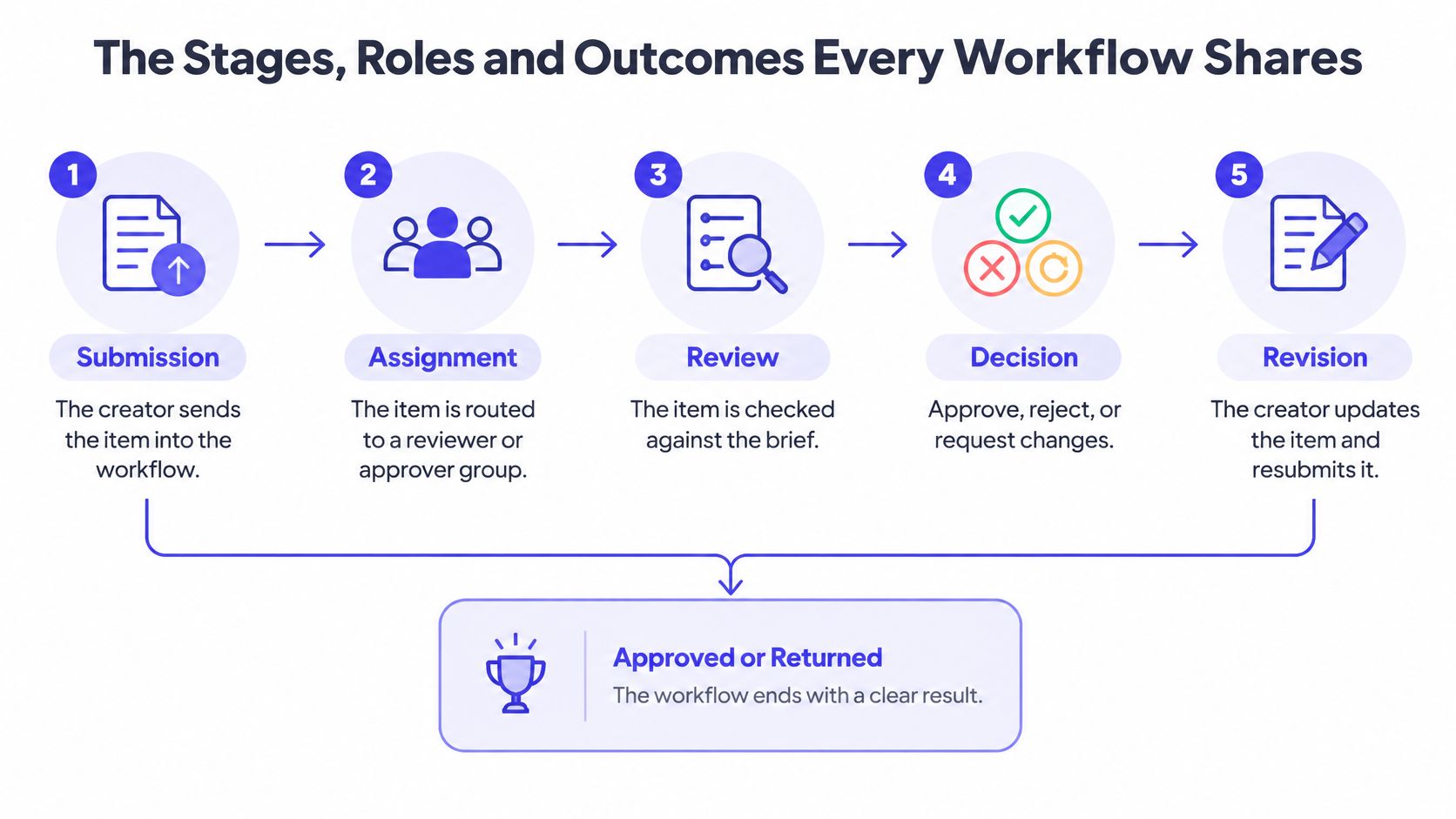
A useful approval workflow works like a relay: each person knows when to act, and the next handoff is clear. Use this sequence to map a social post from its first draft through publication.
| Stage | Who acts | What happens | Possible outcome |
|---|---|---|---|
| Submit | Creator | Sends the draft with its asset, caption and links | Moves to In Review |
| Assign | System or admin | Routes the item to a reviewer or approver group | Reviewer is notified |
| Review | Reviewer | Checks brand terms, claims, disclosures and format | Approve or request changes |
| Revise | Creator | Edits the item and resubmits it | Returns to In Review |
| Final decision | Approver | Signs off on the exact version under review | Approved or rejected |
| Publish | Publisher | Schedules or posts the approved version | Published and logged |
The Roles Behind Each Row
The creator submits the item and handles requested edits. The reviewer checks it against the brief, while the approver makes the final decision. A publisher schedules or posts the approved content. An administrator sets the workflow rules, routing and permissions.
Tools may label the states Draft, In Review, Changes Requested, Approved and Published. The labels can vary, but the permission rule should be clear: only an authorized role can move an item to approved. That turns sign-off into a recorded decision, rather than an informal agreement.
Practical rule: If anyone can mark a post approved, nobody really approves it.
The U.S. Government Accountability Office guidance says significant transactions should be authorized and executed by personnel acting within their authority, with authorization terms clearly communicated and documented. For a content workflow, keep a record of the requester, approver, timestamp, decision, comments and version reviewed.
Make ownership visible by assigning each role a clear lane. The workflow accountability for fashion teams resource shows how swim lanes clarify who owns each step. Shared workspaces can also support collaborative editing, but collaboration does not replace approval: comments and revisions need to lead to a named decision-maker.
The final decision is often left vague. Name the approver, then make sure the published item remains the exact version that person approved.
A Social Post From Draft to Publish
Follow one agency post through a week. The client is launching a product, and the team is building a LinkedIn carousel.

Monday to Wednesday
On Monday at 9.00, a copywriter submits version 1 with the caption and three slides. The system routes it to the account manager, who now owns the next move.
On Tuesday morning, the account manager requests changes because the caption claims "best in market" without evidence. The copywriter removes the claim, resubmits version 2, and the account manager approves it that afternoon. On Wednesday, the client's marketing lead gives final sign-off.
So far, this is the workflow working as designed. Each decision has an owner and a timestamp.
The Step Most Teams Miss
Then the social editor shortens the caption for X and adapts the carousel crop for Instagram. Both changes look small. Neither is the exact asset the client approved.
Watch how a structured review handles this kind of handoff in practice.
For this post, the record should answer four things without anyone guessing:
- Version seen: Which version did each approver review?
- Decision time: When did each person decide?
- What changed: What differs between version 1 and version 2?
- Variant approval: Who authorized the X and Instagram adaptations?
If your record can't answer those, your client approved a post that never published, and the post that published was never approved.
Why Approved Content Still Goes Wrong
A social post can pass review and still change before it goes live. Someone rewrites a caption, swaps a thumbnail, crops an image for a platform, changes a link, or responds to a late stakeholder request. Approval covers one specific version. Any change can create a gap between what was approved and what the audience sees.
This is why version control matters. The risk is easy to miss when an edit seems minor: a shortened caption may change the meaning, and a new image may introduce a detail no one reviewed. Teams can strengthen their quality assurance processes for content by deciding which edits need another approval before publishing.
What Sends a Post Back to Review
| Type of change | Required action |
|---|---|
| Caption claim, price or product detail | Full reapproval by the original approver |
| Link or tagged person | Full reapproval |
| Thumbnail or slide swap | Full reapproval |
| Platform crop or shortened caption | Approval of the new variant before publishing |
| Typo fix | Log the change and summary; it may publish without review |
Keep three version states distinct. An approved version is cleared to publish. A superseded version was once valid but has been replaced. A rejected version must not publish. Clear labels help prevent an editor from scheduling the wrong file by mistake.
Four controls help keep the approved version intact: use immutable version history so drafts cannot be overwritten, require a change summary for each revision, lock the final state at publish, and record which approved asset matches the published one. A typo may need only a logged correction, while a changed claim or image should return to the appropriate approver.
Approval answers what was signed off. Version control proves that is what actually went live.
Before a campaign begins, write down which edits trigger reapproval, whether minor fixes can bypass review, who owns the final publish decision, and how superseded versions are marked. When an agency adapts one client-approved post for several networks, each adaptation is a new version. Keep its review status clear so the published post can be traced to the approval that covered it.
Matching Review Depth to Risk
One review chain for every post is slow, and it still misses risk. A routine tip doesn't need the same scrutiny as a paid partnership claim.
The pressure is real. A 2025 enterprise content-compliance report identified review, editing and approval as the most difficult lifecycle stage for 45.4% of respondents, while only 3.8% reported using AI or automated checking tools.
Review Depth by Risk Tier
| Risk tier | Example content | Review path | Automation may decide |
|---|---|---|---|
| Low | Evergreen tips and reshared company news | Automated checks, then publish | Missing disclosures, banned words, alt text and broken links |
| Medium | Product posts with standard, approved claims | One designated reviewer | Brand terms, formatting and platform length limits |
| High | Regulated products, paid partnerships and sensitive topics | Named human approver plus a saved evidence file | Flags only; never approves automatically |
| Client-owned | Posts published under a client's brand | Client approver signs off after the agency reviewer | Routing and reminders only |
Automation is good at flagging. It can catch a missing disclosure, a banned claim, an accessibility gap or the wrong brand term in seconds. It shouldn't approve high-risk content, because flagging a problem and judging whether a claim is defensible are different jobs.
AI-generated or AI-adapted copy needs one extra rule. Label where it came from, have a human confirm every factual claim, and send any uncertain output up one tier. That way speed does not turn into risk.
Human checkpoints won't appear by default. In 2023, 11% of automated processes in Workato's anonymized dataset included humans in the loop, according to its 2024 Work Automation and AI Index. Write your tiers into the workflow before the first post goes out, not after the first error.
Set Up an Approval Workflow for Your Team
Set this up in order. Each step makes the next one easier to enforce.
- Map your stages. Use the stages table as your starting list and mark which ones your team currently skips. You may discover you have submission and publishing, but no defined final decision.
- Assign roles per workspace. Separate the right to draft from the right to approve, so nobody approves their own work. This one split prevents most quiet errors.
- Set your risk tiers. Attach each tier to a review path, including any client or brand approver. A post's tier should decide its route before anyone starts commenting.
- Define reapproval triggers. Claims, links, tagged people, pricing and media changes always return to review. Typo fixes get logged with a summary instead.
- Run one test post end to end. Include a platform variant, because that's where drift starts. Check the record shows the exact version each approver saw.
- Review the record monthly. Tighten any tier where an error reached publishing, and loosen paths that delay low-risk posts for no reason.
Putting It Into Daily Practice
Roles only work if your tool enforces them. Our Approval Workflows let you define who can draft and approve posts through role-based permissions, and each team member can have customized permissions and access levels. Content can be reviewed, commented on and approved in one place, so feedback doesn't scatter across chat and email.
Pair that structure with planning. A shared view of what a social media calendar should contain helps reviewers see what's coming before it reaches them, which cuts last-minute surprises.
Working test: Pick any published post and ask who approved it, when, and which version went live. If your team answers in under a minute, your workflow is working.
Start small if you need to. One content type, one client, one week of posts is enough to prove the stages, fix the awkward handoffs, and then roll the same pattern across the rest of your calendar.
Ready to stop guessing who approved what? PostSyncer gives your team approval workflows with role-based permissions, so drafts, comments and sign-offs stay in one workspace across every network you publish to. Set up your first workflow today and send your next post through review with a clear record of every decision.